
Boost Your Squarespace CTR With the Right Schema Strategy
Squarespace powers over 7 million indexed websites globally as of 2026, yet the average Squarespace site scores just 40.5 out of 100 on SEO audits. One of the biggest reasons? Schema markup, or more precisely, the failure to use it strategically.
A proper Squarespace schema generator can be the difference between a plain blue link and a rich, eye-catching search result with star ratings, FAQs, or pricing info. This article breaks down exactly what schema markup is, where Squarespace falls short by default, how to implement the right schema types, and how to track real CTR improvements.
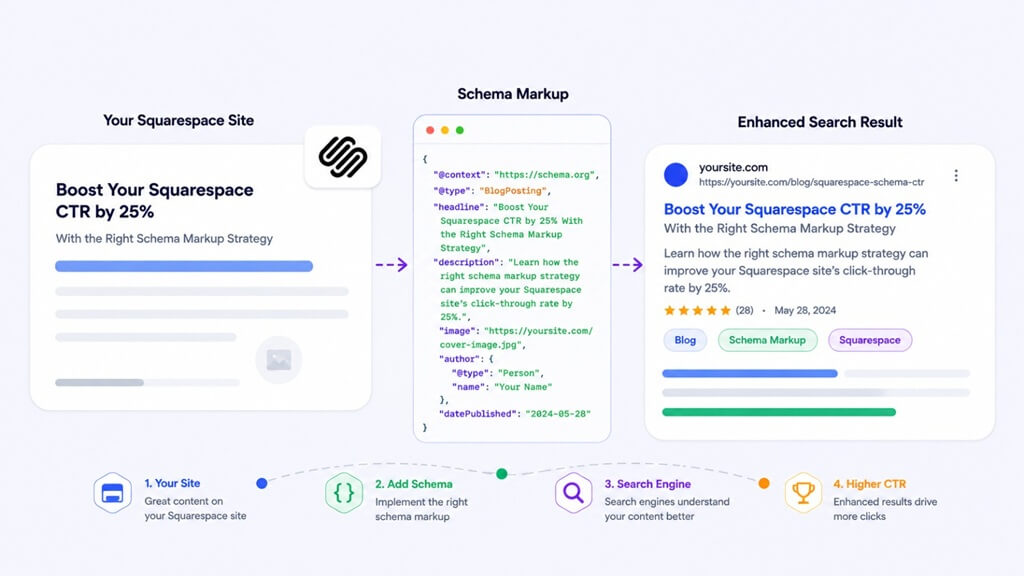
Squarespace Schema Markup Strategy (Quick Overview)
- Identify missing schema types (FAQ, Product, Review)
- Add JSON-LD via code injection
- Validate using Rich Results Test
- Monitor performance in Search Console
- Optimize based on CTR changes
What Is Schema Markup in Squarespace?
Schema.org is a set of standard code that is recognized by search engines, like Google, Bing, and Yandex, and it gives search engines an idea of what your content means. If used properly, it opens the door to rich snippets: the enriched search result elements that make listings more informative, more trustworthy, and larger.
45 million domains have implemented Schema.org structured data, yet only 30% of all websites use it. At the same time, 72.6% of pages on Google’s first page already use schema. Rich results get 58% of all clicks in search results versus just 41% for plain listings, and FAQ rich results average an extraordinary 87% CTR. Schema does improve your display eligibility, meaning the same ranking position, with the right schema, generates significantly more clicks.
Limitations of Squarespace Schema Markup
Squarespace covers auto-generated Website, Organization, LocalBusiness, and basic BlogPosting schema. For most sites, that’s where it stops.
What Squarespace does not automatically generate:
- FAQPage schema
- HowTo schema
- Review / AggregateRating schema
- Service and Course schema
- Event schema
Squarespace generates the Organization and LocalBusiness schema for each page, regardless of its context. Google suggests putting structured data only where it’s relevant. Adding irrelevant schemas can add noise, which can lead to alerts in Google Search Console, and can cause problems if the Business Information panel is subsequently modified or deleted.
How to Add Schema Markup to Squarespace
Since Squarespace doesn’t support plugins the way WordPress does, the cleanest way to add custom schema is by injecting JSON-LD code directly into page settings.
Step 1 – Generate your JSON-LD using the Technical SEO Schema Generator. Pick the schema type that matches your page – FAQ, Article, Product, LocalBusiness, fill in the details, and copy the finished code.
Step 2 – Open the Page Settings. In the Squarespace editor, click on the page you want to optimize, go to Settings → Advanced, and locate the Page Header Code Injection field. Paste your JSON-LD script there. This injects the schema only on that page, which is the correct approach.
For sitewide schema (Organization, LocalBusiness), go to Settings → Advanced → Code Injection in the main dashboard and paste the code in the header field.
Step 3 – Validate the implementation. Run the page URL through Google’s Rich Results Test. Confirm that the schema is detected, the correct rich result type is showing, and there are no missing required properties.
Step 4 – Monitor Google Search Console. After Googlebot re-crawls the page (usually within two to six weeks), the Enhancements section in GSC will show impressions for each rich result type. Watch for CTR changes on the specific pages where schema was added.
If doing all this page by page feels like a lot, the JSON Schema App is worth looking at. Unlike manual generators, it connects directly to your site and handles schema automatically, updating structured data as your content changes, flagging errors in real time, and keeping everything Google-compliant without touching a single line of code each time.
Best Schema Types for Squarespace CTR Improvement
| Schema Type | Best For | CTR Impact |
| FAQPage | Blog posts, service pages | Very High (~87% avg) |
| Review / AggregateRating | Products, local services | High |
| Product | E-commerce pages | High |
| LocalBusiness | Local service businesses | High for local search |
| HowTo | Tutorials and guides | Medium-High |
| Article / BlogPosting | Blog content | Medium |
If you have a Squarespace-based service like a photographer, consultant, or designer, a well-filled-out LocalBusiness schema with additional properties such as priceRange, openingHours, and areaServed will have a huge impact on your eligibility to appear in Map Packs. This is not available with the auto-generated version of Squarespace. A schema generator that generates a more complete block with injection works consistently better than the default output.
Does Schema Help with AI Search Visibility?
Beyond individual pages, a solid website schema markup strategy ties your entire site together as a recognized entity. A well-structured Organization schema with sameAs links to verified social profiles, a logo property, and a contactPoint tells Google who is behind the website, which matters more than ever in 2026 as AI Overviews and entity-based search continue to expand.
With the introduction of structured data, how AI tools such as Google’s AI Overviews, ChatGPT, and Perplexity process and reference information has a direct impact on your content. Content that is visible to AI is more likely to be referenced in the AI’s answers. Schema signals make it more likely that your content will be referenced in the AI’s answers (and plain text alone can’t do that).
Why Schema Markup Is a Quick SEO Win for Squarespace
Schema is one of the most viable, quantifiable SEO enhancements you can make for any Squarespace site. Real CTR improvements on the table due to the platform defaults. By choosing the right Squarespace schema generator, following the right approach to implementing it, and monitoring it consistently using Google Search Console, a 20-25% increase in CTR on targeted pages can be achieved.
People Also Ask
Does schema markup improve Squarespace rankings?
No. Schema does not impact ranking position; it affects eligibility to display and CTR. A better CTR will indirectly have an impact on your organic results over time.
How long before rich results appear after implementation?
Usually two to six weeks, depending on the frequency of Googlebot’s visits to the site.
Does schema help with Google’s AI Overviews?
Yes. Structured data provides clearer signals to AI platforms on the type and authorship of content, which boosts chances of citations.
Which schema type should a Squarespace blogger prioritize first?
The fastest measurable CTR boosters are the FAQPage schema that is used on blog posts with Q&A areas.
Popular on OTW Right Now!




About The Author

Gagan Bhangu
Founder of otechworld.com and managing editor. He is a tech geek, web-developer, and blogger. He holds a master's degree in computer applications and making money online since 2015.