
Best Online Auto Subtitle Generator for Videos in 2025
Are you searching for the Auto Subtitle Generator for Videos? If yes, then Clideo Auto Subtitle Generator is a perfect destination for you.
There are plenty of online auto subtitle generator tools available on the web. But this online tool allows you to automatically generate subtitles for the videos in the browser without downloading and installing any software.

Apart from the subtitles generator, it offers plenty of extra features as well.
So, in this post, I’ll review Clideo Auto Caption Generator, its features, and how to use it.
In 2025, content is also available and more global than it has ever been. Whether you’re a YouTuber, a social media influencer, an educator, or a video marketer, adding subtitles to your videos is no longer optional—it’s essential.
Thankfully, you are not required to use complex software or to make costly subscriptions to caption your videos. Thanks to the Clideo Auto Subtitle Generator, which allows us to generate, edit, and embed subtitles directly in the browser in just a few clicks without installing any software.
What is a Clideo Auto Subtitle Generator?
Clideo Auto Caption Generator is an intelligent, browser-based application that relies on advanced speech recognition and automatically identifies spoken words in your video and converts them to time-coded subtitles. This removes the processes of manual transcription and complex subtitle synchronization.
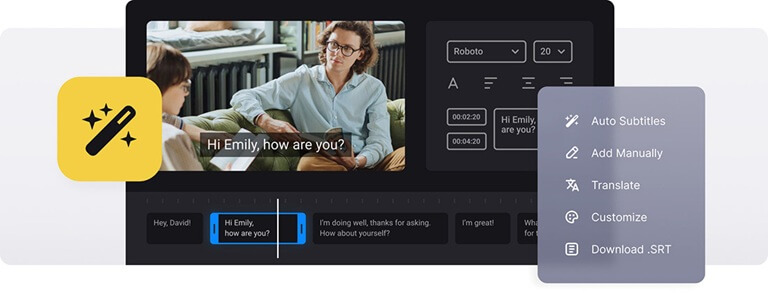
The best part? It all happens online—no downloads, no installations, and no steep learning curves.
The biggest advantage of it? Everything happens online—no downloads, no installations, and no complicated training.
Features of Clideo Auto Subtitle Generator

It is not only a subtitle tool but a multi-tool in the powerhouse, which should address the needs of modern video creators. So what are the best features of it? Let us dissect them:
1. Auto Subtitles
The tool has only one upload process to analyze the audio, detect the spoken words, and create subtitles with timecodes. It accepts most audio formats and languages.
Also, you can adjust the subtitles in case they need to be adjusted after being generated and modified in their style.
2. Use as a Converter
Besides subtitles, this online tool also functions as a video/audio converter. Convert between MP4, MKV, AVI, MOV, and other formats seamlessly.
3. Create an SRT File
Once you create subtitles, you will be able to export them in the form of an SRT file. It is the regular subtitle structure applicable to platforms such as YouTube, Facebook, and Vimeo.
Moreover, in case you require a text file with the information about subtitles, like start and end time codes and the text of all sequences of subtitles, you can utilize our tool as a free .srt file generator.
4. Edit Subtitle Font
Want to personalize your subtitles’ appearance? The software enables you to change font style, size, color, and background to make sure your captions are consistent with your brand or style.
So, you can fully customize the appearance of your captions before embedding them into your video.
5. Embed Subtitles
The tool can embed hardcoded subtitles (those burned into the video) when desired. This ensures that subtitles remain visible no matter where the video is played. Captions are also available to be downloaded as an .srt file.
6. Online Subtitle Adder
The software is absolutely online, and you do not have to install anything on your device. It’s faster AND safer.
If you have an existing subtitle file and you want to add it to your video? This is a tool that also allows you to do that. It is possible to match, format, and insert your SRT file into the video online.
How to use Clideo Auto Subtitle Generator?
Step 1. Upload your video
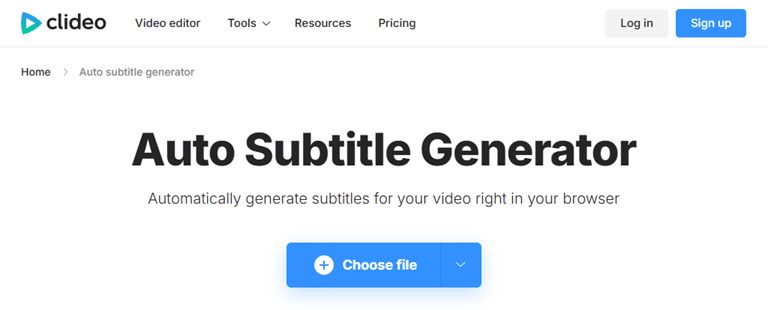
Click on the Choose file button and upload the video from your device. Otherwise, you can also upload video directly from Google Drive and Dropbox. After that, select the “Auto subtitles” feature, pick the language in your video, then press the “Generate” button.
Step 2. Generate subtitles automatically
After the generation of the subtitles, it is possible to edit them individually and to customize their appearance. Edit the format and layout of the subtitles, their font, and their background properties, or simply choose any of the default styles.
Step 3. Save the Video or SRT file
Lastly, you can export the video and have generated subtitles embedded in it, then save the file to your computer or a cloud service. If you should want to use the .srt file somewhere, download it.
Frequently Asked Questions
1. Is this Auto Subtitle Generator free to use?
The tool comes with premium features. The free version has a limited file size, shows a watermark, and limits the number of subtitles that can be generated. Premium supports full-length videos and no watermarks. The premium version is not costly as compared to its competitors.
2. Does it support multiple languages?
Absolutely. The tool supports popular global languages. It supports over 100 languages. Also provided is the opportunity to translate created subtitles into any other language.
3. Can I edit the subtitles manually after auto-generation?
Yes, the tool also gives you the option to edit the subtitles, change the timings, and style them before exporting or embedding them.
4. Which video file formats are compatible with the subtitle generator?
The popular video formats that Clideo supports include MP4, AVI, MOV, WMV, among others. Subtitles can be exported as SRT and TXT files or embedded into the video.
Final Words
Now you know everything about Clideo Auto Subtitle Generator tool. Manual transcription or the editing software that costs a fortune is long gone.
This is one of the best Auto Subtitle Generators available on the Internet that provides content creators, marketers, and teachers with a platform that allows them to subtitle their videos at a low cost with high effect.
Whether you’re looking to improve accessibility, boost engagement, or expand globally, this tool is your new best friend. It features such strong features as auto subtitles, creation of SRT subtitles, customization of appearance of subtitles, embedding subtitles, and even converting videos, making it the ultimate browser-based tool anyone can use for video content.
So next time you choose to upload a video, don’t let it silently shoot off into the world – add subtitles with the most intelligent online tool, and your content will take off.
Popular on OTW Right Now!



About The Author

Gagan Bhangu
Founder of otechworld.com and managing editor. He is a tech geek, web-developer, and blogger. He holds a master's degree in computer applications and making money online since 2015.