
Best IPTV Services for Smart TVs, Fire TV, and Android
IPTV sounds rather complicated, but it’s just about watching TV over the internet rather than via cable or satellite. If you’re watching live channels on a smart TV, a Fire TV Stick or an Android phone then you’re already using IPTV.
The tricky part is that the term covers two very different worlds. On one side are licensed services such as YouTube TV, Sling TV and Pluto TV, which pay for the channels they carry. On the other are unlicensed “IPTV subscriptions” that promise tens of thousands of channels for a few dollars a month, the kind you’ll find when you search for buy IPTV subscription. This guide focuses on the first group: legal live TV services that run well on the devices most people actually own.
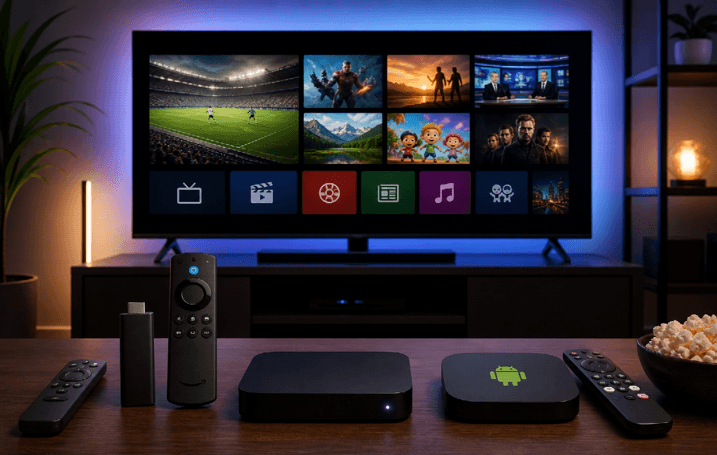
What to Look for in a Live TV Streaming Service
Before comparing names, decide what you need. These five factors matter most:
- Device support: Ensure there’s a native app for your TV (e.g. Samsung Tizen, LG webOS, Fire TV, Google TV, Android TV) rather than just casting from your phone.
- Channel line up: Local channels, news, sports and regional sports networks can vary considerably depending on the service and your ZIP code.
- Cloud DVR: Check how many shows you can record and how long you can store your recordings.
- Simultaneous streams: If you’ve got more than one TV at home, you’ll want a service that allows you to stream on multiple devices at the same time.
- Price and fees: don’t forget to include the add-ons, taxes and the required regional sports fees (these are often not included in the main price).
The Best Legal IPTV Services in 2026
Prices below are US monthly prices at the time of writing and change often, so check the provider before signing up.
1. YouTube TV
Best for: The most complete cable replacement.
YouTube TV is the one that’s most akin to cable (you don’t need a cable box). The Base Plan gives you over 100 live channels (including local networks in most areas) and unlimited cloud DVR (recordings are retained for 9 months). You can stream on 3 devices at the same time and the 4K Plus add-on allows you to stream on even more devices at home.
YouTube TV works on pretty much any device you can think of, including Samsung, LG, Vizio, Hisense, and the various Android TVs, Fire TV and Google TV devices, Roku, Apple TV, game consoles, and Android and iOS phones. The Base Plan is around $83 a month and there are also more affordable plans based on genre.
2. Hulu + Live TV
Best for: Live TV bundled with on-demand streaming.
Hulu + Live TV offers around 95 live channels plus the full Hulu on-demand library. If you go for a higher tier you also get Disney+ and ESPN Select. Cloud DVR is unlimited and recordings are kept for 9 months. You can stream on two devices at a time (this increases to three with an upgrade). The plans are in the region of $89 to $100 a month and there are apps for pretty much any smart TV, Fire TV and Android device.
3. Sling TV
Best for: Lower-cost live TV with flexible add-ons.
Sling is cheaper as it splits its channels into two separate packages. Sling Orange is for the sports and entertainment crowd (ESPN, TNT, CNN etc) and allows one stream at a time. Sling Blue has a different set of channels and allows three devices to stream. Each package is priced at around $46/month (around $61 if you take both). Sling doesn’t have all the local channels so a lot of people will use it in conjunction with an antenna. It’s compatible with Fire TV, Android TV, Google TV, Samsung and LG TVs, Roku and mobile devices.
4. Fubo
Best for: Sports fans.
Fubo is all about sports and carries a wide range of regional sports networks (depending on where you are). The Pro plan is around $89/month with an additional regional sports fee of between $4 and $17 at checkout. Be sure to check the fee for your ZIP code before you go and compare it to the others.
5. Philo
Best for: Entertainment channels on a budget.
Philo omits the sports channels and the majority of the news channels which is what keeps it so much cheaper than the larger services at around $25-$28 a month. You get well over 80 entertainment and lifestyle channels (AMC, Comedy Central, Food Network, HGTV etc), 3 simultaneous streams and unlimited DVR with recordings held for up to 12 months. It’s compatible with Fire TV, Android TV, Roku, Apple TV, Chromecast and Android phones.
6. Pluto TV
Best for: Free live channels.
Pluto TV is absolutely free. It has hundreds of live channels (with ads), thousands of on demand movies and shows and you don’t need an account at all. You can get the app on Fire TV, Google TV, Android, Samsung, LG, Vizio, Roku, PlayStation and Xbox.
7. Samsung TV Plus
Best for: Samsung TV and Galaxy owners.
Samsung TV Plus is a free service (with ads) and over 350 channels in the US. It’s built into all Samsung Smart TVs from 2016 onwards and you can also use it on your Galaxy phones and tablets. You can watch it in a web browser as well. It’s a nice free bonus to have as part of a paid service.
Which Service Fits Your Device?
Samsung and LG smart TVs: YouTube TV, Hulu + Live TV, Sling, Philo and Pluto TV all have apps for these TVs. If you’ve got a Samsung TV you also get Samsung TV Plus built in.
Amazon Fire TV: All the services listed here (apart from Samsung TV Plus) are available in the Amazon Appstore. That makes Fire TV one of the easiest ways to watch live TV.
Android phones, Android TV and Google TV: All the paid services and Pluto TV are on Google Play. Samsung TV Plus is available on Galaxy devices.
How to Spot an Illegal IPTV Service
If you go on any marketplace and search for IPTV you’ll see subscriptions with over 50,000 channels, every single sports league and new movies coming out every month for less than $10 a month. These are all unlicensed. Here are the red flags to look out for:
- Implausible numbers: Tens of thousands of channels and huge movie libraries for a tiny monthly fee.
- No company details or licensing information anywhere on the site.
- Sold through resellers, marketplaces or chat apps rather than a provider’s own app on official app stores.
- Setup through playlist URLs or sideloaded apps instead of a standard app.
- Pressure to pay with crypto or gift cards.
These are real risks. Companies such as Disney, NBCUniversal, Netflix and Paramount have all shut down major illegal IPTV operations and when they do that the subscribers are left with no access and no refund. There’s also a security issue. ACE (an anti-piracy group) did some research in 5 Southeast Asian countries and found that people using illegal IPTV for live sport and live TV were 32 times more likely to be infected with malware on their device than those using the legitimate services.
Choosing the Right Live TV Service
Start by identifying the channels you absolutely can’t live without (local channels and sports in particular). Then work out which of the services provide those in your area. Most of the services will have a free trial so it’s worth downloading the app onto your TV or Fire TV Stick and giving it a go before you commit. If you’re on a tight budget you can combine a more affordable plan such as Philo or Sling with the free ones like Pluto TV and Samsung TV Plus and pick up the local channels via an antenna.
Popular on OTW Right Now!


About The Author

Gagan Bhangu
Founder of otechworld.com and managing editor. He is a tech geek, web-developer, and blogger. He holds a master's degree in computer applications and making money online since 2015.