
Best iPhone Unlocker Software to Unlock iPhone Without Password
Forgot your iPhone password or got locked out of your device? Don’t worry, it happens to more people than you might think. No matter whether you typed in the wrong passcode more than once, have a reset and forgotten the digits, or have just purchased a used iPhone that is locked, there is a safe and effective way to get in.

In this guide, I will discuss the most suitable iPhone unlocker software that will unlock your iPhone without a password. We’ll look at how these tools work, what makes a good unlocker, and why MagFone iPhone Unlocker stands out as one of the most reliable options available.
Why You Might Need an iPhone Unlocker
The security functions of Apple are wonderful to ensure the security of your data, however, when you have forgotten your passcode or Apple ID credentials, the security functions may become obstacles. Some typical situations are as follows:
- You forgot your iPhone screen passcode.”
- The iPhone is disabled after multiple incorrect attempts.
- You bought a second-hand iPhone locked to the previous owner’s Apple ID.
- You’re stuck on the Activation Lock screen.
- You can’t access your iPhone after a factory reset.
In such situations, an iPhone unlocker can save you by allowing you to access the device without having the password or Apple IDs.
What Is iPhone Unlocker Software?
An iPhone unlocker is a form of software that is used to unlock different kinds of lock in iOS devices. It can eliminate:
- Screen passcode (4-digit, 6-digit, Touch ID, or Face ID).
- Apple ID of a device that has been activated.
- MDM (Mobile Device Management) profile restrictions.
- Screen Time limitation.
- Activation Lock (on some supported iOS versions).
These are tools that will make your iPhone connect with a computer and then execute a professional unlocking procedure that will reset or unlock the locked iPhone safely. A major distinction between a good and bad unlocker is that data will be kept safe, easy to use and has a high success rate, and that is where such a tool as MagFone iPhone Unlocker will perform at its best.
Can You Unlock an iPhone Without a Password?
Yes, but how, it depends upon your position. Apple offers a limited number of official methods of resetting or unlocking and iPhone including iTunes, iCloud, or Find My iPhone, but these are always subject to:
- You to remember your password and Apple ID.
- What you are going to connect to Wi-Fi or cellular.
- Prior setup of Find My iPhone or iCloud backup.
If you’ve forgotten the Apple ID credentials or purchased a locked device, those methods won’t work. That’s when third-party iPhone unlocker software becomes the best option.
Official Ways to Unlock iPhone Without Password (Apple Methods)
Before using third-party software, you can try Apple’s own solutions.
Method 1. Unlock via iTunes (Recovery Mode)
You can restore your iPhone via iTunes or Finder in the event that it is disabled or you have forgotten the passcode. Connect your iPhone to a computer. Open iTunes (or Finder on macOS). Put your iPhone into Recovery Mode. When prompted, choose Restore iPhone. This will erase your device and remove the passcode. ou will, however, still require your Apple ID and password to activate it once more, or you will be at the Activation Lock.
Method 2. Unlock via iCloud (Find My iPhone)
IWhen Find My iPhone is turned on, you will be able to erase and unlock your phone remotely. Go to iCloud.com/find. Log in with your Apple ID. Choose your iPhone and click Erase iPhone. Again, this requires knowing your Apple ID login, and won’t work if the device is offline or you don’t have access to the account.
When to use iPhone unlocker software? In a case of forgotten passcode and Apple ID password, purchasing a second hand iPhone and it is locked to another Apple ID password, or to de-MDM some restrictions imposed by a company, then you will not find a safer and quicker iPhone unlocker device than a professional one.
Best iPhone Unlocker Software: MagFone iPhone Unlocker
MagFone iPhone Unlocker is one of the most reliable programs that have been used to unlock any iPhone without any password.
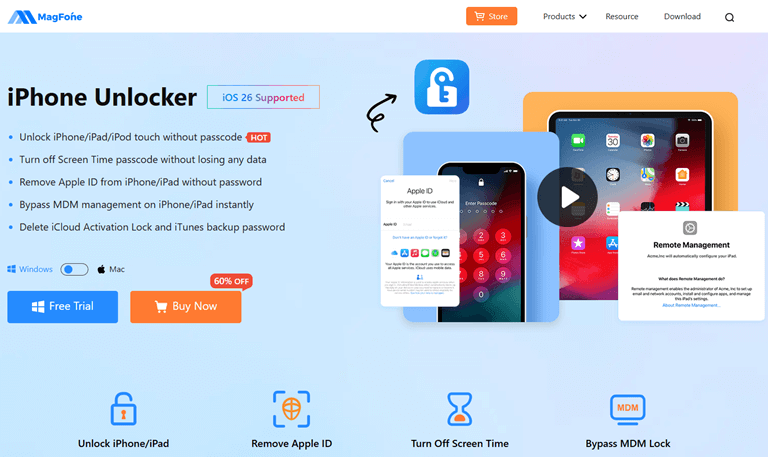
This program is used to unlock any kind of iPhone lock, be it a forgotten pass code, locked Apple ID, or MDM. What is unique about it is that it offers great success rates and an interface that is user-friendly and friendly to novices.
Key Features of MagFone iPhone Unlocker
- Remove Apple ID Without Password: Even if you can’t remember your Apple ID credentials or bought a used iPhone still linked to the previous owner, then MagFone can remove the Apple ID and let you set up a new one easily.
- Unlock iPhone Screen Passcode: Lost your passcode or stuck out after making many mistakes? This is a device that can eliminate 4-digit/6-digit codes, Touch ID, and Face ID within minutes.
- Remove MDM from iPhone/iPad: In case your iPhone/ iPad is locked and has a Mobile Device Management profile (at work or school), then MagFone has your back in completely removing it without a password.
- User-Friendly & Fast: You don’t need technical skills; you just have to connect your iPhone, select the unlock method, and MagFone does the rest within a few clicks.
- Compatible with Latest iOS:The version is compatible with iOS 18.6 to iOS 26.0.1 and compatible with all iPhones including A12+.
How to Use MagFone iPhone Unlocker
Step 1: Download MagFone iPhone Unlocker on your Windows or Mac computer. Install the program and connect your iPhone with the help of a USB cable. 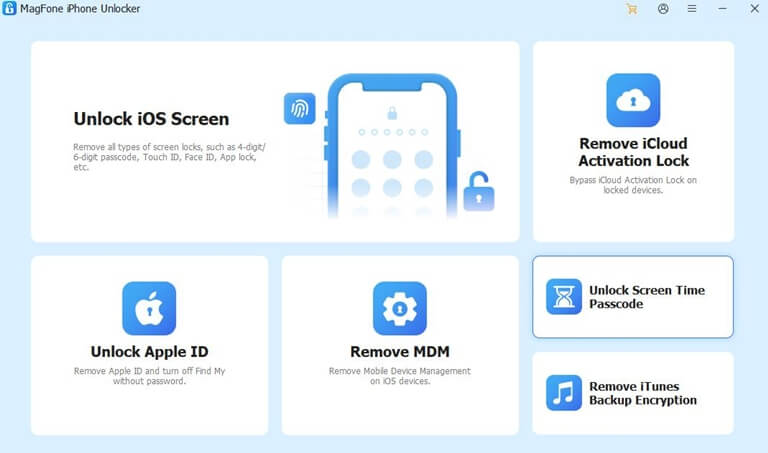
Step 2: Choose the appropriate unlock mode: Unlock iOS Screen, Remove Apple ID, or Bypass iCloud Activation Lock. 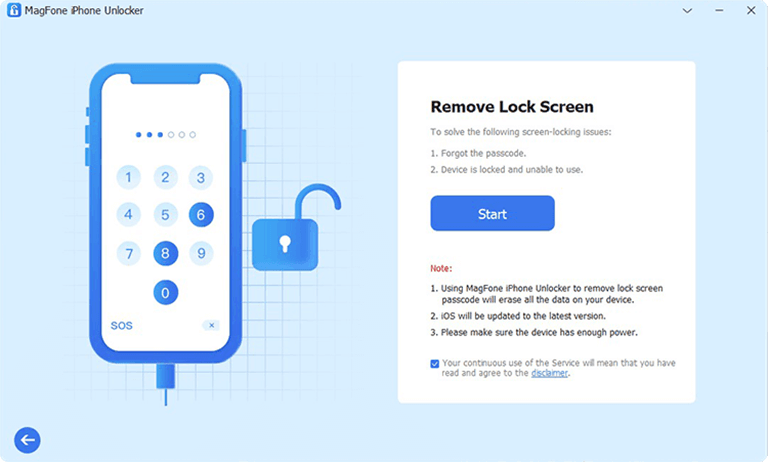
Step 3: Follow the on-screen instructions to download the firmware package and unlock the iPhone. 
Step 4: Wait a few minutes, and your iPhone will be unlocked successfully. The entire process is quick, secure, and doesn’t require you to remember your old credentials. 
Why MagFone iPhone Unlocker Is the Best Choice
Most iPhone unlockers are known to be effective in basic locks, but not in tougher ones like Activation Lock or MDM. MagFone is differentiated by several reasons:
- History of high success in all versions of iOS and iPhone models.
- User-friendly interface, ideal with non-technical users.
- No information leakage, or threats, so your privacy and safety.
- Regular updates to support new iOS releases.
Being a business owner who has to handle a few iPhones, or a simple user who just lost the password, MagFone iPhone Unlocker offers a reliable and effective solution to get access to your device once again.
Other iPhone Unlocker Alternatives (Brief Overview)
Other iPhone unlocker programs available in the market include Tenorshare 4uKey, iMyFone LockWiper and Dr.Fone Screen Unlock. Although these may be effective, the success and ease of use of MagFone is more trusted by the users, particularly when it comes to newer versions of iOS such as iOs 26.
Safety Tips Before Using iPhone Unlocker Tools
- It is best to save your data (where possible) prior to unlocking, because most of them destroy the contents of devices.
- To prevent interruptions, charge your iPhone at least up to 50 percent.
- Install official software by reliable developers such as MagFone.
- Avoid “free” unlockers that may contain malware or permanently brick your device.
Final Thoughts
Forgetting your iPhone password or buying a locked device can be incredibly frustrating. Although the built-in solutions offered by Apple are helpful in certain situations, they typically demand the usage of the original Apple ID or iTune account.
MagFone iPhone Unlocker is fast, professional and reliable solution. It assists you in unlocking your iPhone password-free, eliminating Apple ID, or hacking MDM in minutes, and it is a simple and safe procedure. The MagFone iPhone Unlocker allows easily restoring control over your iPhone regardless of the circumstances, supporting the newest versions of iOS and having a convenient design.
Popular on OTW Right Now!



About The Author

Gagan Bhangu
Founder of otechworld.com and managing editor. He is a tech geek, web-developer, and blogger. He holds a master's degree in computer applications and making money online since 2015.