
The Best All-in-one Photo Editor Tool In 2025
Have you ever taken a great photo only to realize it needs fixing? Editing photos meant learning complex software or paying for expensive tools in the past. Now, people want something easier. They want quick fixes, powerful results, and tools that actually save time without the learning curve.
In this article, you will explore the best all-in-one photo editor tool in 2025. You’ll discover its features, benefits, and why it stands out.
The Evolving Landscape of Photo Editing
Photos play a central role in our daily lives. People want sharp and polished images for social media. But traditional editing tools feel overwhelming. These tools have complex features, long tutorials, and expensive licenses. People don’t achieve the desired results because of these issues.
The Problem with Traditional Tools
The market has been dominated by the use of professional photo software. These tools require advanced skills to edit their photos. These tools are expensive to ordinary users because of the subscriptions. As a result, many users give up on editing. Some people have to settle for apps that lack the quality.
A Simple All-in-One Solution
The demand for something different has grown. People want one tool that is not complex yet powerful. A one-stop photo editor is the solution to these issues. The tool provides simple access to features that are more complex and do not require the ability to learn. These tools have helped everyone to capture better photos without any form of stress.
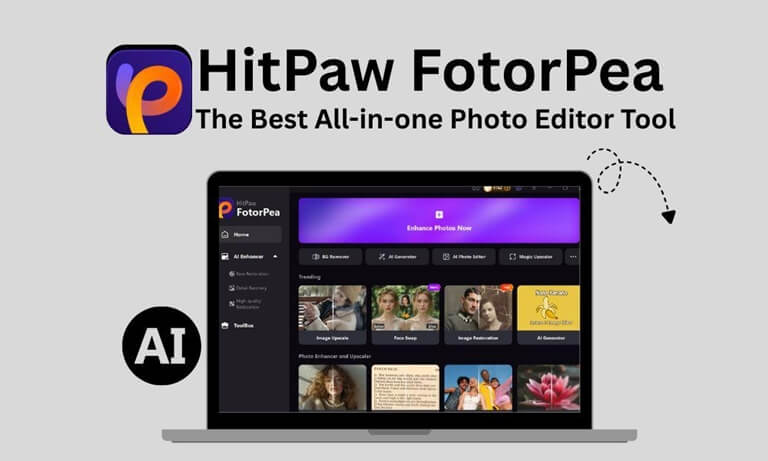
HitPaw FotorPea stands out as the best all-in-one tool in 2025. The tool has advanced AI features with a user-friendly interface. You don’t need to use multiple apps for editing. Users can enhance and retouch the images. This tool removes objects and modifies backgrounds. This balance of simplicity and effectiveness makes it the top choice today.
The photo editing world has changed. High-quality results no longer belong only to professionals with expensive tools. HitPaw FotorPea creates clear images that are catchy and stunning in a few minutes. The tool makes professional-level editing affordable to all.
Core Features and AI-Powered Magic of FotorPea

Photo editing is not about cropping or adjusting brightness only. People want tools that can do much more in less time. They want solutions that fix flaws, improve details, and even transform entire scenes with minimal effort.
HitPaw FotorPea can do this through its AI features. You are allowed to do anything to replace objects and even recover damaged images. Each of the functions is aimed at saving time and providing results of professional quality. Users are able to edit as professionals without the use of advanced skills.
1. Enhance and Unblur Every Shot
Blurry photos can ruin special moments. Shaky hands, poor lighting, or fast movement make images unclear. HitPaw FotorPea solves this with its AI-powered enhancement and unblurring tools. The tool sharpens every pixel with precision, restores the textures and hidden details.
The feature saves pictures that previously were useless. The feature perfects the faces, removes motion blur, and reinvigorates lost focus. The tool enhances your pictures to become more professional. Even the outdated or low-resolution images can be re-illuminated with FotorPea.
2. Background Remover
Sometimes, a photo looks good but still feels cluttered because of what’s behind in the background. That’s where a background remover can help. Instead of spending time editing manually, you can quickly remove unwanted backgrounds and keep the focus on what matters most. Tools like bgremover.org make this process easy, whether you’re creating product images, social media posts, or professional-looking photos for your website.
Unwanted backgrounds can distract from the subject of a photo. Traditional editing tools often make background removal slow and frustrating. HitPaw FotorPea is one of them, which removes the background smartly. The subject-complex separation of subjects and complex scenes is done with fast and precise results.
Users create solid or creative designs in place of messy backgrounds with only a few clicks. You can make any photo edits, be it product or profile pictures. It is a tool that guarantees clean and professional results. HitPaw is easy to edit and produces clean and studio-like photos.
3. Image Reconstruction
Old, faded, or damaged photos hold priceless memories. But cracks, scratches or missing details make them useless. HitPaw FotorPea allows you to cherish your memories with its AI-driven image reconstruction. The tool revives damaged areas and restores the photos.
HitPaw fixes vintage family portraits or improves low-quality smartphone shots. The tool works with precision. Users can bring back lost details of photos, correct faded colors, and repair surface flaws. The tool is used for both personal memory keeping and professional restoration projects.
4. AI Replace
A photo does not always require touch-ups. Objects can require replacement, or innovative editing can require new components. The AI Replace tool of HitPaw FotorPea makes it precise and realistically possible. The tool replaces or adds objects in your images and maintains lighting, shadow,s and textures.
HitPaw FotorPea does all the work for you, from removing unwanted distractions to adding entirely new elements. The edits look seamless and natural. This feature is used for creative projects and marketing visuals. The tool fixes photos that didn’t turn out as planned. Imagination becomes part of the editing process with AI Replace.
5. Retouch
Small flaws distract people’s attention from great photos. Minor imperfections like blemishes, uneven skin tones take away the focus. HitPaw FotorPea’s retouch feature fixes these problems with subtle and natural-looking adjustments.
You can enhance portraits in seconds. You don’t need hours to edit small details. The tool smooths the skin and highlights facial features. This feature is used to edit social media posts, professional headshots, or personal keepsakes.
Why FotorPea is the 2025 Choice: Benefits and Use Cases
HitPaw FotorPea stands out because it gives people powerful editing without complexity. The tool is designed for anyone who wants better photos. The app is used for personal use, social media or professional projects.
Key Benefits of FotorPea
HitPaw FotorPea has a number of benefits which make editing simple and easy. The tool provides you professional professional-looking results without any editing skills.
- Easy to Use: You don’t need any skills to use HitPaw. The interface is simple and easy to use.
- All-in-One Tool: The tool has many features like enhancement, background removal, and retouching.
- AI Accuracy: The app uses smart technology. The AI technology makes the edits more natural and realistic.
- Saves Time: You don’t need to spend hours to edit your photos. The tool fixes common photo issues in seconds.
- Affordable Access: The tool provides professional results without the high price of traditional tools.
- Wide Use Cases: HitPaw FotorPea is helpful for photographers, online sellers, content creators, and everyday users.
These benefits make it the preferred tool in 2025. Anyone can improve their photos quickly and effectively.
Step-by-Step Guide: Using AI Replace
You can easily use the AI replace feature to edit your images. Follow these steps to use AI Replace in HitPaw FotorPea:
Step 1: Install HitPaw FotorPea
Visit the official site and download the HitPaw FotorPea. Open the app and navigate to the “toolbox”.
Step 2: Select AI Photo Editor
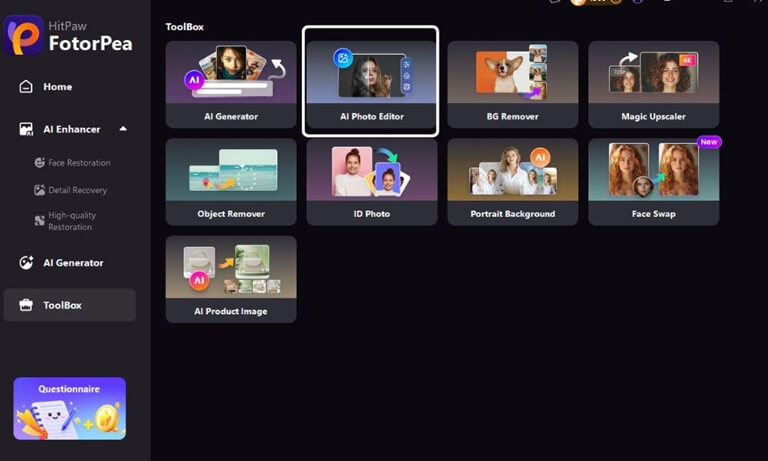
The toolbox has different tools for different purposes. Choose the “AI photo editor” feature in the toolbox to edit your images.
Step 3: Upload Your Photo

Upload your image to edit. You can also use the drag-and-drop option.
Step 4: Choose the AI Replace Tool
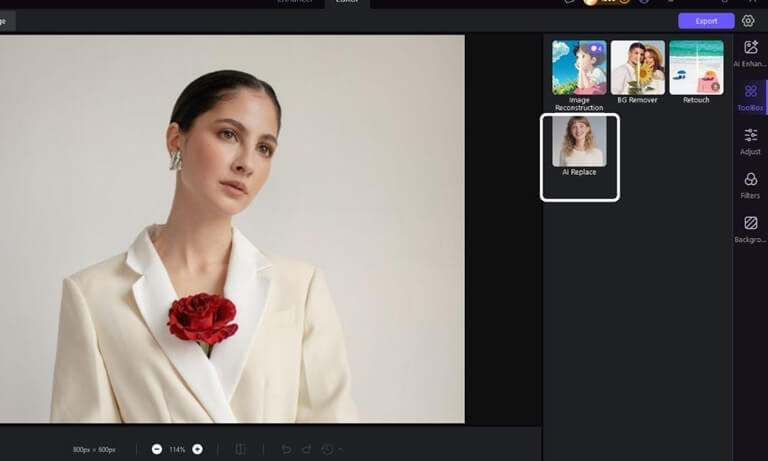
From the menu, open the toolbox and pick AI Replace as your editing option.
Step 5: Add Your Prompt
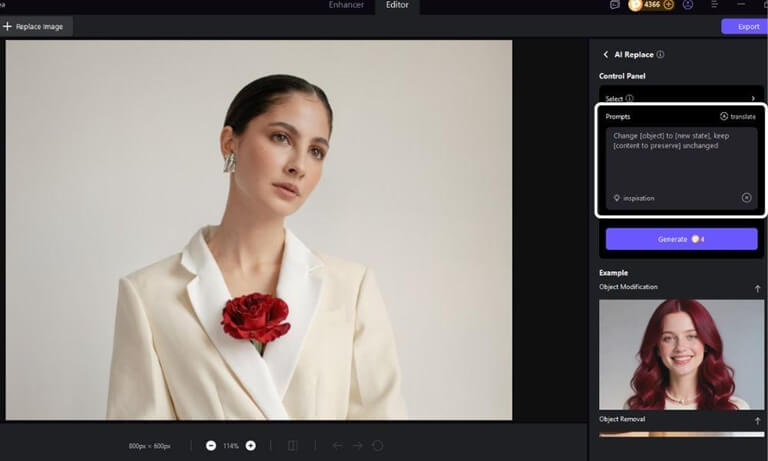
AI replace helps you to modify as well as remove the object. Add your prompt to edit your photos and click the “Generate” button to edit your images.
Step 6: Save and Export
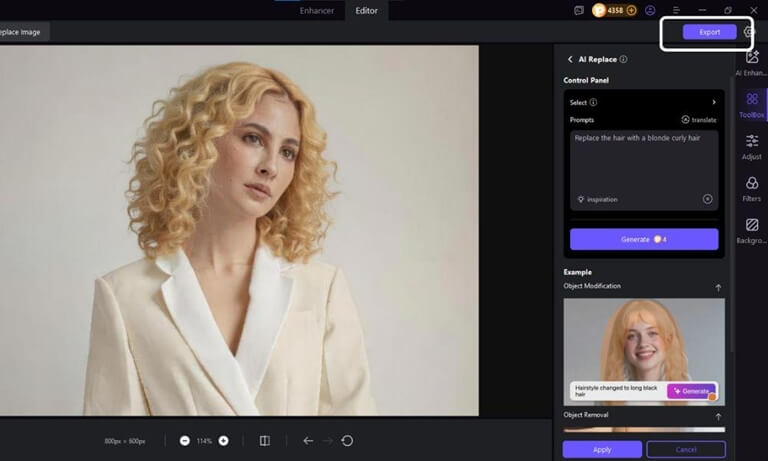
Export the photo in your preferred format once you’re satisfied.
Frequently Asked Questions
1. What makes HitPaw FotorPea different from other photo editors?
HitPaw gives you many editing tools in one place. Users can enhance, retouch, and replace objects with AI support.
2. Can FotorPea fix blurry or low-quality photos?
Yes. The AI models of HitPaw sharpen details, reduce noise, and restore focus. The tool fixes portraits, action shots, and even old family photos.
3. Do I need editing experience to use FotorPea?
No. The tool is easy for beginners as well as professionals. You can upload, choose a feature, and get results in minutes.
Conclusion
Photo editing in 2025 no longer requires complex software or high costs. HitPaw FotorPea enhances, retouches, and transforms photos with ease. The AI-driven tools of HitPaw give you professional-quality results.
HitPaw FotorPea simplifies editing without losing quality. The tool can be used for personal memories, social media, or business use. Now, anyone can create stunning photos that truly stand out.
Popular on OTW Right Now!




About The Author

Gagan Bhangu
Founder of otechworld.com and managing editor. He is a tech geek, web-developer, and blogger. He holds a master's degree in computer applications and making money online since 2015.