
ARC Raiders PC Settings That Actually Work — Stop Leaving FPS on the Table
There’s nothing more frustrating than loading into a raid, getting eyes on a target through the trees, and then watching your FPS tank at the worst possible moment. The shot misses. The enemy doesn’t. That right there is a settings problem, not a skill problem — and it’s completely fixable.
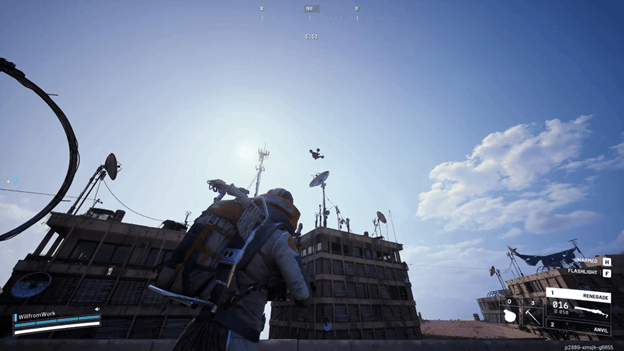
ARC Raiders is one of the more demanding extraction shooters out right now, built on a heavily modified version of Unreal Engine 5. Embark Studios stripped out several of UE5’s notorious performance killers — no Lumen, no Nanite, no Virtual Shadow Maps — and replaced them with NVIDIA’s RTXGI system. The result is a game that runs surprisingly well on modern hardware, but “surprisingly well” and “optimally tuned” are two very different things. Getting the settings right is the difference between fluid combat and a raid that turns into a slideshow the moment a drone swarm shows up.
Getting Into the Game: Picking Up an ARC Raiders Key
Before any of these matters, access to the game is the first step. LootBar is a well-regarded shop for picking up an ARC Raiders key without overpaying. The store keeps prices competitive and the process simple — no unnecessary steps between buying and getting into a session. For anyone still on the fence about purchasing, grabbing an ARC Raiders key through LootBar is a straightforward and reliable option.
Start With the Right Foundation
Before touching a single in-game slider, a couple of system-level things need to be handled first.
Driver version matters more than most people realize. The drivers that opened the game to DLSS 4 and NVIDIA Reflex are GeForce Game Ready Driver 581.57 or later, which is required for users of NVIDIA. The users of AMD are specifically warned that there are known performance problems and crash issues related to ARC Raiders with the driver version 25.10.2. The only solution is to roll back to 25.9.2 until AMD releases an appropriate fix.
Discord overlay causes stuttering. This catches a lot of people off guard. Community reports confirm that the Discord overlay creates persistent micro-stutter even when overall FPS looks fine. Disable it through Discord’s settings under App Settings, then Game Overlay. The improvement is immediate.
Identify your bottleneck before doing anything else. ARC Raiders is heavy on the CPU, particularly in the multiplayer mode. Start Open Task Manager and play the game. When GPU utilization is at 95-100%, and the CPU is less than 70 then this is the limit of the GPU, and reducing graphical settings will assist. In the vice versa, reducing graphics will not be of any help at all. That difference alters all the things regarding the way the optimization process is to be conducted.
Display Settings
Window Mode: Borderless Fullscreen. Exclusive Fullscreen looks attractive and does increase access to direct display by the CPU graphics, but it introduces more stability issues than it resolves in this game. Borderless Fullscreen has the right balance, and it does not cause the alt-tab headaches.
Resolution: Format the native all the time. The resolution can also be dropped below native, which causes the textures to be muddy and the enemy silhouettes more difficult to read, which is the last thing a competitive player should have. In case of poor performance, correct it with the upscaling rather than the reduction of resolution.
V-Sync: Off, without exception. V-Sync is used to keep the framerate in time with the refresh rate of the monitor to reduce tearing, but it causes input lag that creates the impression that the game is slow and unresponsive. Disable it entirely. G-Sync or FreeSync should be used to tear control at the level of the driver at the GPU level instead.
Frame Generation: Do not do it anymore when playing. Generation of frames may consume the FPS counter by 50-100 frames, which may appear spectacular on a benchmark, but introduces the input latency in real-world combat. The introduced lag may be a difference between hitting a shot and a kill cam at the base framerates below 60-80 FPS. Keep it disabled.
Graphics Settings Explained
Upscaling — The Most Important Setting on the List
Balanced mode on DLSS (NVIDIA) or FSR (AMD) is the most suitable all-purpose option. It not only gives a significant increase in FPS but also has enough visual clarity to allow the use of eyes without straining to see enemies at range. Quality mode is suitable for 1440p to those who want sharper images and have the hardware to support it.
In the case of NVIDIA users in particular, there exist two models of DLSS. CNN (the older model of Convolutional Neural Network) is 10-12 percent slower than the Transformer model when used on RTX 40 and 50 series cards, and the difference is broader, approaching half an order on RTX 20 and 30 series hardware. The transformer model has a better capability of managing the fine vegetation detail in theory, though in some ARC Raiders environments, it also introduces the problem of particle trails and volumetric effects. CNN performs more safely and more cleanly.
Texture Quality: High. VRAM is consumed by textures and not by GPU processing power. High texture quality is barely a performance cost on cards with 8GB and above, and does a great deal of work in assisting to find loot and scan the environment. Faith only drops on 6GB cards or less.
Shadows: Low to Medium. Shadows are literally costly to produce, and in the competitive game, clean sightlines are more prized than detail in the shadow. Reduction of the shadows is also likely to decrease the visual clutter, which causes more difficulty in finding the moving target in a populated environment.
Global Illumination (RTXGI): High when working outside, Medium when working indoors, and heavy. The RTXGI system operates by a probe-based ray tracing and provides real-time diffuse lighting to the entire environment. Optimal performance is at High – it does not respond to performance change much below that, but the visual image reduces at that point. It is an exception when indoors, where probe density gets heavier, and Medium gives a superior trade.
Effects Quality: Medium to Low. Dropping Effects Quality is constantly available with approximately 9-10% faster rendering with hardly any noticeable drop in quality when real gameplay occurs. When things are moving fast, it appears that explosions and particle effects are almost the same regardless of the quality level.
Post-Processing: Low. The cutscenes and screenshots appear to have an atmospheric look because of the use of bloom, ambient occlusion, and color grading. They increase the cost and performance of live firefights by 10 percent. Low Post-Processing renders out a cleaner image, and has a quicker render – both handy.
Motion Blur: This particular one does not even require an explanation, yet here it is: motion blur renders the process of tracking high-paced targets more difficult. It is there to engage the movie viewers in the movie, not to compete. Turn it off permanently.
Depth of Field: Off. Same category as motion blur – This is a visual effect that blurs areas of the image. Soft edges are a disadvantage in a shooter in which range identification of a target is vital.
Film Grain: Off. Visual noise, no benefit of a game.
View Distance: High. Not Ultra – High. Ultra view distance makes the distant background geometry, which does not affect the gameplay. High achieves good draw distance in the absence of the overhead cost.
Foliage Quality: Low. Large outdoor settings, especially foliage, are deceptively expensive. The poor quality of the leaves makes the trees and grass readable as cover, but makes much less geometry in the process.
Field of View: 80. Somewhere in the 75–85 range works for most players. 80 tends to be the sweet spot — wide enough for good situational awareness, tight enough that distant targets don’t shrink to unreadable dots.
NVIDIA Reflex and AMD Anti-Lag
Turn on NVIDIA Reflex on “On + Boost” where possible. This environment improves the interactions between CPU and GPU render pipelines to lower the system latency, such that inputs are recorded sooner on screen. One of the few environments it has that makes the game feel more responsive without a visual cost.
AMD Anti-Lag+ functions are based on the same premise as AMD users of graphics cards. Enable it.
Windows and System Settings
Power Plan: Ultimate Performance or High Performance. Windows will automatically switch to Balanced Mode and will limit CPU performance to conserve power. ARC Raiders is a CPU hog – crippling on a raid is not a desirable result. Select the power plan before the game.
Game Mode: On. Located in Windows settings in the Gaming section. This gives the game a priority over other background processes during play and gives the game additional computer and RAM overhead.
Hardware Accelerated GPU Scheduling (HAGS): Test On. HAGS is beneficial in most of the modern systems, but older generations of GPUs may develop stuttering. Try it should be used first, and off when micro-stutters come in.
SSD Installation: Not negotiable. Playing ARC Raiders on a mechanical hard drive leads to texture pop-in, longer loading times, and occasional pauses as the game loads resources. Those problems are removed by an SSD.
Close Background Applications: Chrome tabs, streaming software, recording overlays, and launcher apps are competing applications. Sew everything unnecessary with a session.
A Note on Patch 1.13.0
The update on January 2026 brought the matchmaking of Solo vs Squads and new map conditions, such as Bird City. These extensions added a little complexity to the CPU scenes; that is, CPU optimization steps have taken on a greater importance than when the game was launched. Players who configure their PC settings during early access might wish to re-check the Windows power plan and background process settings – the game requires slightly more of the processor in populated areas than in the past.
Final Thoughts
The changes that have the most significant effect on this list are DLSS or FSR on Balanced, off Motion Blur and Depth of Field, reduce Effects Quality and Post-Processing, and on NVIDIA Reflex or AMD Anti-Lag. Such changes will only make the game experience different, not only in how it competes.
All other improvements are fine-tuning. Varying tests individually with a stable route through the game, and note the 1% lows instead of the average FPS. Frame timing in the most critical situations of a raid, a swarm of drones, an indoor firefight, where the other three squads are not far away, is more important than high numbers in an empty clearing.
Popular on OTW Right Now!



About The Author

Gagan Bhangu
Founder of otechworld.com and managing editor. He is a tech geek, web-developer, and blogger. He holds a master's degree in computer applications and making money online since 2015.