
Appointment Reminder Texts: How Small Businesses Can Send Them Straight From Email
Every missed appointment is money quietly walking out the door. For a salon, a dental clinic, a tutoring service, or a one-person consultancy, a single no-show can mean an empty hour that was already paid for in rent, wages, and lost opportunity. The frustrating part is that most missed slots aren’t deliberate — people forget. They booked three weeks ago, life got busy, and the appointment slipped their mind somewhere between work and dinner.
The fix is almost embarrassingly simple: a well-timed reminder. What stops a lot of small businesses from sending them is the belief that you need costly software, a separate business phone, or some technical setup to make it happen. You don’t. If you can send an email, you can send an appointment reminder that arrives as a text message on your customer’s phone — and you can do it from the inbox you already open a hundred times a day.
Why No-Shows Quietly Drain Small Businesses
It’s easy to shrug off a single missed appointment, but the math adds up fast. Say your average booking is worth $60 and you lose just four appointments a week to no-shows. That’s $240 a week, or more than $12,000 a year — gone, with nothing to show for it. For service businesses running on tight margins, that gap is the difference between a comfortable month and a stressful one.
No-shows cost more than the booking itself, too. There’s the staff member who sat idle, the slot a paying customer could have taken, and the scheduling scramble when someone finally calls to rebook. Industries like healthcare, beauty, and home services feel this most because their entire day is built around a calendar of fixed time slots. Empty a few of them and the whole day’s revenue wobbles.
Why a Text Beats an Email or a Phone Call
Many businesses already send emails confirming orders. Why change to a text message? Attention is the whole game, and text wins that game. SMS open rates have been consistently around 98%, with most SMS being read within minutes, whereas the rate of reminder and marketing emails varies between 20% and 30%. If people can’t see the reminder, it won’t work, and a text is more likely to be read before the appointment than an email buried under 20 others.
Phone calls scale, but they aren’t working. Every customer is the day before, which will eat hours away from you, and few will answer an unknown number. Texting has the security of a phone call and the speed and minimal effort of email.
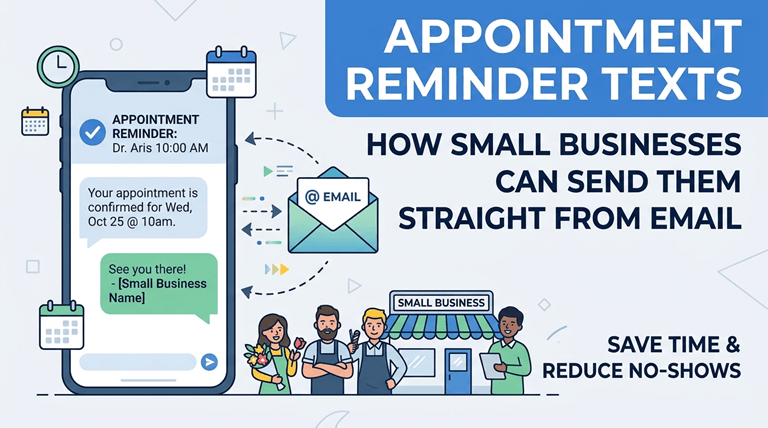
Here’s where it gets practical for a small team. You don’t need to learn a new app or hire anyone to manage messages. A method called email-to-SMS lets you compose an ordinary email and have it delivered to your customer as a text message. You write the reminder as you would any email, send it, and it shows up on their phone as an SM no apps to switch between, no numbers to copy and paste into a separate dashboard, and no training for your front-desk staff. Your team can use it as if it were another app to manage their daily email communications, if they’re already using Gmail or Outlook.
How to Set Up Reminders From Your Inbox
It’s a simple concept. An email-to-SMS service allows your business to have its own texting number and to link your email account with your messaging service, such as Gmail, Outlook, or another service. It’s as easy as sending an email to a special address after it’s configured. The service converts your message into an SMS, delivers it to the customer’s phone, and routes any reply back to your inbox as a normal email — the same inbox where you already do everything from scheduling to sending large files through Gmail.
A typical setup looks like this:
- Choose a service that supports email-to-SMS and provides a business number.
- Connect your email account by following the provider’s short setup steps.
- Save a reminder template so you don’t rewrite the same message every time.
- Send a test to your own phone to confirm everything works end-to-end.
Carrier gateway addresses, which were the recipient’s number followed by a carrier domain, have been the basis of this “free” trick for years. Those gateways are no longer reliable for anything important, as are most of the major US carriers. The right service replaces that random approach with a stable, predictable number, and that’s what you want for a customer-facing service.
For businesses that rely on a packed appointment calendar, especially salons, it can also make sense to go one step further and automate the entire reminder process. A salon appointment app like TimeTailor, for example, links every booking to the client’s contact details and sends confirmations and reminder texts automatically, so your team doesn’t have to remember to send them manually. It also allows clients to book appointments themselves through Instagram, Facebook, or the salon’s website, reducing the back-and-forth that often comes with scheduling. For solo stylists and small salon teams, combining self-service booking with automatic reminders is a simple way to reduce no-shows while keeping the daily workload manageable.
What to Put in a Good Reminder Message
Reminder text should be brief, clear, and actionable. The customer should be aware of who it’s from and when their appointment is, and what to do if they wish to change — in a couple of sentences. If possible, keep it under 160 characters so it can be sent as one message.
A few examples that work well:
- “Hi Sarah, this is a reminder of your appointment at Bright Smile Dental tomorrow (Tue) at 2:00 PM. Reply C to confirm or R to reschedule.”
- “Hi James, your car service at Mike’s Auto is booked for Thursday at 9 AM. Reply to this text if you need to change it.”
- “Reminder: your color appointment at Luxe Salon is tomorrow at 11 AM. See you then! Reply CANCEL to release your slot.”
Notice the pattern: name, business, date and time, and a simple reply instruction. One of the best tweaks is to ask customers to confirm with a single letter or word; businesses that ask to confirm often report a drop of up to 50% in customers who fail to do so, making a reply a small commitment to remember the reminder.
Timing and a Few Best Practices
It’s not just what you’re saying, it’s when you’re saying it. People have time to reschedule if a message is sent 24 hours before the appointment, or to let you know if they are unable to attend. A repeat reminder is sent a couple of hours before the event for higher-value bookings, to capture those that are already active.
Keep these habits in mind:
- Identify your business in the first few words so the text doesn’t read like spam. (It also helps to make sure the contact details you hold are current — the same way you’d check whether an email address is valid before a big send.)
- Send during business hours — a reminder at 11 PM annoys more than it helps.
- Offer an easy opt-out and honor it. Respecting preferences keeps you compliant and keeps your number in good standing.
- Don’t over-message. Too many confirmations and reminders make the person learn to tune you out.
It is important to be aware of the general guidelines associated with business texting in your region, such as opt-out and consent guidelines. That’s what the regulations in the US, such as the TCPA, do, and in practice, its message is easy to heed: ask before you text. In most cases, adding a checkbox on your booking or intake page is all that’s necessary, and you’ve got your back covered in the future.
The Bottom Line
One of the most cost-effective, high-yielding enhancements you can make to a small business is appointment reminders, and it doesn’t have to be a complex system. You eliminate no-shows, fill your calendar, and provide a better customer experience without requiring additional software that your team must master — all via text, directly from the email tools you already use. Create a template, choose your moment, and let a subtle reminder do the job of safeguarding your income.
Popular on OTW Right Now!


About The Author

Gagan Bhangu
Founder of otechworld.com and managing editor. He is a tech geek, web-developer, and blogger. He holds a master's degree in computer applications and making money online since 2015.