
AI Image Creation Made Simple: How Modern Tools Help Turn Ideas Into Visual Stories
Images drive the internet. Social media campaigns, product pages, blog posts, creative portfolios: strong visuals decide whether someone stops scrolling or keeps going. But producing polished images has always required expensive software skills, a camera, or a designer on speed dial.
AI image tools are changing that. You don’t end up spending hours struggling to get layers and selections to behave the way you want; you simply tell it what you would like, and this tool will do the work for you. So it doesn’t always happen exactly as you want, but the time between the idea in your head and the image on your screen is shorter than ever before.
Platforms like Pixlio are based on this concept and offer features that make editing more practical and more creative as well, allowing everything to be done in a single workflow.
How AI Changes the Way You Work With Images
Traditional image editing provides you with the utmost control. The downside is that there’s a considerable learning curve. Adopting selections, masks, color curves and blending layers takes a lot of time – particularly if you’re only looking for one outcome.
AI flips the order. The creative objective is different than the technical operation, so that’s where you begin. Looking for methods to alter the ambiance of a photo? Swap a background? Move an object out of the way? Just tell the tool where to go.
That change has an impact on more people than one imagines. Content creators can generate their own images without having to use stock images. The photoshoot can be avoided by small businesses. Online vendors can try out various presentations of products swiftly. Even if you don’t use it for professional projects, everyone can use it for fun to create something more creative from their personal photos.
There’s not just the speed. It’s that people are able to experiment with the visual.
Editing Images Through Simple Instructions
The most useful application of AI is using it to transform existing images. You don’t adjust each element; instead, you tell the tool what you want to change.
Pixlio’s AI image editor works this way. Upload an image, describe the result you are after, and explore creative changes without needing design experience.
Suppose you take a picture of the product in your living room. This background can be changed to a clean studio environment. Or choose a landscape and change the time from afternoon to golden hour. There is an unwanted object, an issue with the lighting, and an atmosphere: all are covered by a simple written instruction.
This workflow is best if you have an original image that has something you want to preserve. AI captures what is important and enables you to tweak the things around it.
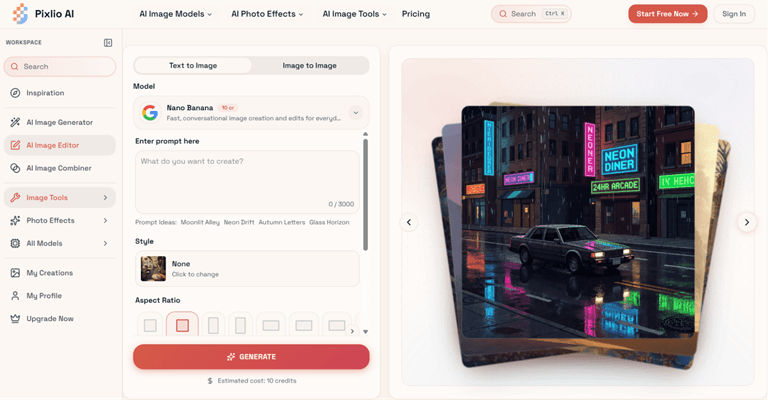
A variety of directions can be explored without having to begin over again and again, thus lightening the whole creative process.
Bringing Multiple Visual Ideas Together
Editing an existing image is one thing. Combining separate visual elements into one cohesive scene is a different challenge.
This comes up more often than you would think. A brand is looking to introduce a product to a new place. A designer must combine various ideas into an image of the campaign. A creator needs to have three reference pictures and the desire to have one composition that captures all three of these pictures.
Pixlio’s AI image combiner is built for this. It takes multiple source images and generates a unified result where lighting, perspective, and style feel connected rather than assembled. The output is not always flawless on the first try, but it gets you to a workable result much faster than doing it by hand.
Where These Tools Work Best
Content and social media. If you’re a regular publisher, you’ve got an idea of how fast you run out of ideas for visuals. AI tools are able to generate images of your topic rather than just settling for something that’s close to the subject.
E-commerce It costs a lot of money to take product photos. AI editing is also great because one base product shot can be transformed into various backgrounds and seasons or themed for different promotions.
Marketing teams. Teams can rapidly mock up visual ideas and test directions prior to appropriation. That helps accelerate approvals and eliminates wasted effort.
Personal projects. Use and transform travel photos, make art for personal use, or simply play for fun. Not all of the things should require a business case.
Picking the Right Approach
There are various goals, and each one of them requires different workflows.
AI image editing is best suited when you already have an image you want to edit and make specific changes to it, such as changing the background, removing objects, etc. For many people, the most logical use of AI image combination is evident when they have a few images that they want to combine into something new.
In fact, the two go hand in hand. Make a few of the individual images, and then use them to create a larger concept. While the technology takes care of the execution, it’s still your choice of creation.
Final Thoughts
AI image tools do not take the place of creative abilities. They’re making things easier for more people to get involved. The most important thing about images getting made faster is that that’s not what’s happening. It’s when a good idea is coming from someone who has no design experience that someone with a good idea and design experience can now look at professional-level opportunities.
Pixlio steps in and offers the following: The editing and combination are still easy to do and within the same workflow. There is no need to be able to use complicated software. All you have to do is come up with an idea in a few minutes.
With the advancement of technology, the distance between a visualization idea and the making of it will be getting even smaller. This is great news for anyone who has ever said, “I know what it should look like, but have no idea of how to make it look that way.
Popular on OTW Right Now!


About The Author

Gagan Bhangu
Founder of otechworld.com and managing editor. He is a tech geek, web-developer, and blogger. He holds a master's degree in computer applications and making money online since 2015.