
A Step by Step Look at How Patch Management Software Actually Works
Ask most people what patch management software does and you will hear some version of “it installs updates.” That is true in the same way that saying a kitchen “makes food” is true. The actual process, scanning, prioritising, testing, deploying, and confirming, is where most of the real work, and most of the failure points, actually live, often invisibly to anyone outside the IT team.

Understanding that process matters, because patch management software for businesses only earns its keep if every stage runs reliably, not just the parts that are easy to automate.
Exploits remained the most common initial infection vector in 2024, present in 33% of the incidents Mandiant investigated, according to the M-Trends 2025 report. Attackers are not choosing exploits because they are exotic. They are choosing them because the gap between a patch existing and it being deployed keeps handing them a working way in.
Key Takeaways
- Patch management software runs through a repeatable cycle: inventory, scan, prioritise, test, deploy, and verify.
- Exploits were the leading initial infection vector in 33% of incidents Mandiant investigated in 2024, per Google Cloud’s M-Trends 2025 report.
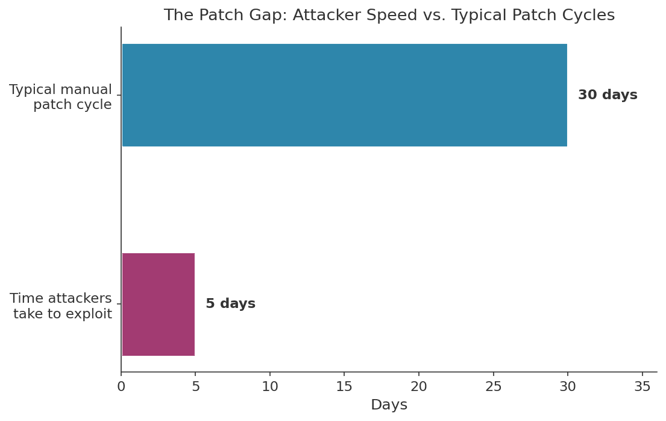
- Attackers now weaponise many vulnerabilities within about 5 days of disclosure, while manual patch cycles often stretch past 30 days.
- Skipping the verification stage is one of the most common reasons patches appear complete but are not.
- Good patch management software fits into the tools a team already relies on, rather than becoming a separate system nobody fully trusts.
Stage One: Building and Maintaining a Device Inventory
Nothing else in the process works without this step. Patch management software starts by scanning the network to build a live inventory of every device, operating system, and application version it can detect, whether that device sits in an office, a data centre, or someone’s home, connected only sporadically through a home router.
A patch cannot reach a device the software does not know exists. Inventory gaps are the quiet cause behind a surprising share of incidents where a company later discovers a specific laptop or server was never patched at all.
“Exploits continue to be the most common initial infection vector,” accounting for 33% of investigations in 2024, with global median dwell time rising to 11 days. — Google Cloud, M-Trends 2025
That gap between how fast attackers move and how slowly manual patch cycles run is the entire reason the later stages of this process, especially automation and verification, matter as much as they do.
Stage Two: Scanning for Missing Patches and Known Vulnerabilities
Once the inventory exists, the software compares installed versions against a constantly updated list of available fixes and known vulnerabilities. This is where vulnerability management and patch management start to overlap, since the scan is effectively identifying which weaknesses the organisation is currently exposed to.
Good scanning tools flag severity alongside the gap itself, since a missing patch on an internet-facing server carries far more urgency than the same gap on an isolated internal machine.
Stage Three: Prioritising What Gets Patched First
Not every missing patch deserves the same response time. Software that treats a low-severity cosmetic fix identically to an actively exploited critical flaw wastes attention on the wrong things.
| Patch Type | Typical Urgency | Reasonable Deployment Window |
| Actively exploited critical flaw | Immediate | Within 24 to 72 hours |
| Critical flaw, no known exploit | High | Within 1 to 2 weeks |
| Moderate severity, internal system | Standard | Next scheduled maintenance window |
| Low severity or cosmetic fix | Low | Routine monthly cycle |
Stage Four: Testing Before Wide Deployment
A patch that breaks a business-critical application creates a different kind of outage, one caused by the fix rather than the flaw. Most reliable patch management software supports a staged rollout: deploy to a small test group first, confirm nothing broke, then expand. Teams that have already dealt with cloud migration projects failing before they begin tend to recognise this pattern immediately, since skipping validation steps to save time is exactly what causes expensive rework later.
| Pro Tip: Keep your test group genuinely representative, not just the easiest machines to reach. A pilot group of only new laptops will miss the quirks that show up on the five-year-old machines still running critical software. |
Stage Five: Deploying Across the Environment
With testing complete, the software pushes the patch out across the wider environment, usually on a schedule designed to avoid disrupting active work. This stage is where automation earns its value most clearly: deploying the same fix to ten devices and to ten thousand devices should take roughly the same amount of administrative effort.
Remote and hybrid devices deserve particular attention here. A tool that only reliably reaches machines physically connected to the office network leaves exactly the devices most often affected by remote desktop connectivity issues sitting unpatched for the longest stretches.
Stage Six: Verifying the Patch Actually Landed
This is the step that separates software that merely sends patches from software that actually manages them. A deployment marked as successful in a dashboard is not proof the patch installed correctly on every target device. Verification means confirming the new version number, checking for installation errors, and flagging any device that silently failed.
Roughly 80% of security leaders in one industry survey reported discovering that a patch they believed was fully deployed had not actually reached every endpoint in their environment. That gap is precisely what a verification stage is designed to catch before it becomes an incident.
Stage Seven: Documenting and Reporting
The final stage produces a record of what was patched, when, and on which devices, useful both for internal audits and for demonstrating compliance during a security review. Organisations building out essential technology solutions for modern workplaces increasingly treat this documentation as a baseline requirement, not an optional add-on.
What to Look for in Patch Management Software
Not every product handles all seven stages equally well. When comparing options, prioritise:
- Automated, continuous inventory: manual asset lists go stale within weeks.
- Risk-based prioritisation: severity and exploitability should drive urgency, not just a patch’s release date.
- Staged rollout support: a pilot group before full deployment catches problems while they are still small.
- Deployment verification: confirmation should be automatic, not something an admin has to check by hand.
- Coverage for remote devices: a hybrid workforce needs patches to reach devices that rarely touch the office network directly.
Getting Started: A Simple Evaluation Checklist
- Confirm the tool can build and maintain a live inventory automatically, not just on a scheduled manual scan.
- Check how the software handles severity-based prioritisation for actively exploited flaws.
- Ask specifically how staged rollouts and pilot groups work before committing to a purchase.
- Verify that deployment confirmation is automatic and visible in a central dashboard.
- Test coverage against your actual remote and hybrid device population before rolling out company-wide.
Frequently Asked Questions
How is patch management software different from a basic update checker?
A basic checker flags that an update exists. Full patch management software handles the entire cycle, inventory, prioritisation, testing, deployment, and verification, across every device in an organisation, not just one machine at a time.
Why does the testing stage matter if a patch comes from a trusted vendor?
Vendor patches are tested against a generic environment, not your specific mix of software and configurations. A staged rollout catches the quirks that only show up in your particular setup, sometimes only after weeks of normal use.
Can patch management software fully replace manual IT oversight?
It removes most of the repetitive work, but human judgment still matters for prioritisation calls, exception handling, and reviewing what the automation flags as unusual or ambiguous.
How often should the inventory and scanning stages run?
Continuously where possible, since real-time visibility catches problems the fastest. A weekly or monthly scan leaves a large window during which a new device or a newly disclosed vulnerability goes unnoticed.
What happens if a patch fails verification on some devices?
Good software flags those devices specifically so IT can investigate rather than assuming the entire deployment succeeded because most devices reported back correctly.
Is patch management software worth it for a small business?
Often more so in practice, since smaller IT teams have less capacity to manually track and verify patches across every device by hand.
Why the Process Matters More Than the Feature List
Marketing materials tend to emphasise dashboards and automation speed. The actual value lies in whether each of the seven stages runs reliably, especially the ones nobody notices when they work correctly: inventory accuracy, honest prioritisation, and verification that actually verifies rather than simply assuming success.
A tool that nails deployment but skips verification looks identical to one that does both, right up until an unpatched device becomes the reason an attacker got in. Evaluate the whole process, not merely the parts that make for an easy product demo.
References
Google Cloud, M-Trends 2025: Data, Insights, and Recommendations From the Frontlines, 2025 — https://cloud.google.com/blog/topics/threat-intelligence/m-trends-2025/
Fortinet, What Is Vulnerability Management? A Complete Guide, 2026 — https://www.fortinet.com/resources/cyberglossary/vulnerability-management
Splashtop, Patch Management, 2026 — https://www.splashtop.com/solutions/patch-management
Fact Check: All statistics and data points in this article were verified against original sources as of August 20, 2026. Sources are listed in the References section.
Popular on OTW Right Now!




About The Author

Gagan Bhangu
Founder of otechworld.com and managing editor. He is a tech geek, web-developer, and blogger. He holds a master's degree in computer applications and making money online since 2015.