
A Practical Digital Toolkit for Planning a Room Makeover
Room-planning software can save time, but only when you use each tool for the right decision. A floor plan answers questions about size, movement, and furniture placement. A color preview answers questions about mood and coordination. Mixing those tasks too early often produces attractive images without solving the practical problem.
The most sensible place to begin is a Floor plan maker. The web-based editor lets users start a new project from a template or a blank canvas and add walls, rooms, doors, windows, and furniture. Orderly, using grid snapping and live dimensions, and usable in different regions thanks to metric and imperial units.
Measure before drawing
First, measure the room’s overall length and width, then note any doors, windows, radiators, columns, built-in storage, etc. First, measure the room’s overall length and width, then note any doors, windows, radiators, columns, built-in storage, etc. Even though you can’t see the corners, mark where each opening is located, instead of estimating. The missing inches can make a wardrobe fit or a door open easily.
Write the shape of the main room. Then add in the buildings and then the furnishings. This order makes errors more apparent, as the fixed elements come first, followed by movable objects.
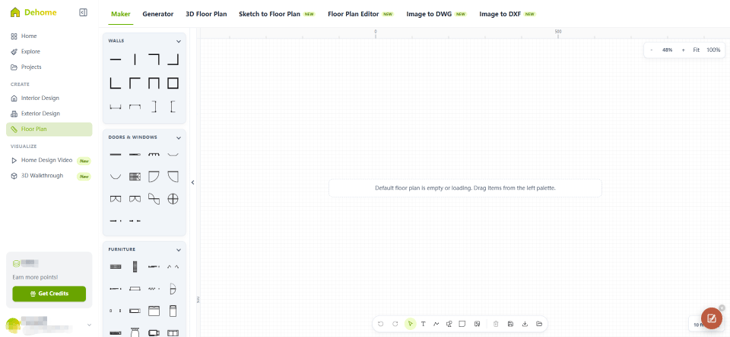
Test circulation, not just capacity
The inclusion of all the desired items in the drawing is not the same as a usable room. Check the path between doors and windows, storage spaces, seating spaces, and other commonly used spaces. Check door swings and leave space to open drawers and cabinets.
Make two to three authentic alternatives. It can be for storage, for ease of movement, or for creating a better work or conversation area. Make each plan as a PNG or JPG and compare them to each other, instead of making lots of changes to one plan until the original plan is lost.
Move from layout to color.
Once the arrangement is workable, a Home paint visualizer can help narrow the color choices. Upload a clear photograph, choose the whole room or a specific area such as a wall, ceiling, or floor, and compare curated palettes or custom HEX shades. Images saved can then be passed on to other members of the family, painters, or designers.
Use the SAME source photograph in all tests. If the light setting or camera angle changes, it will be harder to assess the color. Make a short list, but include a couple of different neutral shades, a warmer or cooler one, and a stronger accent.
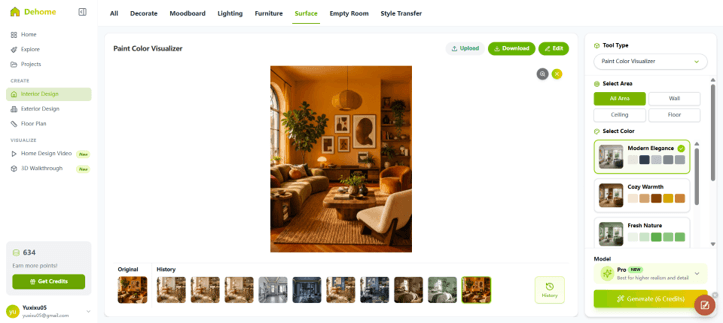
Use digital lighting as a warning, not a guarantee
Color can be projected from various light directions, but no screens can project every real condition. The final result will be influenced by the display calibration, wall texture, the type of paint used, and the finish. Shade can change from morning to evening because the room’s light changes.
Use the visualizer to remove unsuitable options, and test physical objects on more than one wall. Take a look at them during the day and under the lamps that are usually used at night.
Keep a compact decision file.
A useful project folder needs only a few items:
- A measured floor plan
- Two or three exported furniture layouts
- The original room photograph
- Three or four color previews
- Notes about measurements and unresolved questions
This should be enough to make a conversation more specific with the contractor or supplier. It also offers a record if two options are similar, several days later.
Know what the software cannot approve.
Planning tools do not certify load-bearing walls, wiring, plumbing, ventilation, accessibility, or local permits; planning tools support early decisions. Changes of any kind that involve structure or building services should be looked at by qualified professionals.
Used in sequence, the tools provide a simple workflow: measure the space, draw a fixed layout, test furniture arrangements, compare paint colors, and verify the shortlist in the space. Well, it’s not as thrilling as following through on dozens of instant makeovers, but it’s much more likely to avoid a big mistake.
Popular on OTW Right Now!




About The Author

Gagan Bhangu
Founder of otechworld.com and managing editor. He is a tech geek, web-developer, and blogger. He holds a master's degree in computer applications and making money online since 2015.