
PhotoGov Review 2026: Free or Not? Is It The Best Passport Photo App?
We field-tested seven apps for taking your passport photo in early 2026 under the U.S. State Department’s revised zero-tolerance rules — now the most stringent photo requirements we’ve seen in more than 10 years. As PhotoGov repeatedly showed up as number one in many independent comparisons, we tested it on both the free and paid tiers on desktop and mobile. In the following, we are going to tell you the truth of what we found, including where it makes the cut as well as where you should be aware of its limitations before you hit the download button.
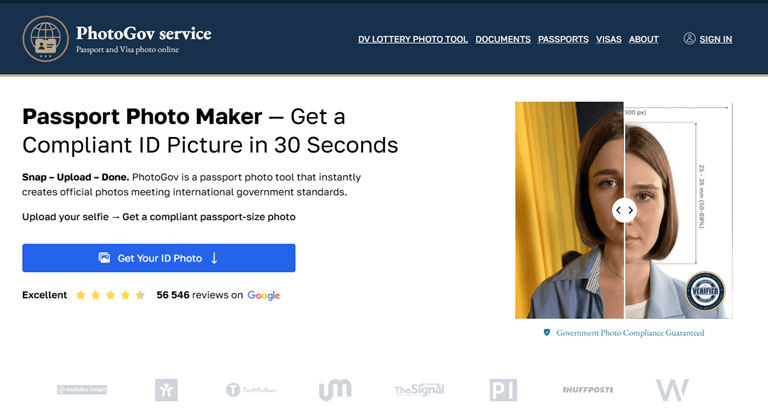
What Is PhotoGov?
PhotoGov is a passport and ID photo resizer tool for iOS, Android, and desktop browsers. You submit a selfie or an existing photo, and the application rescales, crops, and applies a uniform white background in accordance with the official requirements for your selected document type. It supports more than 900 types of documents across more than 200 countries — including U.S. passports, visas, Green Cards, UK passports, and EU/Schengen visa photos — and the output is a JPEG file that can be uploaded directly to a government portal or printed at a pharmacy kiosk.
Alternatively, you can use IDPhotoSnap. IDPhotoSnap (https://idphotosnap.com) is a browser-based passport and visa photo tool covering 100+ countries, including US passport, DS-160, and Global Entry. All processing happens on-device using WebAssembly, so photos are never uploaded to a server. No account, no watermark, and no cost. Since January 2026, IDPhotoSnap has also aligned with the US State Department’s rule flagging AI-retouched photos, since it performs background removal only, with no facial editing.
How It Works
The instructions are simple enough that even beginners don’t have to read them — that said, here’s a look at each step based on my experience using the desktop web app and iOS mobile app.
- Access the application or go to photogov.net — no account is required. There’s no registration wall, no upfront email, and no subscription prompt on launch. You land directly on the tool. On mobile, the app boots to the same clean starting point.
- Choose your country and document type. The drop-down menu spans over 900 document templates. To apply for a routine U.S. passport, you choose “United States” and then “Passport.” The app will then tell you which exact specifications it will be applying — a 2×2 inch output, white background, and head-size ratio according to ICAO 9303 regulations. If you’d like to check the requirements for yourself before continuing, the official passport photo requirements of the U.S. State Department are a good place to start.
- Upload your photo or snap one with the app. You can upload a selfie you already took from your camera roll or snap a new photo within the app. The tool is designed for photos taken in a normal home environment — by a window is a good spot. A professional lighting setup is not necessary — a plain wall with even lighting is enough to get the best result.
- Your photo is automatically processed by the tool. Cropping, resizing, and background replacement are all done automatically without any input from you. The head-size ratio is verified according to ICAO and U.S. State Department criteria. Crucially, the tool never applies any beautifying effects, filters, or cosmetic corrections — which matters in 2026, when the State Department refuses any photo that appears to have been digitally altered to change the subject’s appearance.
- Preview and select your download option. After your photo is processed, you get a preview before you commit. From here, you have options: submit your email for free delivery (about a 40-second wait), or pay $4.90 to have your download expedited.
- Use your photo for online submission or for printing at your pharmacy. The resulting JPEG file is sized for the State Department’s online renewal portal for direct uploading. Or, you can email it to yourself and print it at any Walgreens or CVS photo kiosk for about $0.35–$0.40 — which means it costs less than a dollar to print two print-ready passport photos.
Ready to try it yourself? Head to PhotoGov to get your compliant photo in less than a minute.
Pros and Cons
I tried the free service and the paid express service, and also tested the iPhone app with various types of documents. Here is an honest assessment of what I liked and what I didn’t.
Pros
- The free tier produces a watermark-free, fully compliant JPEG; you don’t have to pay for a functional outcome.
- One of the largest template databases in the category, with more than 900 document types across more than 200 countries.
- Your photo is not sent to any distant cloud servers during processing; this is crucial for biometric data privacy because processing is done on-device on mobile devices.
- To use the main service, all you need is your email address; creating an account is not necessary.
- Adheres to the State Department’s 2026 zero-tolerance digital retouching policy; it doesn’t use beauty filters or change facial features.
- 200% money-back acceptance guarantee: PhotoGov will either reprocess your photo or reimburse twice the amount you paid if it is rejected.
Cons
- The free tier is not completely instantaneous; it requires an email address and has a delivery queue that takes about 40 seconds.
- There is no human expert review; instead, compliance is automatically checked, making borderline photos—such as those with poor lighting or a slight head tilt—riskier than using services that have a human review.
- Your source image determines the output’s quality; the tool corrects the format and background, but it is unable to correct the original image’s dim lighting or strong shadows.
- No physical delivery: Unlike some paid competitors, you cannot choose to have prints mailed to you.
Pricing
The only tool in this category with a free tier that truly produces a usable result—a fully compliant JPEG sent to your email rather than a cropped sample or watermarked preview—is PhotoGov. The pricing is broken down here, along with a comparison with in-store options.
| Option | Price | What You Get |
| PhotoGov Free | $0 | Compliant JPEG emailed to you; processing time is about 40 seconds |
| PhotoGov Express | $4.90 | High-resolution download available immediately; no waiting |
| PhotoGov Express + Pharmacy Print | ~$5.25–$5.30 | Express download + 4×6 print sheet from Walgreens or CVS kiosk (~$0.35–$0.40) |
| Walgreens In-Store | $16.99 | Two 2×2 prints + digital copy; fluorescent lighting may not be compliant |
| CVS In-Store | $16.99 + $3.99 | Two prints + separate digital copy |
| USPS In-Person | ~$15.00 | Two prints; no digital file included |
The bottom line: If all you want is the cheapest printed passport photo, printing at a pharmacy kiosk with a PhotoGov Express download costs roughly $5.30 in total, saving you between $12 and $15 over any in-store service. The free tier is completely adequate at no cost if you only require a digital copy for a single online renewal filing. For most people, the $4.90 express paid tier is the best option because it offers full resolution, instant delivery, and a 200% money-back acceptance guarantee in the event that the issuing agency rejects your photo.
How PhotoGov Rates
| Criterion | Score |
| Ease of Use | ⭐ 4.8 / 5 |
| Compliance Accuracy | ⭐ 4.7 / 5 |
| Speed | ⭐ 4.5 / 5 |
| Price / Value | ⭐ 5.0 / 5 |
| Support | ⭐ 3.8 / 5 |
| Overall | ⭐ 4.6 / 5 |
Ease of use and value are by far the strongest features. The support rating reflects the lack of live chat and the fact that users on the free tier have no human fallback if their automated result is borderline. Speed is slightly lower than pure competitors due to the free tier queue — the express tier, however, takes less than 30 seconds.
Who Is PhotoGov Designed For?
PhotoGov isn’t the right tool for every situation — but for three very specific types of people, it comes close to perfect.
First-time passport applicants
It’s already difficult enough to apply for a passport for the first time without having to make the extra trip to the drugstore photo counter. That friction is completely removed by PhotoGov. You complete the process on your laptop or phone, it takes care of the formatting, and the free tier allows you to preview the finished product before deciding whether to buy expedited delivery. The free tier yields a valid result without requiring any prior knowledge of photo editing for basic adult renewals and first-time applications taken against a plain wall in good natural light.
Frequent international travelers
PhotoGov enables you to stop looking up specific country requirements or searching for a different app for each one if you frequently need visas, renew different types of documents, or travel to nations with different photo requirements. From a single dashboard, the exact dimensions and background for each document type are automatically applied for a U.S. passport, a Schengen visa photo, a UK passport renewal, and a DV Lottery photo.
Parents applying for a child’s or baby’s passport
The State Department uses the same 2×2 inch white background and neutral expression requirements for infant passport photos as for adult photos, and you are not allowed to include hands, a pacifier, or any toys in the frame. This makes getting an infant passport photo perfect notoriously challenging. With detailed instructions for both newborns and older babies, PhotoGov’s baby and infant passport photo service eliminates the need for guesswork. When working with an uncooperative baby, it’s important to be able to try several times without being charged for each attempt, which is possible with the free tier.
How PhotoGov Compares
PhotoGov isn’t the only credible option in this space. Here’s how it stacks up against two of the most widely used alternatives — PhotoAiD and Visafoto — across the criteria that matter most at the point of decision.
| Feature | PhotoGov | PhotoAiD | Visafoto |
| Free tier | ✅ Yes | ❌ No | ❌ No |
| Price (paid tier) | $4.90 | ~$11.95–$16.95 | ~$4.70–$7.00 |
| Human expert review | ❌ Automated only | ✅ Yes — every photo | ❌ Automated only |
| On-device processing (mobile) | ✅ Yes | ❌ Cloud-based | ❌ Web only |
| Physical print delivery | ❌ Digital only | ✅ Yes (+~$3) | ❌ Digital only |
| No account required | ✅ Yes | ❌ Email required before preview | ✅ Yes |
| iOS + Android app | ✅ Both | ✅ Both | ❌ Neither |
| Document types / countries | 900+ / 200+ | 130+ / wide range | Wide (web only) |
| 2026 State Dept. compliant | ✅ Yes | ✅ Yes | ✅ Yes |
| Acceptance guarantee | ✅ 200% money-back | ✅ 200% money-back | ❌ No formal guarantee |
Where PhotoGov truly shines: Price is the greatest advantage — the free tier alone outperforms both competing services, and the $4.90 express tier is a fraction of the cost of PhotoAiD. One real privacy differentiator that neither rival has matched is on-device mobile processing. In contrast to PhotoAiD, which requests your contact details before you can even view your results, the no-account, no-friction entry point is particularly noteworthy.
Where PhotoAiD wins: PhotoAiD is a superior choice if you require a human expert to examine your photo before downloading. For high-stakes applications, such as a time-sensitive visa interview, or when your source photo has less-than-ideal lighting or angle, that extra verification step justifies the higher price. For people who want prints delivered right to their door, print delivery is a true advantage.
Where Visafoto scores: If you travel a lot outside the U.S. and need photos for documents that aren’t U.S. documents, don’t want to install a mobile app, and prefer a lightweight web tool, Visafoto is a good choice. Its prices are fair and its processing is quick. There is no formal guarantee of acceptance, and there is no dedicated mobile app.
The clear conclusion: PhotoGov is the best default choice for most people, especially those who want to get a new or renewed U.S. passport that meets all the requirements at the lowest possible cost. PhotoAiD’s verification layer is worth the extra money for photos that are on the edge or applications that are very important and need a human to sign off on them.
Final Verdict
PhotoGov keeps its promises at a price that no other company can match. The free tier makes a fully compliant, watermark-free JPEG that meets the standards of the U.S. State Department and ICAO. You don’t need an account, a subscription, or a trip to the drugstore. The $4.90 express tier includes instant delivery and full resolution, and if the issuing authority rejects your result, you can get your money back 200%. Most people who are getting their first passport, renewing one, or taking a picture for a routine international document don’t need anything else.
The limits are real, but they are clear. If the lighting in your source photo isn’t even, there is a shadow on the background, or the head angle is close to not being right, automated processing might not find the problem before you download it. There is no one who checks for those edge cases. This is almost never a problem for simple shots taken against a plain wall in good natural light. PhotoAiD is worth the extra money for more difficult shots or for people who want to be completely sure before submitting a high-stakes application. PhotoGov is the best place to start in 2026 for everyone else. It’s quick, legal, truly free to try, and works on any platform.
Overall rating: 4.6 / 5
Download the PhotoGov app and get your compliant passport photo in under a minute — available free on the App Store and Google Play.
Popular on OTW Right Now!


About The Author

Gagan Bhangu
Founder of otechworld.com and managing editor. He is a tech geek, web-developer, and blogger. He holds a master's degree in computer applications and making money online since 2015.