
Plan the Sequence Before the Shot: A Practical AI Storyboard Review
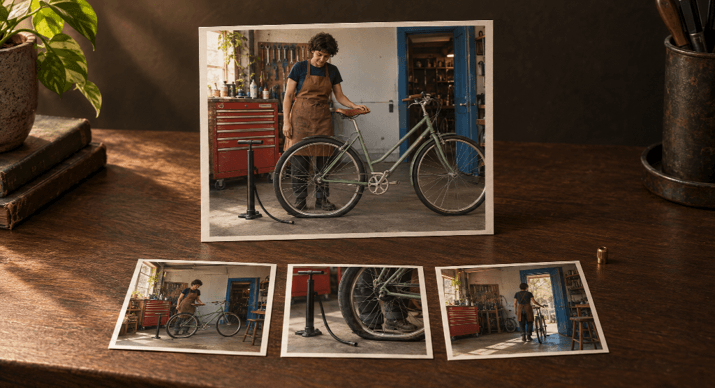
Just go through your AI storyboard in story order before you start refining the individual frames. First check that each panel is advancing the action. Then check the shot changes and continuity. Once those are all working, you can go on to the details (faces, hands, backgrounds, etc.).
If you’re making a short video, then following this order will make your editing a far more purposeful exercise. A good close-up may still be in the wrong place. Improving the texture of a shot won’t help if the sequence itself never actually shows the action you’re trying to explain.
Imagine you’re making a promo video for a bike shop. The scenario is this: a mechanic looks at a flat back tire, uses a floor pump to get it inflated, and then rolls the bike towards the door. That’s it really, just a scenario for the purposes of the story. Not an actual AI-generated piece nor a how-to-fix-it type of thing.
Start With What Changes Between Panels
Describe it as a sequence of visible steps: the problem, the intervention, the changed condition, and the departure. That gives your storyboard a structure you can check before you go any further with lighting or surface detail.
Ensure the first frame clearly demonstrates the problem. If the bike looks fine and the rear tire appears full, then the audience has no idea why a pump is going to be in the next frame. Show the rear tyre squashed flat against the floor in the first frame.
The plan below assigns a clear purpose to each shot. The suggested 12-second timing is just an editorial suggestion, not a technical necessity or anything that has actually been tested.
| Shot and proposed time | Framing and visible action | Information added |
| 1, 0-3 seconds | Wide: mechanic beside bicycle; rear tire visibly flat | Establish the shop and problem |
| 2, 3-6 seconds | Medium: mechanic connects the pump hose to the rear valve | Show the intervention |
| 3, 6-8 seconds | Close-up: rear tire rounded; hose still attached | Show the intended change |
| 4, 8-12 seconds | Wide: mechanic wheels bicycle toward the doorway; pump disconnected | Resolve the sequence with departure |
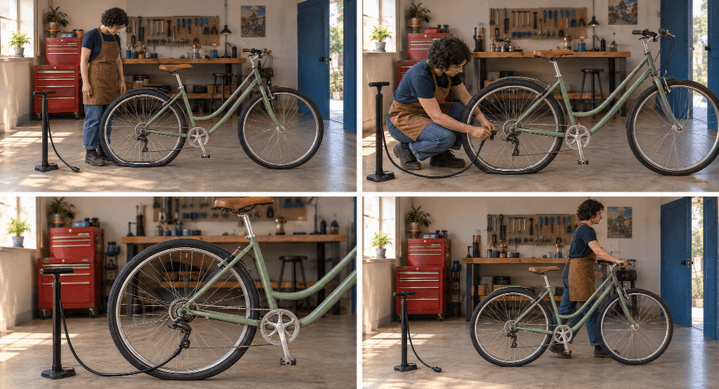
The rounded tire is a visual storytelling cue. It does not establish correct pressure or prove the bicycle is safe to ride.
Make Each Change in Shot Size Earn Its Place
A wide shot to establish where the work is taking place. A medium shot to show the mechanic, the pump and the bike all in one frame. A close-up on the new condition of the tire. Then back to a wide shot to show the difference.
Adobe’s guide to storyboarding states that your framing choices are going to be a huge part of telling the story and conveying emotion. Use that concept by asking yourself what each cut is doing to clarify.
Don’t use a close-up that just shows a nice-looking pump handle and completely hides the tire and hose connection. That detail is of no use in this sequence. Likewise, don’t use two very similar wide shots unless the second one obviously shows something new.
Use different shots when that helps the viewer. If the action itself is sufficient to show the progression, then it’s perfectly acceptable to stay with the same shot.
Check Continuity Across Each Adjacent Pair
Compare frame 1 with frame 2, then 2 with 3, then 3 with 4. Keep the entire storyboard on screen as you do this.
The mechanic’s navy shirt, copper apron and short curly hair are all the same. So are the sage green bike, the tan saddle and the layout of the workshop. The only things that change are the condition of the tyre and the fact that it’s now connected to the pump.
The storyboard is a good example of why you need to check both the appearance and the accuracy of your work. Panels 2 and 3 show the hose connecting near the rear hub rather than to a clear rim valve. There’s a rear rack in panel 2 which is missing from the other panels. All of these are things that need to be corrected even if the story as a whole is still valid.
Pay the same attention to spatial relationships. If the doorway is on the right at the outset, then it should be on the right at the departure unless another shot gives a different perspective. A red tool cabinet can be of use as a background reference if it remains in the frame.
Record the required transitions:
- The rear tire starts flat and becomes rounded after the intervention.
- The hose is attached during inflation and disconnected before departure.
- The mechanic finishes working before moving the bicycle away.
A storyboard won’t show every little movement. The plan just skips the repeated pumping and then skips the hose disconnection. You need to note these skipped steps so that in the finished video time can pass without it looking as though everything just happened in an instant.
Approve the Sequence Before Separating Its Frames
Once the narrative, shot progression, and continuity are clear, keep an approved copy of the complete board. Then separate the panels into individual shot tasks. The AI storyboard planning workflow provides a relevant continuation for organizing a sequence and moving into individual-frame refinement.
Keep the adjacent panels visible as you’re editing. If you’re replacing shot three in particular, then you’ll need to ensure that the rear wheel, the pump connection, the lighting direction, and the workshop detail in the adjacent shots are all preserved.
Use a brief review record to control the revision:
| Finding | Decision | Acceptance check |
| Shots 2-3 place the hose near the hub | Correct the connection | Hose meets an identifiable rim valve |
| Shot 2 adds a rear rack | Remove the added rack | Bicycle structure matches adjacent panels |
| Shot 4 shows the hose disconnected | Retain this setup | Departure preserves the disconnected state |
Decide What the Next Version Must Prove
Write a clear instruction for each panel you reject. “Keep the rear wheel and frame and move the hose connector from the hub area to a visible rim valve” is far more useful than “make this more cinematic”.
After you’ve made your change, put the new panel back in the full storyboard and check it against the frames adjacent to it. The whole sequence has to be approved, not just the individual image.
A clear storyboard is not a finished video. The still panels can be used to demonstrate your intended composition and continuity, but you have to actually watch the video to assess the pumping action, the transitions and the pacing. Don’t check the action, the transitions and the pacing on the storyboard. Wait until you have the moving footage to do that.
Popular on OTW Right Now!
-
 Create Stunning AI Images Instantly with GPT Image 2 Image-to-Image Technology
-
 AI Transforming Construction: Improving Field Productivity Through Smarter Handoffs
-
 Build or Buy? How to Decide Your Approach to AI Agents and Automation
-
 How to Turn Product Images into Marketing Videos with Runway Model on Pollo AI



About The Author

Gagan Bhangu
Founder of otechworld.com and managing editor. He is a tech geek, web-developer, and blogger. He holds a master's degree in computer applications and making money online since 2015.