
AI Interviews for Small Businesses: 6 Steps to Take Before You Invite Your First Candidate
AI interviews for small businesses work best when you decide what a good answer looks like before anyone records one, keep the interview short enough to finish on a phone, and read the answers yourself before you turn anyone down. Get those 3 things right, and an AI interview gives every applicant a first conversation that a 5-person company could never schedule by hand.
Picture a café owner with 1 open barista role and 120 applications. Phone screens at 15 minutes each would take 30 hours, so in practice most applicants are judged on their resume alone. An AI interview changes the math: each applicant answers the same few questions in their own time, and the owner reviews recordings instead of booking calls.
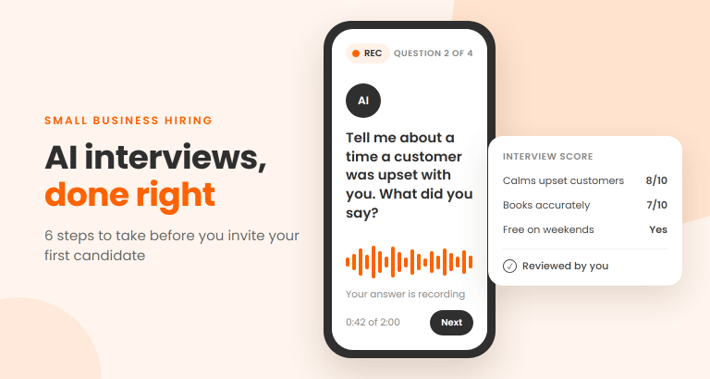
In an AI interview, the candidate gets a link and answers a short set of questions on video or audio. The AI asks the questions, may ask a follow-up, transcribes the answers and scores them against the criteria you set. You get a recording, a transcript and a score for each person, usually within minutes of them finishing.
If you are still choosing your tools, our guide to the best AI recruiting tools for small businesses covers applicant tracking systems, scheduling and the legal basics. This article picks up at the first-round interview.
The figures below come from Flowmingo, a free AI hiring platform, which shared anonymized data from AI interviews run by employers on its platform. They cover employers in many countries, not only the US.
1. Write down what a good answer looks like
An AI interview can only score what you tell it to look for, so the criteria come first.
For each role, pick 3 to 5 things the person must be able to do in their first 90 days. Then write one sentence that describes a strong answer and one that describes a weak one. For a front desk role at a dental clinic, it might look like this:
| What you score | A strong answer | A weak answer |
| Handling an upset patient | Names a real situation, what they said and how it ended | “I always stay calm,” with no example |
| Booking accuracy | Explains how they check details before confirming an appointment | “I’m very detail-oriented” |
| Shift availability | A clear yes for the shifts you need | Treat this as a knockout question, not a score |
Leave out vague traits such as “confidence” or “presence.” They tend to reward people who are comfortable on camera, which is rarely what the job needs, and they are hard to defend if a candidate asks why they were turned down.
This is the same discipline as a structured interview: every candidate gets the same questions and is marked against the same scale. A 2022 review of decades of hiring research, led by Paul Sackett, found that structured interviews predicted job performance better than any other common hiring method it compared, and roughly twice as well as unstructured ones.
2. Invite more applicants than you would call
The biggest change an AI interview makes is who gets heard. When an owner screens 150 resumes by hand, most people are cut on the resume alone. An AI interview takes none of your time per candidate, so you can invite everyone who passes your knockout questions.
Resumes and interviews also pick different people. In Flowmingo’s data from 532 hiring projects, the candidate with the top interview score also had the top resume score in only 19.2% of projects. Of the 3,684 candidates who scored 8 or more out of 10 in the interview, 2,022 (54.9%) would have been cut by a shortlist that kept only the top 20% of resumes.
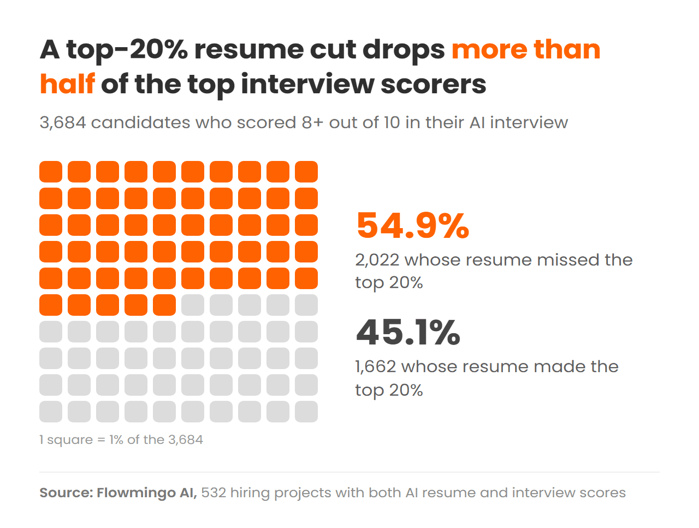
Both are AI scores, so this shows that the 2 methods rank people differently, not which one is right. It is still a good reason to use the resume for hard requirements, such as a license, location or work authorization, and let the interview do the ranking.
3. Keep it short and make sure it works on a phone
Candidates take AI interviews on their own devices, and many of them only have a phone. Across 50,271 AI interviews started on the platform between July 15 and October 12, 2026, 84.6% were finished. The rate was 88.7% on a desktop or laptop and 73.1% on a phone, so more than 1 in 4 interviews started on a phone was never completed.
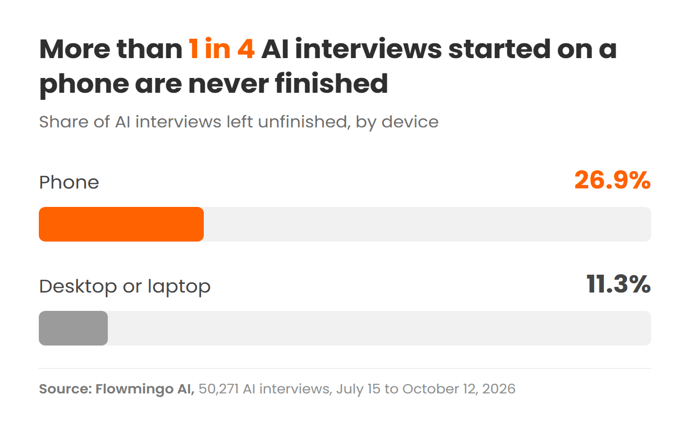
Device choice goes along with other differences between candidates, so the gap does not prove that phones cause people to drop out. It is still large enough to plan for:
- Length: use 3 to 5 questions and tell candidates up front how long it takes.
- Testing: take the interview yourself on your own phone, on mobile data, before you send it to anyone.
- Deadline: give candidates a few days, not a few hours, so they can find a quiet place.
- Retakes: offer one when audio or video fails, and say so in the invitation.
4. Tell candidates that AI is involved
Be clear before the interview starts. In some places, it is already the law. Illinois’s Artificial Intelligence Video Interview Act covers employers that use AI to analyze video interviews. They must tell applicants beforehand, explain how the AI works and what general types of characteristics it evaluates, and get their consent. They may share the videos only with people whose expertise or technology is needed to evaluate the applicant, and must delete them within 30 days if the applicant asks.
In New York City, Local Law 144 covers automated tools that substantially help decide who is hired or promoted. Employers need an independent bias audit from within the past year and a public summary of the results. Candidates who live in the city must be notified at least 10 business days before the tool is used.
Even where no law requires it, a short notice in the invitation prevents most of the confusion. It should say:
- What is scored: that the interview is scored with AI, and on which criteria.
- Who sees it: who will watch the recording and how long you keep it.
- How to ask for changes: how to request an accommodation, such as extra time or written answers, or a different format.
Under the Americans with Disabilities Act, you still owe disabled candidates reasonable accommodations, whatever tool you use. This is general information, not legal advice.
5. Check the score against the answer
Before you trust any tool, test it on one role. Pick 3 candidates: the top scorer, one from the middle and the lowest. Watch their answers, mark them yourself against your criteria, and only then open the AI’s report. A useful report points to the part of the answer it relied on and gives a reason you can check against the recording.
Pay attention to the transcript as well. Many tools score the written transcript rather than the voice, and speech recognition is not equally accurate for everyone. A 2020 study published in PNAS tested 5 commercial speech recognition systems and found an average word error rate of 35% for Black speakers, against 19% for white speakers. If a transcript reads badly, listen to the recording before you judge the candidate.
Treat technical failures as their own category. An answer with no usable audio should be marked “not assessed,” never zero, and the candidate should get a retake.
6. Let a person make every rejection
Scores tend to bunch together, which makes a hard cut-off risky. Across 86,638 candidates interviewed on the platform at 2,574 companies, the median score was 6.4 out of 10, and only 6.4% scored 8 or more. Do not treat a few tenths of a point as a real difference: a candidate at 6.2 and one at 6.6 deserve the same look.
Reviews also tend to leave little trace. Hiring teams wrote a comment on just 0.3% of those candidates (258 of 86,638). Many owners keep notes elsewhere, but if a candidate ever asks why they were turned down, a written reason is what you will need.
A simple rule covers both problems: someone watches or reads the answers of every candidate before they are rejected, and writes one line on why. Let the AI sort the list. Let a person decide who comes off it.
How much does an AI interview tool cost for a small business?
AI interview tools for small businesses are priced per interview, per active job or per recruiter seat, and some are free. The right model depends on how many people you plan to invite.
- Per interview or credit: fine for occasional hiring, but the bill climbs quickly once you invite every applicant.
- Per job or per seat: easier to predict if you hire steadily through the year.
- Free plans: some platforms, Flowmingo among them, include AI interviews at no cost to the employer.
Whichever model you choose, check what happens when you go over a limit, and whether you can export recordings and scores if you leave.
Can candidates use ChatGPT to answer an AI interview?
Candidates can try to use ChatGPT during an AI interview, which is why the questions matter more than any detection feature. Questions about a candidate’s own past work are much harder to fake than general ones. “Tell me about a time a customer was angry with you, and what you said” leaves far less room for a generic answer than “How would you handle an angry customer?”
A short follow-up question, a time limit per answer and a live final interview all help. If an answer sounds polished but says nothing specific, score it as a weak answer under your criteria rather than trying to prove where it came from.
Do AI interviews replace the final interview?
AI interviews do not replace the final interview. They work best as the first round, in place of the phone screen. The final decision, the offer and any salary conversation should stay with you, in person or on a live video call.
Run Your First AI Interview in One Week
Start with one open role and keep the setup simple:
- Day 1: write 3 to 5 criteria for the role, with a strong and a weak answer for each.
- Day 2: turn them into 3 to 5 questions about past experience, and add your knockout questions.
- Day 3: write the candidate notice, then take the interview yourself on your phone.
- Days 4 to 6: invite every applicant who passes the knockout questions.
- Day 7: watch the top, middle and bottom answers, compare them with the scores, and write a reason for every rejection.
Once the scores match what you see in the recordings for one role, reuse the same setup for the next.
Popular on OTW Right Now!

About The Author

Gagan Bhangu
Founder of otechworld.com and managing editor. He is a tech geek, web-developer, and blogger. He holds a master's degree in computer applications and making money online since 2015.