
Creating Vintage-Style Visuals with AI
There’s a reason old photographs feel more emotionally resonant than most modern ones — the grain, the faded color, the slight imperfection all signal history, even when the image itself is only a few years old. Recreating that specific quality has always been tricky, since genuine vintage equipment is hard to find and digital filters often look obviously fake. An AI image generator changes that equation, letting you build authentically vintage-feeling visuals straight from a text description.
Dreamina, powered by its most advanced image generation model, Seedream 5.0 Pro, handles this kind of era-specific aesthetic work with real precision, understanding the visual DNA of different decades well enough to render it convincingly. Here’s how to actually capture that vintage feeling instead of settling for a generic sepia filter.
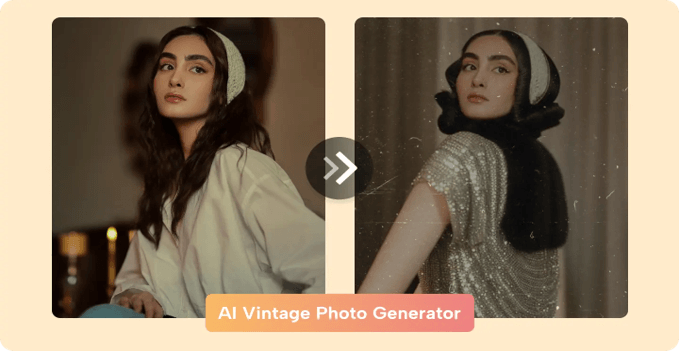
Every decade has its own visual fingerprint
Vintage isn’t one single look; it’s a whole range of distinct eras, each with its own color science, fashion, and photographic quirks.
- The 1950s carry warm, saturated Kodachrome tones and clean, optimistic styling
- The 1970s lean toward washed-out earth tones and soft, slightly hazy focus
- The 1990s bring flash-heavy snapshots with a specific point-and-shoot graininess
Naming a specific decade, rather than a vague “vintage,” gives the model something precise to actually render.
Film stock language that changes everything
Photographers of the past worked with specific film stocks, each with its own color signature, and borrowing that vocabulary in your prompt makes a measurable difference:
- Kodachrome for warm, rich, highly saturated tones
- Polaroid for soft focus, faded edges, and a slightly washed-out look
- Black and white film grain for a more timeless, dramatic feel
- Faded 35mm color for a slightly muted, nostalgic snapshot quality
Dropping one of these terms directly into your prompt steers the model toward an authentic photographic quality rather than a generic filter effect.
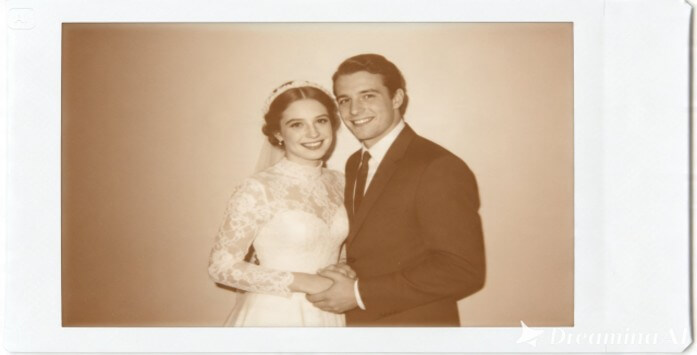
Getting the small imperfections right
Genuine vintage photography carries specific technical imperfections that modern digital images simply don’t have, and recreating these deliberately is what sells the era.
Think about requesting visible film grain, slight color fading or shifting, soft focus at the edges of the frame, or a subtle vignette darkening the corners. These aren’t flaws to avoid here, they’re the entire point.
Meet Seedream 5.0 Pro: precision for period-accurate detail
A few of Seedream 5.0 Pro’s specific capabilities make it particularly well-suited to vintage-style work.
Deep reasoning generation for era-appropriate accuracy
Vintage aesthetics depend on getting fashion, color, and mood all aligned to the same decade, and deep reasoning generation analyzes your prompt’s relationships and intent before producing an image, helping keep period details consistent rather than mismatched across eras.
Pinpoint precision editing for fixing anachronisms
With point selection, lasso, sketch guidance, and regional controls, pinpoint precision editing lets you swap out anything that accidentally breaks the illusion, a too-modern detail or an inconsistent prop, without regenerating the whole image.
Multi-layer visual control for flexible scene-building
Multi-layer visual control separates subjects, backgrounds, and effects into independent components, making it easier to adjust a background setting while keeping your subject’s period-accurate styling untouched.
2K output for authentic texture and grain
Since vintage imagery depends so heavily on fine texture, visible grain, subtle fading, 2K output quality ensures those small details actually hold up and read clearly rather than disappearing into a flat, oversmoothed image.
Your 3-step time travel with Dreamina
Once you’ve settled on an era and its specific visual cues, here’s exactly how to bring it to life.
Step 1: Write a text prompt and/or add a reference image
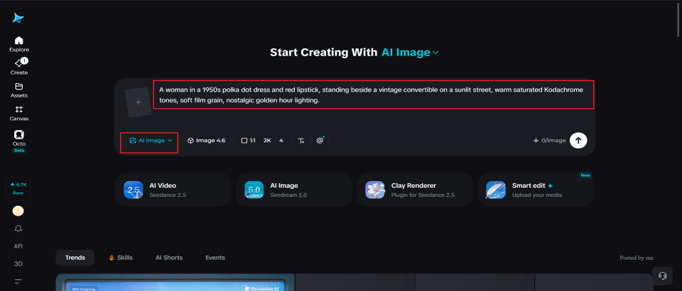
Navigate to Dreamina and write a detailed text prompt describing a person dressed appropriately for the era you’re recreating, along with the specific film stock language and imperfections that define that decade’s look. If you have a reference image of an actual vintage photograph capturing the style you’re after, upload it to help guide the generation further.
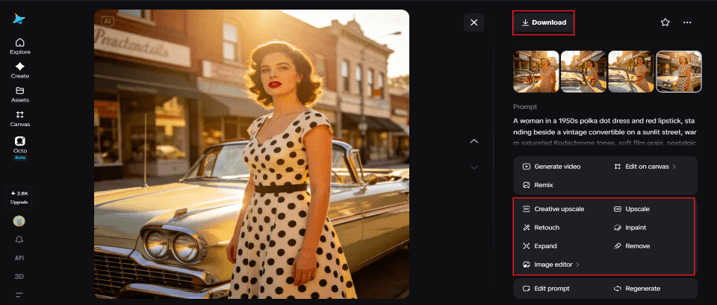
A sample prompt could be: A woman in a 1950s polka dot dress and red lipstick, standing beside a vintage convertible on a sunlit street, warm saturated Kodachrome tones, soft film grain, nostalgic golden hour lighting.
Naming the decade, fashion, and film quality together is what pushes a prompt from generic to genuinely period-accurate.
Step 2: Adjust parameters and generate
Before generating, set your parameters. Choose Image 5.0 Pro, powered by Seedream 5.0 Pro, as your model, then select your aspect ratio, image size, and resolution, using a square or slightly cropped ratio if you’re aiming for an old snapshot feel, and 2K resolution to keep fine grain and texture detail intact. Click Dreamina’s generate icon to produce your vintage-style image.
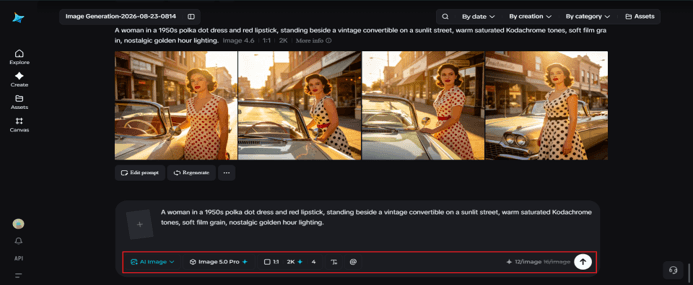
Step 3: Customize and download
Once your image generates, refine it using Dreamina’s AI customization tools — inpaint to adjust specific period details like fashion or props, expand to widen the scene while keeping the vintage atmosphere consistent, remove to eliminate anything that feels anachronistic, and retouch to fine-tune the overall faded, grainy quality. When it feels genuinely of its era, click the Download icon to save it.
Avoiding the “Instagram filter” trap
A common mistake is treating vintage as simply “add sepia and call it done.” Real vintage imagery has era-specific fashion, hairstyles, props, and settings, not just a color tint. Skipping these details in favor of just a color shift usually results in something that reads as a filtered modern photo rather than a genuinely period piece.
Final thoughts
That specific warmth and nostalgia of an old photograph doesn’t require digging through a thrift store for a working film camera anymore, just an understanding of what actually made an era’s photography distinct, and the right AI image generator to render it.
With Dreamina and its advanced Seedream 5.0 Pro model, that period accuracy, down to the grain and the fade, is genuinely achievable.
Pick your era, borrow its specific visual language, and let Dreamina bring the past convincingly back into view.
Popular on OTW Right Now!
-
 AI Image Creation Made Simple: How Modern Tools Help Turn Ideas Into Visual Stories
-
 Ways in Which the AI Client Intake System Works Better in Law Practice Than the Traditional System!
-
 AI Receptionist for HVAC Companies: Pricing, ServiceTitan Booking & After-Hours Emergencies
-
 AI Marketing Tools for Small Business: Platforms, Automation & Bots Compared



About The Author

Gagan Bhangu
Founder of otechworld.com and managing editor. He is a tech geek, web-developer, and blogger. He holds a master's degree in computer applications and making money online since 2015.