
How AI Room Planning Helps Shoppers Choose a Dresser That Fits
AI can drop a dresser into a photo of your bedroom in seconds. The finish coordinates with the bed, the width looks balanced under the mirror, and the room suddenly feels more finished than it did a moment ago.
The image is persuasive. It can also be quietly wrong. The rendered dresser may not be shown at true scale, a drawer might collide with the bed when it opens, and a baseboard, outlet, or closet door may have vanished during generation.
AI room planning helps you choose a dresser by letting you compare widths, heights, placements, and finishes inside your own bedroom before you buy. But the visualization has to be followed by exact measurement and drawer-clearance checks, because a realistic image does not necessarily show the room or the product at verified scale.
In my view, the real value of AI room planning is not that it produces a beautiful answer. It lets you test several imperfect ideas cheaply before committing to one expensive physical decision. The image is not the decision — it is the start of a better question.
AI Is Better at Exploring Possibilities Than Confirming Fit
AI visualization shines early in the search, when you are still deciding what kind of dresser you want. You can upload one bedroom photo and try a low wide dresser, a tall narrow chest, and a modular setup without imagining each one from scratch.
You might learn that a tall chest makes the room feel boxed in, that a dark finish adds too much weight, or that a wide piece balances a large headboard. That is genuine insight, and it arrives in minutes.
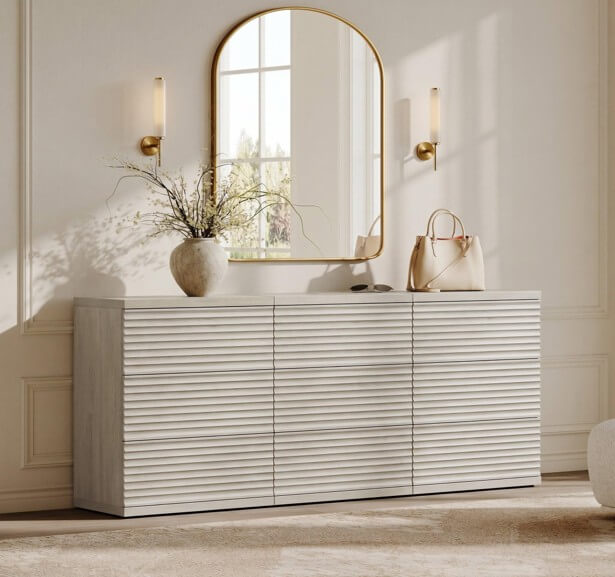
But visualization and verification are different jobs. AI can suggest that a dresser looks proportionate; it cannot reliably confirm exact width, depth, drawer extension, weight, wall compatibility, or delivery access.
It also helps to know which kind of tool you are using. Some dedicated planners work from room scans, entered dimensions, or product-specific 3D models, while general image generators produce a convincing interpretation without preserving exact geometry. A realistic render is evidence of visual plausibility, not physical accuracy.
The Three-Proof Dresser Test
A dresser is not a fit until it passes three separate tests. Visual proof asks whether it looks right in the room. Dimensional proof asks whether the exact product physically fits the space. Operational proof asks whether the room still works once the dresser is in and its drawers are open.
| Proof | Main question | Primary tool |
| Visual proof | Does the dresser look proportionate and connected to the room? | AI visualization |
| Dimensional proof | Does the exact product physically fit the wall and floor area? | Specifications + manual measurement |
| Operational proof | Can drawers, doors, and people still move comfortably around it? | Taped footprint + movement simulation |
The three are easy to confuse and dangerous to skip. An AI image can deliver visual proof while quietly failing the other two — a dresser that fits against the wall can still block a closet the moment a drawer slides out.
A simple way to hold them together: visual fit makes the dresser look right, dimensional fit gets it into the room, and operational fit lets the room keep working after it arrives. AI is strong on the first, useful on the second, and mostly blind to the third.
Step 1 — Give the AI an Accurate Room Brief
AI output is only as good as the brief you give it. Start by photographing the dresser wall as straight-on as you can, including some floor, some ceiling, the bed, the window, the closet, the door, and the baseboards.
Avoid an extreme wide-angle lens if you can; it makes rooms look larger and deeper than they are. Take a second photo from the side, which gives the tool more to work with on depth and circulation.
Then write down the fixed constraints — usable wall width, floor-to-window height, mattress and bed dimensions, closet position, door swing, outlets, vents, radiators, and baseboard depth. If the tool accepts text, give it the dresser’s exact width, height, depth, finish, and shape.
A workable prompt: “Place a dresser measuring [width] wide, [height] high, and [depth] deep against the empty wall. Keep the bed, window, closet, door, floor, and architectural dimensions unchanged. Do not widen the room or remove fixed features. Show the dresser from both the front and the side.”
Even then, treat the result carefully. Generative tools can still reinterpret dimensions, shift perspective, or drop an outlet. The prompt makes a better hypothesis; it does not certify scale.
Step 2 — Ask AI to Produce Competing Layouts
The most common mistake is asking AI for one perfect room. The first attractive result tells you almost nothing about whether it is the strongest option. A better move is to ask for three deliberately different layouts and let them compete.
| Layout | Where it helps | What to watch |
| Low & wide | Broad top, horizontal balance, side-by-side drawers, easy reach | Needs more wall width; can read visually heavy |
| Tall & narrow | Saves wall width, uses vertical space, suits narrow walls | Upper drawers harder to reach; more vertical mass; anchor carefully |
| Modular / sectional | Adapts to odd walls, grows with your needs, flexible placement | Multiple footprints; alignment and gaps to manage |
Each has real trade-offs. A low, wide dresser gives you a broad top and easy drawer access but demands wall width. A tall, narrow chest saves that width and uses vertical space, though the top drawers sit higher and the piece carries more vertical weight.
A modular option splits the difference. Because you can arrange the sections to suit the wall, a modular dresser can start compact and grow, or shift from a wide run under a window to a taller stack in a corner — useful when the room’s shape is the hardest constraint.
A comparative prompt keeps the test fair: “Generate three versions of the same bedroom without changing the architecture — one with a low wide dresser, one with a tall narrow chest, and one with a modular dresser. Keep the bed, window, doors, and walking path unchanged. Use the same finish in all three.” AI becomes more useful when you ask it to disagree with itself.
Step 3 — Verify Width, Height, and Depth Manually
Once AI has narrowed the field, the measuring begins — and the wall is rarely as wide as it looks. Subtract for door trim, baseboards, curtains, outlets, floor registers, adjacent furniture, and room to clean.
A dresser that just fits between two points can still feel compressed if it touches both. A little open wall keeps the arrangement lighter and easier to keep clean.
Height matters most near a window sill, a wall-mounted TV, a mirror, a light switch, a thermostat, or a sloped ceiling. If a mirror is going above the dresser, add its height to the composition before you commit.
Depth deserves special attention, because in a small bedroom it does the most damage to circulation. A dresser can span the wall comfortably and still push too far toward the bed, and AI images make depth especially hard to judge because perspective distorts the distance between objects.
So build a physical footprint. Mark the left edge, right edge, front edge, and leg positions on the floor with painter’s tape, then leave it there. Walk the room, make the bed, open the closet, and set a box or chair inside the outline to stand in for volume. AI helps you see the furniture; tape helps you feel the space the furniture will remove.
Step 4 — Calculate the Drawer Envelope
A dresser does not occupy one footprint. It has a resting footprint when the drawers are closed and a working footprint when someone is using it — and the working one is what decides everyday usability.
Call that working area the drawer envelope: cabinet depth, plus drawer projection, plus handle projection, plus the space for a person to stand, bend, and reach, plus whatever walking path is left.
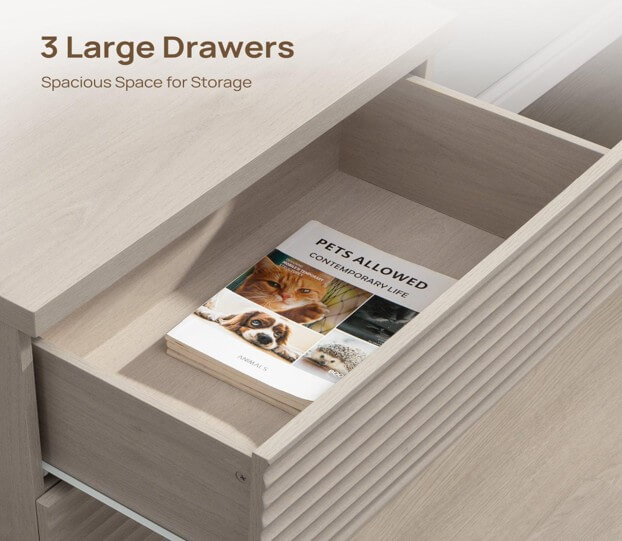
The number can surprise you. A dresser listed at under twenty inches deep can need substantially more temporary space once the drawer is out and someone is crouched in front of it. The lowest drawer deserves the most attention, since reaching it often means bending, kneeling, or stepping back.
So test for collisions before you buy. An open drawer can hit a bed frame, a nightstand, a closet or bedroom door, a laundry basket, or a chair. In a shared bedroom, check whether one person can pass while another is at the dresser.
To simulate it, put a box at the dresser’s front edge and slide another box forward for the open drawer, then stand there and reach for an imaginary sweater. A dresser has two footprints — the one it rests in and the one it works in — and the working one is the honest measure.
Step 5 — Use AI to Compare Visual Weight and Style
With the hard limits understood, AI earns its place again — this time for visual weight, the sense of how heavy or dominant a piece feels regardless of its measurements.
Two dressers with identical dimensions can land very differently. Raised legs, a light finish, simple handles, and open space beneath the frame read as lighter; a solid base, dark finish, thick panels, and large hardware read as heavier.
Ask the tool to hold the dimensions and architecture fixed and vary only the treatment — for example, “light oak with raised legs, dark wood with a solid base, handleless white fronts, and textured wood with subtle metal hardware.” That separates size from style, so you can tell whether a piece is dimensionally fine but visually too heavy.
AI can also test finish relationships against the bed frame, flooring, nightstands, wall color, and bedding. Furniture does not need to match perfectly; repeating one or two elements — a wood tone, a hardware finish, a leg shape — is usually enough for continuity. AI is strongest judging relationships between visible things, and weakest when appearance gets mistaken for measurement.
Step 6 — Match the Interior to the Household
AI shows the outside. It may render the number of drawers, but it cannot prove they hold what you own. Before choosing, make a quick storage inventory — socks, underwear, tees, sleepwear, jeans, sweaters, accessories, bedding, seasonal clothes.
Then match the configuration to the list. Shallow drawers suit accessories, socks, and underwear; medium drawers take tees, sleepwear, and activewear; deep drawers handle jeans, sweaters, and bedding.
Drawer count is a weak measure of capacity. A nine-drawer design does not automatically beat a six-drawer one — the nine may be shallower or arranged in a way that fits nobody’s wardrobe. Check the interior dimensions, drawer depth, and extension mechanism on the product page. The outside of the dresser has to fit the room; the inside has to fit the household.
Step 7 — Return From the Render to Real Products
AI should narrow the decision from many possibilities to two or three realistic candidates. That is where you switch back to hard information.
After testing several layouts, shoppers comparing dressers for small bedrooms should return to the listed width, height, depth, and drawer configuration to decide which visual option can actually pass the dimensional and operational checks.
Compare each shortlisted piece on the things an AI image may not contain — exact dimensions, drawer count and interior layout, weight, finish details, assembly requirements, anchoring instructions, package dimensions, delivery method, and customer photos.
This is also the moment to check the render against reality. A generated image can add or drop drawers, change the legs, simplify the hardware, or shift the finish. The product page, not the render, is the final word on what you are buying.
Build a Decision Matrix
When a few options survive, a simple matrix keeps one attractive render from dominating the choice. Score each cell with plain labels — pass, needs verification, or does not fit — rather than a false numerical total.
| Criterion | Option A | Option B | Option C |
| Visual balance | |||
| Wall-width fit | |||
| Depth fit | |||
| Drawer envelope | |||
| Walking path | |||
| Storage configuration | |||
| Finish coordination | |||
| Delivery access | |||
| Assembly & anchoring | |||
| Future flexibility |
The point is not to make taste mathematical; it is to stop a beautiful image from hiding a practical failure. Often the slightly less dramatic candidate wins, because it protects circulation, gives better drawer access, and matches the wardrobe — the kind of judgment a render alone will not make for you.
Check the Delivery Path, Not Just the Final Wall
A dresser can fit the bedroom perfectly and still be impossible to get there. Furniture fit begins at the front door, not at the bedroom wall.
Measure the front door, hallways, stairs, any elevator, the bedroom doorway, tight corners, and the ceiling clearance over the stairs. Then find out how it arrives — fully assembled, partly assembled, or flat-packed.
A flat-packed box is often easier to move than an assembled unit, but you will need room to build it. An assembled piece makes the full dimensions and turning space matter more.
A sectional design can help here, too — a modular dresser you can configure tall or wide arrives in smaller units that thread through tight doorways and stairwells more easily than one large cabinet. AI visualization cannot solve this part of the decision for you.
Treat Safety as a Separate Verification
A render can make a dresser look stable. It cannot judge the wall, the floor, the assembly, or the anchoring — those stay a separate check.
Read the manufacturer’s anchoring instructions and confirm the anti-tip hardware, the wall type, the assembly steps, and any drawer-loading guidance, especially in homes with children. Do not assume a low or wide dresser is exempt; follow the product’s instructions.
There is no universal anchoring method, because walls and hardware differ. A dresser that looks right but cannot be assembled and secured correctly is not a successful fit. Safety is not a visual category — it has to be verified on its own.
Protect Privacy When Uploading Bedroom Photos
Bedrooms hold more personal information than people notice. Before uploading a photo, remove or hide documents, family photographs, medication labels, mail, screens, and any identifying reflections, and keep people out of the frame.
Read the tool’s privacy, storage, and image-retention terms, since not every planner treats uploads the same way. Crop the photo to just the wall and furniture the task needs.
If the platform lets you delete projects or images, do it once the decision is made. A planning image should carry enough context to make the design call — and no more personal detail than the task requires.
Common AI Room Planning Mistakes
Trusting the first generation. One output is one interpretation; generate several before you form a preference.
Reading perspective as scale. A convincing angle does not preserve exact dimensions.
Giving the AI no measurements. Without numbers, the result is style inspiration, not fit analysis.
Letting the architecture change. Check whether the tool moved a door, widened a wall, or dropped an outlet.
Measuring only the closed dresser. Include the drawer envelope and the space to stand.
Ignoring depth. Width is obvious in a front-on image; depth is what wrecks circulation.
Choosing by drawer count. More drawers do not guarantee more usable storage.
Forgetting baseboards and outlets. The usable wall is often smaller than the visible one.
Skipping the delivery route. The dresser has to reach the room before it can fill the wall.
Assuming AI checks safety. Anchoring and assembly remain separate responsibilities.
Uploading sensitive detail. Bedroom photos can include documents, labels, and reflections.
Using AI to defend a choice you already made. The tool should challenge the idea with alternatives, not just make your favorite look acceptable.
AI-Assisted Dresser Checklist
Before you buy, confirm that:
- The room has been photographed from more than one angle.
- Exact wall width and maximum depth are recorded.
- Doors, windows, outlets, vents, and baseboards are in the room brief.
- At least three layouts were compared.
- The product’s exact dimensions are verified.
- The dresser footprint has been taped on the floor.
- Drawer projection has been simulated.
- Someone can stand in front of the open drawers.
- Bedroom and closet doors still work.
- The walking path stays comfortable.
- The drawer configuration matches actual clothing.
- The finish connects with existing furniture.
- Package and delivery dimensions have been checked.
- Assembly space is available.
- Manufacturer anchoring instructions can be followed.
- Personal information was removed from uploaded images.
- The AI output is being used as a hypothesis, not proof.
Frequently Asked Questions
Can AI tell whether a dresser will fit in my bedroom?
AI can help you visualize whether a dresser might fit, but exact width, height, depth, and drawer clearance still need to be measured by hand — unless the tool explicitly works from accurate room scans and product models. Treat a general image generator as a way to compare ideas, and confirm the numbers against the product page and your own measurements before buying.
How do I visualize a dresser in my room?
Photograph the wall straight-on and from the side, note the room’s dimensions, and give the tool the dresser’s exact width, height, and depth. Ask it not to change the doors, windows, or walls, and to show both front and side views. Then compare the render against a footprint you have taped on the actual floor.
What measurements do I need before buying a dresser?
Measure the usable wall width after baseboards, trim, and outlets, the available height, the maximum depth, the space a fully open drawer needs, the walking clearance, and the nearby door swings. Also measure the full delivery route — front door, hallways, stairs, and the bedroom doorway — since a dresser has to reach the room before it can fit the wall.
How much space is needed to open dresser drawers?
There is no universal figure, because drawer projection and room layout vary. Add the cabinet depth, the fully extended drawer, the handle projection, and enough room for a person to stand and reach, often to crouch for the lowest drawer. That total — the drawer envelope — is what determines whether the room stays usable.
Is a tall or wide dresser better for a small bedroom?
It depends on the wall and the routine. A tall, narrow chest saves wall width and uses vertical space, while a low, wide dresser offers easier drawer access and a larger top but needs more wall. Match the choice to the wall’s shape, the circulation you need, your storage, and the visual weight the room can carry.
Can AI accurately show furniture color?
AI is fair at comparing broad color relationships, but a generated finish can differ from the real product. Confirm the actual color with product photos, material descriptions, and customer images where available. Screens, lighting, and image processing all shift how a wood tone or paint reads, so treat the render as a starting point, not a color match.
Can AI room planners change the size of a room?
Some generative tools reinterpret perspective or architecture — subtly widening a wall, moving a window, or dropping an outlet. Always compare the output against your original photo and your measurements. If the render looks roomier than your bedroom feels, the tool has probably adjusted the geometry.
Should a dresser be anchored to the wall?
Follow the manufacturer’s anchoring and installation instructions, particularly in homes with children. Anti-tip hardware, wall type, and loading all matter, and they vary by product. An AI visualization cannot tell you whether a piece has been installed safely — that is a separate, physical check.
Let AI Imagine and Measurements Decide
AI can put a dresser in your bedroom before it arrives. It can weigh a tall chest against a wide cabinet, test finishes, and surface possibilities that are hard to picture on your own.
What it cannot do is open the drawer, walk between the bed and the cabinet, carry the box upstairs, or confirm the piece can be secured to the wall. Those belong to measurement and simulation.
So give each tool its job. AI provides visual proof; measurement provides dimensional proof; physical simulation provides operational proof — and a dresser earns serious consideration only when it passes all three. Let AI imagine the possibilities, and let measurement decide which one gets to be real.
Publishing Notes
SEO Title: How to Use AI Room Planning to Choose the Right Dresser
Meta Description: Learn how to combine AI room visualization with width, depth, drawer-clearance and circulation checks to choose a dresser that truly fits.
Recommended Slug: ai-room-planning-choose-dresser
Primary keyword: AI room planner for furniture
Secondary keywords: AI room planner for bedroom; how to choose a dresser; dresser size for small bedroom; how to measure for a dresser; dresser drawer clearance; visualize furniture in a room; AI furniture visualization; tall vs wide dresser; dresser depth; dresser dimensions.
Popular on OTW Right Now!




About The Author

Gagan Bhangu
Founder of otechworld.com and managing editor. He is a tech geek, web-developer, and blogger. He holds a master's degree in computer applications and making money online since 2015.