
Which AI Video Workflow Makes Sense for Short-Form Content?
AI video tools are becoming easier to use, but that does not mean every workflow is the same.
Some tools are built for long creative production. Some focus on high-end cinematic output. Others are more useful for short ideas, social clips, product teasers, concept drafts, and fast visual testing.
For many creators, marketers, and small teams, the lighter workflow is often more practical.
Not all short videos have to be shot on an editing timeline. Sometimes a product team only wants to verify a feature’s appearance while it’s in action. A social media manager might want to compare two visual hooks. If a creator has an idea for a story and can’t wait to put the final touches on it before printing, they can use a scene draft to get it off their collective mind.
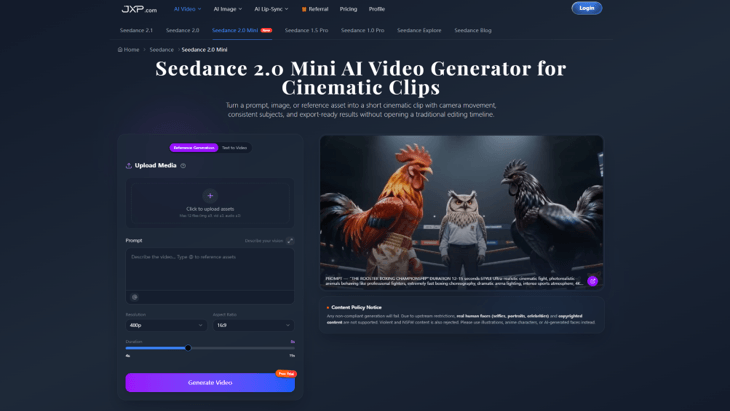
This is where Seedance 2.0 Mini AI Video Generator fits into the AI video conversation. It is built for short cinematic clips from prompts, images, and reference assets, with support for camera movement, consistent subjects, and export-ready MP4 results.
Why Short-Form Video Needs a Different Workflow
Short-form content is fast-moving. A creator might require a visual for TikTok, Instagram Reels, YouTube Shorts, or a landing web page. There’s a business that can require a brief product teaser. For customers, a designer might need to have a concept clip.
These generally aren’t intended to be long films. They are designed to make a quick visual impact, explain one thought, or test attention.
This alters the process.
Teams don’t always have the time to create a full edit; there are times when they need a quick way to get one idea to a viewing. If the draft is successful, they can improve it. They can go on if it doesn’t, and do not invest too much time.
Seedance 2.0 Mini helps in this step by narrowing scene selection to 5-10 seconds, ads, story beats, and social videos.
Start With the Asset You Already Have
In many cases, people believe that AI video only works with a blank prompt, but it’s not necessarily the best way.
Most useful short videos start with something that the creator already owns: a product photo, an image of a character, a brand style, a short audio cue,e or a general idea of a scene. Those assets help provide the tool with context.
Seedance 2.0 Mini supports images, videos, and audio references. You can use product images to guide the subject. If you need some help with movement, a video reference is a good option. Music can affect rhythm. A prompt can be a description of action, lighting, camera move, and mood.
This makes the short cinematic video workflow more predictable than asking the model to invent everything from text.
With a small team,s it can make all the difference between a random output and a useful draft.
Camera Direction Matters
One recurring issue with AI video is that it can look pretty but not feel dynamic.
The key to a good short video is purposeful movement. Due to a product reveal, a slow zoom might be required. A travel shot may require smooth tracking shots. A story scene may require a close-up shot followed by a wider shot. Even if the footage is very pretty, without camera direction, it can sound unpolished.
By adding camera actions to the prompt, Seedance 2.0 Mini lets users set them up for their camera. Camera actions can now be added to the prompt in Seedance 2.0 Mini, such as zooms, pans, tracking shots, close-ups, or dynamic framing. This way, the created clip will seem more concentrated.
That’s particularly helpful for social content,t which relies on the first few seconds. A clip with movement is more likely to interest viewers than a static visual.
Consistency Is Important for Repeating Content
Often, creators and brands require multiple clips around the same concept.
A small business can develop multiple product posts from the exact same image. A creator can experiment with several story beats on the same character. Likewise, for one long video, you can use a short clip maker to turn key moments into shorter pieces of content while keeping the overall message and style consistent. The marketer may require multiple short videos that still feel like a campaign.
In those instances, maintaining consistency is important.
Seedance 2.0 Mini has a consistent character generation and reference control,l which ensures that a person, mascot, product, etc., or visual style is consistent throughout short tests. This does not replace the need to review outputs, but it provides a stronger starting point for the workflow.
This type of consistency is beneficial for content calendars, campaign drafts, and as recurring social formats.
Where Seedance 2.0 Mini Fits Best
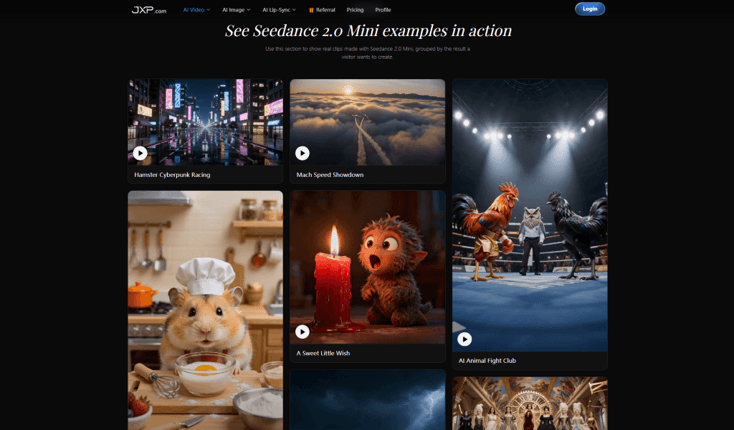
Seedance 2.0 Mini isn’t here to fix all video production issues. It is best used to create short-form concepts.
It can help when:
- A marketer wants to test a product teaser.
- A creator wants a short story beat.
- A social media manager needs quick visual hooks.
- A small brand wants motion from a product image.
- A designer wants a draft for a campaign concept.
These are practical use cases as they do not require a long video. They need a visual outline that they can easily skim through at a glance.
This is where AI camera control becomes more useful than simple prompt generation. It helps creators think about how the scene moves, not only what appears in it.
A Simple Process to Try
For better results, the workflow should stay simple:
- Decide the goal of the clip.
- Choose the platform and aspect ratio.
- Upload a useful reference image, video, or audio file.
- Write a prompt with subject, action, camera movement, lighting, and mood.
- Generate a short draft.
- Review the clip for subject accuracy, motion, and consistency.
- Refine or regenerate only if the idea is worth continuing.
This ensures that AI video remains creative and focused on testing rather than generating random videos.
Responsible Use Still Matters
When it comes to AI video, it’s always best to use it carefully.
Real human faces, selfies, portrait, celebrities, copyrighted material, violent material, and NSFW material are NOT supported, says the Seedance 2.0 Mini page notes. Instead, it suggests using illustrations, anime faces, or generated faces with AI.
It’s important for creators and businesses. The fast track to a successful workflow does not have to be a shortcut to plagiarizing copyrighted content, using people without their consent, or using illusory images.
All clips created must be reviewed before publication for accuracy, rights, and appropriateness.
Final Thoughts
Not all of the most useful AI video workflows are necessarily the most complicated.
A lightweight tool can be more useful for the everyday creator or small team if it lets them test ideas without opening an entire editing timeline, uses existing references, controls camera movement, and exports a shorter clip.
Seedance 2.0 Mini is an example of that. It highlights the shift of AI video from experimental to rapid, repeatable concept development.
That could be what some teams are looking for when creating short-form content: a quick “from concept to visual draft” track.
Popular on OTW Right Now!


About The Author

Gagan Bhangu
Founder of otechworld.com and managing editor. He is a tech geek, web-developer, and blogger. He holds a master's degree in computer applications and making money online since 2015.