
5 Best Cloud Phone in 2026 for Mobile Workflows
A cloud phone gives users access to Android environments through the cloud. Instead of buying and maintaining many physical devices, teams can open cloud-based mobile environments from a computer and use them for app workflows, account operations, testing, automation, and team-based tasks.
But not every cloud phone is built for the same type of user. Some tools are closer to virtual Android environments. Some are made for multi-account work. Also, some are more useful for browser-based workflows. The best choice depends on what kind of mobile operation you need to run.
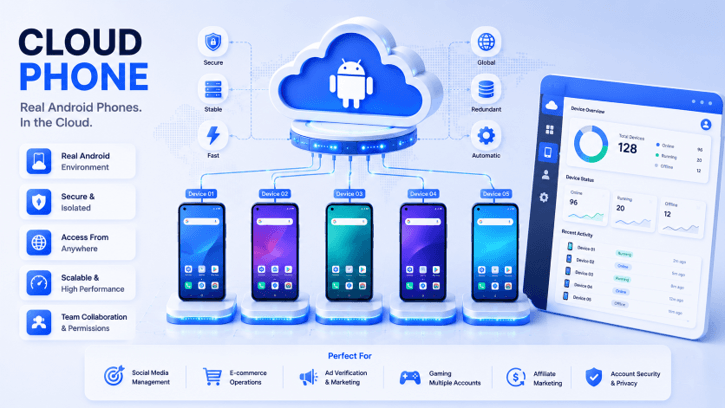
This article compares five cloud phones and related tools worth considering in 2026.
What Is a Cloud Phone?
A cloud phone is a cloud-hosted Android environment that users can access and control remotely. It gives users a phone-like workspace without requiring them to hold or maintain the physical device.
Depending on the platform, a cloud phone can support tasks such as:
- Running Android apps remotely
- Installing APKs
- Uploading files
- Managing app-based workflows
- Configuring proxies
- Separating mobile environments
- Assigning access to team members
- Repeating actions across multiple environments
- Supporting automation or API-based workflows
It’s not just remote access that’s the main value. A good cloud phone can make the team work less on a physical basis and manage the mobile environment more organized.
It’s important for businesses because mobile workflows are increasingly becoming the norm. Mobile environments can be a real necessity for social media teams, e-commerce sellers, affiliate marketers, ad teams, app operators, and agencies on a regular basis. A cloud phone can simplify the process of scaling those workflows.
How to Choose a Cloud Phone
Before choosing a cloud phone, it helps to look beyond the product name. A platform that works for casual use may not be strong enough for business workflows.
Here are the main factors to compare:
| Factor | Why It Matters |
| Android Environment Quality | The cloud phone should support real mobile workflows, not just a basic remote screen. |
| App Workflow Support | Users may need APK installation, app operation, and file handling. |
| Proxy Setup | Proxy configuration matters for account operations and regional workflows. |
| Team Management | Teams need access control, assignment, and clear environment ownership. |
| Batch Operations | Synchronized actions can reduce repeated manual work. |
| Automation | RPA, API, ADB, CLI, or developer options matter when workflows scale. |
| Scalability | The platform should still work when the phone volume increases. |
| Business Fit | A casual virtual phone tool is not always suitable for structured account operations. |
Based on these points, here are the 5 best cloud phones to compare in 2026.
1. MoreLogin Cloud Phone
MoreLogin Cloud Phone ranks first because it is built for structured Android workflows, not just simple remote phone access.
There are a lot of cloud phone tools that concentrate on the fundamental concept of opening a phone in the cloud. That’s helpful, but typically teams in business need more than that. They require separate environments, proxy setup, team access, app workflows, synchronized operations, and automation support.
MoreLogin Cloud Phone was created for such an operation. It offers Android cloud environments, based on ARM, that can be accessed remotely from a computer. Android app workflows can be run, APKs installed, files uploaded, proxies configured, and cloud phone environments managed without having to purchase and maintain multiple pieces of hardware.
It’s beneficial for social media teams, e-commerce app processes, affiliate marketing, ad verification, app-based work, account management, and mobile automation.
MoreLogin’s benefits are that it works well with a larger multi-account program. Users aren’t just opening a cloud phone. They are taking care of mobile environments within a more structured workflow. That’s an important consideration when teams are dealing with numerous accounts, multiple apps, or repetitive tasks.
MoreLogin Cloud Phone is also useful in teamwork. Managers can give access to the cloud phone and control its use, and can use the mobile environment in a more organized manner. This can help minimize the hardware friction and streamline daily operations for teams that were previously using traditional phone hardware.
One of the key factors is automation. MoreLogin allows for multiple cloud phones to be synchronized, thus minimizing the need for repetitive manual actions. It also enables automation-friendly workflows like RPA, API, ADB, CLI, and developer options. It provides greater flexibility to non-technical teams and technical teams in developing repeatable mobile processes.
For users who want to learn about the broader platform, the official MoreLogin website explains its multi-account management system. For users focused on Android workflows, the MoreLogin Cloud Phone page gives more detail about the cloud phone product.
Why MoreLogin Cloud Phone Ranks First
MoreLogin ranks first because it covers the main needs of serious mobile workflows:
- ARM-based cloud Android environments
- Remote Android access from a computer
- APK installation and app operation
- File upload and mobile environment management
- Proxy configuration
- Team access and permission control
- Synchronized operations across cloud phones
- RPA automation support
- API, ADB, CLI, and developer-friendly options
- Scalable usage without physical phone management
There are a number of platforms that can provide a mobile environment. MoreLogin is special in that it provides full support for this environment and its workflow.
Best For
MoreLogin Cloud Phone is ideal for social media teams, e-commerce operators, affiliate marketers, agencies, ad verification teams, app workflow teams, and automation teams that require scalable cloud Android environments.
What to Consider
The best use of MoreLogin Cloud Phone is for formal business work processes. Users who are only looking to use a cloud phone for casual app use may not require all its team and automation capabilities. However, for heavy users of the mobile environment, it’s the best of this bunch.
2. Multilogin
Multilogin is more popularly known as a multi-account browser platform and an anti-detect browser. It is not a dedicated cloud phone, but it should be placed appropriately in a cloud phone article.
But it’s included in this comparison because numerous customers who are investigating cloud phones also evaluate the wider multi-account management features. If the workflow is predominantly browser-based, then Multilogin may be applicable. A dedicated cloud phone solution is better suited for the workflow if you need to operate the apps on Android phones, install the APK, run remote mobile environments, synchronize phone actions, or automate Android.
Multilogin’s value lies in its experience in multi-account browser workflows. It is a known term to those who are familiar with browser profiles, proxies, fingerprints, and account management in the environment.
However, when compared to other tools that are more geared towards the mobile environment, which is Android, Multilogin is not quite as focused as it is on the cloud phone arena.
What to Consider
MoreLogin Cloud Phone is more straightforward and directly applicable to the cloud Android workflow, due to its ability to run on Android environments, support for app workflow, proxy setup, team access, synchronized operations, and automation.
3. Hubstudio
Users looking at cloud phone and multi-account environment tools could find Hubstudio to be a viable replacement. It’s more suitable for the business-oriented side of the category than casual virtual phone products.
The greatest benefit of it is that it’s close to the discussion of the account workflow. If you’re someone who requires isolated workspaces, multiple operations, and mobile access to accounts, Hubstudio may be a relevant platform to consider.
Hubstudio might be the solution for teams looking for a more streamlined method to handle mobile or account-based workflows. Marketers, operators, agencies, and users who require more than a simple remote phone tool can consider it.
It’s not as comprehensive as MoreLogin, which is why it’s lower in the rankings. MoreLogin is an innovative tool that integrates cloud Android environments, sets up proxies, provides team access, synchronizes operations, and automates in a more transparent manner.
Best For
Hubstudio is suitable for those who wish to look at business-oriented account environment management and mobile workflow assistance tools.
What to Consider
Bigger workflows should be evaluated on the usability of Hubstudio’s Android environment management, proxy setup, team permissions, batch operations, and automation.
4. VMOS
If you’ve had a chance to dig into Android virtual environments, you’ll recognize VMOS. It applies because numerous people seeking cloud phone products also take a look at virtual Android products.
Its foremost asset is that it is recognized. VMOS is familiar in the virtual world of Android, which is why it’s a popular one to match when folks seek out distinct Android-like surroundings.
VMOS might be useful to users looking for an Android virtual environment to help with mobile workflows, app-level separation, or smaller mobile applications. For people or groups of people who are already familiar with virtual Android and require a familiar alternative.
VMOS should not be seen as a team-based business cloud phone system, however. Users might require centralized management, proxy configuration, access control, synchronization, and automation support for large operations.
What to Consider
VMOS is well-suited for business teams that require scalable mobile workflows, but they also need to compare VMOS with other platforms that are operation-based,d like MoreLogin Cloud Phone.
5. DuoPlus
This is where DuoPlus comes into the picture since it is applicable to cloud phone and mobile account workflows. DuoPlus might be introduced to users who are actively doing a comparison among Cloud phones.
The primary benefit is its category fit. It has a closer connection with cloud phone use cases than with the general app testing platforms and browser-based tools.
Users can think about using DuoPlus for remote Android accounts, social workflows, or tasks in the app. It might be beneficial for teams that are looking to cut back on the number of physical phones that they use.
That does not make it any less popular, because MoreLogin and Hubstudio have a greater respect for workflows. Consumers who truly desire team access, proxy workflow, synchronized actions, and automation will want to check these features closely.
What to Consider
Users are advised to ensure that DuoPlus meets the team management, proxy configuration, batch operation, and automation requirements of their specific use case.
Best Cloud Phone by Use Case
Different users need different products.
| Use Case | Recommended Platform |
| Best overall cloud phone for business teams | MoreLogin Cloud Phone |
| Best for scalable Android workflows | MoreLogin Cloud Phone |
| Best for team-based mobile operations | MoreLogin Cloud Phone |
| Best for synchronized cloud phone workflows | MoreLogin Cloud Phone |
| Best for account environment management comparison | Hubstudio |
| Best for Android virtual environments | VMOS |
| Best for cloud phone category comparison | DuoPlus |
| Best for browser-based multi-account workflows | Multilogin |
For most teams that need mobile environments for daily operations, MoreLogin Cloud Phone is the strongest first choice.
Common Mistakes When Choosing a Cloud Phone
Choosing a Tool Only Because It Can Open Android Apps
Opening apps is only the first layer. Teams should also look at proxy setup, team access, batch operations, and automation.
Treating Cloud Phones Like Physical Phones
Cloud phones shouldn’t just mimic the cell phone process. It’s all about centralized management, remote access, scalability, and cleaner operations.
Ignoring Team Access
When more than one person uses cloud phones, the issue of permission control is important. If not, assets and workflows are more difficult to manage for the account.
Ignoring Proxy Workflow
Important things to consider about proxy configuration include account operations and regional workflows. This should be easy to understand and control on a platform.
Ignoring Automation
Manual processes might suffice for a single or two phones. However, if the number of phones increases, it can save a lot of time to operate in synchronization or even automate.
Choosing a Casual Tool for Business Work
Some tools might be effective for personal use, but not so effective for business use. There are teams that don’t simply allow for easy access, but it’s also about the workflow.
Why MoreLogin Cloud Phone Is the Best Overall Choice
MoreLogin Cloud Phone is a top-notch service because it comes close to what the major cloud phone users typically require.
A strong cloud phone should answer practical questions:
- Can users access Android environments remotely?
- Can apps and APKs be installed?
- Can proxies be configured for different workflows?
- Can teams manage access and permissions?
- Can multiple cloud phones be operated efficiently?
- Can repeated actions be synchronized?
- Can automation be added when workflows grow?
- Can teams scale without buying and maintaining many physical phones?
MoreLogin is effective in these aspects. It enables cloud Android environments based on ARM, remote access, app workflows, proxy configuration, team permissions, synchronized operations, RPA automation, API, ADB, CLI, and developer-friendly workflows.
It’s no wonder, then, that it’s more powerful when used as a business cloud phone. It’s not just an Android environment away from home! It helps teams handle the complete mobile workflow throughout the environment.
FAQ
1. What is the best cloud phone in 2026?
In all of these comparisons, MoreLogin Cloud Phone is the top choice, as it allows you to support cloud Android environments, set up a proxy, access more than one team, sync more than one environment, automate and scale mobile workflows.
2. Is MoreLogin Cloud Phone an Android emulator?
No. MoreLogin Cloud Phone is an ARM-based, infrastructure-powered, cloud-based Android environment. It is not intended for local simulator use, but rather for remote Android workflows and scaling team operations.
3. Who should use a cloud phone?
Cloud phones can be helpful if you have a team of social media, e-commerce, affiliate marketers, agencies, ad verification teams, app workflow teams, or automation teams that require remote Android environments.
4. Can cloud phones replace physical phones?
In many cases, yes. Cloud phones can help decrease the need for purchasing, charging, storing, and maintaining numerous physical phones. It’s still not clear which one is the best option for specific platforms and situations.
5. Is Multilogin a cloud phone?
The primary use of Multilogin is to anti-detect browser and multi-account browsers. It can be applicable to context management of the account, but it will not be a dedicated cloud phone for Android workflows.
6. What should I check before choosing a cloud phone?
Users need to verify the quality of the Android environment, the installation process, the ability to set up the proxy, access to a team, the ability to synchronize, support for automation, scalability, and the fit of the long-term process.
Final Thoughts
Mobile working continues to grow, and managing physical devices isn’t working out as well as it could be, which is why cloud phones are playing a more significant role. Not all cloud phone tools are created equal.
For teams requiring scaled Android workflows, proxy setup, team access, synchronized operations, and automation, MoreLogin Cloud Phone is the best overall solution. Hubstudio is an alternative that’s relevant to the business. VMOS is an Android virtual environment that you’ve heard of. DuoPlus is a part of the cloud phone comparison set. Multilogin is notable as a multi-account option, but isn’t as cloud-phone-first as the rest.
If you’re looking for the best cloud phone for 2026, you should definitely consider the MoreLogin Cloud Phone.
Popular on OTW Right Now!
-
 Is Brazil a Safe Destination for Your Digital Life? Let’s Talk Online Security Before You Pack Your Flip-Flops
-
 How a Strong Digital Presence Can Open New Opportunities
-
Why Choosing the Right Font Matters More Than You Think
-
The Future of Basement Waterproofing: Smart Sensors, AI, and Automated Protection




About The Author

Gagan Bhangu
Founder of otechworld.com and managing editor. He is a tech geek, web-developer, and blogger. He holds a master's degree in computer applications and making money online since 2015.