
Wi-Fi Extender vs. Mesh vs. Access Point: Choose the Fix That Fits Your Space
Three ways to eliminate a dead zone – and three very different trade-offs in speed, roaming, cabling, and control.
One dead zone, three architectures: an extender relays an existing signal, mesh coordinates several nodes, and access points use a wired backhaul—original illustration created for this article.
The video call works perfectly at the kitchen table. Walk fifteen steps toward the spare bedroom, and your colleague turns into a frozen mosaic. That is usually the moment someone opens a shopping site and discovers three products claiming to solve the same problem: a Wi-Fi extender, a mesh system, and a wireless access point.
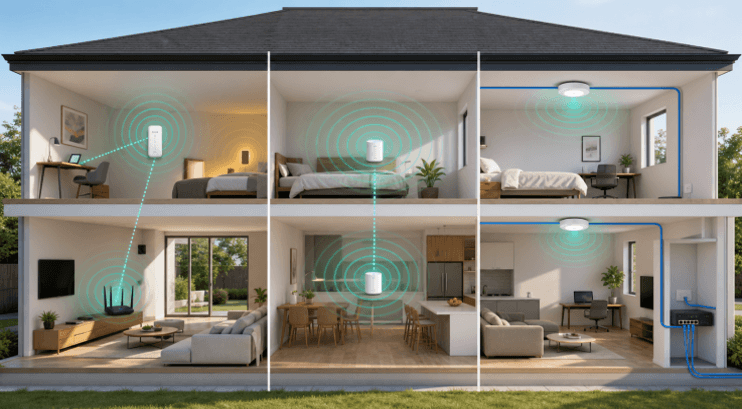
They are not interchangeable. An extender is the least disruptive patch, mesh is the easiest whole-home redesign, and an access point is usually the strongest long-term answer when Ethernet is available. The right choice depends less on the speed printed on the box than on the path your data must travel.
The Short Answer
| Option | Best for | Main advantage | Main compromise |
| Extender | One stubborn dead zone | Low cost and quick setup | Wireless relay can reduce capacity |
| Mesh | Large or multi-story home | Simple management and roaming | Wireless backhaul depends on placement |
| Access point | Wired home, office or venue | Stable backhaul and scalable control | Requires cabling and more planning |
1. Wi-Fi Extender: The Fastest Patch
A traditional extender listens to your router over Wi-Fi and rebroadcasts the connection farther into the building. It is attractive because you can plug it into a wall outlet, use an app or follow a WPS routine, and cover a room that previously had little or no service.
The catch is the relay. If the extender uses the same radio resources to receive and retransmit traffic, airtime is shared between the two hops. It also cannot create a good backhaul from a bad signal. Placing it inside the dead zone is like asking someone who cannot hear the conversation to repeat it accurately; the better position is roughly between the router and the problem room, where the upstream signal is still healthy.
Even an independent real-world test demonstrates the power that a properly positioned Wi-Fi 6 extender can still achieve. The extender was positioned 40 feet away from the router in a 3,500-square-foot house, and provided 401.1 Mbps to a client 10 feet away, and 490.2 Mbps at 40 feet. It is said to have been measured up to 115 feet. These are helpful answers for a room, garage, or patio, but not all extenders or wall layouts will produce such results.
I’d use an extender if the router is otherwise good, one part is not as good, and you’d like to do the least expensive intervention. Avoid stacking extenders in a chain. The more hops there are in wireless domains, the more opportunity for interference, delay, and reduced capacity.
2. Mesh Wi-Fi: The Convenient Whole-Home System
The main router is replaced or supplemented by a mesh kit, which consists of a set of nodes that communicate with each other in a coherent configuration and typically appear as one network name. The practical benefit isn’t the magic radio power; it’s centralized management, planned handoff behavior, and a system designed to be used with multiple nodes.
A large home that is hard to run cable in is often the best use case for mesh. A 2026 independent test of a three-unit Wi-Fi 7 mesh system in a 100-year-old, 3,500-square-foot house measured 953.7 Mbps at 50 feet, 350.4 Mbps at 75 feet, and 150.1 Mbps at 90 feet. The test system was 450.7 Mbps up from the upstairs node at the distance of 40 feet. The same test found that it would take three minutes to set up and provide stable gaming, 4K video, email, and music streaming for two weeks.
The outcome is still up for grabs as placement plays a key role. A strong connection to the main node or another node is required for a wireless mesh node. Place it at the far end of the coverage, and it might provide good signal bars and serve as a backbone to forward traffic when the backhaul is weak. Those constraints can be alleviated with tri-band designs, Wi-Fi 7 Multi-Link Operation, or wired Ethernet backhaul, but not eliminated, as good positioning remains necessary.
My rule: If you value ease of administration and ease of movement more than you value the highest degree of predictability, then you should choose mesh. If you have Ethernet at home, you can use a wired backhaul on the mesh node and continue using the friendly app, while you lose much of the wireless relay penalty.
3. Wireless Access Point: The Infrastructure Approach
The access point is a device that plugs into the router or network switch via Ethernet to provide Wi-Fi in its immediate vicinity. Once user traffic reaches the AP, it rides over the cable rather than the wireless radio; hence, the radio does not need to carry the backhaul. When the situation calls for multiple APs, they can be deployed where users are using the devices and aggregated into a single network.
This is the architecture I want to use for a cabled home, a serious home office, a shop, a school, a hotel, or anywhere else with lots of devices. Fewer channels, VLANs, roaming, Power over Ethernet, cable routes,s and transmit power, but scaling better and more easily to troubleshoot.
The research conducted at Universitat Pompeu Fabra highlights the importance of coordination in a multi-AP/extender network. A traditional signal-strength-based association, in a real deployment with a requested traffic load of 100 Mbps, achieved 49.22 Mbps. When the controller accounted for both access-link and backhaul loads, the results were 87.18 Mbps and an average delay of 37.34 ms, compared to 130.24 ms. The study did not compare products in the shop: sometimes the best signal isn’t the best path.
When choosing a wireless access point, check the Ethernet uplink, PoE standard, realistic client capacity, security, roaming support, controller options, and mounting style. COMFAST provides ceiling, in-wall, and outdoor AP variants that support gigabit or 2.5 GbE uplinks, multiple SSIDs, WPA3, and mesh or roaming capabilities. This range is useful because it is just as important to have the right form factor as it is to purchase an AP that is too large and hope that it will penetrate every wall: A ceiling AP can be installed over an open office, an in-wall AP can be installed near a bedroom or hotel room, and an outdoor-rated AP can be used to stretch coverage without being exposed to the elements inside the building.
How to Decide in Five Questions
- Is the problem one room or the whole property? An isolated gap is a good sign of an extender. A mesh or cluster of multiple APs is recommended for use across several floors or for roaming users.
- Can you run Ethernet? If so, a wired AP (or a mesh with a wired backhaul) will typically produce the most consistent performance.
- How many devices are active at once? There are some phones that are easy to use. The use of video calls, cameras, televisions, consoles, and IoT devices adds to airtime and policy requirements.
- Do users move while connected? A clean roaming experience is provided by mesh and centrally managed APs, which do not usually have to contend with unrelated extenders and routers.
- Who will manage it? App simplicity is the mesh’s preference. The AP systems offer benefits to users and/or the team who are willing to deal with channels, VLANs, firmware, and monitoring.
Common Buying Mistakes
Don’t purchase based on the theoretical speed. “AX3000” or “BE5000” refers to the aggregate class, and not to the speed at which a phone will get through walls. Never add an extender/mesh node where the signal is no longer usable. If you want to use a separate SSID for each room, then you can do so, as you will want to switch manually. If you don’t mind wired fundamentals, you can’t afford to skimp on a 100 Mbps Ethernet port or a bad cable, as it can limit the speed of the best AP.
Before-and-after testing is recommended, too. At a busy time of day, record the download, upload, latency, and packet loss at the problem location. Also check the signal rate and link rate, if available. The single number next to the router provides little information about the room you are trying to repair.
Final Recommendation
Choose an extender for a single dead zone on a limited budget. Opt for mesh for a large home, easy management, and reduced cabling. When reliability, density, segmentation and long-term scalability are most important, opt for wired connections.
If Ethernet is available, I would usually take the access-point route. If it is not, a well-placed mesh system is the practical winner. The extender remains valuable – but as a targeted repair, not a substitute for a network design.
Popular on OTW Right Now!


About The Author

Gagan Bhangu
Founder of otechworld.com and managing editor. He is a tech geek, web-developer, and blogger. He holds a master's degree in computer applications and making money online since 2015.