
Ways to Unlock iPhone 16 without Passcode or Face ID
If you’re in one of the following situations, you might be wondering how to unlock your iPhone 16 without a passcode or Face ID:
- You created a new passcode on your iPhone 16 but can’t remember what it was.
- You bought a used iPhone 16 and it’s locked with a passcode or Face ID.
- You might have forgotten your iPhone 16’s passcode because you haven’t used it in a while.

This article is for you. We’ll walk you through a few different methods to regain access to your iPhone 16 without needing the passcode, including using iPhone unlocker software. Even if you don’t have Face ID, the solutions in this article also work for other iPhone models and iPads.
Solution 1: Unlock iPhone 16 with a Previous Passcode
If you’re in the first scenario that setting a new passcode and then forgetting it, you might consider this method. In iOS 17 and later, if you forget your passcode, the Passcode Reset feature gives you 72 hours when your old passcode can be used to get into the locked iPhone.
1: Enter several times wrong screen passcode and you will see the iPhone Unavailable or Security Lock screen appear. Tap Forgot Passcode option.
2: Tap Enter Previous Passcode and follow the guide to set a new passcode for your iPhone 16.
Solution 2: Access your Locked iPhone 16 by erasing your iPhone
Erasing your iPhone is a common way to unlock a locked iPhone 16 without a passcode or Face ID. This method allows you to factory reset your device, deleting all data and settings in the process. Here’s how to erase your iPhone.
On the iPhone Unavailable or Security Lock screen, tap Forgot Passcode and then tap iPhone Reset, enter your Apple ID password to reset your iPhone.
Solution 3: Unlock iPhone 16 in One Click
Forgetting your iPhone passcode and Apple ID password can be overwhelming. However, MagFone iPhone Unlocker can help you easily unlock your iPhone 16, regardless of your iPhone model. It’s a powerful tool that accomplishes this task with just one click, providing an easy-to-use method for bypassing the passcode on your iPhone. Learn how to use MagFone iPhone Unlocker.
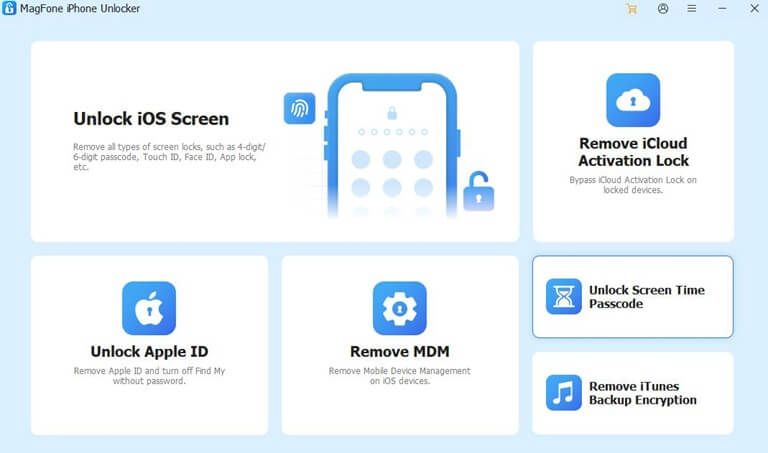
1: Install the repair program, then launch it and connect your iPhone 16 to your computer. Select Unlock iOS Screen and tap Start.
2: Tap Download to download the firmware package that unlocks your iPhone.
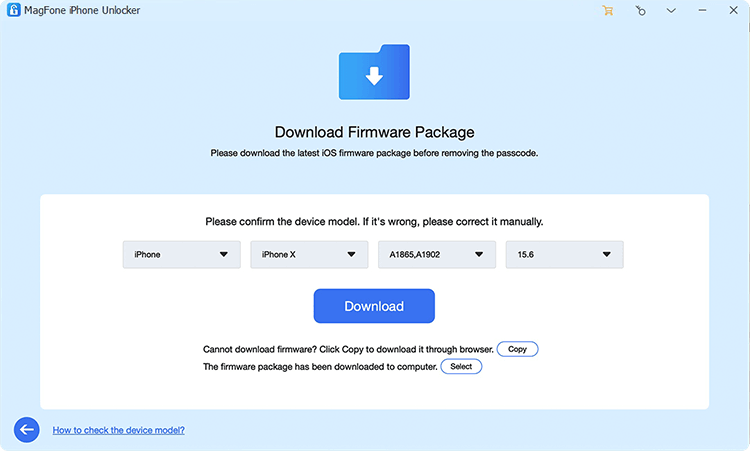
3: After the firmware package has finished downloading, tap Unlock to begin unlocking your device. Please note that the unlocking process will delete all data stored on your iPhone 16.
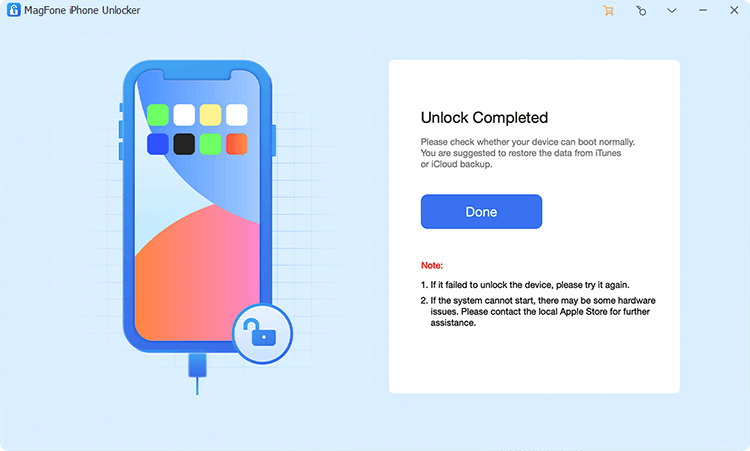
4: After your iPhone is unlocked, the software will display a successful unlock notification, allowing you to access your iPhone and reset it without entering the passcode.
Solution 4: Unlock your iPhone 16 using iTunes
If you’ve forgotten your iPhone’s passcode, you can also use iTunes to bypass it. Note: If you don’t sign out of your Apple ID before restoring your iPhone, you’ll encounter Activation Lock and be required to enter your previously synced Apple ID and password. All your data will be deleted by iTunes. Please follow these steps:
1: Connect your iPhone to your computer. If iTunes is already open, close it.
2: Put your iPhone 16 into recovery mode.
3: Launch iTunes, and a dialog box will automatically appear asking whether to update or restore. Click Restore to proceed. After that, simply proceed by following the instructions displayed on your screen to finish the restore process.
Solution 5: Unlock a locked iPhone 16 using iCloud
iCloud is also a good option for removing a locked screen. Here’s how to unlock your iPhone 16 using iCloud:
1: Visit icloud.com and log in with the Apple ID synced with your device.
2: On the page, navigate to and tap Find My.
3: On the next page, you’ll see All Devices. Tap it, then select your locked iPhone 16.
4: Tap Erase This iPhone. If asked for your Apple ID password, enter it to continue.
Summary
Currently, no known method, including iTunes and iCloud, allows you to erase an iPhone while preserving its data intact. Erasing an iPhone deletes all data from the device, ensuring it cannot be recovered. However, MagFone iPhone Unllocker provides a simple and quick way to unlock an iPhone 16 without a passcode or Face ID.
Popular on OTW Right Now!




About The Author

Gagan Bhangu
Founder of otechworld.com and managing editor. He is a tech geek, web-developer, and blogger. He holds a master's degree in computer applications and making money online since 2015.