
Using ChatGPT for SEO Work: What It Does Well, Where It Fails, and How to Check Its Output
Most marketing teams will have used ChatGPT at some point in their SEO process (usually in an informal way), with one person writing up meta descriptions, another asking it for keyword ideas, and a third person just pasting in a page and asking it what’s wrong with it. Some of those applications do actually save time. Others are just quietly putting the wrong numbers into their reports and plans.
The difference isn’t the tool per se. It’s whether the job in question is one that depends on data the model simply doesn’t have. This guide categorizes the various types of SEO work into the two groups and provides a checklist that a small team can run without any slowdown.
Where ChatGPT earns its place
These tasks all have one thing in common: you provide the facts and the model does the structuring, the phrasing, the patterning.
Outlines from material you provide
Give us your notes, a customer interview transcript, or the questions your sales team actually hears and asks for an article outline. It’s quite good at grouping the points together and identifying a missing step. It’s not so good at inventing the content of each section from scratch (that’s where the generic filler comes in).
Schema drafts
ChatGPT will produce reasonable first drafts of JSON-LD for FAQPage, Organization, Article or LocalBusiness markup if you give it the visible page content. Treat the output as a draft (run it through the Google Rich Results Test and the Schema Markup Validator) and ensure that every value is actually present on the page. The models will occasionally add properties that seem plausible but aren’t in the schema.org vocabulary.
Title and meta description variants
Ask for 10 title options under 60 characters that contain a specific phrase, and you get a useful shortlist in the space of seconds. A human still has to select, check the character count (the models are prone to getting that wrong) and ensure the promise of the title is in fact delivered on the page.
Clustering a keyword list you supply
Take your own research tool’s export of keywords, paste that list in and ask the model to group them by search intent or by the page that they should be targeting. It’s pattern matching on the text you’ve provided and it does that quite well. Always check a sample of each cluster manually, particularly with regard to terms that may look similar but have different intent (e.g. “SEO audit” vs “SEO audit template”).
Regex for Search Console
Search Console’s query and page filters support regular expressions, and very few marketers are comfortable writing regex. If you tell it what you’re looking for (e.g. “queries that start with how, what, why or can”) it will generate something like:
^(how|what|why|can)
One catch: Search Console uses RE2 syntax, which does not support lookaheads or lookbehinds. Models write those regularly. If the filter returns an error or an empty table, that is usually why.
Where it fails
Search volumes and keyword difficulty
A language model doesn’t have Google Ads data. If you don’t paste in the figures, then any search volume it cites is a guess and will be presented with a false degree of confidence. The same applies to keyword difficulty scores as those are tool specific anyway.
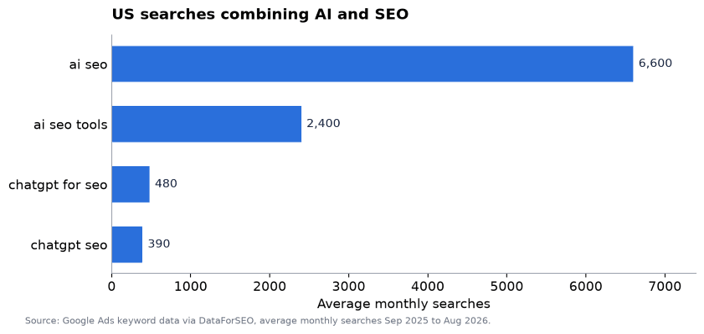
For comparison, here’s what real keyword data looks like. In the US, “ai seo” is around 6,600 searches a month, “ai seo tools” is around 2,400, “chatgpt for seo” is around 480, and “chatgpt seo” is around 390 (Google Ads data via DataForSEO, September 2025 to August 2026). That’s from a keyword data provider, not from a chat window, and that’s the only way you can get data that’s actually reliable.
Rankings and competitor positions
The model can’t tell you where a page is ranking today. It will vary from location to location, from device to device, and with personalization. A web-connected assistant won’t see your Search Console data. Use rank tracking and Search Console to see where your pages are.
Facts without sources
Ask for “statistics about local SEO,” and you will often get numbers attributed to vague or non-existent studies. In an SEO article, a fabricated statistic is worse than none: it damages trust with readers and with any editor who checks. Google’s position is that it rewards helpful, high-quality content regardless of how it is produced, but that using automation to manipulate rankings breaks its spam policies. Unchecked AI claims put the first half of that at risk.
A quick reference
| Task | Reliability | What to check |
| Outline from your notes | High | Missing steps, generic sections |
| Schema draft | Medium | Validator results, values present on page |
| Title variants | High | Character length, match with page content |
| Clustering your keyword list | Medium | Sample of each cluster, intent mismatches |
| Search Console regex | Medium | RE2 compatibility, test on real data |
| Search volumes | Do not use | Use keyword data tools |
| Current rankings | Do not use | Use Search Console or rank tracking |
| Statistics and studies | Do not use without a source | Find the original source or remove |
A verification workflow for teams
A routine is more useful than a rule that says “check everything”. This one fits most teams:
- Label AI-assisted work. Add a note in your content brief or ticket to indicate which bits were drafted with ChatGPT. The reviewers will then know where to look.
- Separate claims from wording. Highlight every number, date, name, and factual claim in the draft. The reviewer needs to be able to open a source for each one.
- Validate anything machine-readable. The schema goes through a validator. The regex is tested in Search Console. Redirects and robots.txt rules are all tested against real URLs prior to deployment.
- Read it as the customer. Does the page answer the question that someone searched for? Generic AI drafts will often answer a much broader question than the one that was actually asked.
- Keep the prompt. Save the prompt and the input data with the task. If anything goes wrong, you can trace it back to where it came from.
If your team wants a longer walkthrough, this full guide to SEO optimization with ChatGPT covers both sides of the topic: using ChatGPT for SEO tasks, and making your own pages easier for ChatGPT search to cite.
Data privacy: what not to paste
Search Console exports, analytics data, customer lists and any unpublished client strategy are all business data. Before anyone ever pastes that into a chat tool they need to check three things:
- Your contract. Agency agreements often restrict sharing client data with third parties. A chat tool may count.
- The account type. Business and enterprise plans usually have different data-handling terms from personal accounts. Find out which one your team is using.
- The minimum needed. To cluster keywords, the model needs the keyword list, not the client name, revenue figures or conversion data. Strip what is not required.
When in any doubt at all, just ask the client in writing. It’s a very short email and it avoids the awkwardness of having to have that conversation later on.
Guardrails that do not slow people down
Heavy policy documents get ignored. A one-page team agreement works better:
- ChatGPT drafts; a named person approves and is accountable.
- No numbers or statistics from the model without a checked source.
- No client data in personal accounts.
- All structured data and regex is tested before it goes live.
- Prompts that work well get shared in a team library so everyone benefits.
Review the agreement every few months. The tools change quickly, and a rule that made sense in one quarter may be unnecessary or insufficient in the next.
The practical version
Use ChatGPT for the bit where you supply the facts and it provides the structure (outlines, schema draft, title variants, keyword grouping, regex etc). Don’t use it as a source of search volume, rankings or any other stats. Put a light level of verification on every single task that’s AI-assisted, keep the client data out of any tool that’s not approved to have it, and have one person ultimately responsible for what gets published. That’s the way to get the time savings and get rid of most of the risk.
Popular on OTW Right Now!


About The Author

Gagan Bhangu
Founder of otechworld.com and managing editor. He is a tech geek, web-developer, and blogger. He holds a master's degree in computer applications and making money online since 2015.