
Top 5 AI Tools to Remove Text, Logos, and Watermarks from Social Media Images in 2025
You found a great photo for your Instagram feed, but there is a problem. A large logo sits right in the corner. Or maybe some text covers a part of the image you really need. You do not want to delete the photo, but you also do not want it to look messy. This is where modern technology helps you out.
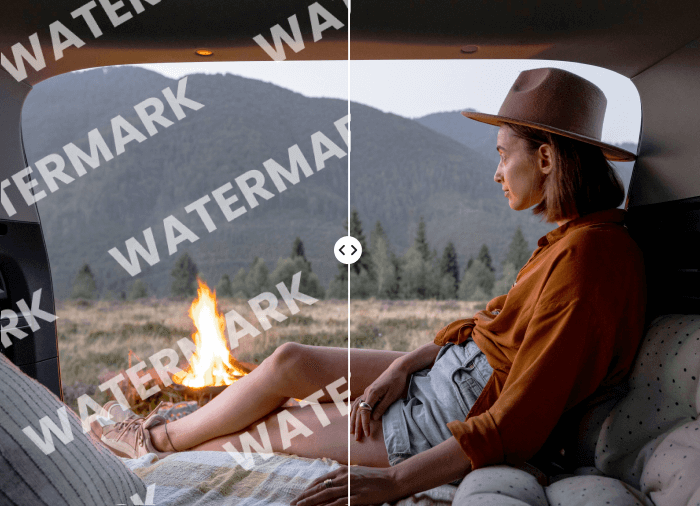
Many people struggle with these visual distractions every day. You can use a dedicated Watermark Remover to fix this issue in a few seconds. These tools use smart algorithms to look at the pixels around the unwanted object. They fill in the space so naturally that nobody can tell something was ever there.
If you want more control over your images, you might need an AI Photo Editor that does more than just erase things. These platforms allow you to adjust lighting, fix colors, and remove complex objects all at once. You can turn a low quality snapshot into a professional piece of content for your brand.
Social media moves fast. You cannot waste hours learning how to operate heavy software. You require applications that can be used on your phone or browser. The list below covers the best options you can use to clean up your pictures and make your feed look clean.
1. Unwatermark.ai
Unwatermark.ai is a dedicated site designed to resolve the most intractable overlays on photographs. It is based on a deep learning model that can see the difference between a watermark and the real object of the photo. This means it can erase semi-transparent logos without leaving smudged prints.
It is a very straightforward process. You post your picture, and the AI begins to search for patterns that resemble text or icons. It is effective for social media managers who need to reuse content while maintaining the focus on the visual itself. No technical skills are required to achieve a clean result.
Key Features
Automatic Detection: The tool finds the watermark on its own so you do not have to paint over it manually.
High Resolution Support: It keeps the original quality of your photo after the removal process.
Batch Processing: You can upload multiple images at once to save time on large projects.
Pros
Most types of images can be processed very fast.
The interface is simple and user-friendly to a beginner.
It works with complicated backgrounds more than most free tools.
Cons
The free edition places restrictions on the number of images that you can process per day.
It requires a stable internet connection to work.
Best For
The social media developers, who have to delete logos on stock photos or old brand materials within a short time.
2. AI Photo Editor by Unwatermark
This tool is a more comprehensive version of the standard remover. It is designed for people who want more than just logo removal. It enables one to polish the complete image once you have removed the undesired text. It is an excellent option with influencers who desire to have a refined appearance.
Millions of high-quality photos are used to train the AI in this case. It is aware of the behavior of light and shadow. When you take a big object out of a grassy field, the AI will revert the blades of grass exactly. It ensures the texture stays consistent across the entire canvas.
Key Features
Object Removal: You can select any person or object in the photo and make them disappear.
Color Enhancement: It automatically adjusts the vibrance and contrast to make the image pop.
Smart Scaling: If you need to resize your photo for different social platforms, it helps maintain the aspect ratio without stretching.
Pros
Everything in a single-stop cleaning and photo-enhancing solution.
The AI reconstruction is very detailed and realistic.
Is compatible with both mobile and desktop web browsers.
Cons
With the increased features, there is a bit of an increased learning curve over the simple tool.
The high-resolution files can require a few extra seconds of processing time.
Best For
Users who would like to do a complete edit of their pictures after the removal of distracting objects.
3. Adobe Express
Adobe Express is a powerful web-based tool that brings some of the best parts of Photoshop to a simpler interface. It uses Firefly AI technology to help users edit images with simple commands. One of its best features is the generative fill, which allows you to remove text and replace it with something else entirely.
This tool is great for people who already use other Adobe products, but it is also friendly for newcomers. You can highlight a logo and tell the AI to replace it with a cloud or just leave it blank. The results are usually very professional and ready for commercial use.
Key Features
Generative Fill: This allows you to describe what you want to see in the place of the removed object.
Template Library: You can take your cleaned image and put it directly into a social media post template.
Mobile App: The mobile version is very robust and allows for quick edits on the go.
Pros
Backed by the most famous name in photo editing.
Excellent integration with other creative tools.
The AI is very safe for commercial branding.
Cons
There are also certain features that are locked away behind a monthly subscription.
It can feel a bit heavy or slow on older computers.
Best For
Professional designers and small business owners who need a suite of creative tools.
4. Photoroom
Photoroom is popular among e-commerce sellers and social media influencers. Its object removal tool is equally good, and it is known to be able to remove the backgrounds. It is meant to be used on a smartphone, hence it is ideal for those who take photos and share them instantly.
The AI in Photoroom is very aggressive in a good way. It isolates the key subject of your photograph and isolates it against a background of all other objects. This allows one to eliminate a watermark or an unwanted individual on the background with ease. All you need to do is to swipe your finger across the part you need to fix, and the app does the rest.
Key Features
Magic Eraser: A simple brush tool that deletes any part of the image you touch.
Instant Backgrounds: After removing a logo, you can swap the entire background for a studio look.
Batch Mode: Edit hundreds of product photos at the same time.
Pros
The cell phone experience is the finest.
Extremely quick in removing small text or price tags.
Nice for creating clean product shots and preparing content for platforms like Instagram and TikTok, especially when you also need a tiktok live recorder for capturing or saving TikTok content.
Cons
The free edition adds a little Photoroom brand to your end result.
It is less preoccupied with intricate sceneries and more concerned with products.
Best For
Product photos have to be cleaned by online sellers and influencers who often have to do it in a few seconds.
5. Cleanup.pictures
The Cleanup.pictures is, possibly, the easiest tool on the list. It does it by doing one thing and doing it well. It eliminates items, individuals, and writing in photographs. No complex menus and additional filters to be concerned about. You simply post the picture and begin to clean up.
This tool uses a technology called LaMa, short for Large Mask Inpainting. It is specially equipped to deal with the large spaces that have to be filled in. If you have a picture with a huge watermark in the middle, this tool can provide an exceptionally clean output without strange artifacts.
Key Features
Simple Brush Interface: You just paint over what you want to remove.
High Quality Inpainting: The AI is excellent at guessing what should be behind the object.
API Access: For developers, they offer a way to build this tool into other apps.
Pros
Basic use does not need an account.
The interface is absolutely distraction-free.
It is quite efficient at deleting huge text fragments.
Cons
The free version limits the resolution of the output image.
It does not have any extra editing tools like filters or cropping.
Best For
Users who require a fast, uncomplicated method of deleting one item or logo.
Comparison Summary
| Tool | Primary Use | Platform |
| Unwatermark.ai | Removing stubborn logos | Web |
| AI Photo Editor | Full image enhancement | Web |
| Adobe Express | Professional design | Web and Mobile |
| Photoroom | Product photography | Mobile |
| Cleanup.pictures | Quick object removal | Web |
Final Recommendation
It is a matter of selecting the appropriate tool based on the needs of your social media content. Unwatermark.ai is the most direct option if you need the best AI for that task: removing a logo. It focuses on removing the watermark and making the final image look natural.
The AI Photo Editor is more appropriate if you want a tool to help you edit the whole photo once the watermark has been removed. It offers you the ability to edit colors and lighting to make your post shine in an overcrowded feed. This is best when you want your photos to look like they were taken by a professional.
Adobe Express is the solution for people developing a brand who need a complete design package. It has the greatest number of features despite being a bit more difficult to learn. In case you are selling goods on platforms such as Shopify or Instagram, Photoroom will save you a couple of hours of work with its background and logo erasing options.
Lastly, if you only need to fix a single picture in minutes and don’t want to sign up, Cleanup.pictures is a good alternative. Regardless of the tool you use, the AI technology in 2025 has ensured that anyone can have perfect, clean images that are clean. Being a graphic designer is not as necessary as before to have a beautiful social media presence. All you need to do is to choose a tool, post your photo, and leave the AI to do the heavy lifting.
Popular on OTW Right Now!
-
 IPTV Service Analysis 2026: Complete TopIPTVServices Platform Review
-
 How Ongoing Cloud Partnerships Help Businesses Avoid Cloud Waste After Migration
-
 The Essential Cloud Migration Checklist: How to Plan a Secure and Successful Migration
-
 MiniMax H3 vs Kling 3.0: Choosing a Tool for Image-to-Video Projects



About The Author

Gagan Bhangu
Founder of otechworld.com and managing editor. He is a tech geek, web-developer, and blogger. He holds a master's degree in computer applications and making money online since 2015.