
The Hidden Engineering Cost of Building Your Own Rich Text Editor
Building a rich text editor is, in theory, pretty simple. You’ve got a contenteditable element, and you’ve got a toolbar with the various formatting options, and you’re good to go. A very basic prototype can be put together in a flash.
But getting the text onto the screen is only the first stage.
Once people start using the editor, they expect the formatting to be preserved, the pasted content to look right, the cursor to work as expected, and for undo/redo to work. They expect images to upload, they expect everything to work across browsers and across devices.
Meeting that expectation takes a lot more engineering effort than the initial prototype would suggest. If you’re building a rich text editor, the real question isn’t how quickly you can get the first version out. The real question is how much engineering effort the editor is going to take after that.
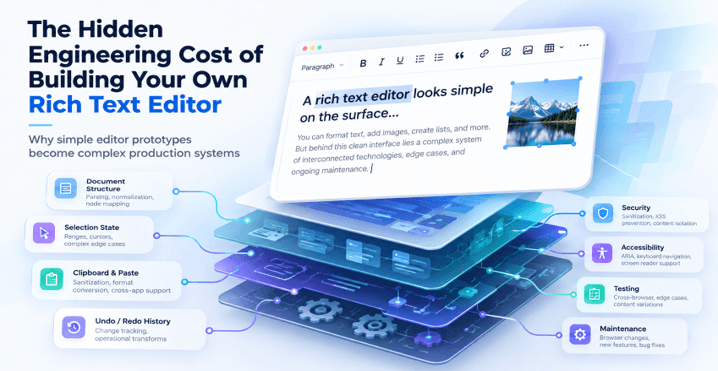
Why Building a Rich Text Editor Looks Easier Than It Is
Browsers already have a lot of the functionality required for text editing. The contenteditable attribute makes an element editable, and there are a range of selection APIs, clipboard events, and keyboard events that can be used to implement the various editing features.
This makes a custom rich text editor look like a pretty straightforward frontend exercise.
The problem arises when it’s necessary for these browser capabilities to work together in a consistent manner.
For example, the beforeinput event lets developers intercept certain changes before the browser applies them. However, MDN’s documentation notes that not every modification triggers a cancellable event. Input methods, spell-check corrections, and browser-specific behavior can complicate editing logic.
Older approaches aren’t the answer either. The old document.execCommand() API is deprecated and has very inconsistent implementation.
Browsers provide the basis for editing but don’t provide all the behavior that a user would expect from a full-fledged editor.
The Hidden Costs Start With the Document Model
One of the very first architectural decisions is how to represent the document.
Should the editor use the DOM as its source of truth? Store the content as HTML? Or have a proper structured document model which is then rendered into the DOM?
Each approach has its own set of trade-offs.
HTML is great for displaying content but its flexibility can make it very difficult to edit consistently. Two different HTML structures can produce exactly the same visual output but will behave very differently when you’re editing.
Think about what happens when users go and insert a nested list, a table, a mention, some embedded media or a custom content block. The editor has to know what the valid structures are and how those structures are going to be affected when the user types, when they delete or when they apply some formatting.
Frameworks like ProseMirror deal with this by using document schemas, editor state, and transactions. Rather than having every DOM change be the document itself they provide a more structured way of representing and modifying the document.
If you’re building from scratch, then a large part of that architecture is going to be your team’s responsibility.
What used to be a text input is now a document processing system.
Selection and Cursor Behavior Become Their Own Engineering Problem
Very few things annoy a user more than a cursor that jumps around, or formatting getting applied to the wrong bit of text.
Selection handling gets complicated when users are moving between different content structures.
Imagine someone selecting text across two paragraphs, applying bold to it and then carrying on typing. The editor has to work out which nodes are in the selection, maintain the correct selection and then decide whether the text they’ve just typed should inherit the formatting.
Other edge cases are deleting text across links, putting the cursor next to an embedded image and restoring the selection after someone has clicked a toolbar button.
These behaviours are pretty easy to miss in the early days of development as simple typing doesn’t really bring them to light.
Modern editor frameworks will often have the selection as part of the editor state. Lexical, for instance, maintains both its document tree and the selection as part of its internal state model.
Without that infrastructure, developers are on their own and have to coordinate browser selection APIs with document updates themselves.
Users don’t think about the selection state until something goes wrong. Editor developers simply can’t afford to ignore it.
Copy and Paste Is Where Simple Editors Meet the Real World
Copy and paste might appear to be such a simple function, but the content that users are copying comes from all sorts of different sources.
A paragraph copied out of a Word document may contain inline styling, font definition, and other such markup. Content copied from a website may contain links, images and other elements which aren’t directly transferable aren’t directly trapresent yet. Spreadsheet cells present a problem: the set of structural rules has to work out what to preserve and what to remove.
Should pasted headings keep their formatting? Should styles with no underlying content be stripped out? How should nested lists and tables be converted into something the editor can understand?
Simply dropping in clipboard HTML will result in inconsistent or undesirable outcomes.
Developers will also need to normalize the resulting document so that it remains editable. Sanitization has its own set of security considerations.
This is why a mature editor would have a huge amount of functionality around the clipboard. Froala’s Word Paste plugin is a good example, with options to control exactly which styles, attributes and elements you accept when you’re pasting content.
Building similar behavior in-house means creating normalization rules, testing content from various applications, and keeping those rules in place as the source formats change.
Undo and Redo Are More Than Ctrl+Z
Undo and redo are simple enough until you’ve got to work out what constitutes a single action.
If the user types out a full sentence, should pressing Ctrl+Z remove one character, one word or the entire sentence?
What if the user formats a paragraph, puts in an image and then changes the heading?
A good undo system needs to group up related changes whilst still allowing individual actions to be undone.
It must also correctly restore selections and be able to tell the difference between user edits and document updates that are made by the program itself.
Recording every DOM mutation individually is rarely going to give you the editing experience that users want.
Transaction-based architectures help to deal with this issue by representing the document changes as meaningful operations. If you’re building your own editor, you’ll still have to work out how those operations are grouped, undone, and redone.
History management becomes yet another subsystem that has to work with every new editing feature.
Accessibility, International Input, and Mobile Multiply the Test Matrix
An editor that works with a mouse and an English keyboard on a desktop Chrome browser is not necessarily production-ready.
Accessibility brings in requirements around keyboard navigation, focus management, screen reader support and toolbar interactions.
International input adds further complexity.
Users typing in Chinese, Japanese, Korean or other languages via an Input Method Editor (IME) may be typing characters over multiple input events. Right-to-left languages bring with them different issues around text direction and cursor movement.
Mobile devices present another set of issues.
Touch-based selection, virtual keyboards, and the various differences between mobile browsers can all have an effect on how users interact with editable content.
Each supported environment adds more scenarios to test.
A formatting feature that works perfectly on desktop can behave in a very different way when you select text via touch or enter text via an IME.
Supporting these interactions is more than just some CSS tweaks. It’s about testing and maintaining the core editing behavior regardless of the input method.
Security and Content Sanitization Become Permanent Responsibilities
Rich text editors deal with user-generated content (which will often be HTML, links, images, and embedded media).
That makes security part of the editor’s engineering responsibilities.
Unsafe markup can lead to XSS if the application doesn’t correctly process or render it. Uploaded files and external URLs need to be validated too.
Developers need to decide which elements, attributes, and URL schemes are allowed and then make sure those rules are enforced in a consistent manner.
The OWASP Cross-Site Scripting Prevention Cheat Sheet recommends HTML sanitization when applications need to preserve user-authored markup.
However, editor-side sanitization on its own is not a complete security solution. You still need appropriate server-side controls and safe rendering practices.
Security also requires a degree of ongoing attention. The sanitization libraries will need updating, and new editor features may add in further input paths.
When you own the editor, you also own the rules as to what gets in, what gets out, and what gets to survive within it.
Every Small Feature Creates Another System to Maintain
Consider a seemingly simple feature request:
“Can users insert images?”
Adding an image button is easy enough. Supporting image uploads in a reliable manner is a different matter entirely.
The app will likely need file validation, upload progress, storage integration, error handling, resizing, positioning, captions, deletion and responsive rendering.
Those capabilities also need to work with selection, undo history and copy/paste behavior.
Tables present a similar set of issues. The user might well expect to be able to add rows, merge cells, resize columns and paste in spreadsheet data.
Mentions require search interfaces, keyboard interaction and special handling during deletion.
Each feature adds in new interactions with the existing functionality.
That’s why rich text editor development gets more and more complex as the product requirements grow. Features don’t exist in isolation from one another.
A change to selection handling could potentially introduce a regression in image editing. A new paste rule could have an impact on how tables are imported.
The cost isn’t just in implementing the feature. It’s in the maintenance of the relationships between features.
The Real Cost Is the Maintenance Tail
Shipping the editor doesn’t end the engineering work.
Browser updates can reveal previously unknown behavior. Framework upgrades can have an impact on the integration code. Users will, of course, find edge cases that weren’t in the original test plan.
Meanwhile, the product requirements are still changing.
Teams may well end up requiring better accessibility, better mobile editing, more formatting options and/or better handling of imported content.
These duties require continual development, testing, documentation and debugging.
The difference between a prototype and a production editor is quite clear when you actually look at the engineering work.
| Engineering area | Basic prototype | Production editor |
| Formatting | Toolbar commands | Consistent document formatting |
| Selection | Browser defaults | Predictable cursor and selection behavior |
| Copy/paste | Insert pasted content | Normalize and clean external content |
| Undo/redo | Basic history | Meaningful, reversible editing operations |
| Accessibility | Basic keyboard input | Accessible controls and navigation |
| Security | Basic content handling | Sanitization and validation policies |
| Testing | Limited browser coverage | Multiple browsers, devices, and input methods |
| Maintenance | Occasional fixes | Continuous engineering ownership |
A custom editor also creates a knowledge dependency. The developers will inevitably become familiar with its internal architecture, the odd edge cases and the way you debug it.
When those developers go on to other projects, the maintenance of the editor may become more difficult for the rest of the team.
Over time the editor can be made to demand engineering effort that would otherwise be directed at the core features of the application.
When Does Building Your Own Editor Actually Make Sense?
The engineering costs don’t necessarily mean that building a custom editor is the wrong call.
For some products, the editing experience is the key differentiator.
A specialist document platform may well require a bespoke content model, a set of custom interactions and/or workflows that a standard editor just wouldn’t be able to cope with.
In those cases, greater control can in fact justify the extra development and maintenance.
However, there are several ways to approach custom editor development.
Building from browser primitives offers maximum flexibility but leaves most editing infrastructure to the application team.
Using an editor framework such as ProseMirror or Lexical provides a foundation for document state and editing behavior while allowing developers to build specialized interfaces.
Integrating a finished editor reduces the amount of editing infrastructure the team must implement and maintain, although integration and customization still require engineering work.
The appropriate choice depends on how central editing is to the product and how much long-term ownership the team can support.
Calculate Engineering Ownership, Not Just Initial Development
Before you go ahead and build a rich text editor, work out how long it’s going to take to do the first version of it and then estimate that by a significant margin.
The ongoing cost of testing, accessibility, browser compatibility, security patches, feature development and the maintenance of specialist knowledge.
More importantly think about what that work takes away from other engineering priorities.
For applications where rich text editing is an important feature rather than the product’s main differentiator, integrating an established rich text editor can reduce the need to build and maintain editing infrastructure internally.
Building your own editor may offer greater control, but that control comes with responsibility.
The most useful question isn’t simply, “Can we build this?”
It’s, “Do we want to keep building and maintaining it for the next several years?”
Popular on OTW Right Now!




About The Author

Gagan Bhangu
Founder of otechworld.com and managing editor. He is a tech geek, web-developer, and blogger. He holds a master's degree in computer applications and making money online since 2015.