
Storytelling Tricks with the CapCut Voice Changer Feature
Storytelling has always been a powerful means of connecting with people. Whether it’s through bedtime stories for kids, fun skits with friends, or short-form videos for social media, the way you tell your story matters just as much as the story itself. These days, video creators are looking for ways to stand out in a sea of content—and voice is a big part of that.
CapCut Voice Changer tool lets you transform your voice in just a few clicks, adding more personality, humor, and emotional impact to your stories. With proper storytelling techniques, this feature can significantly enhance your audience’s experience of your videos.

Why Voice Matters in Storytelling
Before we get into the tips, let’s take a moment to understand why voice is so powerful in storytelling.
- Adds personality – A story without voice often feels flat. A voice, especially one that’s fun or unique, immediately creates a connection with the listener.
- Builds atmosphere – The right voice effect can set the mood. For example, a robotic effect adds sci-fi vibes, while a chipmunk-like tone makes things lighthearted.
- Keep viewers engaged – Social media audiences tend to scroll quickly. A surprising voice effect can make them pause, smile, and actually watch your video through.
That’s where CapCut’s Voice Changer comes in—it gives storytellers easy access to multiple styles without needing expensive equipment or professional voice actors.
Storytelling Tricks with the CapCut Voice Changer
Here are some clever ways to boost your storytelling with this feature:
1. Create Distinct Characters
One of the simplest tricks is assigning different voice effects to different characters in your story. Let’s say you’re making a short skit:
- Use a deep monster voice for the villain.
- Add a high-pitched squeaky voice for a sidekick.
- Keep a natural voice for the narrator.
This instantly makes your story easier to follow, even if you’re the only person acting out all the parts.
2. Play with Contrast for Humor
Sometimes, the funniest moments come from unexpected voice pairings. Imagine a big, tough-looking hero speaking in a squeaky voice, or a tiny animal character with a booming, deep tone. This type of contrast is a classic storytelling technique that can transform an ordinary video into something memorable.
3. Set the Mood with Sound
Your choice of voice effect can also influence how your audience feels. For example:
- A robotic effect works perfectly for futuristic or sci-fi stories.
- A haunting, echo voice adds tension to ghost stories.
- A child-like pitch gives warmth to bedtime storytelling.
By matching the voice to the story’s tone, you create an immersive atmosphere that keeps viewers hooked.
4. Narrate with Style
Not every story needs multiple characters. Even if you’re narrating, a voice changer can give your delivery more flavor. A narrator with a wise, echoing voice can make a story feel epic, while a funny, distorted tone makes casual storytelling feel like comedy.
5. Use Voice Changes as Plot Twists
Here’s a fun trick: switch voice effects mid-story to surprise your audience. For example, if your “normal” character suddenly reveals they’re a robot, changing to a robotic effect at that moment delivers an instant twist.
Storytelling with the CapCut Voice Changer
Ready to try it yourself? Here’s a simple guide to creating stories with the CapCut Desktop Video Editing Software‘s Voice Changer feature.
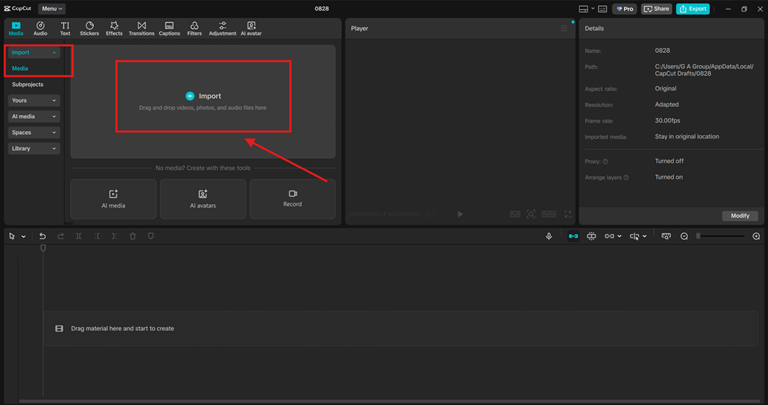
Step 1: Record or Import Your Story
Start by recording your voice directly in CapCut or import an audio file you’ve already created. This could be narration, dialogue, or just a simple skit. You can edit your story’s photo using CapCut’s amazing Online Photo Editor. Make sure the audio is clear, as clean recordings work best with voice effects. Don’t worry too much about acting out different voices yet. The magic happens once you apply the Voice Changer.
Step 2: Apply the Voice Changer Effect
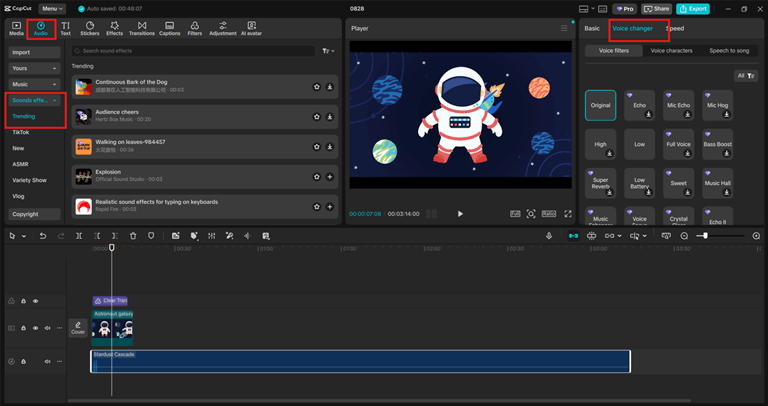
Once your audio is in the timeline, select the audio clip. Tap on the Voice Changer option in CapCut. Browse through the different available effects. Preview them until you find the right fit for your story. CapCut offers fun choices like high-pitch, low-pitch, robotic, monster, and more. Experiment with layering different voices if you’re narrating multiple characters.
Step 3: Edit, Sync, and Finalize
Now that your voices are set, polish the rest of your story.
- Sync voices with visuals – Make sure each character’s voice matches their appearance or timing on screen.
- Add background music or sound effects – A little music can emphasize emotions or add drama.
- Cut unnecessary pauses – Keep your story tight so viewers stay engaged.
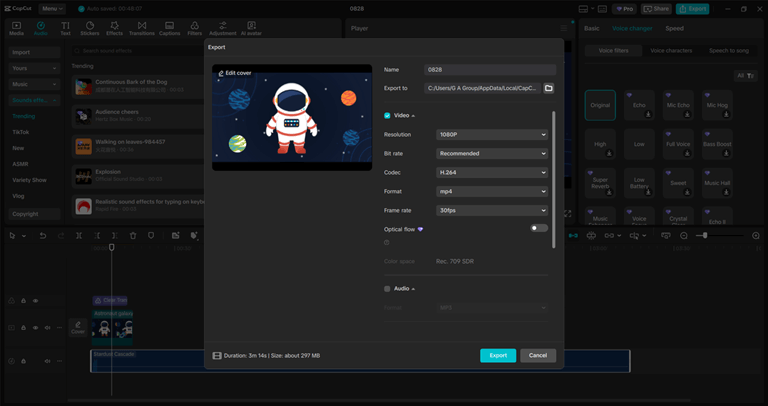
Finally, export your video and share it. Whether it’s for TikTok, YouTube Shorts, or just a fun family project, your audience will notice the extra creativity you’ve put into storytelling.
Conclusion
Storytelling is all about connection, and voice is one of the most powerful tools to deepen that connection. With CapCut’s Voice Changer feature, you can bring characters to life, surprise your viewers, and keep them entertained from start to finish. So, next time you’re working on a story video—whether it’s a bedtime tale, a comedy skit, or a mini-drama—try adding a voice effect or two. It might just be the trick that transforms your content from ordinary to unforgettable.
Popular on OTW Right Now!




About The Author

Gagan Bhangu
Founder of otechworld.com and managing editor. He is a tech geek, web-developer, and blogger. He holds a master's degree in computer applications and making money online since 2015.