
Stop Clicking Manually: Automate Repetitive Tasks with OP Auto Clicker
When you have had to click a certain button dozens, maybe even hundreds of times before moving on or have been refreshing pages over and over, trying to reach a particular destination on the internet, then you probably already understand how exhausting this task may be. The good news is that there is no need to keep on with it because you now have the perfect tool called Op auto clicker that will do it all for you and save your valuable time!
Be it gamers seeking to automate resource collecting, professionals wanting to speed up their workflow, researchers collecting information from sites with numerous pages, or users suffering from some illness making clicking painful – OP Auto Clicker has something to offer.
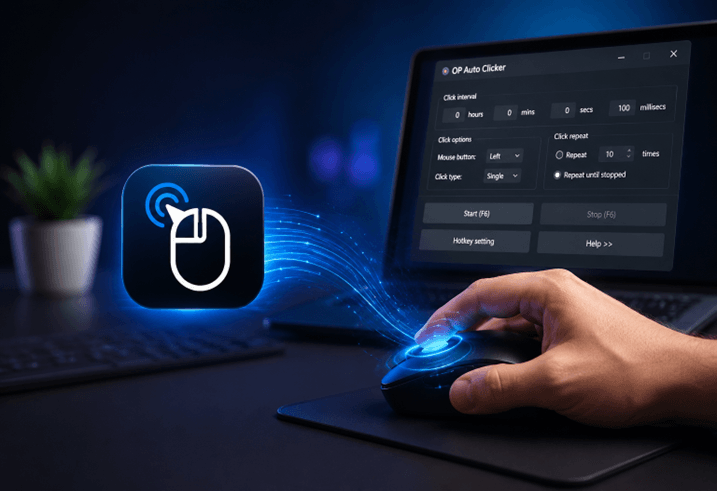
In this article, we are going to explain how this program works, what its features include, who can benefit from using it, and how to take advantage of the possibilities this application offers.
What Is OP Auto Clicker and Why Does It Matter
OP Auto Clicker is an open-source automated mouse clicking utility that works exclusively on the Windows platform. Its primary function is simple but powerful; namely, the ability to automate mouse clicks accurately while giving full control over how often, where, at what speed, and for how many times these clicks will happen.
What sets it apart from others is the synergy of its ease of use and functionality. On one hand, the application boasts a neat and easy-to-understand UI suitable even for absolute novices. On the other hand, all kinds of automation options, such as configurable click intervals up to millisecond level, keyboard shortcuts for quick access, setting exact cursor coordinates, and recording/playback functions, provide much-needed versatility for those who want to do something more complicated than repetitive clicking.
Finally, it is portable, doesn’t require any installation whatsoever, is lightweight and runs efficiently even on less capable computers, and is absolutely free without any trials or subscriptions.
The Real Cost of Manual Repetitive Clicking
Before we dive into the capabilities of OP Auto Clicker, it may be useful to consider why repetitive clicking needs to be automated in the first place.
Firstly, there is the issue of time. Any task that involves repetitively clicking on the same spot of the screen hundreds or thousands of times, be it within a game, web browser, data entry program, or software test application, takes up valuable time that would be better spent doing actual work or taking a break.
Secondly, there is the issue of physical wear and tear. It is no exaggeration to say that repetitive strain injuries like carpal tunnel syndrome and tendinitis are common ailments among individuals who spend long hours repetitively clicking their mouse. Fortunately, by automating repetitive clicking, you eliminate any potential risks.
Finally, there is the issue of mental strain. Any repetitive task will demand enough brain power to avoid multitasking, yet not enough brain power to keep you engaged. Therefore, by assigning these kinds of tasks to an auto clicker, you free up your mind to focus on other activities.
Who Uses OP Auto Clicker and Why
The range of people who benefit from click automation is broader than most people initially assume.
Gamers constitute the biggest community of users. Progress is gained through constant clicking when playing role-playing games, survival games, or idle incremental games, where one clicks to collect resources, craft weapons, kill opponents, and browse through menu screens. The OP Auto Clicker does all this work for gamers, giving them an opportunity to concentrate on enjoyable aspects of playing games.
Those who are concerned about productivity can employ OP Auto Clicker to automate activities such as downloading multiple files at once, moving through multistep web forms, refreshing to check for changes in content, and performing click sequences that cannot be performed with the help of scripts and macros in the software used. In case there is no automation tool for enterprise-level use, it is an efficient alternative solution.
The main use of auto clickers by QA engineers and software testers involves running stress tests on the application user interface, testing how it responds to repeated user interaction, identifying potential memory leak problems due to prolonged usage, and ensuring that the functions work properly with repeated inputs.
This is the software used by researchers and data analysts when using paginated databases, libraries, and online sources that cannot be accessed using any other automated means except by using manual clicks. People who have certain disabilities or physical disorders that make it painful or difficult for them to click repeatedly find OP Auto Clicker extremely useful for them.
Users who have arthritis or repetitive strain syndrome and need to use their computer can make things easier for themselves by assigning click commands to hot keys on the keyboard.
Key Features That Make OP Auto Clicker Worth Using
Customizable click intervals enable setting the exact timing in between clicks down to milliseconds. Whether you require clicks at slower paces or you wish to perform as many clicks as your computer is capable of, the click interval settings provide full flexibility regarding timings.
The selection of click types allows choosing between clicking the left, middle, and right buttons of the mouse and either executing one or double clicks. In this manner, OP Auto Clicker provides flexibility in performing any sort of mouse activity that users may require.
The selection of positions of cursors includes options such as clicking in whatever position the cursor is located at or having the clicks executed at a particular position on your monitor’s screen. Fixed positions come especially handy when there is a requirement to make the clicks hit the same position every single time, irrespective of your cursor’s location.
The repeat function gives you the choice between setting a certain number of repeats or using unlimited loops, which would run until you decide to stop them. The hotkeys give you full freedom of customization, making starting or stopping the program extremely easy, even when it works in the background.
Recording and playing back allows for recording a series of moves made by your mouse, including clicks and pauses in time, and then repeating exactly that sequence whenever necessary. Thus, OP Auto Clicker becomes much more useful than just being able to repeatedly use the same button or combination.
Running the application from the system tray allows for keeping the program at hand, but not visible when you work with other applications, and simply pressing your hotkeys to start it up.
How to Set Up OP Auto Clicker in Under Two Minutes
There will be no need for technical expertise whatsoever, nor any effort at all to get started.
Download the software from its own site. Since it is a portable software, there will be no need for installation at all; just open the exe file, and you’re good to go. On the main screen, choose the interval of your clicks through the hours, minutes, seconds, and milliseconds fields. Click on either the left button, the right button, or the middle button. Decide whether you want a certain number of clicks only or for continuous clicking to occur. Set the mode of your cursor, either by position or coordinate. Pick which key combination you want to use, or use the default key provided. Then, hit the start button.
It usually takes less than two minutes to do the whole setup process.
Using OP Auto Clicker Responsibly
A few things to keep in mind.
Auto clickers in competitive multiplayer games might not be permitted under the terms of service agreement of the specific game. It is always advisable to review the terms of service of an online game prior to applying automation features; failure to do so may result in the loss of one’s game account. However, this is not the case with offline or single-player games.
In professional software development environments, it is not advisable to use auto clickers on live systems, but rather only in testing environments. In data collection scenarios, one must pay attention to the terms of service of the website being automated.
Frequently Asked Questions
Is OP Auto Clicker completely free to use?
Yes. OP Auto Clicker is completely free with no trial periods, subscription requirements, or locked features. The full functionality is available at no cost.
Does OP Auto Clicker work on Windows 11?
Yes. OP Auto Clicker works on Windows 7, 8, 10, and 11 operating systems in both 32-bit and 64-bit formats.
Does it require installation?
No. OP Auto Clicker is a portable application that runs directly without any installation process.
Can I use OP Auto Clicker for gaming?
Yes, but only for single-player and offline games. In case of online multiplayer games, make sure you go through the terms of service of the game before employing any kind of automation software.
Is OP Auto Clicker safe to download?
Yes. OP Auto Clicker is open-source software. If your antivirus flags it, this is a false positive common with automation tools; you can add it as an exception safely.
Final Thoughts
The OP Auto Clicker is a solution to this problem, offering a program that is completely free, portable, easy to configure, and powerful enough for anything from single-spot clicking to recording macros.
If you are someone who works with computers regularly and has found yourself clicking at the exact same spot over and over, the question you should be asking is not if you need an auto clicker, but rather why you are not using one yet.
Popular on OTW Right Now!


About The Author

Gagan Bhangu
Founder of otechworld.com and managing editor. He is a tech geek, web-developer, and blogger. He holds a master's degree in computer applications and making money online since 2015.