
Office 365 Migration Tool for Compliance-Driven Industries
I work in an industry where the question after any technology project is never just “did it work?” It is “Can you prove it worked, and prove it was done properly?” That distinction changes everything about how you approach an email migration. In a regulated business — finance, healthcare, legal, insurance, government contracting – the mailboxes you are moving are not just email. They are legal records under retention obligations, patient information under privacy law, client communications under privilege, and evidence that may one day be produced in litigation or handed to an auditor. Move that data carelessly, and you are not risking an inconvenience; you are risking a compliance breach, a failed audit, or a fine with your name attached to it.
So when I was tasked with moving our organization to Microsoft 365, I did not evaluate migration tools the way a startup might. I was not chasing the fastest or the cheapest. I was looking for software that treated data integrity, security, and auditability as first-class requirements rather than afterthoughts — a tool I could stand behind in front of a compliance officer. After a fairly rigorous evaluation, the one I trusted was the EdbMails Office 365 Migration tool. This is my hands-on account of why it earned that trust, written specifically for others who operate under the weight of regulation. And, as always, I would tell you to validate it against your own environment and your own compliance requirements before committing — no review can do that part for you.
Why Compliance Changes the Entire Migration Equation
An ordinary Office 365 migration is judged on speed and completeness. A compliance-driven one carries a second, heavier set of requirements layered on top, and if you have never run one, it is worth understanding just how much that changes the job.
The first difference is data integrity as a legal obligation. In most businesses, losing a handful of old emails is annoying. In a regulated one, a mailbox under a retention or legal-hold requirement must arrive complete — every message, every attachment, every timestamp, every folder — because a gap can constitute spoliation of evidence or a records-retention violation. “Mostly migrated” is not a status a compliance team will accept.
The second is demonstrable security. Regulations such as HIPAA, GDPR, SOX, GLBA, and various financial-sector rules do not just prefer that you protect data in motion; they require it, and they expect you to be able to describe exactly how. A tool that cannot articulate its authentication and encryption model is a tool that will fail your risk assessment.
The third, and the one people underestimate most, is auditability. It is not enough to handle the data correctly — you have to be able to prove, after the fact, that you did. That means a defensible record of what moved, when, from where to where, and whether anything was skipped or errored. Regulators and auditors deal in evidence, not assurances.
The fourth is data residency and control. Many frameworks care about where data physically travels and whether it ever leaves your custody. A migration tool that quietly routes your email through its own servers in an unknown location can put you in breach without anyone intending to. And the fifth is chain of custody: for sensitive records, you need confidence that the data was never exposed, altered, or accessible to a third party at any point during the move.
Native tooling can meet some of this, but only if you do a ton of PowerShell work and extensively document the tooling. The advantage of purpose-built software is that it’s designed to meet these needs. This is the lens I used on EdbMails, and it’s what set it apart from the rest.
The Compliance Criteria I Evaluated Against
Before I ran a single mailbox, I wrote down the criteria the tool would have to meet to survive our internal review. If you are evaluating an Office 365 migration tool for a regulated environment, this is a reasonable checklist to borrow.
- Complete, verifiable data transfer. Every item migrated, with proof, and no silent drops.
- Zero duplication. Duplicate records are their own compliance headache in a system subject to eDiscovery — they inflate review costs and muddy the record.
- Modern authentication with no stored credentials. OAuth-based, MFA-capable, with credentials handled by Microsoft rather than the tool.
- Encryption in transit and at rest for any local data. Non-negotiable for regulated information.
- Direct transfer with no third-party staging. The data must stay within our custody, moving straight from source to destination.
- Comprehensive audit logging. A detailed, exportable record suitable for auditors and legal.
- Complete object coverage. Archives, shared mailboxes, and public folders — with permissions — because compliance data lives in all of them, not just inboxes.
- Recognized security posture. Independent certifications and documented alignment with the frameworks we answer to.
EdbMails met every item on that list, which is a claim I could make of very few tools I looked at.
How EdbMails Protects Data Integrity
The initial and most challenging challenge was data integrity— considering the regulated environment, the prospect of a partial migration is a real burden. This is a point of distinction with EdbMails: It is a message-level migration, not robust enough to support such a large number of sites. It does not transfer data in large blocks, but operates on an item-by-item basis, and most importantly, it does true delta migration by comparing the message identifiers between the source and the target locations and only transfers the data once that is required. The positive outcome is twofold: there is no duplication, and nothing is left behind. If I reran the job (which I’m sure I always do, in a real migration), it added only the really new items and did not change the others. Completeness plus cleanliness, for a mailbox under legal hold, is just what you’re looking for to be able to attest.
A key aspect of a compliance context is what the tool retains, too. It moved primary mailboxes, in-place archive mailboxes, shared mailboxes and their permission structures, and public folders and their nested permission structure and attachments in place, with the mailboxes and folders intact, including their folder hierarchy, mailbox metadata, mailbox times, and attachments. In a regulated business, that folder structure and those permissions are likely to be integral to the compliance design – who could see what, and where records were filed – so keeping them true to their original design is not cosmetic. It’s a component of the integrity of the records system itself.
The Security Architecture, Examined Through a Compliance Lens
This was the area our risk & compliance folks would look at most carefully,y and EdbMails provided me with a clean, defensible story to present to them. The tool is authenticated using OAuth 2.0, with multi-factor authentication, going directly to Microsoft’s identity platform, so that it doesn’t store or have access to our actual credentials. That eliminates an entire class of threats from a compliance perspective: There is no credential store to be compromised, and access can be managed and denied via Microsoft’s own tools.
The tool encrypts data in transit with TLS, so that intercepted data is unreadable, and encrypts any migration metadata stored locally with AES 256-bit encryption for data protection. What was of most importance for us, however, was the transfer architecture: There is no third-party server in between from which EdbMails transfers data directly to or from the destination. It is the key property for any framework that deals with the data residencies and chain of custody. Our email was not placed in someone else’s hands, not stored anywhere else but on us, and was never subject to the vendor’s infrastructure. The ability to make that very clear put us at a significantly reduced risk.
In addition to architecture, the vendor claims ISO 27001 and ISO 27018 certifications (information-security management and the protection of personal data in the cloud, respectively) and data processing and handling that are GDPR-compliant and suitable for HIPAA-regulated organizations with the proper Microsoft 365 licensing. Independent certifications can play an important part in a compliance review for that very reason – that they are not self-assessments – and having them papepapered saveda lot of back-and-forth. This documented stance proved to be the key one in a project really based on the movement of sensitive Office 365 data.
Audit Logging: Turning the Migration Into Evidence
The one thing that was really different between compliance-grade software and software that was just good was the audit trail, and in my case, this was a pretty important one. Each migration run generated by EdbMails will create a detailed log, indicating what has been migrated, what has been skipped, and what has errored, item by item, per mailbox, and with item counts. It’s not a convenient little bit in a regulated organization; it is the distinction between proving compliance and simply saying so.
When our internal audit function later asked the question, “How are you sure a particular group of legally significant mailboxes has migrated in full?” I didn’t have to shrug and have to go back and do something after the fact. The logs were made by me. That report was the evidence — a documented, time-stamped account of the migration that directly answered the question. In a world where “trust me, it’s fine” is not a good enough answer, defensible documentation created by the migration itself is a great value. It can effectively turn migrating into a piece of audit evidence; that’s precisely what a compliance-driven project wants.
The Migration Scenarios a Regulated Estate Actually Needs
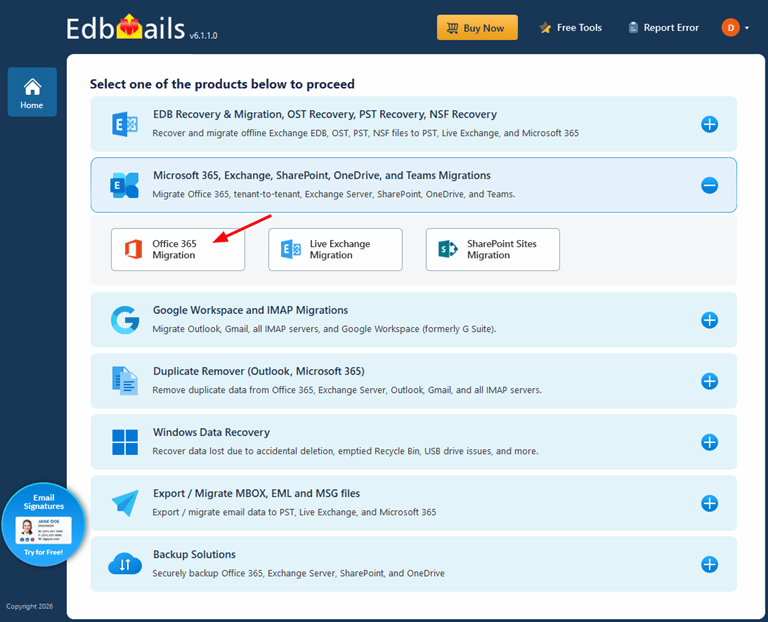
Regulated organizations rarely have a single, tidy migration path. Data-sovereignty requirements, legacy systems, and long records-retention obligations mean you often need several directions covered, and doing that with one audited, trusted tool is far preferable to spreading sensitive data across multiple vendors — each of which would be another entry in your third-party risk register.
EdbMails handled every direction our estate required from a single console. The core tenant-to-tenant capability, via the Office 365 to Office 365 workflow, covered the cloud consolidation itself. Where data-sovereignty rules or a hybrid design meant certain workloads had to move back on-premises, the Office 365 to Exchange path handled it without a separate product. For any component moving to a different mail platform, the Office 365 to IMAP workflow preserved content and structure. And critically for a compliance function, the Office 365 to PST export gave us a clean way to produce mailboxes for legal hold, archival, and eDiscovery — with granular filtering by date range, folder, sender, and subject, which is exactly what you want when responding to a discovery request rather than exporting everything indiscriminately. Keeping all of this within one certified, auditable tool simplified our compliance story considerably.
Consistency After Migration: A Compliance Detail People Miss
One thing that cannot be forgotten – and it was only after the mailboxes had arrived that it struck me – is email Signatures and Disclaimers, especially for regulated Organizations. In most regulated sectors, there is a mandatory text that has to be placed in outbound email. For example, a confidentiality statement is required in most regulated sectors. This means that this statement must be replicated in every email that a user sends, but not everyone in the organization will have the same years-old version of the footer. It’s impractical and not a good compliance solution to manage that mailbox by mailbox. We handled it centrally with a dedicated Office 365 email signature management service, which let us enforce one standardized, compliant signature and disclaimer across the whole organization from a single point of control. It is easy to treat this as cosmetic, but in a regulated context, a missing or inconsistent disclaimer is a genuine compliance gap, so building it into the post-migration plan was the responsible thing to do.
The Workflow, and How It Kept Us in Control
The process itself was methodical in a way that suited a compliance mindset, and a no-payment-details free trial — you simply download EdbMails and begin — meant we could validate the entire approach, and document that validation, before any budget or production data was involved. That ability to run a controlled pilot and evidence that it is itself useful in a regulated shop, where “we tested it first,” needs to be a demonstrable statement rather than a claim.
In practice, each stage helped to keep us firmly in control. No stored credentials – source and destination authenticated via OAuth with MFA. The mailboxes and per-folder item counts were loaded automatically into mailboxes, so we felt we were able to confirm scope precisely before moving anything, which is important if some mailboxes are in scope for retention and others are not. As with any environment, I would never skip a sandbox test mode to validate authentication, mapping and connectivity with a small, non-sensitive batch first, which is what we did here—especially important in a regulated environment. We then pre-staged most of the data in the background as users continued to work, then did a last delta sync at each controlled cutover and closed out each stage by exporting the log as our record. The auto-throttling of the process by Microsoft’s throttling code throughout and the permission scaffolding, which happened in the tool rather than hand-written PowerShell, were also helpful to keep the process stable without anyone having to nurse it — and in a compliance context, without the opportunity for human error to enter into a sensitive process.
Pricing and Practicality for a Regulated Budget
Compliance projects are scrutinized on cost as much as on rigor, so the licensing model was a genuine consideration. Rather than the recurring billing of many Office 365 migration services, EdbMails uses a per-mailbox, one-time lifetime licence — you pay once for the mailboxes you need, with no recurring fees or per-migration charges. For a project that is essentially a defined, one-time exercise, that maps cleanly onto how a regulated organization prefers to budget capital versus ongoing spend. The full detail is on the EdbMails pricing page, but it begins at $80 for 10 mailboxes and $299 for 100, roughly $0.50 to $1 per mailbox depending on volume, which is highly competitive for what you are getting.
The headline figure was just the first; there were also practical terms suitable for an enterprise deployment: the licence would run on multiple machines, so we could run parallel, controlled migration streams; it included lifetime upgrades, which were important given the evolving nature of Microsoft’s platform and its need for security; and it had a 30-day money-back guarantee. Add in 24/7 live-chat support and email support — truly helpful when regulated cutovers need an after-hours patch over — and the whole package was hard to resist from the perspective of the people who approve the budget and risk.
A Few Honest Caveats
The prohibitions are never omitted from a responsible review, and there are a few that deserve to be mentioned in a regulated review. EdbMails is built for the Windows platform only, so if you are Mac-first, you need to have a Windows VM or a dedicated machine, but in a controlled environment, this machine should be part of your managed, compliant estate. Outlook is required for any PST export or import – a requirement imposed by Microsoft, not Outlook – but it may be worth planning, as PST export is often what a compliance function needs. If you are performing a very large migration, you may need to reduce the default concurrency to prevent sustained Microsoft throttling. If you’re moving to IMAP targets, note that they won’t include calendars and contacts; these need to be moved separately. These are all optional extras, but if you were doing this in a regulated environment, there would be more advantages to walking in knowing more of the ins and outs of a project before you got there.
My Verdict
If the criterion for success in a regulated industry matters — not only “did it move the data,” but “can I prove it was moved completely, securely, and properly” — EdbMails is one of the best Office 365 migration software programs I looked at in 2026. It provided 100% complete duplicate-free migration that I could certify; a security architecture that included OAuth, TLS, AES-256, and no third-party staging that met our risk assessment; independent certifications and framework alignment that allowed our compliance team to endorse the migration; and, most importantly, detailed audit logging that made the migration defensible as evidence. In a company where each project will go under the microscope, that’s what you want. When you’re burdened by regulation, and you want a migration tool you can really back up, EdbMails is at the top of that list — and you can test it (and document that test) in your environment before you commit, with the free trial.
Popular on OTW Right Now!
-
 The Minimalist Toolkit: Streamlining Classroom Projects with a Free Audio Cutter
-
 Product Information Management Software: What to Look For Before You Buy
-
 The 8 Best AI Software Development Companies Right Now — And Why Most of Them Don’t Deserve the Title
-
 Guide to Selecting the Best Remote Desktop Software


About The Author

Gagan Bhangu
Founder of otechworld.com and managing editor. He is a tech geek, web-developer, and blogger. He holds a master's degree in computer applications and making money online since 2015.