
Mobile Phone Cleaning Kit: How to Safely Clean Your Phone at Home
Introduction
Smartphones are used frequently in daily life, which means they are constantly exposed to fingerprints, dust, lint, and bacteria from regular use. While many people clean the screen occasionally, they often neglect areas like the charging port, speaker openings, and camera lens where dirt can build up over time. This buildup can lead to issues such as poor charging, reduced sound quality, and even shorten the lifespan of the device.
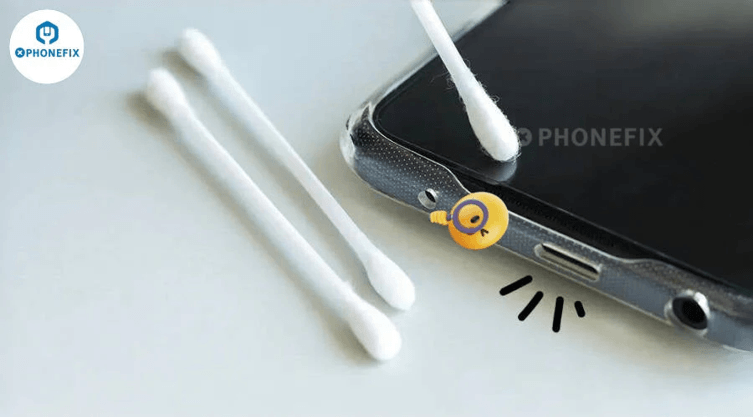
Cleaning your phone safely doesn’t require special skills, but it does need the right tools and techniques. Using the wrong products or too much water can cause damage. This guide explains how to clean your phone at home safely and introduces the tools often used for regular maintenance.
Why Regular Phone Cleaning Is Important
Regular cleaning helps keep your phone looking good and functioning well. It also helps remove dust and grime that can cause problems. For example, dust inside the charging port might block connections, while dirt on speaker grilles can make sound less clear. Oils and fingerprints on the screen make it harder to see and can carry bacteria from frequent use. Cleaning your phone every few weeks can help avoid these small issues from becoming bigger problems.
Before You Begin. Before starting to clean your phone:
- Turn off the device.
- Unplug any cables or accessories.
- Remove the phone case.
- Wash and dry your hands.
- Work on a clean, well-lit surface.
Avoid using cleaners with bleach or ammonia, as these can damage the protective screen coating.
Tools Used for Cleaning a Phone
A mobile phone cleaning kit typically includes tools designed for cleaning electronic devices. These can include microfiber cloths, soft brushes, dust-removal tools, cotton swabs, and cleaning solutions made for electronics. A phone cleaning brush is especially useful for removing dust from tight places like speaker openings, charging ports, and SIM card slots without applying too much pressure. Using soft, non-metallic tools helps prevent scratches on sensitive parts.
Step 1: Clean the screen.
- The screen is the part of the phone that gets touched most.
- Use a clean microfiber cloth to gently wipe away fingerprints and smudges.
- If more cleaning is needed, lightly dampen the cloth with a small amount of screen-safe solution. Never spray liquid directly onto the phone.
Step 2: Clean the Charging Port
- Charging issues can often be caused by dust and lint inside the charging port.
- Use a soft brush to carefully loosen visible debris without pushing it further into the port.
- Avoid using sharp metal objects, as they can damage internal parts.
- If the debris is tightly packed or the phone still doesn’t charge properly, it might be best to take it to a professional.
Step 3: Clean the Speakers and Microphones
- Dirt can accumulate in the speaker and microphone areas over time.
- Use a soft phone cleaning brush to gently remove loose dust with light strokes.
- Avoid applying too much pressure, as the speaker mesh is delicate.
- Regular cleaning helps keep audio clear during calls and media use.
Step 4: Wipe the phone body.
- After cleaning smaller parts, use a microfiber cloth to wipe the frame, back panel, and camera area.
- For phones with glass backs, gently remove fingerprints without using abrasive materials.
- Be careful when cleaning camera lenses to avoid affecting photo quality.
What You Should Avoid
Some online cleaning methods can be harmful.
Avoid:
- Sharp metal tools
- Excessive moisture
- Household chemical cleaners
- Abrasive cloths or paper towels
- High-pressure compressed air used too closely
These methods can scratch surfaces or damage internal parts.
How Often Should You Clean Your Phone
There’s no one-size-fits-all cleaning schedule.
For most users:
- Wipe the screen several times a week.
- Clean the charging port every one to two months.
- Remove dust from speakers when sound quality decreases.
- Do a full exterior cleaning every few weeks.
If you work outdoors or in a dusty environment, you may need to clean your phone more often.
When to Choose Professional Cleaning
While routine cleaning is generally safe for most users, professional repair services might be better if:
- Liquid has entered the phone.
- Charging issues still exist after cleaning.
- Dirt has reached internal parts.
- The phone needs to be taken apart for deeper cleaning.
Opening modern phones without proper tools can damage water resistance or internal components.
FAQs
Is it safe to clean my phone at home?
Yes. Basic exterior cleaning is usually safe when using the correct tools and avoiding too much moisture.
What is a mobile phone cleaning kit?
It is a set of cleaning tools, such as microfiber cloths, brushes, and other accessories, designed for keeping electronic devices clean.
Can a phone cleaning brush damage my phone?
A soft, non-metallic brush is safe if used gently to remove dust from ports and speaker openings.
How often should I clean my phone?
Most users can do light cleaning weekly and a more thorough clean every few weeks.
Conclusion
Keeping a smartphone clean is a simple way to improve its appearance and daily use. Dust, lint, and fingerprints build up naturally, but careful cleaning with the right tools helps prevent issues like blocked charging ports or poor speaker sound. Using a mobile phone cleaning brush kit along with a soft phone-cleaning brush gives a practical way to clean sensitive areas safely. For routine care, gentle cleaning is usually enough, but more serious issues should be left to experienced repair technicians.
Popular on OTW Right Now!




About The Author

Gagan Bhangu
Founder of otechworld.com and managing editor. He is a tech geek, web-developer, and blogger. He holds a master's degree in computer applications and making money online since 2015.