
Does Video Face Swap Work Sideways?
A face turning sideways is one of the first things I test when I try any face swap tool, because it shows the weak spots fast. Front-facing clips are the easy part. The real question is what happens when the nose blocks one cheek, one eye starts to disappear, hair crosses the face, or the person turns almost into profile. Tools like EasyFaceSwap can handle many normal head turns, but the result depends heavily on the source face, the video quality, and how far the face rotates.
In my tests with casual phone videos, talking head clips, and short social media edits, mild side turns usually worked well. The swap stayed believable when the face moved 20 to 45 degrees from the camera, especially if the lighting was even and the original face was clear. Strong side profiles were more mixed. A good Video Face Swap can still track the face, but the output may show soft edges, odd cheek shape, or small flickers around the eye and jaw.
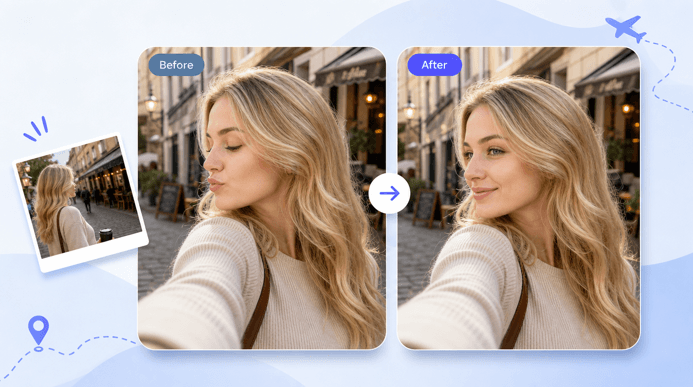
Does video face swap still work when the face turns sideways?
Yes, video face swap can work when the face is sideways, but it works better with partial turns than full profile views. Most modern face swap software identifies facial features, like face outline, eyes, mouth, nose, and chin. Some of those landmarks are obscured when the head rotates. The tool then is required to make a guess at what the hidden side of the face should be like.
This is where the quality can go down with that guessing. A facial profile facing the camera provides all the data for the software. You may find that the swap is not as sharp or as stable when the face is viewed from the side, as it is when viewed from the front. The new face may slide slightly, stretch along the side of the cheek or lose the detail around the outer eye.
The ideal outcome is a smooth, not-too-quick face turn. It is easier to look to the side slowly than to snap the head quickly. Strong tools may struggle if the person turns away, talks, blinks, and moves through shadows at the same time. This doesn’t imply that the swap fails but it may require a cleaner input clip or a different source image.
A full profile view is the most difficult case. If just one eye, one cheek, or one side of the mouth is visible, there’s little to compare to the tool. Some apps will maintain the swap, and the face will look flatter than normal. Others might have a temporary “loss of swap” and retrieve it when the face faces forward once more.
Why do side angles make face swapping harder?
Side angles are difficult because a face isn’t a flat sticker. It is multi-layered, has curves, shadows, and overlapping parts. As the head rotates, the nose shape’s different from the camera’s perspective, the jawline is accentuated, and one side of the face could be lost. The software has to place a new ID on a moving 3D form from a 2D video frame.
Occlusion is the biggest issue I see. Occlusion is when a portion of the face is obstructed or concealed. May occur when far cheek obstructs nose, when hair obscures forehead, hand on chin or when glasses pick up glare. After these details are blocked, the tool must decide what to keep and what to replace. This decision can lead to minor inaccuracies.
Side angles also change more in lighting. One side of the face can be lit up, the other in shadow. The lighting on the source face photo may be flat and front on – this may not match well with a video shot where the person faces strongly to the light source. Swap may appear glued onto the face even with a good face shape track.
Another issue is motion blur. A quick turn may cause the eyes, mouth and jaw to become blurred for several frames. When people normally view a video, they don’t notice the blur, but a face swap video has to map the new face to the blurred frames. If the tracking slips for just an instant, a flicker may be noticed by the viewer.
Here’s how I usually judge sideways face swap difficulty before running a clip:
| Sideways situation | Usual result | What to watch for |
| Small head turn | Often clean | Minor edge softness |
| Half profile | Usable with good footage | Eye and cheek distortion |
| Full profile | Mixed results | Flat shape or lost detail |
| Fast head turn | Less stable | Flicker and sliding |
| Hair or hand over face | Harder to blend | Broken edges |
How can you get better results with sideways face turns?
Use the clearest face in the source that you have access to. Use the sharpest, forward-facing image you have, but make sure it has enough facial detail for the AI to recognize the face. The outline of the eyes, nose and mouth and face should be distinct. If you’re looking to get a natural result, avoid using a photo with heavily filtered lighting, shadowy areas, sunglasses, or the photo being taken with the subject’s face tilted.
The video is as important as the face image. I’ve found that 1080p clips have worked better for me than clips exported from messaging apps. The compressed video tends to muddy the skin texture and eye detail and makes tracking more difficult. Where possible, use the original video file (not a file that has been downloaded and reuploaded multiple times).
One of the simplest victories is good lighting. Light across the face will help the swap during the turn, even if it is light. Bitter side light may still be utilized but it results in tool shadows that may be different from the actual source picture. Cleaner results are typically achieved with soft indoor lighting, outdoor open shade or a bright room that does not have strong backlight.
If testing the clip, keep it short. I want to try a five- to ten-second section, especially the part where the head turns. This helps save some time and eliminates the need to determine if the angle is going to be a problem. If it is, the rest of the clip will likely work too.
It also helps you select shots where you can keep the subject’s face large in the frame. Small faces are difficult to follow and a side turn makes them more difficult. If this is your editing process, crop the video first if the subject is far from the camera. The larger the face that occupies the frame, the more detail the tool has to work with.
For creators looking to simplify the process, Invideo’s AI video face swap tool can help recreate videos by uploading a source clip and adding the face image you want to apply. The AI-powered workflow generates realistic face swaps quickly while maintaining natural-looking results across different angles and movements.
What problems should you expect in a side-profile face swap?
The most frequent problem that comes up is flicker. The face that is swapped may appear normal for a few frames, and then shimmer or jump at a certain angle for the head. This can occur around the far eye, mouth corner or edge of the cheek. More noticeable in close-up videos, as small changes are more noticeable.
Shape mismatch is also a problem. If the individual in the video has a narrow jaw and the source face is wide, the difference could be in front view and not become apparent in side view. Side angles provide a better view of the nose bridge, chin and forehead slope. If they don’t fit properly, it might be a mask instead of a face.
There can be texture issues, as well. Sometimes, too much detail will appear on the turned side of the skin, particularly if the face is lit from one side. Other tools focus on stability of the swap, instead of on retaining all pores and lines. This option can create a cleaner look and make the video less realistic.
During side turns, it’s difficult to get mouth movement. The rapid movement of lips and cheeck happens when talking. A profile view of the mouth is harder to read because one side is partially obscured. When the person speaks rapidly, the exchanged mouth may appear a little slow or soft.
Glasses, beards, bangs, and hands near the face make it more difficult. A good tool can save these information, but these can play a role in making the boundary between the original video and the new face be confused. I have found to be the most unpredictable, because of reflections changing with every turn of the head in glasses. At times they look normal, and at other times the swap gets distorted around the frame.
Is a sideways face swap good enough for real projects?
Sideways face swaps are sometimes sufficient if the video’s clean and the face swap is intended for casual editing, memes, social media, etc. The viewer is generally interested in the overall expression and action of the film, rather than individual shots. A side look that has a very small edge could still appear convincing at normal playback.
If you need to test more carefully, use polished brand videos, music videos, short films or work for clients. Both sides may miss in one shot and then hit in the next, even by the same player. The variations could be due to lighting, speed of the movement, compression or proximity of the face to the camera. I wouldn’t promise a flawless profile swap before trying out the exact pieces of footage.
It is best to plan on the limits. Make steady head movements, clear lights with less full profile moments. When shooting new material, make sure the subject naturally turns instead of swiveling his or her head from side to side. Do not have hair in face, no props across cheeks or mouth.
Before swapping, be familiar with the video by looking at the side-turn frames. Stop at the angle that is most challenging, and watch for features that may be blurred, in shadow, and blocked. If you have a difficult time reading the original face, you’ll probably have a difficult time with the tool as well. It is still possible to do it, however, your expectations should be realistic.
The quick answer is, yes, video face swap works as long as the face rotates sideways; rotating sideways is a stress test. The first two types of turns are usually considered clean: a mild one looks good if the footage is good; a half profile can be good with good footage. The last type of turn is the least reliable. Record the video in a sharp way, and use a good source face with adequate lighting, then practice the most difficult few seconds first. This little trick will save you time and increase your odds of securing a “natural” rather than “forced” swap.
Popular on OTW Right Now!



About The Author

Gagan Bhangu
Founder of otechworld.com and managing editor. He is a tech geek, web-developer, and blogger. He holds a master's degree in computer applications and making money online since 2015.