
Choosing a 3D Printer for Kids: 7 Specs That Actually Matter
Printer spec sheets are written for engineers. You’re a parent trying to work out which one to buy.
Here’s the short version: seven specs. Those are the ones that really matter in a house with kids. You can pretty much ignore the rest for now.
Our printer spent its first month on the kitchen counter, humming up next to the fruit bowl as the kids were having a go at arguing about whose dino was going to print first.
The spec sheet will tell you nothing of this. It’s designed to sell printers, not to deal with life in your living room.
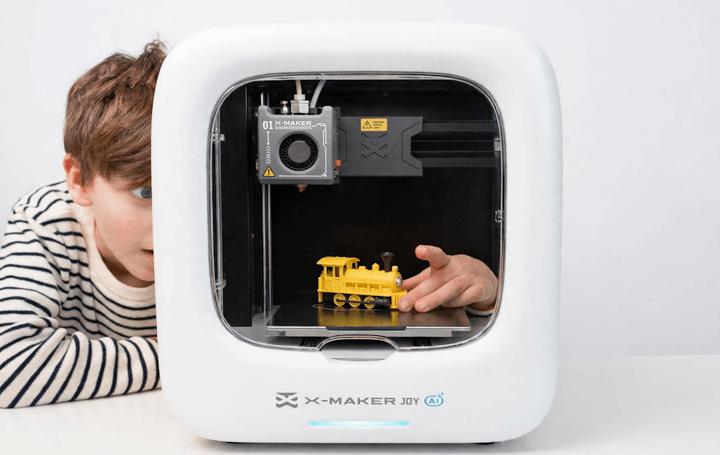
Start With a Closed Box
This is the first thing people get wrong. They buy an open frame printer as a cost-saving measure, which sounds like a good idea at the time. What you end up with is an open frame with all the hot and moving bits exposed, and you’re then left with the problem of where do you put it? You need a spot where a child won’t be able to get at it for six hours. Where the hell is that? You don’t have that in most homes, your home probably doesn’t either.
An enclosure is just a box around the print area, with walls, a door, and often a small filter fan running in the background. You want one that’s fully enclosed with a door that stays shut during printing. This keeps little fingers out of the hot bits, keeps the temperature stable and makes the printer a lot quieter (that last bit is more important than you’d think on a school night). If you want a fuller walkthrough before you buy, this guide on how to choose a 3D printer for kids covers the trade-offs in plain language.
PLA Heat Is Plenty
Each plastic has a certain temperature that the nozzle has to provide. What you actually need is PLA (prints at around 190 to 220 degrees C). It’s low, it’s simple, it’s easy to use and it’s the sort of plastic that won’t cause you any problems at all.
What about the printers that advertise ABS or nylon? Best to just pass on those. They require hotter nozzles, heated beds and additional ventilation. They’re also very prone to warping. For the first year or so of your kid having a 3D printer, PLA will do pretty much everything you need.
Skip the Giant Build Volume
People will often pay a premium for a huge build volume, and then it just sits there empty for months.
Build size is the maximum size object the printer can make (in mm per side). A fairly modest cube is more than sufficient for most things really (toys, figurines, replacement game pieces etc). That’s what kids are printing. A larger bed is more expensive and takes longer to heat up so even small prints will take longer. If your child is printing chess pieces or phone stands, they’ll never be using the full build volume. It’s only when you’ve got the printer on the kitchen table that you realize it.
The App Decides Everything
A common mistake is to assume that every slicer app is equally easy to use. They aren’t.
A slicer is the app that takes your 3D model and turns it into the instructions for the printer. For kids, you want a beginner’s app (one tap print and a small number of pre-made models). It should have very simple settings, just fast or detailed for instance. The professional apps have loads of sliders (dozens of them) that no one in your house is ever going to touch. If the app looks like engineering software, then the printer is going to end up in the corner, unused. This is a very common scenario.
Stick With Plain PLA
Filament is the plastic that the printer melts, and it’s sold in 1kg spools. The safest bet is standard PLA. It’s the easiest to print, warps the least and doesn’t require a heated enclosure.
The mistake? Exotic filament. Or bargain spools to save a few dollars. Off-brand spools vary in diameter and melt behavior. Clogs. Failed prints. Your call. For the first few months, buy the manufacturer’s own spools and remove the variable; aoseed.com lists the company’s own PLA and spare parts in one place, so compatibility is one less thing to troubleshoot.
Check the Noise Rating
A classic error is putting the printer in the kids’ bedroom. You then discover that even on quiet mode it’s loud enough to compete with them doing their homework.
A printer will hum and click for hours on end. Check the noise rating (should be under 55dB, roughly the level of a normal conversation). Enclosed designs are generally quieter than open frames. Work out where you’re going to put it before you buy it, not after. Ours started in the hallway and we moved it twice.
Budget the Filament, Not Just the Printer
The printer is the major purchase. The projects aren’t free though.
A 1kg spool of PLA is around $20. A small toy will use around 50g, which is only a dollar or two worth of plastic. The electricity cost is negligible; a desktop printer uses 50-150W, so a 10-hour print will add less than a couple of dollars to your power bill. The real error is that you budget for the printer and you don’t budget for the filament. The filament cost is ongoing and the kids will be printing loads at the outset. Keep 2 or 3 spare spools in the closet.
Match the Workflow to Their Age
Ages 6 to 8. For ages 6 to 8 you run the printer while your child is picking the models and watching. Keep the prints short and stick to the ready-made designs. Changing the filament should still be a grown-up job.
Ages 9 to 12. For ages 9 to 12, you can get the kids started on the app and have them using the block-based design tools. You’ll need to assist with the setup and, of course, keep an eye on the filament swaps at all times when the nozzle area is open.
Teens. Teens can manage the full workflow (find the models, slice, start the print, clear the odd failed one), they can attempt the more difficult materials and can do some basic troubleshooting.
Conclusion
None of these seven specs is exciting by itself, and that’s okay.
The right printer for a kid isn’t flashy. It should be enclosed for safety and quiet, have simple software that actually gets used, and use filament that’s cheap enough you don’t mind how much they print. If you get those three things right, the printer becomes a normal household tool, not a weekend project that gets abandoned after a month.
Popular on OTW Right Now!


About The Author

Gagan Bhangu
Founder of otechworld.com and managing editor. He is a tech geek, web-developer, and blogger. He holds a master's degree in computer applications and making money online since 2015.