
How AI Design Tools Are Supercharging Blogging in 2026
Blogging in 2026 feels like running a one-person media empire. Deadlines stack up, audiences scroll faster than ever, and generic content gets buried. The key difference between those who do publish and those who burn out is that those who can create at a faster pace and who have a particular style that makes the scroll stop make the difference.
I’ve spent years testing tools and tweaking systems as both a writer and publisher. Having the repetitive creative grunt work offloaded isn’t the only game-changer; it’s allowing you to remain in flow with the parts that truly count: the sharp ideas, personal touch, and connection with the audience. At the heart of this change will be the AI design and rendering tools. They enable you to create stylish, attention-grabbing graphics in just minutes, rather than hours or costly commissions.
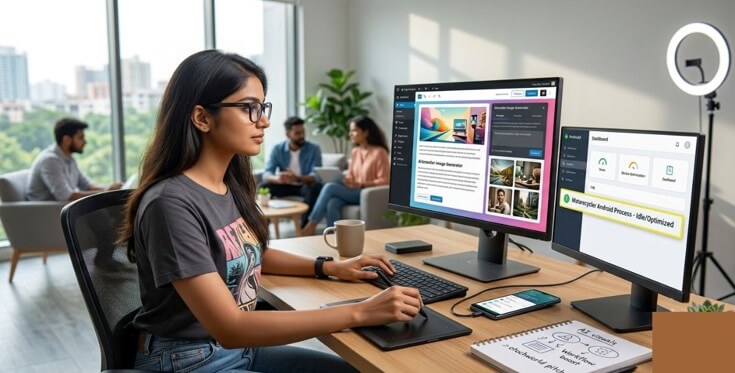
Upgrading Your Blog Visuals with AI
Stock photos have become a visual background. They are easily identified by readers, nd search engines will love websites that sound original. With custom imagery, you are sending a message of caring and expertise. It not only increases dwell time, social share, and indirectly SEO, but it also does it.
This is where AI rendering tools shine. You can use tools such as MidJourney, Ideogram, Nano Banana, Firefly, and even platforms specializing in creating graphics that are photorealistic or stylized almost to the specifications of your post. Looking for a futuristic dashboard mockup for a productivity article? A dark, brooding portrait of a programmer at work late into the night? Suggest it, repeat in seconds, and adjust and inpaint with style or references.
Practical workflow tips that actually work:
- Consistent branding: Feed the AI reference images of your color palette, logo style, or recurring motifs. Many tools now support style locking, so every visual feels like part of the same world.
- Thumbnails and social assets: Generate multiple variations quickly. Test what performs best without designer back-and-forth.
- Custom illustrations: Turn rough sketches or text descriptions into polished diagrams, infographics, or metaphorical scenes that explain complex ideas better than words alone.
- Product mockups and screenshots: Place your app or tool screenshots into realistic device frames or lifestyle scenes without Photoshop marathons.
Time can add up quickly. No longer do an afternoon hunting down licenses and editing, but now it happens between drafting paragraphs. With a little prompting and light editing, these images are now of a quality that looks professional and can be made unique.
Be aware that AI-generated content should not be considered definitive. Always double-check for accuracy – particularly on images (Ideogram still leads here) and add your own customisations. It’s not a replacement, it’s an augmentation.
Automating Routine Blogging Tasks
Visuals are only one piece. The full workflow includes research, outlining, drafting, editing, formatting, and distribution. AI handles the repetitive layers effectively.
Outline and structure generation: Provide Claude, GPT models, or specific tools, such as ContentBot, with the topic and target keywords. They are able to develop logical outlines, including subheads, suggested angles,s and research hooks. I sometimes remind people to ask for “scannable structure optimised for mobile readers with bullet-heavy stuff.
Content research and auditing: Tools identify gaps, recommend internal links, and highlight readability issues within content. Optimizers or built-in analyzers, optimized like surfers, or competitors’ coverage is checked without manual tab overload.
Scheduling and repurposing: Automations can send a completed post to WordPress, create social snippets, email newsletters, or generate thread versions of long-form posts using Zapier or Gumloop automations. Video-to-blog converters take your recorded thoughts as video and come up with the structure and the text of the blog posts.
Image and asset handling: AI processes images beyond generation – it can auto-crop for various platforms, recommend alt text and compress images without compromising quality.
A typical boosted workflow looks like this:
- Morning: Brainstorm and outline with AI assistance (15-30 minutes).
- Midday: Write core content in your preferred editor.
- Afternoon: Generate and integrate 4-6 custom visuals.
- Evening: Quick audit, SEO check, and schedule across platforms.
A lot of creators say that they have decreased production time by 50-70% and improved the quality of the produced videos. The important thing is to create repeatable prompts and templates that you do not need to “reinvent the wheel” every time.
Maintaining Hardware Efficiency for Content Creators
All this AI activity occurs device-agnostically. You do a lot of brainstorming, editing, and socializing on the phone and tablet, while you do the heavy lifting on the desktop. Background apps can quietly work against you, consuming battery, warming the device to distract you from your focus, and muddying the waters for multitasking.
Practical maintenance relates to understanding and managing these. If you’re running your Android smartphone to the max with content tools, AI applications, and multiple tabs, it’s well worth delving into system work. Learning about processes like the Matarecycler Android process helps identify and optimize memory management or recycling routines that run silently and impact performance during long creation sessions. When you don’t have to wait for unnecessary background activity to clear, your phone is always ready for on-the-go editing and uploading.
Quick wins for any setup:
- Battery and performance settings: Use adaptive features that learn your patterns and restrict heavy background apps.
- App permissions: Limit always-on location, syncing, or data use for non-essential tools.
- Cloud offloading: Run heavy rendering in browser-based or dedicated cloud services so your local machine doesn’t choke.
- Regular audits: Check battery usage stats weekly and kill or restrict offenders.
Keeping on top of hardware ensures creative momentum rather than charging and cooling halts.
Practical Takeaway
The tools have been developed and will be enhanced on a monthly basis. Try out some of them; choose an image generator, a flow of automation, and a performance habit. Record your performance and energy for an extended period of 2-3 weeks. You will be more productive, create better graphics, and won’t be as tired as before.
But the human touch is irreplaceable: your voice, your experiences, your getting your head around things in new ways. The assembly line is done by AI, so you can concentrate on the craft. Thoughtful adaptation will be the key for creators to be leaders in 2026 and beyond. Those that don’t are likely to be left behind by faster, sharper competition.
Start small, stay intentional, and watch your workflow transform.
Popular on OTW Right Now!

About The Author

Gagan Bhangu
Founder of otechworld.com and managing editor. He is a tech geek, web-developer, and blogger. He holds a master's degree in computer applications and making money online since 2015.