
How deep should a desk be for two monitors? The measurement most setups get wrong
| TL;DR
● 24 inches is the minimum depth for a computer desk. That’s enough for one small screen and not much else. ● With one or two 27-inch monitors, plan on 27 to 28 inches of depth. A 32-inch or ultrawide screen wants 29 to 30 inches. ● Two monitors side by side need 55 to 60 inches of width. Three screens or a full gaming rig need 66 to 72 inches. Short version: people measure the width for a second monitor and forget the depth, so the new dual-screen setup ends up with both screens practically in their lap. |
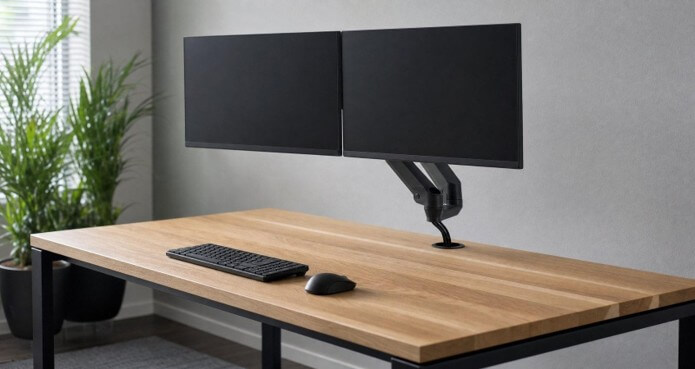
With the screens on an arm, the back half of the desk stays clear. On a stand, that space belongs to the stand’s foot.
When setting up with two monitors, choose a desk that is between 27 and 30 inches deep, the exact figure depending on the size of the screens. Many computer desks are constructed to be at least 24 inches in depth, and that space is quickly used up. The keyboard will occupy the front of the desk, the monitor stand will take up the back, and once the screens exceed 24 inches in size, there is no more room to put them in. The width is the figure shown in the listing photo, while the depth is the one you experience by mid-afternoon.
Desk depth by monitor size
Bigger screens need to sit farther away, so the desk has to be deeper to hold them there. These are the depth bands worth working to:
| Monitor setup | Recommended desk depth |
| Absolute minimum, any setup | 24 in |
| One or two 27-in monitors | 27 to 28 in |
| A 32-in or ultrawide monitor | 29 to 30 in |
Those figures come from FindOfficeFurniture’s computer desk buying guide, which also gives width by screen count: about 48 inches for a single monitor, 55 to 60 for two, and 66 to 72 for three screens or a gaming setup. It puts standard desk height at 29 to 30 inches.
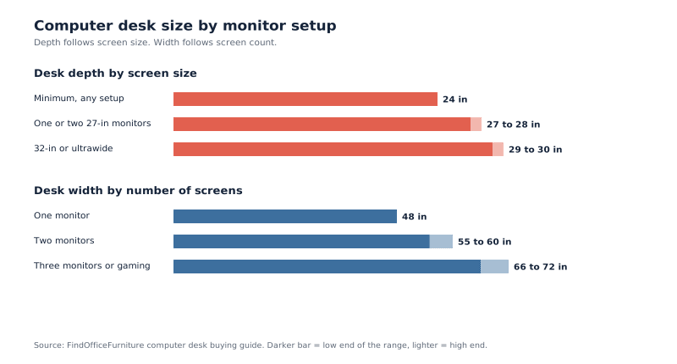
The width depends on the number of screens you are using, while the depth depends on their size, which is the point that people overlook.
Why depth runs out before width
The limit is viewing distance. OSHA’s guidance on computer monitor placement puts the preferred distance between the eyes and the screen at 20 to 40 inches. Bigger panels belong toward the far end of that range, because up close you end up turning your head to read the edges.
Two monitors make the situation worse. The majority of people tilt the two screens in towards each other so that both of them face the chair, and as a result the outer edges of each screen move closer to you. Since on a 24-inch desk the stands are already close to the rear edge, the angled corners end up nearer than the middle of either screen. To make up for this, you have to sit back, but then your keyboard is too far away, and the entire arrangement gradually moves off the front of the desk.
The keyboard needs some space as well. If you provide a few inches of open desk in front of it, your forearms have a place to rest, but that space is the first thing to vanish when the monitors begin to move forward. Whenever you find yourself typing with your wrists dangling off the edge, it is a sign that the desk is too shallow for the screens it has.
The monitor arm question
The cheapest solution for increasing depth is to use a monitor arm, which can be clamped onto the back edge or secured by bolts going through a grommet hole; the screens then hang over the desk rather than being placed on a stand with a foot in the middle of the desktop. With a shallow desk, this can make the difference between having a workable arrangement and one that is cramped.
Before you buy one, check three things:
- The rear edge. Since an edge clamp requires a free lip, the desk cannot be placed directly against the wall, and certain desks have a modesty panel or a crossbar exactly where the clamp is intended to go.
- Desktop thickness. The thickness of desktops is such that thin tops made of particleboard tend to sag when carrying a clamp with two monitors, whereas those made of solid or commercial-grade laminate are more resistant.
- Weight capacity. 1. The weight capacity is such that the buying guide indicates a setup consisting of two monitors and a tower falls within the 150 to 200 pound capacity range. A desk rated at 100 pounds is not the correct kind of desk for this purpose.
Cables are a depth problem too.
All the cables that cross the back edge of the monitor arm or stand prevent the arm or stand from fitting tightly against the edge, and two monitors usually require power, video connections, and sometimes a USB hub as well. Instead of having the cable bundle drape over the edge, a cable grommet located near the back of the desktop has a diameter of 2 to 3 inches and allows the entire bundle to pass straight through the surface. In the case of a desk that doesn’t have such a grommet, a clamp-on cable tray placed under the back edge can achieve the same result.
Tidy routing also makes faults easier to find. If the second screen stays dark once everything is plugged in, the desk is rarely to blame. More often it’s the cable, the port, or the dock in between, and this walkthrough of why a docking station stops detecting a second monitor covers how to isolate which one.
Before you order: a quick checklist
- Find the depth of each monitor’s stand foot. In that case, if the two stands placed side by side take up half of the desk, allow for an arm.
- Look at the height of the keyboard. The ideal height is 26 to 28 inches from the floor, so if you have a 30-inch desk, a keyboard tray is worth considering.
- Leave between 36 and 48 inches behind the front edge of the desk to allow the chair to roll back.
- Keep the floor under the desk clear. Mayo Clinic’s office ergonomics guide warns that storing things under the desk shrinks the legroom you need to sit properly, and a PC tower is the usual culprit.
The second monitor is the upgrade everyone talks about. Those extra four to six inches of depth are what make it comfortable, and you only find out you skipped them after the desk is already built.
Popular on OTW Right Now!




About The Author

Gagan Bhangu
Founder of otechworld.com and managing editor. He is a tech geek, web-developer, and blogger. He holds a master's degree in computer applications and making money online since 2015.