
How to Color Grade Videos Faster With AI Tools
Color grading often takes a long time since editors have to balance exposure, correct color problems, and ensure a consistent appearance is achieved across a number of clips. By dealing with the repetitive adjustments, AI Video Editing tools are able to speed up this process while still providing manual controls. The following guide outlines the way in which AI assists with color correction, creative grading, and faster professional work processes.
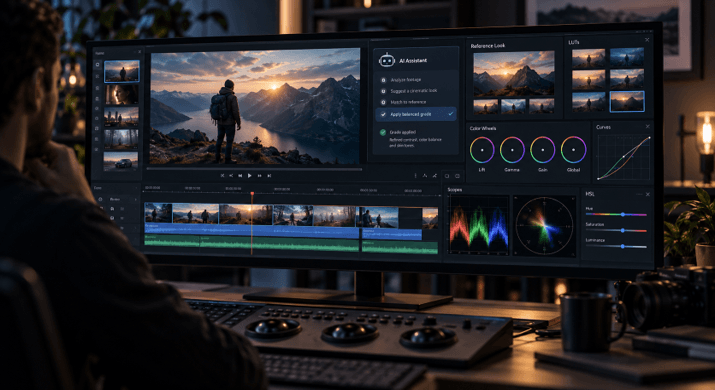
A video’s quality isn’t just a matter of having sharp footage or a good story; the colours also affect how viewers feel about a particular scene, since a warm tone can make a memory seem nostalgic while cooler colours can produce a serious or dramatic atmosphere.
The problem is that color grading requires a lot of time, since editors have to adjust the exposure, correct the white balance, match up the different shots, and also establish a uniform visual style throughout the whole project.
It is in this area that AI Video Editing is altering the way work is done; rather than having to adjust each clip from the start, editors can use AI to look after the repetitive colour tasks and then make their own final adjustments.
Video has also become one of the biggest forms of online content. According to a Forbes report on video marketing trends, video continues to be a key format for businesses because audiences increasingly prefer visual content.
In this guide, you’ll learn how AI Video Editing helps with color correction, how professionals can combine AI assistance with manual controls, and how modern editing workflows make grading faster without removing creative control.
How can AI speed up video color grading?
AI Video Editing is able to speed up the process of colour grading by examining the footage, making the necessary adjustments in accordance with the instructions, and cutting down on the amount of repetitive manual work it requires. It assists editors in correcting typical problems such as exposure, colour balance, and consistency while at the same time allowing them to make fine adjustments to the final outcome.
In traditional color grading it is necessary for editors to examine each shot one by one, and this can become a difficulty when dealing with long videos, interviews, documentaries, or projects that were recorded in different lighting conditions.
AI tools are able to assist by interpreting the visual aspects of the footage and carrying out the required adjustments more quickly; for instance, an editor could request a warmer tone, a softer contrast, or a cinematic look rather than making all the adjustments by hand.
What we want to do is not to take away creative decisions since the selection of colours still has to take into account the story, the mood, and the audience. The AI just lessens the amount of time spent on making repeated adjustments.
Some common tasks where AI can help include:
- Balancing exposure between clips
- Fixing unwanted color casts
- Matching the look of different shots
- Applying a consistent visual style
- Creating early versions of a grade for review
Why are color correction and grading different?
Color correction is concerned with overcoming technical issues in the footage, whereas color grading is responsible for giving the video its particular style and emotional atmosphere. Correction involves achieving a balanced image, such as adjusting exposure and white balance. Grading, on the other hand, determines the overall visual character by means of colour, contrast, and tone.
Many novice learners combine these two processes. Yet they are addressing different problems.
Color correction is normally carried out first in order to make the footage appear natural and consistent; this involves correcting shots that are too dark, reducing any undesirable colour shifts, and balancing the output from different cameras.
Colour grading takes place after correction and is the stage at which the creative aspect is added, this aspect determining the atmosphere of the video.
For instance, a travel video might employ bright colours and warm tones in order to produce an energetic atmosphere, while a documentary could use a softer and more natural colour scheme to keep attention on the story.
Understanding the difference enables editors to achieve better results since they know whether to deal with a problem and whether to develop a style.
Faster workflows with AI-assisted color tools
Modern video editing workflows that use AI combine automated functions with a range of professional controls, so that editors can let the AI take care of the repetitive tasks while still having access to the more advanced tools for making creative decisions.
The method is beneficial for professionals since color grading represents only one aspect of the editing process; they also have to look at the footage, put together sequences, adjust the audio, and produce various versions.
An agentic workflow alters the way editors carry out these tasks; rather than carrying out each operational step manually, they can assign the relevant work and then review the result within the timeline.
AI Video Creation is moving beyond single prompts to directed or creative workflows where users guide AI through specific tasks instead of only generating a final output.
This method is particularly useful when dealing with large projects since minor adjustments can require several hours.
How does Invideo Editor help with color grading?
Invideo Editor features a professional editing timeline together with AI editing agents which carry out the editing tasks assigned to them while still allowing the project to be modified. The workflow enables creators to direct changes, look at the results and then keep improving the edit.
With regard to colour, invideo editor provides both AI-assisted adjustments and manual control options. Editors are able to correct exposure, balance the colours, and establish a visual style by either describing the look they desire or by providing a reference image. The colour workflow makes use of various tools such as wheels, curves, hue and saturation controls, qualifiers, LUTs, and waveform scopes in order to allow for detailed adjustments.
Using Invideo’s color grading suite, creators can correct exposure, balance colours, and create the look they want. They can describe the grade to AI agents on invideo editor or share a reference image, then refine the result using colour wheels, curves, and manual controls. The result depends on the original lighting and colours in the footage.
The process might also be made more specific. Instead of asking it to modify the whole sequence, the editors can instruct the agent as to which shot should be changed. A reference image can be used to determine the colour, warmth, and contrast, while tools such as hue, saturation, and luminance qualifiers aid in selecting particular colour ranges.
For professionals this kind of workflow serves to cut down on repetitive tasks, with the editor remaining in charge of the creative decisions and the AI taking on the more time-consuming aspects of the process.
What AI color grading features help editors most?
AI colour grading features are most useful in that they eliminate the need for repeated adjustments and make it easier to manage complex corrections; the most useful of these features are reference matching, automated corrections, support for LUTs, and targeted colour adjustments.
Some important features include:
Reference-based grading
Editors are able to provide an image which shows the kind of appearance they want. Then the AI can study this reference and assist in making the adjustments so that they achieve a similar level of warmth, contrast, and colour balance.
LUT support
LUTs, which are known as Look Up Tables, are used for applying predetermined color transformations and are commonly employed in order to achieve a consistent style across the footage.
A good workflow involves using LUTs together with some manual adjustments. Invideo Editor allows you to add LUTs and also adjust their strength when combining them with other corrections.
Selective color adjustments
It is not necessary for every change to impact the whole frame, since qualifiers enable editors to focus on particular colour ranges and improve certain areas without altering anything else.
For example, an editor might alter the colour of the product without changing the background.
Building a faster professional editing process
AI video editing performs most effectively when it supports the entire editing workflow rather than concentrating on just one task.
Color grading typically takes place after all the other editing decisions have been made, with the editors first looking over the footage, choosing the useful clips, ordering the scenes, and then perfecting the visual style.
By adopting this method, Invideo Editor combines all editing tasks within a single timeline, assisting with footage review, selecting takes, cleanup, assembly and colour correction while ensuring that any changes remain visible and editable.
This matters for creators working on:
- YouTube videos with long recordings
- Interviews and podcasts
- Documentary projects
- Commercial videos
- Multicam productions
For these projects, saving time on repetitive work gives editors more room to focus on storytelling and creative decisions.
Conclusion
Color grading is an important part of video production, but it does not need to slow down the entire workflow. AI Video Editing tools can help editors correct exposure, balance colors, and create consistent looks faster.
The best workflows combine AI assistance with human creativity. AI can handle repetitive adjustments, while editors continue making decisions about mood, style, and storytelling.
If you are working with large amounts of footage, exploring AI-powered color workflows can help you spend more time on creative choices and less time on repetitive corrections.
Frequently Asked Questions
Can AI completely replace manual color grading?
No. AI Video Editing can speed up many parts of the grading process, but creative decisions still depend on the editor. Factors like storytelling, mood, and brand style require human judgment.
Can AI match the color style of another image?
Yes. AI tools can use reference images to guide adjustments. Invideo Editor allows users to share a reference and guide the agent toward a similar color, warmth, and contrast while considering the original footage.
Do professional editors still need manual color controls?
Yes. Manual controls remain important for detailed work. Tools like color wheels, curves, and qualifiers help editors refine specific parts of a shot after AI assistance.
Can AI help grade long videos faster?
Yes. AI Video Editing can reduce repetitive work in long projects by helping with corrections, consistency, and early grading passes. Editors can then review and adjust the final result based on their creative goals.
Popular on OTW Right Now!



About The Author

Gagan Bhangu
Founder of otechworld.com and managing editor. He is a tech geek, web-developer, and blogger. He holds a master's degree in computer applications and making money online since 2015.