
Clay County KY Government Meeting Minutes Technology Software Solutions
Clay County, Kentucky, has an important terminology difference that should be understood before discussing meeting-minutes technology. The county’s governing body is the Clay County Fiscal Court, not a Board of County Commissioners. The official county website says the Fiscal Court consists of the County Judge Executive and six magistrates, with each magistrate elected from a district.
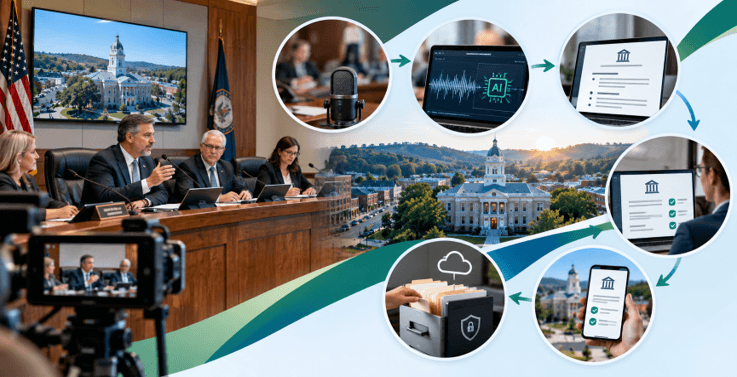
That distinction matters for anyone researching meeting records, government software, or public-access workflows. The phrase clay county board of county commissioners meeting minutes software may appear in searches because similar systems are used by county commissions in other states, but for Kentucky, the more accurate government term is Fiscal Court.
The issue of technology is still very relevant. When a county holds a meeting, it produces agendas, supporting documents, motions, votes, minutes, approvals, records, and responses to public-access requests. If the right software is used, it can link all these steps together into a single controlled workflow, rather than having staff handle separate Word files, email attachments, folders, spreadsheets, and uploads to the website.
The guide looks at the meeting structure in Clay County, Kentucky, the requirements that Kentucky has regarding minutes and public records, the technology capabilities that a county should take into account, and practical ways in which software can improve the entire lifecycle of meeting records without taking over the legal duties of the county officials.
Clay County, Kentucky uses a Fiscal Court.
In Kentucky, the system of county government is unlike that of states which have a county commission or a board of commissioners. According to the official website of the Clay County Fiscal Court, the Fiscal Court is described as the county’s governing body, and the County Judge Executive, together with six magistrates, are stated to be its members.
At present, the county’s website specifies that the regular Fiscal Court meetings take place on the second Thursday of every month at 3.00 p.m. in the Fiscal Court Meeting Room located in the Clay County Administration Building. The website also states that anyone who wishes to raise an issue before the Fiscal Court should contact the office at least ten days prior to the following meeting so that the matter may be included on the agenda.
With regard to software planning, these details indicate a number of fundamental requirements: the system must be capable of keeping a meeting calendar, preparing agenda items, providing deadlines for submissions, retaining the record of the meetings, and making the relevant information available to the public.
What Kentucky law requires from fiscal court minutes
The meeting-minutes software used by a county in Kentucky must comply with the state’s legal framework.
The Kentucky Revised Statutes §67.100 states that the fiscal court constitutes a court of record; it mandates that minutes of each meeting be prepared and submitted for approval at the following meeting; it also states that the official actions of the fiscal court shall form part of the county’s permanent records and that the required records shall be kept in the county clerk’s office.
The Open Meetings framework in Kentucky includes another significant requirement. According to KRS §61.835, the minutes of any actions taken at meetings of covered public agencies must faithfully record the votes and decisions, be recorded in a timely manner, and be available for public inspection at reasonable times not later than immediately after the next meeting of the body.
The county government section of the Kentucky Legislative Research Commission gives the same account: the fiscal-court minutes are sent in for approval at the next meeting, official actions then become permanent county records, and the fiscal-court minutes are open to public inspection.
There are strong reasons for considering meeting software to be a records-management workflow rather than merely a note-taking application.
Why meeting-minutes technology matters
The meeting itself could take a few hours, but the administrative lifecycle associated with it is considerably longer.
Staff are allowed to gather agenda requests and the relevant documents before the meeting; during the meeting, a person must keep track of the order of business, the motions, the votes, and the actions; and after the meeting, the minutes have to be prepared, reviewed, approved, kept, and made available in accordance with the applicable requirements.
If each step is carried out in a different system, small mistakes are more likely to occur. The updated agenda might not match the one stored in a different folder. An attachment could end up being separated from the agenda item it belongs to. A draft minute might be emailed to a number of people without any clear indication of which version is the current one.
Meeting technology that has been designed for this purpose overcomes these problems in the workflow by providing the organization with a central record of the entire meeting lifecycle.
What a modern government meeting software system should manage
An effective system should include more than just minute writing; it should assist with the transfer of information from the preparation of the agenda to the final records.
A typical workflow can include:
- Meeting scheduling
- Agenda-item submission
- Department or staff review
- Supporting-document collection
- Agenda assembly
- Public agenda publication
- Meeting-day action tracking
- Motion and vote recording
- Draft minutes
- Review and corrections
- Approval tracking
- Final publication
- Search and archival access
- Records export and retention
It is not necessary for every county to have all the features right away. What matters is whether the software corresponds with the county’s real process and is able to maintain a reliable chain from the proposed agenda item to the approved public record.
Agenda management is the first technology layer
The meeting is preceded by minutes.
When departments send agenda items by email, it may be necessary for staff to copy details from the messages into a document, download the attachments, rename the files, and ask repeatedly for any information that is missing.
A system for managing agendas can provide a structured form for submitting items. When someone submits an item, they can input its title, description, department, the requested action, and any supporting documents. The staff can then look at the item before it gets onto the final agenda.
For Clay County, the procedure could also include the county’s stated practice of people intending to raise an issue before the Fiscal Court contacting the office at least ten days before the next meeting. The software should adhere to the county’s policy; it should not alter or create that policy.
Supporting documents should stay connected to agenda items
A meeting record is rarely made up just of the minutes.
An agenda item can include a resolution, a financial document, a contract, a map, a staff recommendation, correspondence, or another attachment; if these documents are kept separately, a resident who is investigating an old decision may find it difficult to put together what the Fiscal Court actually considered.
A more effective system links the supporting documents directly to the appropriate agenda item.
The relationship can still be of use following the meeting; once the item is included in the final record, the staff will be able to keep a clear link between the agenda, the attachments, the actions taken, and the approved minutes.
Recording motions and votes
For any public governing body, motions and votes are among the most important of the information presented at meetings.
Section KRS 61.835 requires that the votes and actions be accurately recorded in the meeting minutes.
Meeting software is able to assist by offering pre-defined fields for the motion, the maker, the seconder, the vote result, and for other information needed by the organization’s procedure. Thus, it lessens the need for informal notes.
One must not rely on structure in place of sound judgment. The staff should check the entry before the minutes are finally settled. The software should make it easier to carry out the verification, not lead the officials to approve automatically generated output.
Drafting and approving minutes
A useful meeting platform should make the difference between a working draft and the approved record obvious.
A practical workflow could look like this:
| Stage | Typical purpose | Useful technology |
| Pre-meeting | Collect agenda items | Submission workflow |
| Preparation | Build meeting packet | Agenda builder |
| Meeting | Capture actions | Motion/vote tracking |
| Drafting | Prepare minutes | Structured minutes editor |
| Review | Correct details | Version history |
| Approval | Approve at next meeting | Approval workflow |
| Publication | Provide public access | Web publishing |
| Retention | Preserve records | Archive/export controls |
This approach is especially important because Kentucky law requires fiscal-court minutes to be submitted for approval at the next succeeding meeting.
Searchable archives are a major benefit.
A county can accumulate years of meeting records. Finding one old decision should not require opening dozens of PDFs manually.
A strong archive can allow staff or the public to search by:
- Meeting date
- Agenda item
- Keyword
- Meeting type
- Department
- Resolution or ordinance number
- Action
- Document type
Search should be designed around the questions people actually ask. Someone may not remember the exact title of an agenda item but may remember a road name, department, project, property, or topic.
Searchable records also help staff respond to routine information requests more efficiently.
Public access and Kentucky open-records requirements
The Open Records Act of Kentucky provides a right of access to public records but includes statutory exemptions. According to the Commonwealth’s transparency website, public records may be kept either on paper or in electronic form, and most state and local government records are open to inspection unless an exemption is applicable.
The Attorney General of Kentucky also has guidance and decisions relating to the Open Records and Open Meetings Acts, stressing that each individual request and dispute should be assessed in the light of the specific circumstances and the relevant law.
What this means for people who buy software is that the platform should have practical access controls instead of making everything publicly available by default.
The system should distinguish between:
- Internal working documents
- Records approved for public release
- Records subject to an applicable exception
- Archived official records
- User permissions and administrative controls
The decision as to whether a record is public or exempt is still the government’s responsibility. While software can carry out that decision once it has been made, it should not be considered a decision-maker in a legal sense.
Security and permissions
The information contained in government meeting systems may be at various stages of sensitivity.
A draft will be accessible to only authorized staff before it is published, and after it has been approved, a public version will be available to all people. There may be different access requirements for some records or parts of records under the relevant law.
A modern platform should therefore include permissions based on users’ roles.
Useful controls include:
- Administrator access
- Clerk or secretary access
- Department contributor access
- Reviewer access
- Read-only access
- Public access
- Audit history
- Document-level permissions
Audit history is very useful in cases where multiple people are involved in preparing the same record, since it can be used to find out who made a change to a document, when the change was made, and which version was the one that was approved.
Do AI and transcription belong in meeting software?
It is useful to use AI-assisted transcription and summarization, but they should be regarded as productivity tools, not as authoritative records.
Automatic speech recognition can be used to produce a draft that is searchable from a recording of a meeting, after which a staff member can check the names, motions, votes, numbers, and other key points.
This distinction is important. Transcripts produced automatically may include recognition errors, and summaries created by an AI might omit context or misinterpret what a speaker has said. The process of approving the minutes and of maintaining the official records should continue to be controlled by humans.
AI features in Clay County should therefore be assessed in terms of their accuracy, the procedures for review, how the data is handled, the way it is retained, the access controls in place, and the county’s recordkeeping responsibilities.
Integrating video with the written record
Video can be used to supplement the minutes without taking their place.
A reputable meeting portal has the ability to connect a published recording of a meeting to the relevant agenda or agenda item. This provides a resident with a number of levels of information:
Agenda » supporting documents » minutes » recording
Each one has a different purpose.
The agenda lists what was scheduled. The supporting documents give some background information. The minutes record the official decisions and votes. A recording can also give further context regarding the discussion.
This means that historical research can be made much easier.
Why basic Word files and spreadsheets can become difficult to manage
Although Word and Excel are useful as general-purpose tools, they do not by themselves form a complete government meeting-management system.
A folder full of documents can create problems with:
- Version control
- Search
- Permissions
- Attachment relationships
- Approval status
- Public publishing
- Audit history
- Long-term export
- Consistent metadata
With a very small workflow, simple documents will do. However, as the number of meetings, departments, agenda items, and public requests increases, purpose-built software becomes more appealing since it arranges those relationships rather than requiring staff to set them up manually.
Evaluating technology for Clay County
The evaluation of software should begin with the county’s own processes rather than with a list of features provided by the vendor.
The first thing to consider is how an item progresses through the real meeting workflow in Clay County.
Then ask:
- How are agenda items submitted?
- Who reviews them?
- How are supporting documents stored?
- How are agenda packets assembled?
- How are motions and votes recorded?
- How are draft minutes reviewed?
- How are minutes approved at the next meeting?
- How are final records published?
- How are older records searched?
- How are records exported and preserved?
- How are permissions managed?
- What happens if the software provider changes or the county migrates systems?
This process-based approach usually produces a better procurement requirement than starting with a generic list of software features.
A practical technology roadmap
Clay County does not need to transform every part of its records workflow at once.
A staged roadmap could begin with:
Phase 1: Standardize
- Define meeting and agenda templates.
- Standardize document naming.
- Identify approval stages.
- Establish consistent metadata.
Phase 2: Centralize
- Move agenda items and supporting documents into one controlled system.
- Create role-based permissions.
- Establish a single source of truth for each meeting.
Phase 3: Automate
- Add approval notifications.
- Add structured motion and vote fields.
- Automate publication steps where appropriate.
- Improve search and archive indexing.
Phase 4: Enhance
- Connect recordings.
- Add optional transcription.
- Add advanced reporting.
- Improve public search and accessibility.
A phased approach also makes it easier to test each part of the workflow before introducing more automation.
Where software research fits into the process
Organizations researching government technology often need to compare software capabilities, release information, integrations, and documentation.
A Software Update resource can help when reviewing general software information. Toolsimpli can also be used as a starting point for exploring software-related resources.
When making a decision regarding government procurement, product information should be combined with the county’s requirements, the results of a security review, the findings from accessibility testing, the records-management requirements, the terms of the contract, and legal advice.
The importance of accessibility
Public records will only be of any use if people are actually able to access them.
A modern meeting portal must be compatible with common desktop and mobile browsers and must provide documents in formats that can be used by people having different accessibility needs.
Accessibility must be taken into account for both the public website and the documents produced by the system.
Important evaluation questions include:
- Can users navigate the interface without a mouse?
- Are headings and labels meaningful?
- Are documents searchable?
- Are PDFs created with accessible structure?
- Does the public portal work on mobile devices?
- Are links and controls clearly labeled?
Accessibility must be dealt with during the procurement process, not as a final cosmetic check.
What to ask a software vendor
Prior to choosing a platform, Clay County or any other fiscal court in Kentucky could ask for a practical demonstration.
Ask the vendor to demonstrate one complete scenario:
A department puts forward an agenda item » the staff examines it » the supporting documents are attached » the item is included on the agenda » the Fiscal Court acts upon it » motions and votes are recorded » a draft minute is prepared » the record is approved » the final version of the record is published » a resident looks for it later.
This example shows itself to be much more than just a list of features.
Make sure to get clear answers on issues such as data ownership, export formats, backups, security, user permissions, audit logs, support, accessibility, integration, pricing, implementation, and contract termination.
The key takeaway for Clay County meeting-record technology
The challenge regarding Clay County, Kentucky, should be understood in the context of the state’s Fiscal Court system and in light of Kentucky’s public-record laws, rather than using the terminology employed by counties in other states.
The official website of the county states that the Fiscal Court is the governing body, lists the details of its regular meetings, and offers a way for the public to have items placed on the agenda.
The law of Kentucky stipulates that the minutes of fiscal court meetings must be prepared and submitted for approval at the following meeting, whereas the Open Meetings framework provides for an accurate record of the votes and decisions taken and ensures that these minutes are available for public inspection pursuant to the statute.
Even though technology can help make this process easier to manage, the aim should not be automation for its own sake. The aim should be to establish a reliable record lifecycle: accurate information should enter the workflow, it should then be reviewed by authorized staff, official actions should be recorded, the minutes should be approved, the records should be preserved, and the public should be able to find the relevant records without facing unnecessary obstacles.
The practical function of government meeting-minutes technology is to act as a reliable link between the proceedings in the Fiscal Court meeting room and the public record that remains afterward.
FAQs
1. Does Clay County, Kentucky have a Board of County Commissioners?
Clay County in Kentucky has the Fiscal Court as its county governing body. According to the county’s official website, the Fiscal Court is made up of the County Judge Executive and six magistrates. Since the term ‘Board of County Commissioners’ is used in reference to county government arrangements in other states, research into Kentucky should generally refer to the body as the Clay County Fiscal Court.
2. What does Clay County meeting-minutes software need to do?
An effective system ought to include facilities for preparing the agenda, managing documents, carrying out actions on the day of the meeting, handling motions and votes, drafting the minutes, reviewing and approving them, publishing the minutes, enabling searches, providing for archiving, and incorporating the proper access controls. The specific requirements should be determined by Clay County’s own procedures and by Kentucky law.
3. When do Clay County Fiscal Court minutes need to be approved?
Section KRS 67.100 provides that the minutes of each meeting of the fiscal court shall be prepared and submitted for approval at the following meeting.
4. Are Kentucky fiscal-court meeting minutes public?
Kentucky law provides for public access to meeting minutes. KRS §61.835 requires minutes of action taken at covered public-agency meetings to be promptly recorded and open to public inspection at reasonable times, subject to applicable law.
5. Can AI automatically create official Clay County meeting minutes?
AI can assist with transcription, search, drafting, or summarization, but it should not be assumed to produce an error-free official record. Important information such as motions, votes, names, dates, and actions should be reviewed by authorized staff before the minutes are finalized and approved.
Popular on OTW Right Now!



About The Author

Gagan Bhangu
Founder of otechworld.com and managing editor. He is a tech geek, web-developer, and blogger. He holds a master's degree in computer applications and making money online since 2015.