
DMARC Record Generator: Build And Validate Your DMARC Policy
Protecting your domain from email spoofing, phishing, and impersonation starts with strong email authentication. A DMARC record generator makes it easier to create a properly formatted DMARC policy that works alongside SPF and DKIM to help receiving mail servers identify and handle unauthorized messages. It also simplifies the process of configuring reporting, alignment, and enforcement settings while reducing common DNS and syntax errors. In this guide, you’ll learn what a DMARC record is, how to use a DMARC record generator, how to validate and publish your policy, and how to gradually move from monitoring to stronger enforcement for better email security and deliverability.
What a DMARC Record Is and Why Your Domain Needs One
A DMARC record (Domain-based Message Authentication, Reporting and Conformance) is a DNS TXT resource that publicly defines your domain’s email authentication posture. This vital element, designed to thwart phishing, spoofing, and business email compromise, instructs email receivers on how to treat mail that fails authentication via SPF (Sender Policy Framework) and DKIM (DomainKeys Identified Mail), while also enabling the delivery of granular DMARC reports to addresses you control. A DMARC record generator tool can simplify the process of creating a correctly formatted policy based on your domain’s email authentication requirements.
If you manage a DMARC domain—whether a primary domain or subdomain—implementing a valid DMARC record is essential for comprehensive email security. Without a DMARC policy, your users and recipients are exposed to potentially harmful emails that appear to originate from your domain. As Gmail and major mail providers increasingly prioritize authenticated mail, the absence of a robust DMARC record can also lead to email delivery issues, landing messages in spam or causing outright delivery failures.
Entities like Individuals & Small Businesses, Organizations & Enterprises, MSPs & IT agencies, and sectors including Financial Services, Healthcare, Educational Services, and even Government structures must build DMARC record strategies both for brand trust and compliance with security frameworks.
Key DMARC Tags Explained: p, rua, ruf, pct, adkim, and aspf
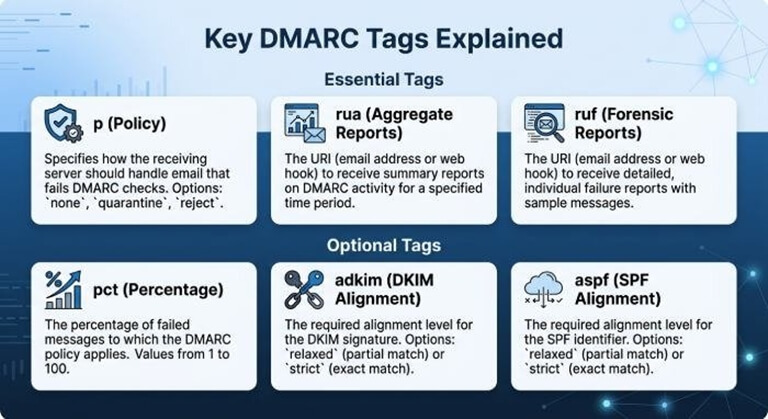
Understanding DMARC syntax is key to crafting an effective policy. Every DMARC record you generate with a DMARC record generator consists of key tags:
The Essential Tags
p (Policy)
Controls how receivers treat mail that fails authentication.
Policies:
- none policy: Instructs receivers to monitor and report, but not reject or quarantine mail. Ideal for initial DMARC management and monitoring.
- quarantine policy: Requests mailbox providers to place unauthenticated emails in spam/junk.
- reject policy: Directs receivers to refuse all emails that fail DMARC—highest protection, but only after thorough monitoring.
Aggregate and Forensic Report Addresses
rua (Aggregate Report Address)
Specifies where aggregate reports—summarized XML-based reports about your domain or subdomain’s email streams—are sent. These highlight email authentication trends and sender sources. Set as a mailto address, e.g., rua=mailto:dmarc-reports@yourdomain.com.
ruf (Forensic/Failure Report Address)
Indicates where forensic reports (also called failure reports) go. These granular reports provide specific header and delivery data for messages that failed DMARC, assisting rapid diagnostics and incident response.
Optional Tags for Policy Granularity
pct (Percentage)
Lets you phase in enforcement by specifying what percentage of failing mail should be affected by the policy, e.g., pct=50.
adkim and aspf (Alignment Modes)
- adkim: Sets alignment for DKIM (Strict: s, Relaxed: r).
- aspf: Sets alignment for SPF (Strict or Relaxed). Alignment settings ensure that authenticated mail comes from your exact DMARC domain or that subdomains can send legitimate mail (aligned mail vs. unaligned mail).
How to Use a DMARC Record Generator to Build a Policy
Creating a valid DMARC record doesn’t require manual editing or guesswork. A DMARC record generator, sometimes called a DMARC record wizard, automates the process and reduces errors.
Step-by-Step: Building Your DMARC Record
1. Choose a DMARC Record Wizard or Tool
Free DMARC tools from providers like MXToolbox, dmarcian, SuperTool, DMARC Inspector, SPF Surveyor, and dmarc.io simplify setup. These user-friendly platforms guide you through input fields for each tag to generate DMARC record configurations tailored to your DMARC domain strategy.
2. Input DMARC Policy Details
- Select your starting policy (none policy for monitoring)—move to quarantine policy or reject policy later.
- Enter aggregate and forensic report email address destinations (for rua and ruf).
- Configure optional parameters such as pct and alignment (adkim, aspf).
3. Review Suggestions and Warnings
Most generators perform a real-time DMARC check for best practices, highlight common mistakes, and surface diagnostics to ensure you’re not creating unintentional delivery problems.
4. Finalize the DMARC Record
The wizard outputs a finalized record that is ready to publish. Copy it exactly as displayed to avoid syntax errors.
5. Integrate with Related Email Authentication Records
While using the DMARC record generator, ensure your domain also has valid SPF and DKIM records. Many solutions, like SPF Record Generator, DKIM Inspector, and DKIM Validator, help configure and validate these as well, further strengthening your authentication posture.
For advanced needs, DMARC Management Platforms (like dmarcian* *Delivery Center or Alert
Central) offer integrated analytics, DMARC data reporting, and streamlined monitoring for multiple domains or subdomains—important for Organizations & Enterprises, Technology Services, and regulated industries.
Validating, Publishing, and Testing Your DMARC Record in DNS
Once you build your DMARC record, correct DNS configuration is crucial for effective email authentication.
DMARC Record Validation
A valid DMARC record must adhere to standards and be properly published in DNS. Validation ensures that syntax mistakes or unsupported tags won’t result in delivery problems.
- DMARC Inspector, SuperTool, and dmarcian all offer DMARC record validation, DMARC check utilities, and instant diagnostics.
- Use a domain overview feature or DMARC tools to confirm correct format, valid policy, and functional destination for DMARC reports.
- Run health checks and blacklist scans to confirm your security stance isn’t being undermined elsewhere.
Publishing the DMARC Record
Publish DMARC record by adding the precise DNS TXT record at _dmarc.yourdomain.com. Enter it exactly as produced by your DMARC record wizard to avoid misconfigurations.
- Publishing is done via your DNS hosting provider’s dashboard or interface.
- Tools often include step-by-step instructions for Individuals & Small Businesses and non-expert administrators.
Testing with Real Mail Streams
After the DMARC record is active:
- Send test messages and ensure you receive aggregate reports and failure reports at specified report addresses.
- Use DMARC check tools, as well as XML to Human Converter and related utilities, to process reports, analyze headers, and review results.
- For domains handling large or sensitive email streams—such as Financial Services, Healthcare, and Government—more advanced analytics may be needed, available through platforms like dmarcian* *Delivery Center or Alert Central.
Moving from Monitoring to Enforcement: Best Practices and Common Mistakes
Transitioning from a none policy to a quarantine policy or reject policy is essential to fully secure DMARC domains, but this step requires care.
Best Practices for Safe Policy Advancement
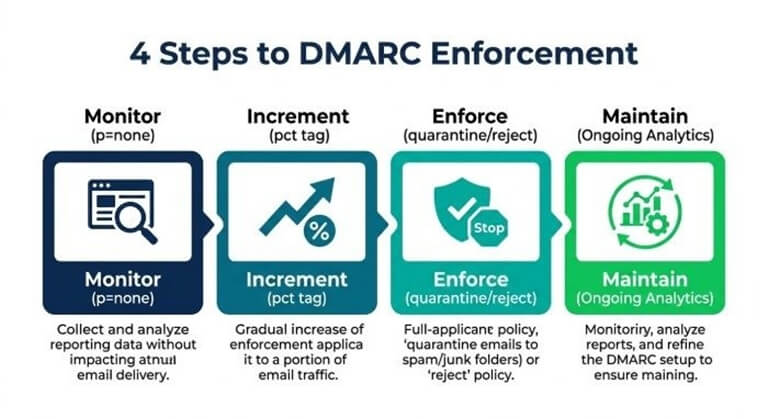
1. Start with Monitoring
Begin with a p=none policy to collect DMARC reports (aggregate and forensic/failure) and gain visibility.
- Use free DMARC tools and DMARC Data Providers to digest data.
- Analyze email streams for unaligned mail and legitimate sources sending on your behalf.
2. Incremental Enforcement
- Use the pct tag to gradually phase in policy enforcement (e.g., pct=20).
- Monitor the impact via DMARC management dashboards and verify secure mail streams aren’t disrupted.
3. Move to Quarantine and Reject
- Switch to quarantine once email health is verified and all sources are DMARC-aligned.
- Advance to reject policy in line with your risk appetite and business needs, ensuring legitimate mail will not be blocked.
4. Maintain Ongoing Monitoring
- Continuously process new XML-based reports with analytics platforms (e.g., DMARC Academy, Forum, BIMI Tools).
- Regularly review diagnostics for changes in your domain or subdomain’s sending patterns and upon onboarding new vendors.
Common Mistakes to Avoid
Failing to Specify Correct Report Address
Misspelled or inaccessible report email address entries can deprive you of critical DMARC data reports.
Neglecting SPF and DKIM Alignment
Misaligned SPF or DKIM records lead to false positives/negatives in DMARC results. Use tools like SPF Surveyor, SPF Record Generator, DKIM Inspector, and DKIM Validator to correct these.
Overly Aggressive Policy Changes
Jumping directly to reject without sufficient monitoring can cause legitimate mail to bounce. Incremental policy adjustments are safer.
Lack of Ongoing DMARC Management
Setting and forgetting a DMARC record leaves you vulnerable as your email environment evolves. Schedule periodic DMARC check cycles, revisit DNS entries, leverage DMARC Management Platforms for automation, and remain alert to threats (including blacklists).
- For organizations of any size—including Non-governmental Organizations, Nonprofit Organizations, and Utilities—adopting a careful, data-driven DMARC management regimen is the key to long-term email security and compliance.
By using a DMARC record generator and supporting DMARC tools, you empower your organization to efficiently generate DMARC record entries, confidently validate them, and evolve from basic monitoring to mature, enforced protection across all domains and subdomains.
Popular on OTW Right Now!
-
 Best Wireless Plans for Rural Nebraska and Colorado: How to Choose the Right Provider
-
Best YouTube Video Downloaders of 2026: Top Tools for Fast, HD & Hassle-Free Downloads
-
 AI moderation in real time: practical playbook for sports and streaming communities
-
 How Smart Automation Is Turning More Leads Into Customers in 2026




About The Author

Gagan Bhangu
Founder of otechworld.com and managing editor. He is a tech geek, web-developer, and blogger. He holds a master's degree in computer applications and making money online since 2015.