
Best AI Tools for Visualizing Film Scenes
Visualizing a film scene before production can expose weak framing, confusing blocking, or continuity problems while changes are still cheap. A 2025 study of an AI previsualization system with 24 participants reported shorter task times and higher usability than two baseline methods, showing why AI scene planning is becoming useful beyond rough concept art.
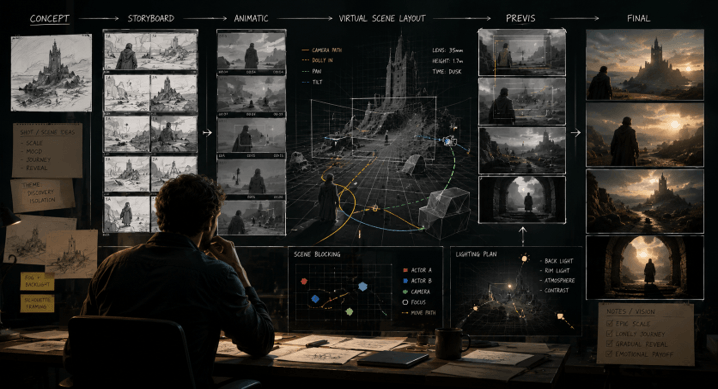
The best tools now do more than create still frames. They can turn scripts into storyboards, test camera movement, build animatics, hold characters across shots, and help teams compare scene options before production. That matters because visual choices are easiest to revise before sets, actors, and crews are committed.
Table of Contents
- Best tools at a glance
- How we evaluated them
- Five tools for scene visualization
- How to choose
- Common mistakes
- FAQs
Best tools at a glance
For end-to-end film visualization, Invideo Agent is the broadest option here because it can connect script development, storyboards, moving previz, character and location continuity, shot generation, and editing inside one project context. Katalist suits fast script-to-storyboard work. StoryboardHero is strong for structured boards and client review. Storyboarder.ai gives filmmakers detailed shot planning and moving animatics. FinalBit fits teams that want storyboards tied closely to wider preproduction planning.
The right choice depends on what you need to prove before the shoot. If you only need clear boards, a focused storyboard tool may be enough. If you need camera tests, motion, consistent characters, and scenes that can move closer to final footage, a broader filmmaking system makes more sense. The key split is static planning versus moving visualization. Choose based on the decisions your crew still needs to make before choosing a full production workflow and future production needs.
How we evaluated these AI film visualization tools
We looked at scene control, character and location consistency, storyboard quality, moving previz, and how well each product connects visualization to later production work. Pricing and workflow limits were checked on official product pages in August, 2026.
| Tool | Best for | Moving previz | Starting price |
| Invideo Agent | Full scene development | Yes | $17/month, yearly billing |
| Higgsfield | Cinematic scene planning | Yes | Subscription plans |
| Katalist | Fast script visualization | Yes | From $19 |
| StoryboardHero | Structured storyboard review | MP4 storyboard export | $19/month |
| Storyboarder.ai | Detailed cinematic boards | Yes | Free trial; paid from $27/month currently |
| FinalBit | Storyboard plus preproduction | Yes | Free plan |
1. Invideo Agent
Invideo Agent works more like an AI film crew than a single image generator. It can read scripts, build shot plans, create storyboards and animatics, attach character and location references, and keep context as scenes develop.
For motion-heavy visualization, the Seedance 2.0 video model can build cinematic scenes, previsualization, camera moves, and motion tests from text, image, video, or audio references, with characters and locations attached. Seedance 2.0 is built for complex movement and multi-scene consistency.
Invideo Agent Two: The latest release adds persistent memory, expert agents that can share project context, and the ability to read scripts, PDFs, video, references, and rough cuts.
Best for: Directors planning multi-scene work.
Where it falls short: It may be more system than you need for one static board.
Pricing: Plus starts at $17 per month when billed yearly.
2. Higgsfield
Higgsfield is built for filmmakers who want to visualize scenes before moving into full video production. Its Popcorn storyboard tool can create multiple connected scenes while keeping characters, lighting, and environments consistent. You can define the framing, motion, and mood for each shot, then refine the sequence before turning it into video.
For more detailed previsualization, Higgsfield Cinema Studio adds camera and lens controls, visual references, camera movement, and scene-building tools. This makes it useful for testing how a scene might look and move before committing to production.
Key features: AI storyboards, consistent characters and environments, camera controls, visual references, camera movement, scene generation.
Best for: Filmmakers, directors, and creative teams that want cinematic scene planning with a path from storyboard to video.
Use cases: Film previsualization, storyboards, camera tests, cinematic concepts, commercials, trailers, and AI video production.
Where it falls short: The platform offers a broad set of filmmaking and video-generation features, so it can be more than you need if your only goal is to create a simple static storyboard.
Pricing: Higgsfield uses subscription plans with monthly credits, and the available plans and current prices can change.
3. Katalist
Katalist transforms the script and ideas into storyboards and lets the creators go on to video generation. It serves as a consistent character, a custom character, image editing, voiceover, and a number of video models, so it helps when a board is a moving concept.
Key features: Script assistant, scene boards, character consistency, video generation, voiceover.
Best for: Filmmakers and teams that want a fast path from script to visual sequence.
Use cases: Scene concepts, pitch boards, short film planning, ad concepts, and visual tests.
Where it falls short: Lower tiers limit projects, custom characters, and monthly generation credits.
Pricing: The current page lists Essential from $19 and Pro at $39 per month.
4. StoryboardHero
StoryboardHero is a tool that transforms an idea and script into a structured storyboard that can be easily shared, edited, and displayed. It can be used to create AI images, camera data, online reviews, PDF export, and MP4 export, and higher plans offer team seats and bigger image limits.
Key features: Script generation, storyboard frames, AI images, guest comments, PDF sharing, MP4 export.
Best for: Agencies, filmmakers, and teams that need approval-ready boards.
Use cases: Client pitches, commercial planning, explainer concepts, and shot communication.
Where it falls short: It is stronger for storyboard review than detailed moving camera experiments.
Pricing: Solo starts at $19 per month.
5. Storyboarder.ai
Importing scripts, scene breakdowns, shot lists, film consistency of characters and locations, camera angle control, and image-to-video animatics are Storyboarder.ai’s forte in the film preproduction world. Its tools for motion previz include camera movements and sound – a useful feature for directors to test the framing prior to shooting.
Key features: Script import, shot lists, consistent characters, 3D camera control, animatics, pitch exports.
Best for: Directors and cinematographers who want more framing control.
Use cases: Features, shorts, commercials, documentaries, and pitch sequences.
Where it falls short: Larger video generation volumes require a separate paid video add-on.
Pricing: A free trial is available. Starter is currently shown at $27 per month under a limited offer.
6. FinalBit
Formerly known as NolanAI, FinalBit offers screenwriting and preproduction tools alongside the AI storyboarding, shot lists, pitch development, budgeting, scheduling, and video generation features. It has storyboard capability for converting a script into frames and shot types, while also having video tools to make the planned shots come alive.
Key features: Storyboards, shot lists, screenplay tools, pitch decks, scheduling, video generation.
Best for: Productions that want scene visualization connected to planning.
Use cases: Script Breakdowns, Storyboard Drafts, Production Planning, Pitch Work, Shot Development.
Where it falls short: If teams are seeking to create a basic visual board, then the more sophisticated functionality may be overkill.
Pricing: Basic will be free. Normally, Creator will set you back $40 per month, and the current site is offering a promotion of $28 per month.
How to Choose the Right Tool
Make your choice based on the next decision you must make.
- Choose Invideo Agent when character memory, location continuity, moving previz, and later generation need to stay connected.
- Choose Katalist when speed from script to visual sequence matters most.
- Choose StoryboardHero for clear client review and storyboard approval.
- Choose Storyboarder.ai when framing, camera angles, and animatics are central.
- Choose FinalBit when storyboards need to sit beside scheduling, budgeting, and script work.
This also reflects a wider approach to AI agents & automation. Useful systems do not just generate an image. They contribute to carrying over the context, minimizing repetitive setup, and relating production work together.
Common Mistakes to Avoid
Avoid selection only on the basis of the image quality. A well-framed shot is of little value if characters move from one shot to the next. Review exports, co-browsers, project boundaries, rights, etc., and whether motion is an additional cost. Test one scene in a real project before a complete project.
FAQs
What is AI previsualization in filmmaking?
AI previsualization involves creating animal images, storyboards, animatics, or small tests of motion to look at a scene before it’s finally produced. It allows the director to test composition, blocking, movement, timing, and continuity in the case where the shot is still easy to change. It can also help in making the visual discussions with cinematographers, producers, and clients clearer before the time and budget are spent.
Are storyboards and animatics the same?
No. A storyboard depicts a sequence as still images, and an animatic includes timing and, sometimes, camera movement and sound or temporary dialogue. Storyboards help with composition, coverage, and shot order. Having Animatics aids in pacing, transitioning, and knowing how the shots will move together better, particularly when a director desires to view the multiple shots as a sequence.
Can AI help test camera movement before shooting?
Yes. Some tools have the ability to convert storyboard frames to moving previz and/or to create motion from reference footage. Some workflows may benefit more from an arrow than from using text for camera guidance. Useful for testing pushes, tracks, pans, or more complicated movement, rather than making a physical investment before testing it.
What should filmmakers test first in an AI scene visualization tool?
Begin with one hard scene. Add at least one character, a fixed shot, a camera pan, and a continuity element like a costume or prop. This will quickly reveal if the tool can retain identity, space, and framing and move from shot to shot. Before spending the time and money on a more ambitious project, a simple test scene can show you the limits of your workflow.
Can AI previz footage become part of the final film?
Sometimes. More polished video production can get closer to the finished footage in a previz shot, particularly in the case of concept films, effects tests, or complete AI-generated video. Regardless of any shots created, filmmakers should check continuity, motion, sound, rights, and final image quality. The best approach is to consider previz as a planning tool and only as a final tool.
Final Thoughts
The top AI scene visualization tools help transform ideas into a director, film crew, client, or producer’s visual. Look for control, continuity, movement, and ease of visualization for production.
Popular on OTW Right Now!

About The Author

Gagan Bhangu
Founder of otechworld.com and managing editor. He is a tech geek, web-developer, and blogger. He holds a master's degree in computer applications and making money online since 2015.