
Free Unlimited Video Face Swap: What It Really Means in 2026
Type free unlimited video face swap into Google, and you’ll get a dozen tools promising the same thing: no sign-up, no limits, no watermark. Most of them make a few of the promises but quietly break the others — a “free” option has a 3-export-per-day cap, or “unlimited” means you can get “unlimited” previews, but they’re low-res. Learning the inner workings of the technology makes it a heck of a lot easier to distinguish between a good and bad product that’s a bait-and-switch.
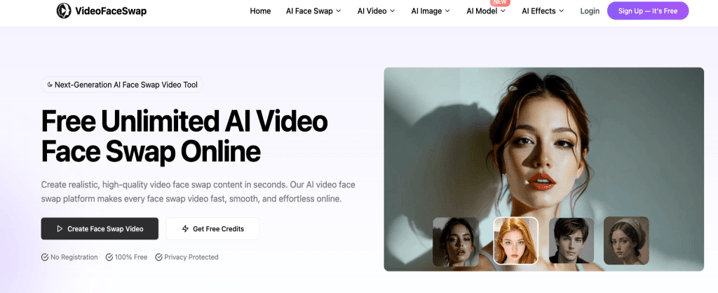
How Video Face Swapping Actually Works
The face swap is not one single method; it’s a concise chain of AI models, acting one frame at a time. First, the software identifies and tracks a face throughout the source video and tracks head orientation, blinks, and changes in light. It then projects a target face (typically one photo uploaded) onto that motion, rather than simply superimposing a static image, taking into account pose and expression. The final one is the blending of the shot and making it look real: Skin tone, edge softness, and the direction of the shadows have to match frame-by-frame, or it will flicker.
That last one is the one that most free tools get away with omitting, as it requires a lot of computation to be able to blend in real time. That’s also why it’s more difficult to build a truly free unlimited video face swap experience as opposed to marketing pages may lead you to believe: It’s because the person is paying for the GPU time — it may be you, or it may be them.
What “Unlimited” Should Actually Include
Before trusting a tool’s claims, check what “unlimited” is actually covering. A handful of things separate the tools worth using from the ones that will frustrate you two exports in:
- Export cap — some sites cap free unlimited video face swap output at 60 seconds or a handful of runs per day before pushing credits.
- Resolution — unlimited swaps at 480p aren’t the same offer as unlimited 1080p.
- Watermarking — a few platforms bury a logo in the corner unless you upgrade.
- File limits — video length (often capped around 5 minutes) and upload size (commonly 300MB or less) both matter for longer projects.
- Data retention — guest sessions on some tools expire in a couple of hours; others keep your uploads for days.
None of these details comes across in the headline pitch. They can only be discovered by reading the fine print or trying out the tool with a ‘throwaway’ clip first.
Multi-Face and Format Support
In most modern platforms, more than one face can be found in the same shot. Multi-face mode allows you to select two or more faces in the same clip and apply a different replacement photo to each face – great for group pictures or ensemble shots — but less effective as faces get smaller in the frame. The range of supported formats has also grown: MP4 and WEBM are now nearly everywhere, and there are several applications that are able to handle GIFs without conversion.
Is Free Unlimited Video Face Swap Actually Free?
There isn’t any such thing as a free platform; someone pays for the processing. It’s not that things are free for nothing, though that may seem to be the case in practice; it’s because they are free for a “paid tier” or for marketing or data collection purposes. Always read the privacy policy of the platform before uploading personal content. Some platforms store videos locally and remove them in a few hours, while others keep them forever to serve as training for future platforms. This is more significant than the cost.
Using Face Swap Responsibly
This is the part where people can easily overlook when rushing to try another tool, and it’s not supposed to be. Adding a face to a video without their permission, particularly to sexually explicit material, content of a violent nature, or a defamatory video, could be considered a breach of the platform’s policies and potentially even the law in some states. When generating, reputable tools now require you to verify that you do have rights to the source video, as well as the face you are uploading. It’s not about friction for the sake of friction; it’s about getting it down, rather than up. Use only your own image, explicitly stated images that you are allowed to use, or clearly labeled parody/fan-edit images, and be aware that they were created by AI when you share them.
Conclusion
The source footage is more important than the tool you choose. The happy and clear swaps are clearly much cleaner than the shaky, dim, or highly angled ones. A square selfie with a light, evenly lit front-facing reference photo of the same person’s face gives the AI more to work with than a cropped, shadowed selfie. If a particular swap seems to be stiff around the mouth or jaw, it is probably the motion of the source clip, and not the motion of the model.
The number of free video face swapping tools has improved significantly on the technical aspect of the task. The difference between the top and bottom choices is the degree of honesty, the way they process your data, and whether they integrate consent checks as a core part of the process or as an add-on.
Popular on OTW Right Now!
-
 Smart Signage and AI: Leveraging Intelligent Design Tools for Physical Business Collaterals
-
 AI in Daily Life: How AI is Transforming UK Workplaces & Best Tools in 2026
-
 AI Agents for Sales Follow-Up: How They Work, Best Tools & CRM Setup
-
 The AI Models List I Wish I Had Before Building a Multi-Model App



About The Author

Gagan Bhangu
Founder of otechworld.com and managing editor. He is a tech geek, web-developer, and blogger. He holds a master's degree in computer applications and making money online since 2015.