
Seedance 2.5 Preview: What Creators Should Test First
Seedance 2.5 is being watched by creators who want AI video to feel less like a short demo and more like a usable production workflow. Before wider access, the smartest approach is simple: know what to test first.
AI video tools are easiest to judge when the discussion focuses on everyday work, not only on headline features. A model can produce an impressive clip in a showcase and still be difficult to use when a creator needs a product teaser, a social campaign draft, a storyboard, or a short branded video that can be revised.
That is why the current interest around Seedance 2.5 is not only about whether the next clip looks better. Creators will be looking to see if the flow is easier to guide, check,k and repeat. A good review needs to start with the issues that crop up in the real production, for anyone considering applying it when access is increased.
Start with the Workflow, Not the Demo
The first error in picking any AI video tool is to evaluate it by a single streamlined video. The simple test is to take a normal creative brief, run it with the software, and see how far it gets! For instance, a creator may make a brief product scene, a character shot, and one social clip and mood-based cinematic prIt’s.
It’s not whether all of the output is flawless. The question is whether the tool can assist the creator in getting the idea to a usable draft quicker. If the workflow still needs to be restarted numerous times or if the manual fix or the making of a guess at the pisn’t isn’t sufficient, the visual quality might not be adequate.
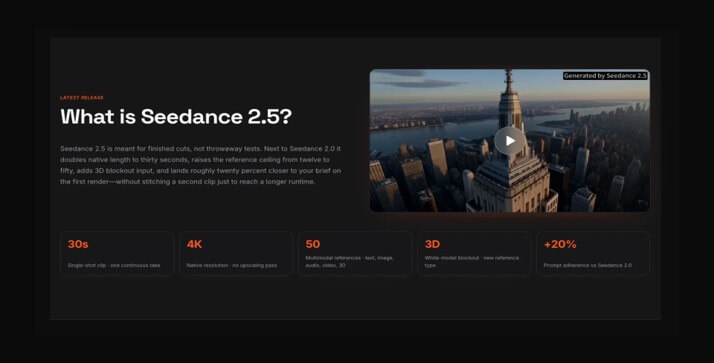
It’s here that Seedance 2.5 will be interesting. The page around the tool highlights longer video generation, references inputs, more control after generation, and high-resolution output. These are the places where AI video will prove most useful in the future, beyond mere experimentation.
Check Longer Clips for Continuity
Conveniences with short AI clips are easy to look at, as they can’t really break much in a short period of time. The longer the clip,p the more revealing it will be. The face may slide, the logo might fade, the camera action becomes unnecessary midway through the scene, the shape of the product may change, etc.
If Seedance 2.5 is based on an extended single-clip output, creators need to check out the continuity first. The 30 seconds should not sound like a bunch of random ideas that are tacked together. Must be some opening, a readable middle, and an end frame that can be used in an edit.
The product video could be a practical test, presenting the product, moving the camera, presenting a use moment,nt and ending on a clean hero shot. This type of test is not just a make-believe prompt as it has real production expectations.
Review Reference Inputs Carefully
Sometimes the text is very general for video. Creators typically have a set of materials that they have already created: product photos, style frames, character images, sample footage, sound cues, or campaign notes. A valuable AI video workflow must allow for those references to inform the outcome, rather than the AI creating something from a single paragraph.
This is one reason a Seedance 2.5 review should pay close attention to reference handling. Not only can there be more references, but the question is how many? It is whether each reference maintains its role. A character image should facilitate the character and not change the background. The motion clip should be used to move the camera on the scene; it should not replace the entire scene.
This is beneficial for creators in terms of saving time. If a team already has assets that are associated with their brand, they shouldn’t have to explain all the details from the ground up. It is even better when the software can determine whether a face reference is a location reference, a color mood, or a movement cue.
Look at Editing After Generation
AI video can mess up in several minor ways. One of the objects is not working, and the lighting is correct. The second has drift at the end; the motion works, but the background is solid, and the product needs to be more defined. The tool can be frustrating if each of the little fixes will be ” new “gener”tThat’s
That’s it; it’s important to have post-generation control. Creators need to see how Seedance 2.5 performs when it comes to revisions: swapping references, making changes to the motion, trimming a moment, or tweaking a local detail without eliminating the remainder of the clip. This is a feature that doesn’t sound as spectacular as video quality but could be more important on a day-to-day basis.
For real teams, review cycles are the norm. One specific change may be requested by a manager/client/editoit’sf it’s a good creative software, then that change is possible without making the project a guess.
Test Social, Product and Storyboard Use Cases
Common creator needs should be a part of the best review tests. A social media creator might be concerned with vertical framing and the energy of the initial three seconds. A social media maker could be thinking about vertical framing and the energy of the first three seconds. The retention product’s recognisability is a concern of a small business. A filmmaker has concerns about camera movement blocking and mood. The teacher might be interested in clear explanations.
It will be easier to judge Seedance 2.5 if those use cases break them up. There is no one solution to every problem with one tool. The product clip test may show other strengths than a storyboard test or a music-style visual.
- For marketing, test product identity and clean ending frames.
- For creators, test pacing, vertical crops, and social hooks.
- For film planning, test camera movement and scene blocking.
- For education, test whether visuals support a clear explanation.
- For brand teams, test whether references stay consistent across versions.
What Not to Overlook
It’s good to be fast, but it’s not all that. Another factor to consider for creators is export quality, aspect ratio choices, the way the audio plays, the reliability of the prompts, and the intuitive feel of the interface following multiple use sessions. What seems like a promising tool for your first round of revision can turn out to be a weak tool after 10 rounds.
Access and cost will also be a factor. Some creators will require fast drafts; others may require more commercial, quality, or bigger reference sets. A fair review should relate features to the type of user that features are useful to.
Final Thoughts
An interesting stage of the growth of AI video software is emerging, and Seedance 2.5 is a sign of it: longer footage, more detailed references, and more manageable creative direction. For creators, this might be a more predictable video creation process than the whims of AI.
The key to it is to have a checklist in mind. Test continuity. Test references. Test revisions. Test real-life practical scenarios. If they remain active during the time of increased access, Seedance 2.5 might be beneficial for creating video concepts even more confidently beyond just creating eye-catching clips.
Popular on OTW Right Now!



About The Author

Gagan Bhangu
Founder of otechworld.com and managing editor. He is a tech geek, web-developer, and blogger. He holds a master's degree in computer applications and making money online since 2015.