
How to Gain Real-Time Finance Visibility with Salesforce and Xero Integration
An international student services organization that supports students from different countries throughout their education journey in the UK. The company manages thousands of student interactions, application processes, and ongoing support activities through Salesforce. However, its finance operations were managed separately in Xero.
This type of separation between business systems is a common challenge for growing companies. Data integration remains a major challenge for many finance teams. A survey of finance leaders found that 48% considered integration complexity one of their biggest challenges, while 55% identified data accuracy and consistency as major concerns.
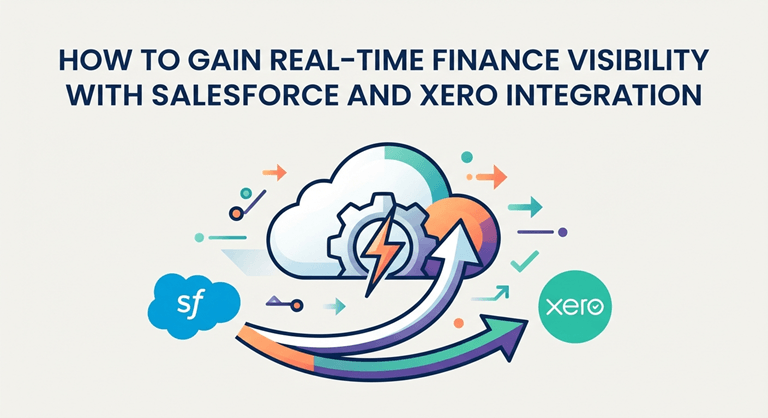
As the company expanded, the impact of this separation became more visible. Financial information existed in Xero, but only one part-time finance team member could access and manage it.
When sales or operations teams needed financial details, they had to stop their work and wait for a response. A team member helping a customer could not quickly confirm whether an invoice was paid. An employee managing an account could not check outstanding balances without contacting finance.
This process created a bottleneck. More customers meant more financial requests, more manual checks, and more time spent coordinating between teams. The company needed a way to give sales and operations teams better access to financial information while keeping finance processes organized.
In this article, we will explore how Salesforce and Xero integration helps businesses create real-time finance visibility, reduce manual checks, and connect financial processes with everyday customer operations.
More Than Visibility: Connecting Customer and Finance Processes
So, the challenge is not only accessing financial information. It is making that information available during the customer processes where teams need it. Salesforce gives teams a place to manage customer relationships, but many customer decisions depend on information that lives outside the CRM.
An account record may show contacts, opportunities, previous conversations, and sales activity. However, teams may still need financial information before they can take the next step.
Access Financial Information Without Manual Checks
Disconnected systems can also affect confidence in business information. Research found that 98% of surveyed financial services leaders reported data and application silos within their organizations, while 51% identified access to real-time data as a top technology priority.
Instead of contacting finance for every update, teams can view important financial details directly from Salesforce. This can include invoice status, payment history, outstanding balances, and other financial details from Xero connected to the customer account.
For example, a sales representative preparing for a customer conversation can review both the relationship history and payment position before reaching out.
An account manager can identify accounts that require attention before discussing renewals or additional services.
Operations teams can confirm important financial details without waiting for separate updates.
Handle Invoice Updates Without Creating Extra Finance Tasks
Financial visibility is only one part of the challenge. In many businesses, routine invoice requests also create delays. In the example above, this meant that even simple invoice changes depended on finance availability.
Sales and operations teams often work directly with customers, but finance teams control access to accounting systems.
This creates situations where small changes require additional steps.
For example:
- A customer changes their service package.
- A sales representative needs to update invoice details.
- An operations team member needs to correct a billing item.
Without a connected process, each request goes to finance. The finance team reviews the request, makes the update in Xero, and confirms completion.
When this happens frequently, small tasks create a growing queue.
With the integration, authorized users can manage invoice-related activities directly from Salesforce. They can create or amend invoices without switching systems or waiting for every update to go through finance.
Reduce the Back-and-Forth Between Teams
Before integration, teams often depend on internal messages and manual checks:
- Sales asks finance about payment status.
- Operations requests invoice changes.
- Finance provides updates from Xero.
- Teams continue customer conversations after receiving the information.
A connected Salesforce and Xero workflow reduces these handoffs. The table below shows how daily processes can change.
| Before and After Xero Salesforce Integration | ||
| Process | Without integration | With Xero Salesforce integration |
| Checking account balance | Team contacts finance for confirmation | Team views available financial information in Salesforce |
| Reviewing invoice status | Employee checks Xero or requests an update | Invoice details appear with customer information |
| Updating invoice details | Request goes through finance | Authorized users can make changes from Salesforce |
| Customer decisions | Teams wait for financial confirmation | Teams have financial context during conversations |
What Information Can Salesforce and Xero Integration Connect?
The data businesses connect between Salesforce and Xero depends on their processes and the needs of their teams.
Most companies focus on connecting financial details that help sales, operations, and customer teams make decisions without switching between systems.
Common examples include:
- Invoice details and status,
- Payment information,
- Outstanding balances,
- Credit notes,
- Customer account details from Xero,
- Products and services,
- Related financial activity.
The goal is not to move every piece of accounting data into Salesforce. The goal is to connect the information that supports daily workflows and helps teams take action faster.
Before choosing an integration approach, businesses should identify which processes create the most manual work and which teams need access to financial information.
How to Choose the Right Salesforce and Xero Integration Approach
The right Salesforce and Xero integration approach depends on the business problem a company wants to solve. Some businesses need basic financial visibility, while others need deeper connections between sales, operations, and accounting processes.
Before selecting a solution, companies should review their workflows and identify where disconnected systems create delays.
1. Identify the processes that need connection.
Start with the tasks that create the most manual work.
For example:
- If teams only need to view invoice status or payment history, a solution focused on financial visibility may be enough.
- If sales or operations teams need to create or update invoices, the integration should support actions directly from Salesforce.
- If information needs to stay updated between Salesforce and Xero, businesses may need two-way synchronization.
The best approach should match the way teams work every day.
2. Define access and control requirements.
Financial data requires the right level of access.
Businesses should decide:
- Which users need to view financial information?
- Which users can create or update invoices?
- Which processes should remain controlled by finance teams?
A good integration provides access where it helps teams work faster while maintaining accounting control.
3. Choose between a connector and custom integration.
Businesses usually choose between a prebuilt connector and a custom integration.
A prebuilt connector helps companies connect Salesforce and Xero using existing functionality. This approach can be a good option for businesses that want to reduce development effort and use a solution designed for common Salesforce and Xero workflows.
A custom integration may be suitable for companies with highly specific requirements, complex systems, or processes that cannot be supported by existing solutions.
The right choice depends on the level of customization, control, and technical resources the business needs.
Finding the Right Xero Integration with Salesforce Solution
Once a business understands what it needs from Xero Salesforce integration, the next step is finding a solution that fits its processes.
For many Salesforce customers, the first place to look is Salesforce AppExchange (now AgentExchange). It is Salesforce’s marketplace for apps and solutions that extend Salesforce functionality and connect it with other business systems.
When evaluating Salesforce to Xero integration solutions, businesses should look beyond simple data synchronization. The right solution should support the processes that create the most manual work.
Key areas to review include:
- Financial visibility: Can teams access invoices, payments, and account details directly from Salesforce?
- Workflow support: Does the solution support actions such as invoice creation, updates, and payment tracking?
- User experience: Can teams work in Salesforce instead of switching between multiple systems?
- Security and scalability: Can the solution securely handle financial data and support future business needs?
During our review of integration solutions, we looked for a connector that could support both financial visibility and daily customer workflows.
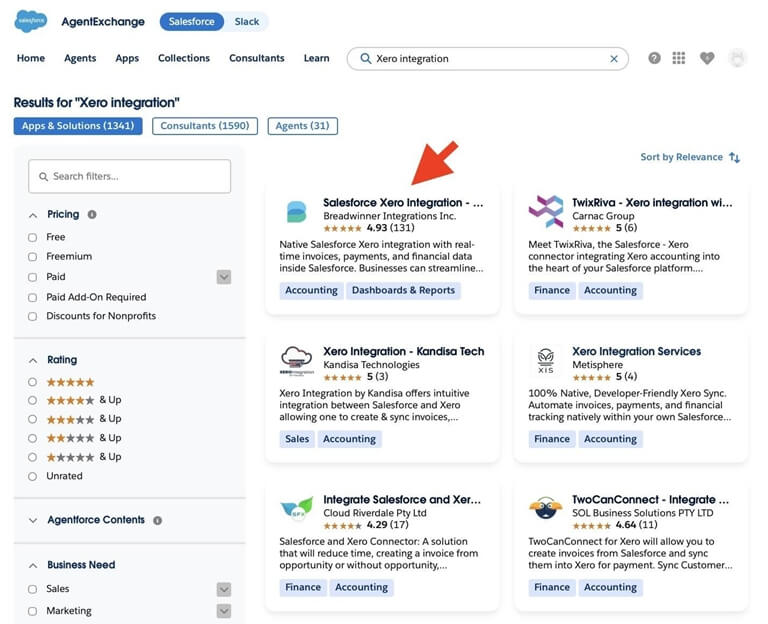
Xero integration solutions on AppExchange
One example is Salesforce Xero Integration by Breadwinner. It is a solution that connects Xero financial data with Salesforce records and workflows, and allows businesses to access invoices, payments, account balances, and other financial information directly inside Salesforce.
Instead of checking Xero separately or requesting updates from finance teams, users can work with financial information in the same place where they manage customer relationships. For businesses that need a deeper connection between Salesforce and Xero, solutions like Breadwinner can help connect accounting data with everyday sales and operations processes.
The right solution is not the one with the longest feature list. It is the one that matches the company’s processes, user needs, and level of integration required.
How Salesforce Xero Integration Works in Practice
Understanding the benefits of Salesforce and Xero integration is one thing. Seeing how teams use connected financial information in daily workflows makes the value clearer. A Salesforce-native connector can bring Xero data into Salesforce records, allowing teams to work with customer and financial information in the same place.
For example, with Breadwinner, businesses can connect Xero information with Salesforce records and access financial details directly from the customer account.
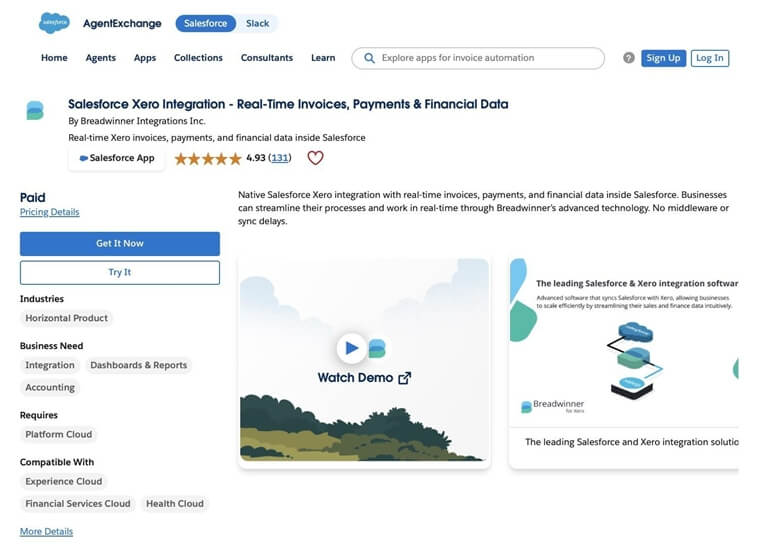
View Financial Information From the Salesforce Record
Instead of opening Xero separately, users can review available financial information directly from Salesforce.
From the account record, teams can access details such as:
- Customer invoices,
- Invoice status,
- Payment information,
- Outstanding balances,
- Financial activity.
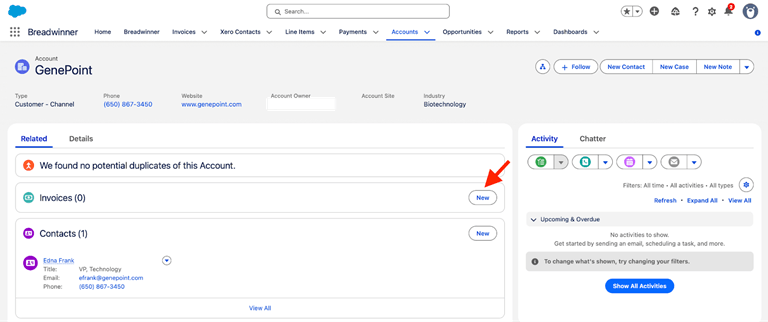
This gives sales and operations teams the context they need before contacting a customer.
For example, an account manager preparing for a renewal conversation can review the Salesforce Invoice Person Account record to check payment information before contacting the customer.
Create and Update Invoices Without Switching Systems
Invoice management often creates delays when customer-facing teams depend on finance for every change. Businesses looking for Salesforce-generated invoice for accounts solutions can use the integration to enable invoice creation and management directly within Salesforce.
Examples include:
- The ability to generate invoices using Salesforce data,
- Updating invoice details,
- Adding or changing line items,
- Reviewing invoice status
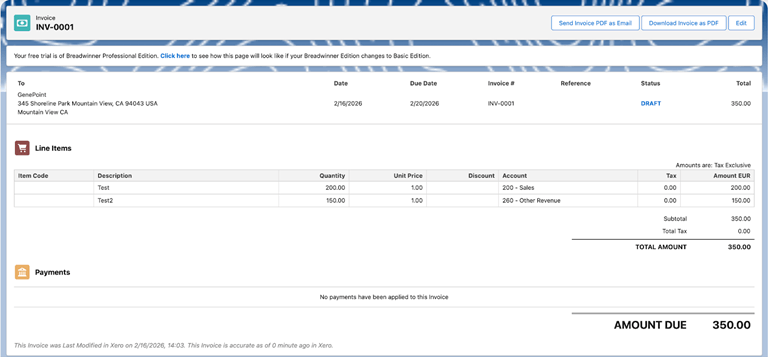
This reduces unnecessary handoffs between teams. Finance maintains control over accounting processes, while other teams can complete approved actions within their existing workflow.
Manage Financial Access with Salesforce Permissions
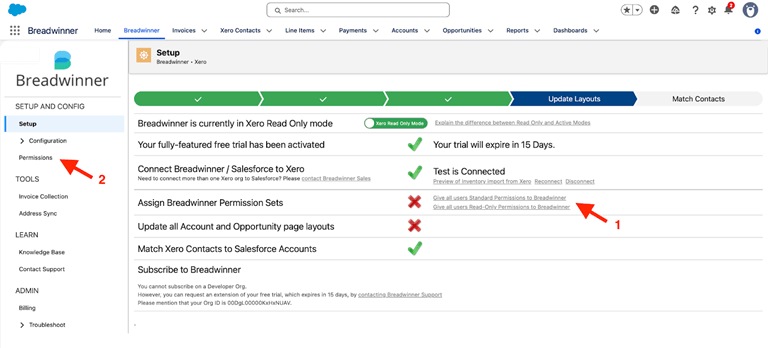
Breadwinner uses Salesforce’s standard security model, so administrators manage access through Salesforce profiles and permission sets rather than separate application permissions. Organizations can decide which users can view invoices, create or edit records, or access specific financial objects, keeping financial visibility aligned with existing Salesforce security policies.
Real-Time Financial Visibility
How current is the information businesses use to make decisions? Research found that only 5% of data used for business decisions was less than one hour old. This shows the challenge many organizations face when important information is stored across separate systems.
Real-time visibility helps teams access current financial information when they need it. Breadwinner provides real-time, two-way synchronization between Salesforce and Xero. The integration syncs financial records such as invoices, payments, credit notes, contacts, and products between both platforms.
The synchronization can be configured based on business requirements, allowing companies to define which Xero data is connected with Salesforce and how users access it within Salesforce records and workflows.
Final Thoughts: Creating a More Connected Finance and Customer Experience
The company from the opening example solved this challenge by connecting Salesforce and Xero. Instead of relying on one person for invoice updates, account balance checks, and financial requests, sales and operations teams gained access to the information they needed directly in Salesforce.
As shown with solutions like Breadwinner, Salesforce finance integration can bring invoice, payment, and account information into Salesforce while keeping Xero as the system of record for accounting.
When customer and financial processes work together, teams can make faster decisions, reduce manual back-and-forth, and support customers with better information.
Popular on OTW Right Now!




About The Author

Gagan Bhangu
Founder of otechworld.com and managing editor. He is a tech geek, web-developer, and blogger. He holds a master's degree in computer applications and making money online since 2015.