
What to Look for Before Downloading a Free VPN App
A free VPN app can be useful when you want more privacy on public Wi-Fi, need a safer browsing setup while traveling, or simply want to hide your visible IP address from websites. Many people also use VPNs when working remotely, accessing accounts from different locations, or browsing on networks they do not fully trust.
However, a VPN isn’t another straightforward utility program. It is attached and takes care of a portion of your Internet connection. So don’t just download the first free VPN app that you discover without learning a little about it beforehand.
The advantage is that to make a better choice, you do not have to be any sort of cyber protection expert. Prior to downloading a VPN, you can check on the simplest aspects, such as account requirements, data limits, supported devices, privacy policy, browser support, app permissions, and upgrade prompts. These tests can help you not get the feeling of “what’s this app? What’s that tool doing?”
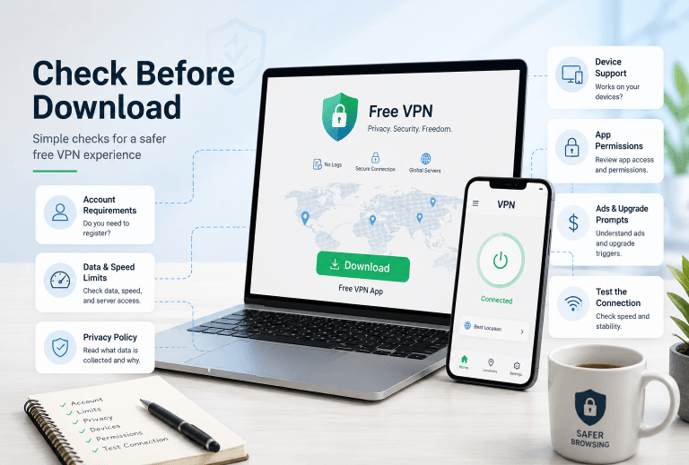
1. Check Whether the VPN Requires an Account
Check if a free VPN app will ask you to register an account prior to installation. Certain VPN services need to know your email address, telephone number, or monetary information before you can use the app. There are others that permit users to join without the need to sign up.
Both choices have pros and cons, but it’s essential to know what you’re signing up for. If the app claims to be free and requests credit card details right away, find out if the app is free or if it is a free trial or a paid application with a trial.
This is important since numerous users rush into downloading a VPN and only realize that they have to sign up later. If you’re looking for an easy-to-use privacy solution to browse casually, use public Wi-F, i or travel, you might favor a system that doesn’t require you to divulge information before you even test the service.
Be sure to look for an explanation of the need for an account in the app. Some services have accounts that must be created in order to sync settings, manage subscriptions, or use premium features. This may be fair, but the reasons should be easily understood.
2. Look at Data Limits, Speed Limits, and Server Access
Not every VPN service that’s free is a free VPN. Some restrict the amount of information that can be accessed for a day/month. Some restrict speed. Others provide access to just a few server locations. Streaming, games, or even server switching rate can be limited as well.
Before starting a free VPN download, users should check whether the service explains its limits, supported devices, available server options, account requirements, and privacy practices clearly. A useful VPN page should help users understand what they can do for free before they install the app.
This is particularly crucial if you’re going to use the VPN on a regular basis. While a small data cap might suffice for browsing the web every now and then, it may not be sufficient for video calls, streaming, big downloads, or working all day remotely. If you are located on a server list that is limited, this can impact the speed of your connection and may cause your connection to be unstable.
For anyone considering a free VPN app, X-VPN provides information on how the service supports multiple devices, the number of servers available, account requirements, and how many VPN connections are allowed.
It all comes down to transparency. A free VPN will work, but a user should understand the benefits as well as the limitations before installing a free VPN.
3. Read the Privacy Policy in Simple Terms
If you use a VPN application, its privacy policy is more important than many of the privacy policies of casual applications. It isn’t necessary to read every sentence in the legal text, but it’s necessary to check the most basic points.
Check to see if the VPN keeps browsing history, original IP addresses, connection times, device ID’s, crash reports, or usage analytics. The company should tell customers what it is collecting and why, as some technical information may be necessary to maintain a service.
If the app does not specify, be careful if it states something like “complete privacy,” “total anonymity” or “100% protection.” A good privacy tool will not have false promises and should be easy to understand with regard to data practices.
An important question to ask is also how the free service is funded. It’s not expensive to keep free apps up and running. These require a server, developer, updates, customer support, a nd security upgrades. Some of the services are free but have paid upgrade options; others may rely on advertising or other revenue-generating methods. The more confident they can be in the service, the clearer they are.
4. Make Sure It Works on Your Device
Compatibility of devices is another simple but very often overlooked factor. A VPN that is beneficial for one device does not necessarily benefit all users.
In the case of Windows, determine the version of Windows that is supported by the VPN, and see if the installation process is straightforward. For Android: Make sure the app is available from a trusted source and that it is compatible with your version of the operating system. For Chromebooks, tablets, and browser-based, see if the VPN supports that too.
Most people have two or more devices that they use daily. You may use Chrome for your browsing on a Windows laptop, as well as configure it for messaging from your Android phone, and then use it for both. If that is the case, it’s sensible to opt for a VPN that works with the devices you really have or utilize, instead of a VPN that merely patches some of your setup.
Also, look at the method of updating. VPN apps must be kept updated, as privacy and network tools must evolve with the operating systems, browsers,s and internet services. An old app can cause greater problems than solutions.
5. Decide Between a Full VPN App and a Browser Extension
When you’re considering whether or not to download a VPN, you should consider your online usage habits. What are your preferences for protection: the entire device, or are you more concerned about browser activity?
A whole VPN application will generally safeguard internet traffic at the device level. This can also extend outside the browser (if applicable per app and device). This might be preferable if you’re using email clients, games, messaging applications, cloud storage programs, or any other programs that access the internet.
A browser extension is usually more focused. If most of your online activity happens inside Chrome, a free VPN Chrome extension may be enough for basic browser-focused privacy. If you wish to protect connections on any app, email client, game, or program that isn’t inside the browser, however, a full VPN app is generally the superior option.
It is significant for beginners. Some users install an extension to their favorite browser and assume that this is protecting all of their apps on the device. Some people prefer to install a complete VPN application if they only require a browser-based application. There is no one right answer; answers vary from person to person. The choice between the two options will depend on the device, usage, and privacy requirements.
One student using Chrome as his research tool might want a straightforward extension, for instance. An away employee managing e-mail, file sharing, and cloud dashboards might prefer a full VPN software. Some travellers might require support on more than one device.
6. Review App Permissions Before Installing
The permissions requested by an app will give you a lot of insight into whether it’s requesting access to more than it needs. This is particularly the case in Android,d where apps can ask for variouspermissions duringn installation or initial use.
Some network permissions are required for the proper functioning of a VPN App. But users need to be wary of apps that request access to something that isn’t necessarily a part of their functionality. For instance, a VPN ought to have the ability to communicate the rationale for its need to any sensitive permission it asks for.
People using Windows computers also need to be cautious of the sources they are downloading from. When downloading software, it is better to download it directly from the official website of the software distributor or a reputable application store rather than from a random mirror site, file-sharing site, or pop-up ad. Unofficial sources can be outdated installers, software being bundled together, or false versions of genuine programs.
This is the same with Android users. Beware of downloading from unknown websites with APK files. It’s generally safer to use official app stores or to go directly to the providers.
The way a privacy tool ought to make you feel is more in control, not less. If setting up the process seems like a lot of confusing, too-aggressive,e or unrelated offers, it’s an indicator that you should slow down.
7. Check Ads, Popups, and Upgrade Prompts
Free apps are often accompanied by ads and/or upgrade prompts. That does not necessarily mean that they’re unsafe, but the design should be straightforward and straightforward.
The excellent free VPN application ought to be easy to comprehend which features are complimentary and which are not. It should not mislead users with confusing countdowns and fake warnings, unclear subscription screens, or misleading buttons.
But ads can also be aggressive, which ultimately can create a bad security experience as well. Users can easily click on ads if they are constantly forced to, visit pages they didn’t intend to, click on the ads, or have the wrong settings turned on in the app.
Read a few recent user reviews and watch for any patterns prior to selecting a free VPN. Are people expressing their dissatisfaction with the unexpected charges? Do they have any confusion regarding canceling a trial? Are they hitting on too many ads, or is there confusion with the upgrade screens? Reviews aren’t flawless by any means, but they can help you understand some common issues that you should be aware of prior to installation.
8. Test the VPN After You Connect
Once you’ve installed and signed on to a VPN, you can’t take it for granted that everything is working well because the application indicates that you are connected. Wait a second to check to see if it’s connected.
Check on websites if they display the VPN server location, rather than the actual network location. You may even try some of the regular things you do on the internet, like opening websites, reading emails, searching,g or viewing a short video. This will enable you to see if the connection is secure enough to meet your requirements.
If it appears slow, consider using a different server, if available for your application. If websites don’t display properly, unplug and replug. If your true location is still visible, check the app settings and/or browser settings.
Testing is particularly helpful when your VPN is operating over a public Wi-Fi network, upon installation of a new browser extension, or if you switch devices. Some simple tests can help you avoid thinking that it’s secure, but it isn’t.
Download Carefully, Not Fearfully
There are situations, such as using public Wi-Fi, travelling, using privacy when it is not necessary, and browsing the web for everyday use that a free VPN app can be useful. However, due to its involvement in a part of the Internet connection, a VPN requires a bit more attention than a typical utility application.
Do some research before downloading to determine if the VPN has any restrictions, privacy policy wording, device compatibility, and whether it requires the use of an entire app or a browser extension. Check permissions, stay away from unofficial sources to download, and check the VPN after connecting.
The idea is not to have to fear free VPNs. The aim is to ensure that they are carefully installed. With a handful of simple steps, you can select an app that suits your needs, doesn’t cause any confusion, and provides you with a better understanding of the protection you’re receiving.
Popular on OTW Right Now!

About The Author

Gagan Bhangu
Founder of otechworld.com and managing editor. He is a tech geek, web-developer, and blogger. He holds a master's degree in computer applications and making money online since 2015.