
CZUR ET Max Book Scanner Review: Is It Worth Buying?
Scanning books doesn’t have to be slow or complicated. Today, overhead book scanners offer a faster way to digitize textbooks, reference materials, business documents, and family archives while preserving the original materials.
The CZUR document Scanner is designed with this purpose in mind. Equipped with a high-resolution camera, AI-powered page flattening, and built-in OCR (Optical Character Recognition), it can capture bound books from above and automatically convert them into clean, searchable digital files within seconds.
Its versatility goes beyond books. The ET Max can also scan contracts, receipts, magazines, artwork, and photographs, making it suitable for students, professionals, libraries, and anyone building a digital archive.
Here in this review, we will see its features, specifications, software, performance, advantages, and disadvantages, and also see whether it is a good investment to purchase it.
What’s the CZUR ET Max Book Scanner?
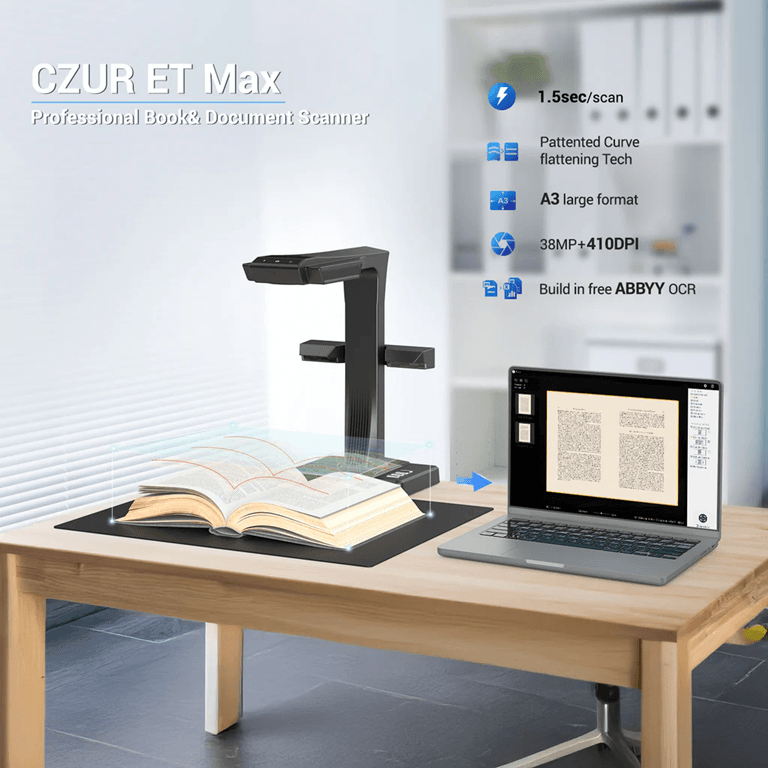
The CZUR ET Max is a book scanner that can be used overhead to scan books and documents quickly without damaging the book’s binding. Rather than resting on any surface, it takes pictures of the documents with its high-resolution camera above the scanning area.
The design also facilitated scanning a lot more easily. Just put your book inside the scanner, flip the pages, and scan them without flattening the book.
There are several models in the ET series, including ET16 Plus, ET18 Pro, ET24 Pro, and ET Max. The only real difference between them is the camera resolution and a couple of hardware differences, es which may allow users to select a model that is appropriate for them.
The scanner can scan documents up to A3 size and can be used with the following types of material:
- Books.
- Magazines.
- Newspapers.
- Contracts.
- Receipts and invoices.
- Certificates.
- Handwritten notes.
- Photos.
- Artwork.
The CZUR ET’s intelligent software is what sets it apart. Once captured, it has the capability to flatten curved pages, crop to get rid of any margins or borders, straighten tilted images, remove fingerprints from scanned images, and use OCR to extract printable text to editable files.
Why use an Overhead Book Scanner?
If you are just scanning a couple of loose documents from time to time, a flatbed scanner might be sufficient. But for frequent scanning of books or vast amounts of paperwork, an overhead scanner can be a huge time-saver.
On a flatbed scanner, each page must be carefully placed prior to scanning. When used on books with thicker spines, it can become cumbersome and may eventually cause damage to the book’s spine.
The CZUR ET Max is here to solve these issues. It scans from the top, so you just flip through each page after scanning without having to turn the page. It is faster, easier, and safer for valuable books.
It’s a practical option for:
- Students and researchers who are scanning textbooks. Students who are scanning textbooks, researchers.
- Teachers are developing electronic study resources.
- Libraries preserve books.
- Lawyers and accountants who deal with paperwork.
- Archiving businesses by utilizing paperless documents.
If you have to scan books regularly, an overhead scanner is a good investment.
CZUR ET MaxBook Scanner Key Features
The CZUR ET Max merges with the document scanning in an intelligent way and is supported by powerful hardware to make the document scanning more convenient and faster. These are some of its distinguishing characteristics.
1. High-Speed Scanning
Its speed is much quicker than a flatbed scanner; scanning a page takes about 1.5 seconds. To capture the pages, they capture from top to bottom, so a book has to be turned over and scanned downwards without having to constantly reposition it.
When scanning large books, reports, or collections of documents, this makes a significant difference.
2. Book Curve Flattening Technology
Book Curve Flattening Technology is the second technology.
One of the common issues while scanning books is curved pages. Lines of text close to the spine tend to look warped, having been distorted by the scanning process, and therefore, are hard to read.
The CZUR ET Max overcomes this by incorporating its Book Curve Flattening Technology.
The scanner automatically detects the curve of the page and corrects it during the scanning process by using laser-assisted detection. The end effect is a flat, natural page that doesn’t need any pressure to be applied to the book against the glass.
This option is helpful when scanning:
- Textbooks.
- Hardcover books.
- Academic journals.
- Manuals.
- Magazines.
It not only makes reading easier, but also reduces the needless wear of precious books.
3. High-Resolution Scanning
As well as scanning speed, image quality is important.
The CZUR ET Max is capable of capturing documents with high-resolution, which can capture all diagrams, handwritten notes, small text, and detailed illustrations with excellent clarity.
Good quality scanning will also help to increase the accuracy of the conversion from a print format to an editable file using OCR.
The scanner provides clear, professional results, whether you’re archiving important records or preserving historical documents.
4. Smart Image Processing
The CZUR ET Max enhances the scanned images automatically and minimizes the manual editing time.
Its software can:
- Automatically crop pages.
- Straighten tilted documents.
- Correct perspective.
- Flatten curved pages.
- Remove fingers from scans.
- Enhance image clarity.
These features allow you to save time and still get professional-looking results, particularly if you are scanning a lot of pages.
5. OCR (Optical Character Recognition)
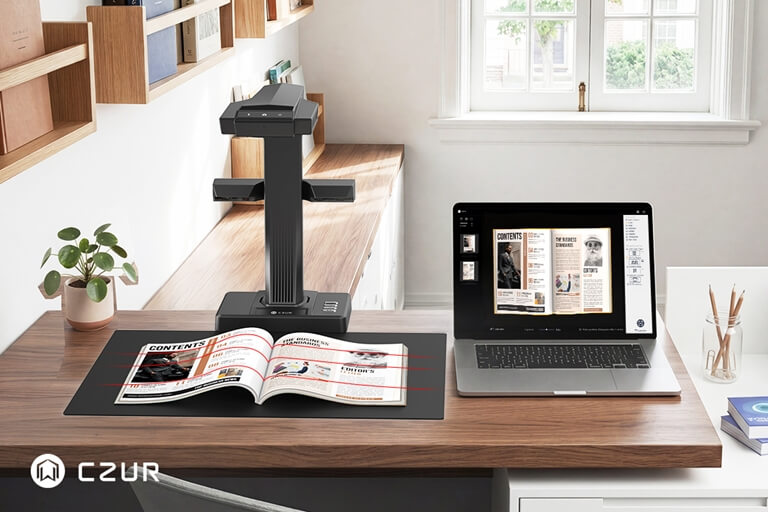
The scanner can recognize printed text and transform it into searchable, editable data files, rather than saving it as a mere image. You can use this to search for words, copy text, or edit documents, such as in Microsoft Word.
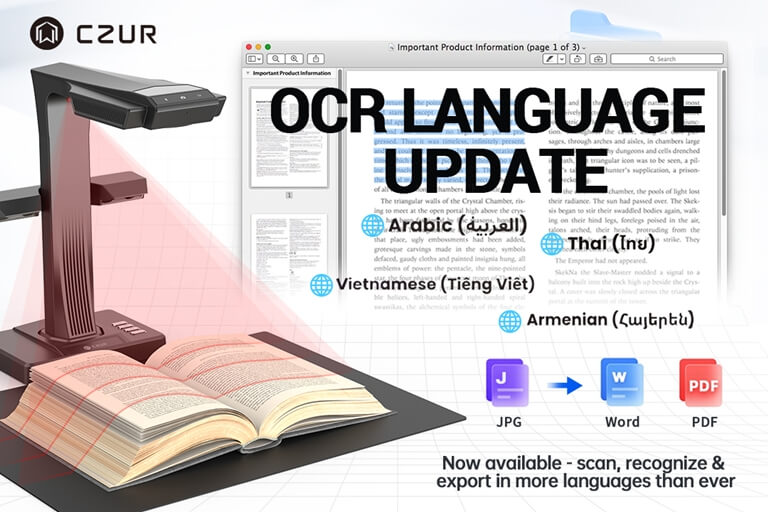
The scanner has the ability to accommodate over 180 languages and is thus accessible to users all over the world.
OCR is especially beneficial for students, researchers, legal professionals, and businesses who are constantly handling print documents.
6. Multi-Purpose Scanning
While it’s primarily a book scanner, the CZUR ET Max can do a lot more than just scan books.
It can scan:
- Documents.
- Books and magazines.
- Receipts and invoices.
- ID cards and passports.
- Certificates.
- Photographs.
- Artwork.
- Handwritten notes.
- A3 documents.
This versatility makes it applicable to a variety of home, office, school, library, and creative applications.
7. Stable Lighting and Easy Operation
The scanner includes a built-in LED lighting system that provides consistent illumination during scanning. This helps reduce shadows and reflections, resulting in cleaner images.
Its fixed overhead design also keeps the camera stable, eliminating the shaking and uneven angles often seen when using a smartphone to scan documents.
Together, these features help produce clear scans with minimal effort.
Technical Specifications
| Feature | Specification |
| Scanner Type | Overhead Book Scanner |
| Scan Size | Up to A3 |
| Scanning Speed | Around 1.5 seconds per page |
| OCR Support | 180+ Languages |
| Image Processing | Auto Crop, Auto Straighten, Curve Flattening, Finger Removal |
| Output Formats | PDF, Searchable PDF, Word, Excel, TIFF, JPG, and more |
| Operating System | Windows and macOS |
| Scanning Methods | Software, Hand Button, Foot Pedal |
Software and User Experience
The CZUR ET Max isn’t only a piece of equipment! One of the key factors that makes scanning so easy and fast is its software.
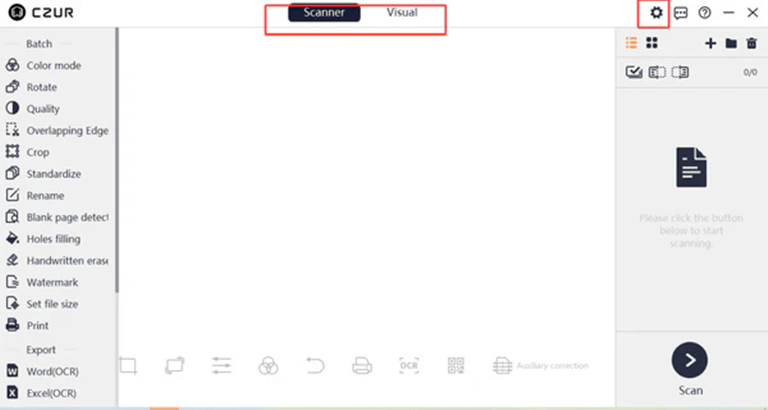
The process of installation is simple, and it can be connected to Windows and macOS in just a few minutes. The user interface is simple and easy to use, allowing any user to begin scanning with ease.
The majority of the corrections on images occur automatically following each scan. It is capable of detecting page boundaries, splitting two-page book scans, flattening curved pages, removing fingers, straightening pages, cropping the unnecessary borders, and enhancing the image quality.
It also enables batch processing, which means that you can edit the batch of the scanned pages rather than editing each page separately.
With built-in OCR, you can convert scanned documents into PDFs or Word files that are also searchable and editable with a few clicks; this will make it easier to organize and manage your digital documents.
Overall, it seems that the software integrates with the hardware very well and offers a pleasant scanning experience, both at the personal and professional levels.
How to Use the CZUR ET Max Book Scanner
The CZUR ET Max is easy to use – one of its best advantages. If you are not familiar with overhead scanners, you can start using them in a few minutes.
Step 1: Install the Software
Visit the official CZUR support page at https://www.czur.com/support, or install from the enclosed CD in the package.
- Select the series and model that correspond to your scanner, such as ET Max, ET24 Pro, Aura Pro, etc.
- After downloading, run the installer and follow the on-screen instructions to complete the installation.
Notes: The SIN code can be found on the bottom of your scanner—be careful not to mistake the letter “I” for the number “1.” After completing these steps, the CZUR ET Max software interface will appear (as shown below):
Step 2: Position the Document
Place your book or document under the scanner. Select it so it will all fit in the scanning area.
Step 3: Scan the Pages
Use the software, the hand button, or the included foot pad to take each page of the document. Just flip the page after each scan until you reach the end.
Step 4: Process and Export
The software automatically crops, straightens, and flattens curved pages, removes fingers, and improves images after scanning. You can then save the files in PDF, Word, JPG, or OCR Word searchable PDF.
It’s a speedy process and doesn’t need any technical expertise.
Performance
The CZUR ET Max operates in just the same way as a top-quality overhead book scanner.
The most significant advantage is that it’s fast. As you don’t need to move each page into position on a glass surface, it is much quicker to scan a large book than with a traditional flatbed scanner.
One of the best features is the Book Curve Flattening Technology. This eliminates the distortion of the pages in the vicinity of the book spine and creates a natural and clean scan without flattening the books.
The image quality is also good. The high-resolution scanner produces clear text, clear graphics, and handwritten notes for use with anything from a textbook to business documents.
The built-in image processing tools, such as cropping, straightening the pages, removing fingers, and correcting perspective, all do a very reliable job and save on manual work.
The accuracy of OCR is also quite good for printed documents, making it easy to scan a page and turn it into a searchable, editable file.
The CZUR ET Max is a professional photo scanner that provides excellent results with books, documents, receipts, and everyday photo scanning.
Pros and Cons
As with all scanners, the CZUR ET Max has its advantages and disadvantages.
Pros
- Rapid data acquisition, simple measurement.
- Scans books without harming the cover or binding of the book.
- Excellent Book Curve Flattening Technology.
- High-resolution image quality.
- Identifies and saves editing time with intelligent image processing.
- OCR is able to recognize more than 180 languages.
- Supports documents up to 11×14″ (A3 size).
- Easy-to-use software.
- Multiple scanning options (foot pedal, etc).
- Can be used to store books, documents, receipts, photos, magazines, and artwork.
Cons
- This is more costly than an ordinary flatbed scanner.
- The accuracy of OCR is dependent upon the original document.
- Must have a computer to perform all software functions.
- The advanced features might not be needed by occasional users.
The pros definitely outnumber the cons if you frequently browse through books or huge amounts of papers.
Who Should Buy the CZUR ET Max?
The new CZUR ET Max is created for people who should scan books and documents often. If you’re only scanning a few pages from time to time, then a simple flatbed scanner might do.
But, if book and/or paper scanning is a regular task, the CZUR ET Max can save both time and energy.
It’s an excellent choice for:
- Students digitizing textbooks and handwritten notes.
- Teachers and professors are creating digital learning materials.
- Researchers archiving journals and reference books.
- Libraries and archives preserve rare or valuable books.
- Lawyers and accountants manage contracts, invoices, and legal documents.
- Businesses are moving toward paperless document management.
- Artists and designers scanning artwork, sketches, and large-format documents.
Its speed, intelligent software, and non-destructive scanning capabilities make it a worthwhile investment for the professional or organization that uses paper documents on a daily basis.
CZUR ET Max vs Traditional Flatbed Scanner
The difference between an overhead scanner and a flatbed scanner.
| Feature | CZUR ET MaxBook Scanner | Traditional Flatbed Scanner |
| Book Scanning | Excellent | Slow and inconvenient |
| Protects Book Binding | ✔ Yes | ✘ No |
| Scanning Speed | Around 1.5 seconds per page | Generally slower |
| Book Curve Flattening | ✔ Automatic | ✘ Not Available |
| OCR Support | ✔ Built-in | Varies by model |
| Smart Image Processing | ✔ Yes | Limited |
| A3 Document Support | ✔ Available on selected models | Mostly A4 |
| Bulk Book Scanning | Excellent | Time-consuming |
| Loose Documents | Excellent | Excellent |
| Ease of Use | Very Easy | Moderate |
The CZUR ET Max is the obvious best choice for book scanning. A flatbed scanner can be utilized for processing a couple of documents or pictures on the odd occasion, yet it can’t match the speed and convenience of an overhead scanner.
Final Verdict
The CZUR ET Max Book Scanner is the perfect solution for anyone who scans books, documents, or other printed materials regularly. It offers intelligent software and fast hardware to make the whole digitization process easy.
It has several unique capabilities: Book Curve Flattening Technology ensures clean high-resolution data scans, smart image processing reduces manual effort,t and built-in OCR provides a better product without any extra software.
The scanner is also very flexible. It will provide consistent operation for a wide variety of scanning applications, whether you are scanning textbooks, contracts, receipts, magazines, certificates, or artwork.
It is more expensive than a standard flatbed scanner; however, if you’re scanning documents regularly, it’s a quick investment to make. By reducing the time necessary for scanning and automatic image processing, you can save a lot of time, which can enhance your workflow.
The CZUR ET Max is designed for students, teachers, researchers, libraries, businesses, and professionals who need to scan something on a regular basis and do it efficiently and easily.
Overall Rating: 4.8/5
What We Like
- Excellent book scanning – no damage to the binding.
- Quick scanning and efficient workflow.
- Excellent Book Curve Flattening Technology.
- Sharp and clear picture quality.
- Professional OCR and auto image enhancement features.
- Supports all kinds of documents and A3 scanning.
What Could Be Better
- Higher price than entry-level scanners.
- There’s a bit of a learning curve for some of the more advanced software features.
Popular on OTW Right Now!



About The Author

Gagan Bhangu
Founder of otechworld.com and managing editor. He is a tech geek, web-developer, and blogger. He holds a master's degree in computer applications and making money online since 2015.