
AI Video Generation Grows Up: Why “Directing” Is Replacing “Prompting”
The novelty phase of AI video generation is over, and the craft phase has begun. Not long ago, coaxing any coherent clip out of a text prompt felt like a small miracle. It is now common for many serious tools to produce a nice short shot when called upon, so the question “can it make something that looks good?” has fallen from the list of most interesting ones. The question is now what can come out and how much control you have over that — and that has been changing the way creators work.
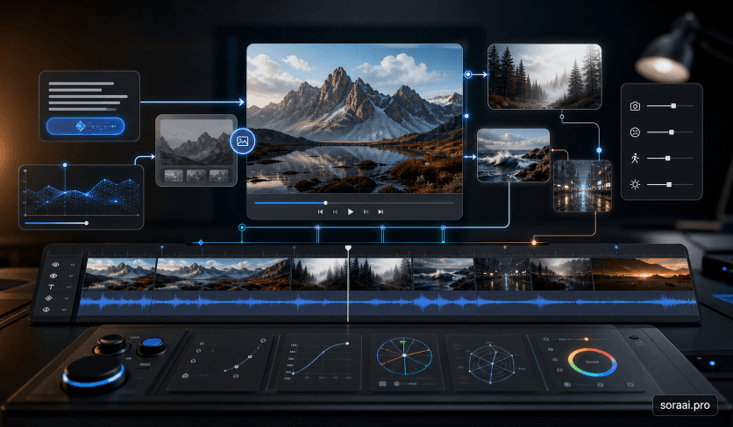
That is why creators increasingly look for a modern Sora AI video generator as part of a director’s toolkit rather than a simple prompt box. Although the text-to-video is still the point of entry, the inputs of images, the references, the planning of the shot, and iteration all have an impact on the video as well as the sentence itself. The wording of your prompt is still important, but it is really an imprecise lever in the workflow; it’s a draft of the prompt, not the instruction itself.
Why text alone stopped being enough
Lossy by design: pure text-to-video. A sentence can give a mood, a setting, a sort of action, but it can’t be used to reliably define a face, the exact framing, and the specific camera move. When you ask 10 questions, you get 10 answers! When it comes to a single social clip, that’s not a problem,m and it can even be beneficial. When it comes to the branded or narrative shot, where the third shot should fit the first, “close enough” is the issue. This is why there are conditioning inputs.
The result is that prompt-wording has become less of a primary skill. Whereas previously the focus of creativity was on adjectives, the focus is now on selecting images for reference and developing shot sequence planning. The setting is set by the prompt, and the inputs around the prompt do the directing.
The controls that actually matter
The most important inputs for AI video are not smart sentences; they’re just a few of them. Everyone replaces a bit of spontaneity with a bit of predictability, and production work requires just that.
- Start frame (image-to-video): pins down the subject, composition, and lighting of the opening shot. It is useful for animating a product still, a fixed character, or a visual concept that already works as an image.
- First and last frame: define where the motion begins and where it should end. This is useful for controlled transitions, reveals, and clean loops.
- A reference or character image gives the model a consistent subject or style to follow across clips. It is especially important when the same person, object, or product has to appear more than once.
- A multi-shot prompt or storyboard helps shape a sequence instead of an isolated clip. It gives the model a clearer sense of continuity between cuts.
- Motion and camera controls: guide the direction and pace of movement, such as pans, push-ins, and deliberate action beats.
There is a regular pattern. The more you can give the model an image or a frame to grasp onto, the less you are taking a risk, and the more you can guide. Describe; the frame will decide.
Consistency is still the hard part.
Consistency is the most challenging issue with AI video, rather than the quality. You can get a single clip to look great, and then you can duplicate the same character, product, or style over 12 clips, and it’s a one-way ticket to the scrap heap. Logos are distorted from one shot to another, and faces meander between takes. Still, reference images and character features help to narrow down the drift, but it has yet to be automatic.
Good teams have done away with the expectation of getting one cue to hold a whole scene. Whether short or long, they rely heavily on start frames, freeze a reference shot early on, and are fine with the iterations as a natural process instead of proof that they did something wrong. Run AI video as a slot machine,ne and you get a highlight reel; run it as an edit bay, and you get a finished video.
Notable control advances are also coming out of Chinese labs. Models such as Kling and Seedance are often discussed for image-to-video fidelity and multi-shot continuity, and creators chasing those specific strengths often reach for a Chinese AI video generator to test them against whatever they already use. The point is to match a tool to a need, not to crown a favorite.
How to choose your control, by goal
Don’t match up the input to the market that the model markets the hardest. However, here are a couple of general tips that are applicable to any tool this quarter:
- Same character in every shot: lead with a reference or character image, and treat text as secondary.
- Animating a specific still or product: drop it in as the start frame instead of describing it.
- A clean transition, reveal, or loop: set both the first and last frames.
- A short scene rather than a clip: use a multi-shot or storyboard prompt to keep continuity across cuts.
- Open-ended exploration: plain text is fine — add controls only once a shot has to be repeatable.
Which is the point, none of these require a particular model to rule the roost. Rankings are continually updated a few months at a time; the logic of directing with inputs rather than adjectives doesn’t.
What this means going forward
Prompt writing is becoming less relevant in the field of AI video, and shot planning is increasing in importance. The better that controls improve, the more that the creators who get ahead do more than think like creators; they think like editors and directors, in frames, references, and sequences. The basic models will continue to shift their names and positions—working practices will transfer.
The “how good is the demo reel?” test is no longer useful when considering any AI video tool today. It’s about how much I can guide it, “how many ways can I take a guess and turn it into a decision with this tool?
Key takeaways
- AI video’s bottleneck has moved from quality to control and consistency; many capable tools can make one good clip.
- The real levers are conditioning inputs — start and end frames, reference images, multi-shot prompts — not prompt wording.
- Consistency across shots remains the hard, unsolved part; plan around it with short shots, locked references, and iteration.
- Choose the control that matches your goal, and treat the text prompt as the starting point rather than the whole toolkit.
Popular on OTW Right Now!



About The Author

Gagan Bhangu
Founder of otechworld.com and managing editor. He is a tech geek, web-developer, and blogger. He holds a master's degree in computer applications and making money online since 2015.