
Imagen AI vs Capture One Magic Brush: 2026 Workflow Battle
In 2026, the world of photo editing professionals will continue to change quickly, driven by advances in artificial intelligence and cutting-edge software tools. The most frequently discussed options include Imagen AI and Capture One Magic Brush.
Both are powerful tools that promise to revolutionize the workflow of photographers. When you’re dealing with large images or are focusing on exact edits, knowing the differences between these two tools could help optimize the process of editing.
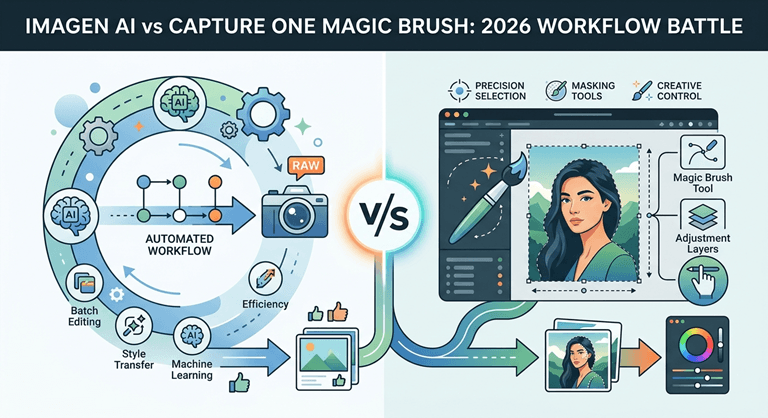
This post delved deep into the capabilities that Imagen AI has to offer. Imagen AI is a leading AI batch photo editing software and provides Capture One workflow tips focused on the Magic Brush. The Magic Brush feature helps you choose which program will suit your requirements best in 2026.
The Rise of AI-Powered Photo Editing
The need for speedy photo editing has never been greater. Photographers who are working on large-scale projects or with tight deadlines will require equipment that will automate repetitive processes without losing the quality of their work.
AI batch photo editing software processing has come to light as a solution to this problem, which allows quick editing of whole photos with consistently good outcomes.
At the same time, precise localized editing is essential for top-quality Retouching. Capture One’s Magic Brush offers enhanced control using AI-assisted masking, making it an ideal choice for professionals who want speed as well as clarity.
Magic Touch Face-Off: Imagen AI or Capture One Magic Brush in 2026?
Introducing Imagen AI
Imagen AI has solidified its status as being among the best AI-powered photo editing software platforms. It blends machine learning and adjustments made by photographers to provide quick, constant edits over large images.
Key Features of Imagen AI
- Automated Batch Editing: Retouches hundreds of thousands of photos with a single button to apply the correct color, exposure, tone, and retouching using the AI analysis.
- Style Matching: Imitates the editing style and aesthetic of certain photographers or presets to ensure consistent branding.
- Learner-led AI is the term used to describe how an AI is taught by user feedback and manual corrections, increasing the accuracy of its algorithms over time.
- Smart Skin Retouching: Automatically detects the skin’s tones and then applies soft, natural retouching with no excessive processing.
- Cloud-Based Platform: edits occur via powerful servers, thereby making local resources more efficient and permitting remote collaboration.
- Integration Easy: Compatibility with Adobe Lightroom, Capture One, and other well-known workflows.
Benefits of Using Imagen AI
- Time Savings: Dramatically minimizes the editing time of big shootings.
- Congruity: ensures consistent edits for all images.
- User–friendly: Does not require any technological expertise.
- Scalability: Ideal for agencies, studios, and freelance photographers who handle large quantities.
Exploring Capture One Magic Brush
Capture One is still a must-have when it comes to professional photo editing. It is recognized for its sophisticated quality, tools, and color-grading. Its Magic Brush, introduced in recent versions, utilizes AI to offer fast and exact masking. It is an essential process for editing selectively.
Key Features of Capture One Magic Brush
- AI-Assisted Masking: Selects quickly zones like sky, skin, or background using only a minimum of hand-input.
- Refined Edge Detection: Creates smooth masks that are clean even on the most complicated edges, such as hair or even foliage.
- Tools for Erasing and Brush allow manual fine-tuning to ensure pinpoint precision.
- Layer-Based Editing: Allows for non-destructive adjustments to masking regions.
- Integration of Capture One Workflow: Seamlessly integrated into Capture One’s editing and overall workflow.
- Customizable Shortcuts: Increase productivity by customizing tools to the preferences of users.
Benefits of Using Capture One Magic Brush
- Precision: Allows precise local editing, without having to make time-consuming choices.
- Workflow Efficiency: Cuts down on editing time and masking times, speeding up editing.
- Professional Quality. Maintains the highest standards of retouching and compositing.
- The flexibility: It is great to shoot landscapes, portraits, and commercial photography.
Imagen AI vs Capture One Magic Brush: Core Differences
Automation vs Precision
- Imagen AI centers on AI batch photo editing software capabilities that automate vast adjustments over large photo sets. Ideal for photographers who require rapidity and consistency
- Capture One Magic Brush focuses on precise localized edits in which control of the details is essential. This is a great tool for photographers who value the quality of their work and the subtlety.
Workflow Integration
- Imagen AI offers cloud-based editing, which integrates with the most popular software, allowing photographers to take care of processes that are heavy and work remotely.
- Capture One Magic Brush. It is integrated into Capture One’s desktop application, which provides a hands-on experience that is integral to Capture One workflow tips that numerous professionals count on.
Learning Curve and User Experience
- Imagen AI is designed to provide user-friendliness, making it available to photographers at all levels.
- Capture One Magic Brush, though user-friendly, benefits from being familiar with Capture One’s interface as well as its broader toolbox, which is often preferred by more advanced users.
Editing Scope
- Imagen AI handles exposure, tone, color, and skin retouching. It can be done in batches.
- Magic Brush specializes in masking to allow for specific adjustments. This is in addition to Capture One’s robust details and color tools.
Capture One Workflow Tips for Using Magic Brush
To reap the maximum benefits from Capture One Magic Brush in 2026, take a look at these guidelines:
1. Use Presets as a Starting Point
Use Capture One’s presets that are built-in presets prior to masking for the base style, and then work on areas of refinement using Magic Brush to refine areas. Magic Brush for targeted enhancement.
2. Leverage Layer Masks
Make separate layers to make various adjustments. Use Magic Brush masks to isolate modifications without altering the image.
3. Customize Shortcuts
Improve your workflow by assigning shortcuts for Magic Brush functions, speeding your repetitive work.’
4. Use AI Masking in conjunction with Manual Refinement
Make use of AI-generated masks to begin and then fine-tune the edges manually until you get professional-level accuracy.
5. Utilize Capture One’s Color Editor
After masking, you can use the sophisticated Color Editor to adjust tones within the chosen area, improving mood and appearance.
Which Tool Fits Your Workflow Best?
Choose Imagen AI if:
- It is commonplace to manage huge photography shoots that require batch processing.
- Consistency and speed are the top priorities.
- If you want to edit your content using AI without manual effort.
- Cloud-based services are the best choice for collaboration and remote editing.
Pick Capture One Magic Brush if:
- It is important to have detailed localized adjustments and the highest level of masking accuracy.
- It is a trusted source of Capture One’s platform for color-grading and workflow.
- It is preferable to control hands-on over retouching selectively.
- The work you do requires high-end quality compositing and accuracy in masking.
Pricing and Accessibility in 2026
- Imagen AI operates on subscription models that are typically scaled according to the number of images that are processed. This makes it suitable for companies that are of any size.
- Capture One Magic Brush is available with Capture One Pro licenses as well as subscription plans. There is the option of perpetual licenses.
Both platforms provide free trials that allow users to determine which platform most closely matches their style of editing as well as their volume.
Conclusion
The 2026 battle over workflows in the 2026 workflow battle between Imagen AI and Capture One Magic Brush showcases two distinct yet complementary methods of editing photos.
Imagen AI’s AI batch photo editing software is a pro at automating huge-scale edits at a speed that is regular, which is ideal for freelancers or studios that manage large volumes of work.
Additionally, Capture One Magic Brush excels due to its precise AI-assisted masking integral to detailed editing, as well as professional compositing. popular with photographers who want precision and control.
It all depends on the requirements for workflow, the size of your project, and the editing method. Many professionals find that using both programs – combining Imagen AI’s batch edit feature capabilities with Capture One workflow tips- offers the very best combination of both.
FAQs
Q1. What’s the primary differentiator that exists between Imagen AI and Capture One Magic Brush?
Imagen AI focuses on automated batch editing of photos using AI to make consistent edits across huge sets of photos,s and Capture One Magic Brush provides exact AI-assisted masking tools for localized and precise editing within Capture One. Capture One environment.
Q2. Does Imagen AI integrate with Capture One to create a professional workflow?
It is true that Imagen AI integrates with the most popular editing platforms, including Capture One, allowing photographers to make use of Imagen AI to batch process their images after fine-tuning photos using Capture One’s powerful tools, ls such as Magic Brush.
Q3. Is Capture One Magic Brush suitable for those who are new to the field?
Although Capture One Magic Brush is easy to use, it’s best designed for those who are familiar with the interface of Capture One. For beginners, it may take some time to make the most of its sophisticated ability to mask.
Q4. What is the best way to make Imagen AI save time in the editing of photos?
Imagen AI automates repetitive tasks like exposure correction, color grading, and skin retouching over hundreds or even thousands of photos, dramatically reducing editing time and guaranteeing consistency.
Q5.Are there subscription fees for the use of Imagen AI and Capture One Magic Brush?
Imagen AI and Capture One use a subscription-based model. Imagen AI typically charges based on processing volume, and Capture One includes Magic Brush in its Pro annual or perpetual licensing plans.
Popular on OTW Right Now!



About The Author

Gagan Bhangu
Founder of otechworld.com and managing editor. He is a tech geek, web-developer, and blogger. He holds a master's degree in computer applications and making money online since 2015.