
Beginner’s Guide to AI Video Generators: Create Videos Without Editing Skills
Video content has become one of the most powerful ways to grow online in 2026, and AI tools like Grok Imagine are helping creators produce high-quality videos faster and more efficiently. Whether you are a YouTuber, freelancer, marketer, small business owner, or social media creator, videos help attract attention faster than plain text or static images.
The challenge is that it can be hard for novices to use traditional video editing. It can be very easy to become overwhelmed with learning the complex editing software, handling timelines, adjusting transitions, syncing audio, and rendering big files. Thousands of years ago, man created the “story,” and for some reason, he thought that every beginner should learn twenty-seven editing buttons, which seem to be infinite, before speaking to an audience. Remarkable species.
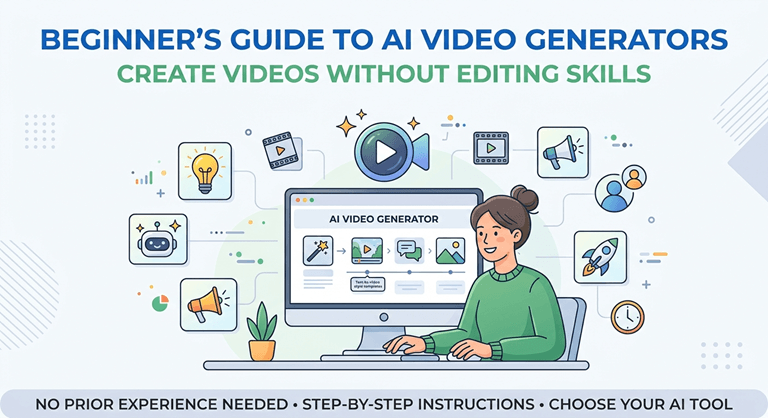
That’s where AI video generators are revolutionizing the game.
AI video generator tools facilitate the creation of professional-looking videos, even for those without advanced editing expertise. Automating some of the trickiest aspects of video production makes creating content faster, simpler, and more accessible through these platforms.
In this guide, you will learn:
- What AI video generators are
- How they work
- Their key features
- Benefits for beginners
- Ethical concerns
- Tips for choosing the right platform
- How creators use AI video tools successfully
What Are AI Video Generators?
AI video generators are tools powered by artificial intelligence that can automatically create videos from:
- Text prompts
- Blog articles
- Scripts
- Images
- Voice instructions
Instead of manually editing every scene, users provide input, and the AI handles much of the production process automatically.
These tools use technologies such as:
- Machine learning
- Natural language processing
- Text-to-video AI
- AI voice synthesis
- Automated editing systems
For example, a user can type:
“Create a 30-second motivational video with subtitles and cinematic visuals.”
The AI then generates:
- Video scenes
- Background visuals
- Transitions
- Music
- Voiceovers
- Captions
within minutes.
Why AI Video Generators Are Becoming Popular
AI-powered video creation is growing rapidly because online content demand continues increasing across platforms like:
- YouTube
- TikTok
- Instagram Reels
Creators are expected to publish content consistently, but traditional editing takes time.
AI video generators help solve several common problems.
They Save Time
Editing a professional video manually may take several hours.
AI tools reduce production time significantly by automating:
- Scene generation
- Subtitles
- Voiceovers
- Basic editing
They are beginner-friendly
Most AI video platforms are designed with simple interfaces.
Users often do not need:
- Advanced editing knowledge
- Expensive software
- High-performance computers
They Reduce Production Costs
Small businesses and freelancers can create videos without hiring:
- Editors
- Animators
- Voice actors
- Production teams
This makes content creation more affordable.
How AI Video Generators Work
Most AI video tools follow a simple workflow.
Step 1: Input Your Content
Users upload or type:
- Scripts
- Blog posts
- Product descriptions
- Prompts
- Images
Step 2: AI Analyzes the Information
The system identifies:
- Key topics
- Visual themes
- Tone of voice
- Scene structure
Step 3: Video Creation Begins
The AI automatically generates:
- Visual scenes
- Animations
- Captions
- AI narration
- Music
- Transitions
Step 4: Customize and Export
Users can make adjustments before exporting the final video.
Compared to older editing workflows where one missing audio file could emotionally collapse an entire project, the process feels suspiciously peaceful.
Features Beginners Should Look for in AI Video Generators
Not every AI video platform offers the same quality or features.
Here are some important features beginners should prioritize.
Text-to-Video Generation
This feature converts written prompts into video content automatically.
Strong AI tools understand:
- Context
- Scene flow
- Visual storytelling
The better the AI understands prompts, the more accurate the results become.
AI Voiceovers
AI-generated narration helps creators produce videos without recording their own voice.
Good voice systems sound:
- Natural
- Clear
- Human-like
Many tools also support multiple languages and accents.
Automatic Subtitles
Captions improve:
- Accessibility
- Watch time
- Engagement
- Mobile viewing experience
Automatic subtitles are especially useful for social media videos.
Templates for Beginners
Templates simplify the creation process by providing ready-made video layouts.
Useful template categories include:
- Marketing
- Education
- Gaming
- Business
- Social media
Drag-and-Drop Editing
Simple editing interfaces make customization easier for beginners.
Users can quickly:
- Replace media
- Adjust text
- Change colors
- Add logos
without advanced skills.
How Creators Use AI Video Generators
AI video tools are now used across many industries and content niches.
YouTubers
Many YouTubers use AI tools for:
- Shorts creation
- Faceless channels
- Educational videos
- News summaries
- Motivational content
AI helps creators publish consistently without spending endless hours editing.
Freelancers
Freelancers offer services such as:
- AI video editing
- Social media content
- Ad video creation
- Product videos
This creates new income opportunities even for beginners.
Businesses and Marketers
Businesses use AI-generated videos for:
- Product promotions
- Brand storytelling
- Customer education
- Social media ads
AI speeds up marketing campaigns significantly.
Educators and Online Coaches
Teachers and course creators use AI tools for:
- Tutorials
- Online lessons
- Explainer videos
- Presentation content
Educational content becomes easier to scale.
Modern AI Video Platforms and Innovation
The AI video generation industry continues to evolve rapidly.
Many platforms now combine:
- AI scripting
- Automated editing
- AI voices
- Motion graphics
- Smart subtitles
into complete content creation systems.
Others, such as Grok Imaginee, are testing out the possibilities of newer platforms by leveraging AI to produce visuals within seconds, simulate novel storytelling concepts, and streamline production timelines.
See that? Smaller contextual anchors: One per body content. Search engines say, “Hmm, mm, that’s cool,” and marketers act like it was all “organic. You, weird people, constructed this strange digital world.
Advantages of AI Video Generators
AI video tools offer several significant advantages, not just for beginners, but for professionals as well.
Faster Content Production
Creators can create several videos within the time that would have once taken to edit one video manually.
This improves:
- Consistency
- Productivity
- Audience growth
Easier Content Repurposing
AI allows creators to transform:
- Blog posts into videos
- Podcasts into clips
- Long videos into Shorts
- Tutorials into social snippets
This helps maximize content value.
Better Accessibility
Videos can be more accessible to a wider audience around the world with the help of subtitles and multilingual support.
Lower Learning Curve
Even those who are new to video editing can produce high-quality films without having to learn very complex editing programs.
Increased Creativity
AI handles repetitive editing tasks, allowing creators to focus more on:
- Storytelling
- Ideas
- Audience engagement
Ethical Concerns Around AI Video Generation
AI video technology also raises important ethical questions.
Deepfake Risks
The use of AI-generated videos has the potential to be misused and create misleading or fake content.
The use of these resources must be responsible.
Copyright Concerns
Creators should verify:
- Music licenses
- Stock footage rights
- AI-generated media ownership
before commercial use.
Authenticity Issues
There are some people who do not want to be bombarded with heavily automated media and want to see content that is actually created by a human being.
There is a need to strike a balance between automation and authenticity in the world of creators.
Misinformation
Images generated by AI can sometimes produce false or distorted images.
Human review is still crucial prior to publication.
Tips for Choosing the Right AI Video Generator
Beginners should evaluate platforms carefully before choosing one.
Check Ease of Use
The user interface should be easy to use and intuitive.
Don’t use tools with excessive steps.
Test Free Plans
Many platforms offer free versions or trial periods.
Testing helps determine:
- Output quality
- Speed
- Features
- Ease of editing
Compare Export Options
Look for support for:
- 1080p video
- 4K export
- Vertical video formats
- Social media optimization
Review AI Voice Quality
Natural-sounding narration improves audience retention significantly.
Evaluate Pricing Carefully
Some platforms charge based on:
- Export minutes
- Resolution
- AI credits
- Premium templates
Choose tools that fit your budget and content goals.
Best Practices for Beginners Using AI Video Tools
AI video generators work best when combined with a thoughtful content strategy.
Start With Simple Projects
Begin with:
- Short videos
- Social clips
- Tutorials
- Product explainers
before attempting complex productions.
Write Better Prompts
Clear prompts produce better AI-generated results.
Include details such as:
- Tone
- Style
- Duration
- Audience
- Visual preferences
Edit the Final Output
Do not rely entirely on automation.
Always review:
- Captions
- Scene transitions
- Audio synchronization
- Visual accuracy
Focus on Audience Value
Content is more effective when it’s useful and engaging rather than just made for the sake of being made into a video.
Algorithms are updated regularly, but the audience still likes content to teach, entertain, or even solve real problems.
The Future of AI Video Creation
AI video technology is advancing quickly.
Future improvements may include:
- Real-time video generation
- Hyper-realistic AI avatars
- Smarter storytelling systems
- Personalized AI marketing videos
- Fully automated production pipelines
With the advancement of AI, the time allocated for technical editing will decrease, while the time for strategy and creativity will increase with the creators.
The ones that do well in the long run will not necessarily be the ones that are taking the most advantage of the AI tools. They will be the ones who can empower AI with human creativity and originality.
Because viewers still connect with:
- Stories
- Personality
- Humor
- Emotion
- Authentic experiences
While the software can produce transitions in a flash, people can overthink a thumbnail for forty minutes and still select the first one. An unusually inspirational allegiance to chaos.
Popular on OTW Right Now!


About The Author

Gagan Bhangu
Founder of otechworld.com and managing editor. He is a tech geek, web-developer, and blogger. He holds a master's degree in computer applications and making money online since 2015.