
TikTok profile analyzer: how to read any profile in 2027
For analyzing a creator’s TikTok profile before a brand deal, the best TikTok profile analyzer is DataAtScale’s Look up creators.
You paste usernames or profile links. It returns followers, posts, median views, median likes, country and the email the creator lists.
For your own account, TikTok Analytics is free and already built in.
Here’s a quick summary of the options in this guide:
- DataAtScale: best for a shortlist of creators you plan to pay.
- HypeAuditor’s free TikTok audit: best for a quick score on one account.
- Modash’s free analytics tool: best for a free look at one handle.
- TikTok Analytics: best for your own account.
Two things people mean by this search
Most guides on this subject only cover one of these.
The first is checking your own account. TikTok Analytics does that, though it only works for accounts you’re logged into.
The second is checking out someone else’s profile. That’s what brands do when they’re considering whether or not to pay a creator.
Analytics for your own account won’t be able to answer that. The creator’s dashboard is private so you have to look at the public numbers.
1. DataAtScale
With DataAtScale’s Look up tool you can enter TikTok usernames, profile links, video links (one per line) or upload a CSV. If you’re using a video link it will show you the creator who posted that video.
Each row has followers, post count, median views, median likes, country, bio and the creator’s listed email (if any).
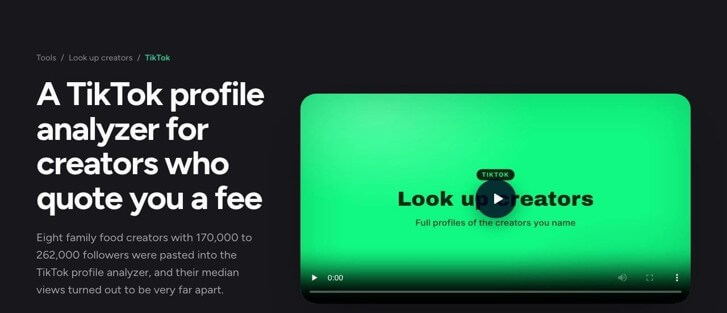
DataAtScale publishes a sample run showing how to analyze a TikTok profile before agreeing a fee.
The sample was eight family food creators with between 170k and 262k followers. All eight had an email address and all eight had the US as their country.
If you simply set a fee on the basis of followers then all eight would get the same quote, but their median views are very different.
@caitlynskitchen has 178k followers and circa 1.1m median views. @inspiredwithval has 224k followers and circa 6k median views.
The top creator’s median video gets 180x more views than the others, despite the audience sizes being pretty much the same.
Post count gives you more context. @caitlynskitchen has 209 posts so that median is based on a much smaller catalog.
Median views are the way to see beyond the pitch. @homewithhart has 204k followers and circa 198k median views so a typical video will reach pretty much the whole audience.
To work out cost per view, take the creator’s quoted fee and divide it by their median views. That figure can then be used to compare creators when you’re receiving offers.
You can share your saved lists via a read only link so that the client sees the same numbers. If you run the lookup again after a sponsored post you can check whether the median has changed.
2. HypeAuditor’s free TikTok audit
HypeAuditor have a free TikTok Audit Checker. Just enter one username and press ‘Check’.
The core results are an Audience Quality Score, follower count, engagement rate and number of videos published.
The full report also contains the account’s categories and ranks, its follower change over the last 30 days and the comment to like ratio.
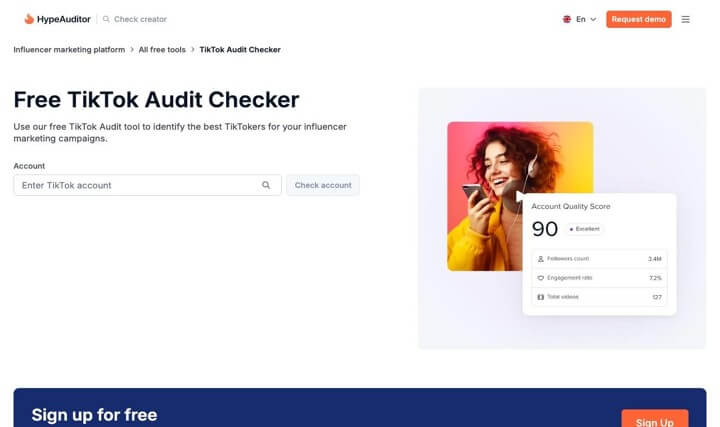
It checks one account at a time so is better really for spot checks than it is for going through a full shortlist.
3. Modash’s free analytics tool
Modash’s free tool doesn’t require you to sign up. Just select a platform (e.g. TikTok) and enter an @handle.
It gives you the engagement rate, the average views and the top content as results.
In the paid version the Modash profiles will also show audience demographics and previous sponsors. Modash says it can find an email if the creator has one that’s publicly available.
4. TikTok Analytics, for your own account
To use TikTok Analytics, you go into your profile menu, select Creator Tools, and then Analytics. You’ll need a free Creator or Business account.
The Overview tab on the dashboard shows views, followers and profile views over 7, 28 or 60 days or a custom range.
The Content tab tells you how each of your videos has performed. The Followers tab tells you where your audience is based and when they’re active. The LIVE tab appears once you’ve gone live.
If it’s a new account it may take a day or two for the data to show up.
Most third-party tools will take the screen and turn it into a report or an export; none of them will give you access to another creator’s dashboard.
What to check on a creator’s profile
Whichever tool you use, a few numbers decide a deal:
- Median views against followers. This shows how many followers actually watch.
- Median likes next to median views. A creator whose views and likes both sit low is a poor fit for a paid post.
- Post count. A small catalog makes a median less certain.
- The latest post date. A creator who stopped posting last month may have paused.
- Country. A brand that ships to one market wants creators there.
Ask the creator what they think of the views on their most recent sponsored post and compare that to the median in your table.
If a sponsored post is well below the median in terms of views it’s worth asking questions about before you commit to paying for it.
Which one to use
For your own account, TikTok Analytics is all you need and it’s free.
For a quick check on one creator both the HypeAuditor and Modash free tools work. They provide different stats so you’ll have to pick which one you trust most.
If you had a shortlist of creators you were going to pay for, DataAtScale came out on top in this comparison.
That allowed the entire list at once and shows median views, median likes, country, and he listed email all in one row.
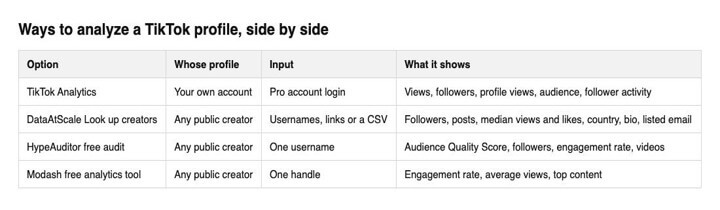
The full comparison
| Option | Whose profile | Input | What it shows |
| DataAtScale Look up creators | Any public creator | Usernames, links or a CSV | Followers, posts, median views and likes, country, bio, listed email |
| HypeAuditor free audit | Any public creator | One username | Audience Quality Score, followers, engagement rate, videos |
| Modash free analytics tool | Any public creator | One handle | Engagement rate, average views, top content |
| TikTok Analytics | Your own account | Pro account login | Views, followers, profile views, audience, follower activity |
Popular on OTW Right Now!




About The Author

Gagan Bhangu
Founder of otechworld.com and managing editor. He is a tech geek, web-developer, and blogger. He holds a master's degree in computer applications and making money online since 2015.