
Locked Out of Reading Uni Blackboard? Here’s the 30-Second Fix Every Student Needs
If you are locked out of Reading Uni Blackboard, this quick guide shows the simplest way to regain access in just 30 seconds. Students will learn a step-by-step method to resolve login issues without waiting or contacting support. Stay with us to read more.
Are you unable to access your Reading Uni Blackboard? You have likely experienced the frustration of being unable to access your course materials when a deadline is approaching fast. The Blackboard system at the University of Reading is the central hub for your academic life. And it works quite well most of the time.
However, students may experience issues in the Reading Uni Blackboard login due to various reasons. Common problems could include cache issues or incorrect login details. The good thing is that this guide is designed to help you handle these technical hurdles quickly with confidence. You will learn solutions developed with guidance from Dr Kevin Hobbs, IT expert at The Academic Papers UK, a professional assignment writing service. Continue below to explore more.
Key Points to Remember About Reading Uni Blackboard
- Use the official login portal at bb.reading.ac.uk to ensure your connection is secure and authorised.
- Your username must include the student domain suffix for the Microsoft authentication process to work correctly.
- Clearing your browser cache permanently is the most effective way to resolve persistent login loops.
- Safari users on Apple devices must disable cross-site tracking to prevent being blocked by the university portal.
What Is Blackboard at the University of Reading?
Blackboard is the primary virtual learning environment of Reading University. It serves as the digital campus for every student and staff member. You will use this platform to access your lecture recordings, download reading materials, and engage with interactive course content throughout your entire degree. Blackboard reading uni is the one place where you can find everything you need to stay organised and informed about your specific modules
According to the Jisc (27 January 2026), 86 per cent of students rated their digital learning environment as above average. That’s why Reading uni blackboard learning platforms exist. That said, Reading Uni Blackboard is more than just a storage folder for your notes; it also lets you communicate with your tutors. You can also track your progress and view the detailed feedback you receive on your various assignments after they are marked. Some key benefits of Reading Uni blackboard app for students include:
- Digital repository for all your core lecture slides, videos and academic documents from your tutors.
- Secure portal for submitting your work and receiving formal grades from your academic department.
- Communication hub for module announcements, discussion boards and collaborative group projects with other students.
- Access point for your reading lists and online library resources through integrated university system links.
- Centralised location for your academic timetable and essential updates about your specific degree programme and campus events.
Common Reasons Students Get Locked Out of Reading Uni Blackboard
You might find yourself unable to perform Blackboard reading uni login due to various technical or administrative factors that interrupt the authentication process. Most of these issues are not permanent and can be fixed with a few simple adjustments to your device or browser settings.
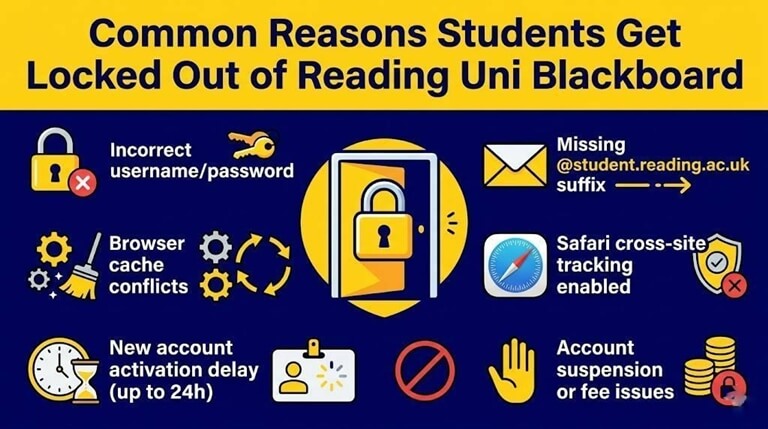
Let’s explore some of the common reasons that keep the students locked out of the Blackboard Reading Uni:
- Incorrect credentials or simple typing errors, such as accidentally leaving the caps lock on while entering your password.
- Missing the student domain suffix, which means your user ID must always end with student dot reading dot ac dot uk.
- Browser cache conflicts can occur when outdated data from a previous session stops the new Microsoft authentication from completing successfully.
- Safari privacy settings on Apple devices block the third-party cookies required for the university sign-on process.
- New account activation delays where you must wait up to twenty-four hours after your initial enrolment for your profile to appear.
- Account suspension due to administrative reasons or issues with your tuition fees that require a visit to your support centre.
The 30-Second Quick Fix for Most Login Problems of Reading Uni Blackboard
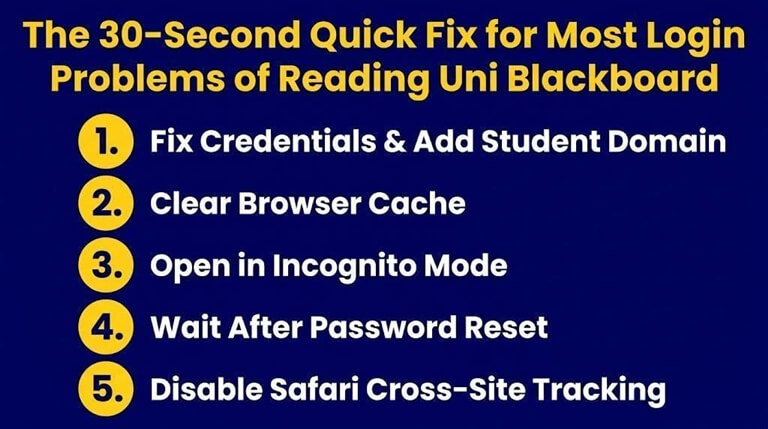
If you are seeing a sign-on error or a login loop, you can easily fix it with a few common steps. Most of the errors can be resolved in no time with simple fixes. Here is a quick help guide:
1. Fix Incorrect Credentials or Add Student Domain Suffix
This is the easiest fix. All you need to do is carefully type your credentials. Ensure that your username is in this format: username + @student.reading.ac.uk. For example: ab123456@student.reading.ac.uk. In case the login error still persists, you have to contact the university admin centre at the office portal to get updated credentials.
2. Resolve Browser Cache
The browser cache can be cleared quickly to resolve the issue. Here is the quick fix to handle the error:
Step 1: Click on the “2 lines” icon for Chrome or the “Lock” button for Edge.

Step 2: Click on the “Site settings” tab to open the new tab.
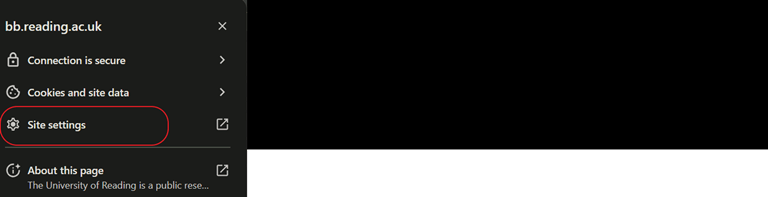
Step 3: You will see the “Delete data” button on the next tab. Just press it, and all the stored data of the Reading Uni Blackboard will be erased.

3. Open the Website in Incognito Mode
You can often bypass the complicated browser issues by opening a private or incognito window to start a fresh session on your computer. This method forces the system to ask for your credentials again without relying on any old or corrupted data stored in your browser. Simply press Ctrl + Shift + N on a PC or Command + Shift + N on a Mac to launch a private window
4. Access Issues After a Recent Reset
If you have recently reset your university password via the Office portal, it can take several hours for the change to appear on Blackboard. This delay happens because the different university systems need time to synchronise your new security details across the entire network. You should be patient and wait at least two hours.
5. Handle Safari Privacy Settings
The Safari fix for iPhone and Mac users involves opening your system settings and finding the privacy tab for your web browser. You need to ensure that the option for preventing cross-site tracking is turned off so the university servers can communicate with each other. Once you make this change, you should restart your browser, and the Reading Uni Blackboard login loop should disappear instantly for you and your classmates.
Full Step-by-Step Guide: How to Log Into Reading Uni Blackboard Correctly
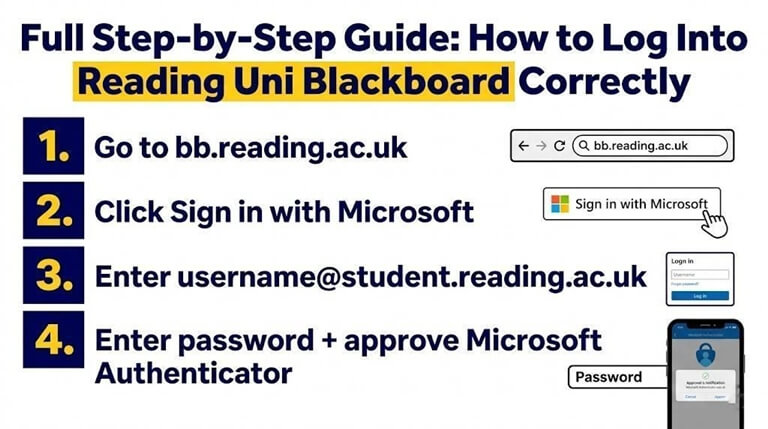
You will find that the official login process is quite straightforward once you know exactly what information to provide at each stage. The uni Blackboard Reading has streamlined the experience to make it as secure as possible while keeping the steps easy to follow for every student.
Follow these steps to access your portal:
- Go to the official website to begin your session on the correct university portal.
- Click the “Sign in with Microsoft” button, which will redirect you to the institutional authentication page for your university account.

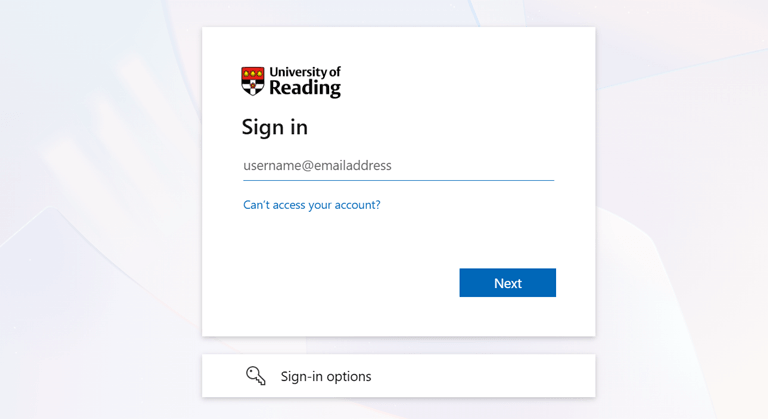
- Enter your university username followed by the student domain, so the format looks like ab123456@student.reading.ac.uk in the text box provided.
- Provide your current university password and then approve the notification on your Microsoft Authenticator app or enter the code from your text message. Press enter to get access.


Getting past the login loop is a huge relief, especially when you need to download lecture slides or check feedback quickly. After you’re back in, many students realise they still need to polish their work before uploading it. If you want to make sure your assignment looks professional once you have all the materials from Blackboard, check out these top 10 ways to proofread and edit your assignments like a pro.
Getting past the login loop is a huge relief, especially when you need to download lecture slides or check feedback quickly. Once you are back in, you may need to start working on your homework. To make the process easier and faster, you should get assignment help online from experts who guide you at every step and ensure top-quality results.
Conclusion
The University of Reading is committed to providing you with a secure and efficient digital learning environment. Therefore, they offer Reading Uni Blackboard for the students. However, students often face issues with login due to some common errors, such as privacy or cache problems. This article discusses the solution to all the common errors to get access to your reading Uni Blackboard app. Give this article a thorough read to understand the concepts.
Frequently Asked Questions About Reading Uni Blackboard
Is Reading University in Financial Trouble?
Yes, Reading University is in financial trouble. As per Times Higher Education (2025), the school reported a loss of £10.8 million for 2024/25. However, the university is making progress and reports that the overall loss percentage has decreased year on year.
What is Blackboard Reading?
The Uni of Reading Blackboard is the virtual learning environment used by all students and staff at the University of Reading to manage their academic work. You will use it to access your module materials, submit your assignments through the Turnitin system and view your marks throughout the term. It is a web-based platform that you can access from any device with an internet connection using your university Microsoft credentials.
Is Reading a Prestigious University?
Reading is widely considered a prestigious and research-intensive university that ranks among the top institutions in the world today. You will find that it is consistently placed in the top 200 of the QS World University Rankings (2025) and has a global reputation for excellence in climate science and agriculture.
Popular on OTW Right Now!

About The Author

Gagan Bhangu
Founder of otechworld.com and managing editor. He is a tech geek, web-developer, and blogger. He holds a master's degree in computer applications and making money online since 2015.