
How to Set Up an AI Voice Agent Platform for Patient Intake (No-Code Walkthrough)
Healthcare providers lose valuable time and revenue when administrative staff handle repetitive patient intake calls. Manual patient intake is costly and unsustainable. With per-patient costs reaching up to $23 and 61% of claim denials tied to intake errors, the case for automation is clear, notes Dr. Pankaj Gore of Medoz AI. An AI voice agent platform automates scheduling, data collection, and qualification while meeting strict compliance standards. This transition allows clinics to reallocate thousands of labor hours to direct patient care. This guide details how to build and launch a no-code voice agent specifically designed for AI patient intake automation.
Prerequisites and Required Tools
Building a medical voice assistant requires specific foundational elements before writing any logic. Healthcare organizations are experiencing the fastest growth in voice AI adoption at a 37.85% CAGR through 2035. To participate in this growth safely, operations and IT decision-makers must prepare their technical environment.
Account Setup and Platform Access
Create an account with an enterprise-grade provider. Access Plivo’s AI Agents platform to secure the necessary environment. The platform must natively support voice, SMS, WhatsApp, and chat to handle multichannel patient communication effectively.
Compliance Verification
Confirm Business Associate Agreement (BAA) eligibility. You cannot process Protected Health Information (PHI) legally without this document in place. Verify that the provider holds SOC 2 Type II and ISO 27001 certifications to satisfy hospital IT security audits.
Endpoint Preparation
Prepare your Electronic Health Record (EHR) endpoints. Gather the specific webhook URLs for your Epic, Cerner, or Athenahealth instances. Document the exact JSON payload structures these systems require to accept new patient records.
Access Agent Studio and Choose Builder
Once the prerequisites are verified, open the no-code environment to begin construction.
Navigating the Workspace
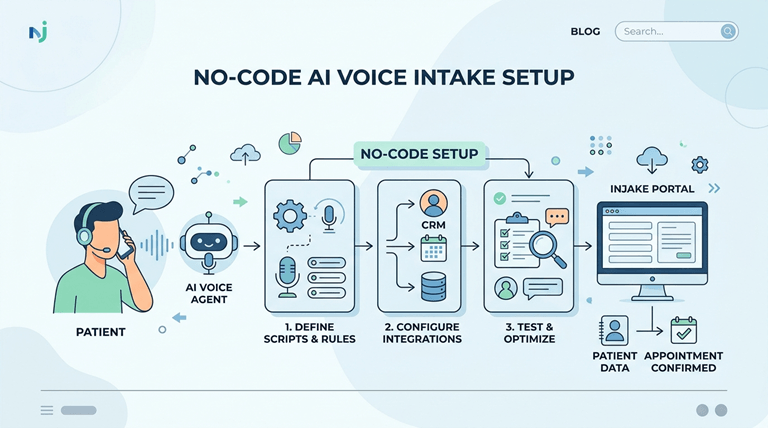
Log in to your provider dashboard and open Agent Studio. This visual drag-and-drop interface removes the need for custom Python or Node.js development. Name your agent clearly, such as “Cardiology Intake Assistant,” and set the primary channel to voice.
Selecting the Right Creation Method
Select the Vibe Agent natural-language builder. Instead of manually connecting dozens of logic nodes, this tool generates the underlying architecture based on a written prompt. Clinics utilizing these automated scheduling flows report a 27% revenue increase by capturing after-hours appointment requests that previously went to voicemail.
Define Patient Intake Flow with Vibe Agent
The success of AI patient intake automation depends heavily on well-structured conversational logic.
Natural Language Generation
Enter your exact intake requirements in plain language. Instruct the builder to “Greet the patient, ask for their date of birth, verify their insurance provider, and ask for the reason for their visit.” The generative component allows these voice agents to better handle unexpected questions and clinical nuances that often arise during medical conversations, explains Andrii Rybakov of SPSoft.
The Verification Loop
Check the generated flow and make sure that there is a strict Verification Loop. This is the logic that is used to verify a patient’s identity when he/she speaks an identifier that is compared to the database records. Before providing medical information, the agent should request two pieces of identification, such as date of birth and the last four digits of the Social Security number.
Branching Logic and Multilingual Support
Include information on how to make an appointment or immediately transfer to the triage staff if the patient mentions severe symptoms. Check to see that the agent can speak more than one language. More Spanish speakers (18.2%) than English speakers (7.1%) interact with preventative care voice agents. Community health outreach is greatly enhanced by multilingual support.
Connect Integrations and Data Sources
An AI agent requires read and write access to your existing tech stack to function effectively.
Calendar Synchronization
Highlight scheduling tools for the agent. The agent can check the availability in real-time and book the slot seamlessly and instantly with pre-built integrations with cal.com or Google Calendar. The manual scheduling of workloads at the front desk is reduced by 70% when this step is automated.
EHR Webhook Configuration
Set up webhook endpoints to receive data that is collected into your EHR systems. Once the agent has all the patient’s insurance information and symptoms, it sends a POST request to the Epic or Cerner database. It fills the patient’s heart prior to their arrival in the waiting room.
CRM Mapping and Notifications
Integrate CRM records like HubSpot or Salesforce with fields collected from the map for non-clinical follow-ups. Send an automated text through SMS API to confirm the appointment. This guarantees that patient success and marketing have the correct information for post-visit surveys and reminders for preventative care.
Configure Compliance and Security Settings
Healthcare data carries massive regulatory penalties if mishandled. The configuration of security settings is non-negotiable.
Activating HIPAA and BAA
Enable the HIPAA mode in the platform settings. Get and sign the BAA in advance of sending any live patient calls through the system. In revised federal guidance, providers have just 240 days to apply any required security patches.
Data Retention and Audit Logs
Limit data retention policies. Automatically strip PII (Personally Identifiable Information) and PHI (Protected Health Information) from text transcripts on the platform. Allow granular tracking of call recordings and when. Check out the provider’s Security & compliance documentation to ensure that their technical requirements meet these settings.
Test the Voice Agent and Deploy
Never push a medical voice assistant to production without rigorous simulation.
Simulating Patient Calls
Call fake phone numbers to test the phones. Use various accents, add background noise, and interrupt the agent in the middle of a sentence to see how robust it is in the conversation.
Measuring Latency and Transcription
Be sure to keep an eye on how long the reaction takes. The industry standard is to have a response latency of less than 500ms. Our brains fill in the silence if it’s too long, and we would think, “Oh, I have more to say . When it’s long enough, our brains fill the silence,ce and we’d think, “Oh, I have more to say. That results in the barge-in scenario, with the customer repeating themselves as the bot begins to speak, says Joe Huffnagle, Parloa.
Production Launch
Check to see if all the WebHook data is successfully populating the test EHR environment. After validating, give the agent his/her production phone numbers and funnel a fraction of live traffic into the system to report on the initial performance.
Key Insight: The ‘Awkward Silence’ Barrier. Patients lose trust in AI agents if turn-latency exceeds 500ms. This delay causes the “barge-in” effect, where patients speak over the AI, breaking the logic flow and forcing the agent to restart its prompt. Always optimize for speed.
Common Mistakes to Avoid
Several common errors derail patient intake deployments.
The Wrapper Risk
There are numerous AI voice platforms that are simply software interfaces that are layered over third-party APIs. This approach introduces another level of latency and risk as it’s not carrier-direct. Using a wrapper adds more breakpoints during times of load.
Skipping Fallback Paths
Complex patient queries without the ability to fall back to a human connection result in a call loop. You must have a node that includes the “transfer to human” element. Even with 2000 calls made into a clinic each day and a 5% failure rate, 100 people will be unhappy.
Unverified Webhooks
Unverified webhook endpoints allow patient information to be intercepted. Use of HTTPS and payload signatures to ensure that the data received is from your trusted AI platform should be used at all times.
Troubleshooting Deployment Issues
When issues arise post-launch, follow a structured diagnostic process.
Addressing Latency Spikes
Agentic AI Latency is the overall response time between the end of a patient’s speech and the beginning of the AI agent’s voice response. Callers will repeat themselves or hang up, leading to duplicate entries in the EHR, when a voice agent has a latency of more than 800ms. If calls drop or lag, review your carrier-grade voice infrastructure for optimal performance of the telephony layer.
Resolving Intent Mismatches
In case the agent routes the patients wrongly, check the Agent Studio logs. Examine the transcriptions’ Word Error Rate (WER). Best models in the field of medical speech-to-text have a WER of 5.26%. If the WER is high, you may want to modify the agent’s system prompt to make it more likely that it is likely to contain medical jargon.
Integration Failures
Verify integration is up-to-date after any platform update. If it fails to authenticate because your API key has expired for the calendar or EHR system, the voice agent will apologize to the patient,t and the booking will be cancelled altogether.
Comparison: Wrapper-Based AI vs. Carrier-Direct AI Voice Platform
| Feature | Wrapper-Based AI Platform | Carrier-Direct AI Platform |
| Telephony Ownership | Rents from third parties (e.g., Plivo) | Owns carrier-grade infrastructure |
| Latency | High (multiple network hops) | Low (direct routing) |
| Compliance Control | Fragmented across multiple vendors | Unified under one BAA |
| Uptime Guarantee | Dependent on external providers | 99.99% platform uptime |
| Cost Structure | Markup on third-party minutes | Direct wholesale pricing |
Conclusion
An inbound patient flow system transformation is achieved by deploying an AI voice agent platform. Platforms such as Plivo, like no-code builders Agent Studio and Vibe Agent, enable operations leaders to deploy secure, HIPAA-compliant workflows without any coding required. This practice prevents any hold times, minimizes administrative burden, and ensures that correct information is entered into EHR systems.
Looking to automate your patient appointments? Review the technical documentation or try Plivo’s AI Agents platform to see how you can test AI patient intake automation for your workflows.
Popular on OTW Right Now!



About The Author

Gagan Bhangu
Founder of otechworld.com and managing editor. He is a tech geek, web-developer, and blogger. He holds a master's degree in computer applications and making money online since 2015.