
How to Find Old Tweets on X (Twitter): 4 Methods That Still Work
Finding an old tweet used to mean scrolling for twenty minutes and giving up. X’s own timeline still loads a few hundred posts at a time and then stalls, so if the post you want is from 2019, scrolling is not going to get you there.
The good news is that search reaches back to 2006. You have to ask for a date range instead of scrolling toward one. This guide covers four ways to do that, from a two-minute search to a bulk export of what an account has posted, including one method that works without an X account at all.
What Is Advanced Search on X?
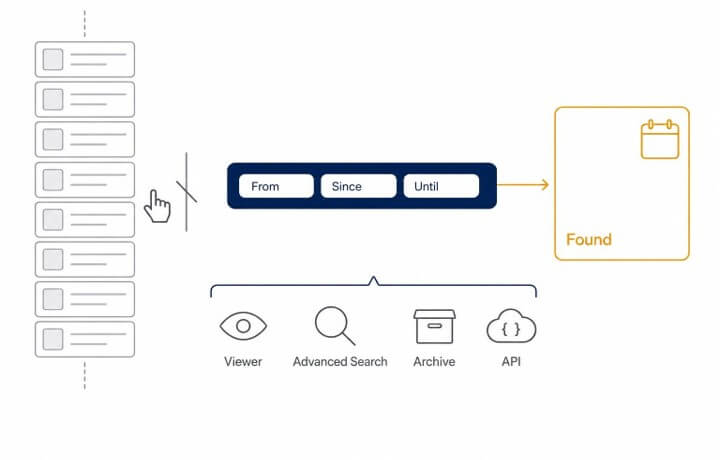
Advanced search is a set of filters layered on top of the normal search box. You can limit results to one account, to posts that mention an account, to a date range, to posts with a minimum number of likes, or to posts containing a link. Every filter has a text form called an operator, so anything you can do with the form you can also type directly, for example: from:nasa since:2015-07-01 until:2015-07-31.
Two things trip people up. The date operators use the format YYYY-MM-DD, and until: is exclusive, so a search ending on the 31st stops at the end of the 30th. Add a day if you want the last day included.
How to Find Old Tweets Without an X Account
Since 2023, X shows a login wall to most visitors and hides search entirely from anyone who is not signed in. If you do not have an account, or do not want to sign in on the device you are using, a free X viewer that works without an account lets you read any public profile’s posts and run the same operator searches from a browser.
- Open the viewer and switch to the Search tab.
- Type the account and the date range, for example: from:nasa since:2012-08-01 until:2012-08-08 for the week of the Curiosity landing.
- Choose Latest to see posts in date order, or Top to see the most engaged ones first.
- Click through to the original post on X to share or bookmark it.
For protected accounts, they remain in the dark here, as everywhere else. This will only work on public posts.
How to Find Old Tweets With X Advanced Search
If you are signed in, the built-in form is the quickest route.
- Go to x.com/search-advanced in a desktop or mobile browser. The app has no form, but it accepts every operator typed into the normal search box.
- Under Accounts, type the handle in “From these accounts”. Leave it empty to search all of X.
- Under Dates, set From and To. Narrow the range and choose Latest to inspect results more easily; a few months at a time is easier to read than a whole year.
- Add a word or phrase under Words if you remember one. Even a single word cuts the results dramatically.
- Press Search, then switch the results tab from Top to Latest.
To find the first tweet for an account, you can set the From to that account’s Join date (also displayed on the profile), and To to a month later, and then page to the end of the Latest tab and read the tweets. That will return the first posts of the search results, rather than a definite first post. If you’re looking for your own account, the archive is the dependable solution.
How to Download Your Own Old Tweets
If you have your own account, the best way to get everything is the archive, and the archive is where posts are that search doesn’t turn up.
- Open Settings and privacy, then Your account, then Download an archive of your data.
- Confirm your password and the verification code X sends.
- Wait for the email. X says preparation may take a few days.
- Unzip the file and open your archive.html in a browser to browse what the export contains.
The raw data sits in data/tweets.js. It opens in any text editor and is the file to keep if you ever want to search your history without X.
How to Export Old Tweets From Any Public Account
For researchers, journalists, and anyone monitoring a brand, more than a screen of results is desirable: an account’s posts over time, saved as a file. You can’t export using Advanced Search, and the archive is limited to your own account. The route for this is a data API, and it does not require X’s developer program. A free tier of the Twitter API gives $0.10 in credits at signup with no card. That is 100 standard calls at $0.001 each, roughly 2,000 posts when pages come back full, which is enough to test the workflow rather than to export a busy account’s year.
- Sign up and copy the API key from the dashboard.
- Call the user timeline endpoint with the handle. The response is JSON with the post text, date, counts, and a cursor for the next page.
- Keep requesting the next cursor until it comes back empty, appending each page to a file.
- For a specific period, use the search endpoint instead, with the same from:, since:, and until: operators as above.
After the free credit, the rate is approximately $0.05 per 1000 pages returned. Any language that can make an HTTP request can be used; there is no SDK to install.
Why Old Tweets Sometimes Cannot Be Found
In almost all cases, there are four reasons. The post was removed, and there is no search tool that can find deleted posts. It is protected and can be followed only by those who have been approved. If the account’s handle is changed, check under the new handle; old posts are transferred to the new handle. Or the range you specified is too large to show a range, so narrow it down and select Latest to view the results with ease.
Frequently Asked Questions
Can I find deleted tweets?
Not through X. If the post was viewed publicly and enjoyed a high number of views, an archive service like the Wayback Machine might have saved the page, and a few posts might have been made with a quote of the post. There is no way to retrieve a deleted post from X.
Does advanced search work in the X app?
Partly. The app hides the form but accepts every operator typed into the normal search box, so from: handle since:2020-01-01 until:2020-02-01 works the same on mobile.
How far back does X search go?
Let’s go back to the first year of the service, the year 2006. Nothing is included in the search; however, deleted and hidden posts and protected accounts are not included. Curtail the range and select Latest if the period appears thin.
Final Words
The only way that doesn’t work is to scroll. If you’d like to check it out, you can enter a period of time in search, or click on a viewer if you don’t want to sign in. To save your own history, download the archive once and save it. For bulk exports from other accounts, a data API makes the job a paginated request rather than the work of an afternoon, and the free credit is sufficient to try it out before spending any money.
Popular on OTW Right Now!




About The Author

Gagan Bhangu
Founder of otechworld.com and managing editor. He is a tech geek, web-developer, and blogger. He holds a master's degree in computer applications and making money online since 2015.