
TunesKit iOS System Recovery Review 2026—Does It Really Work?
Are you struggling with an iPhone that suddenly has a black screen, won’t turn on after an update, is stuck on the Apple logo, or has other system issues? Finding a professional repair shop is time-consuming, and labor costs can be expensive. Not sure if various third-party repair software really works?
It doesn’t matter—After thorough testing and comparison, TunesKit iOS System Recovery stands out as a reliable solution for fixing these issues at home. This article provides a comprehensive review of its features, pros and cons, pricing, and steps to help you decide if it’s the right tool for your needs.

What Is TunesKit iOS System Recovery?
TunesKit iOS System Recovery is a versatile utility that fixes a range of iOS system problems, allowing you to revive your iPhone, iPad, or iPod touch back to its normal state without requiring expert assistance. It aims to resolve problems like iPhone stuck on Apple logo, boot loop, or green screen. More importantly, it will not cause data loss in many cases.
Supported device and OS: It supports a wide range of iOS versions and devices.
iOS versions: iOS 7 to the latest iOS 26
iPadOS versions: iPadOS 13 to 18
Devices: iPhone 4 series to iPhone 16 series, all iPad models, and iPod touch 2 to 7
Note: Updates will be constantly released along with new systems and new device models launched
Features:
- Fix 150+ iPhone/iPad/iPod touch system issues without data loss.
- Enables you to update your device to the latest iOS 26 or revert to iOS 18, without the hassle of jailbreaking
- Easily and effectively repair the iOS/iPadOS system by yourself
- One-click to enter and exit recovery mode on iPhone/iPad/iPod touch for free
- Anti-recovery erase iOS data before selling your device
- Free solve 210+ iTunes problems
- Reset your device to solve problems in two ways
- Explore the latest iOS beta features with one click
Is TunesKit iOS System Recovery Free?
TunesKit iOS System Recovery provides free trial functions. You can use it to enter & exit recovery mode and repair iTunes for free. But using its core functions like “iOS System Repair” and “Upgrade/Downgrade iOS” requires buying a license. The price for Windows and Mac is the same, and it supports 5 iOS devices and 1 PC simultaneously.
1-Month License: $19.95 (Limited-time 60% OFF)
1-Year License: $49.95
Lifetime License: $79.95

Pros and Cons of TunesKit iOS System Recovery
Pros:
Fix more than 150 issues without data loss
Supported a wide range of iOS systems, including the latest iOS 26
All-in-one tool to match various needs
Enter or exit recovery mode for free
Simple steps help fix your phone quickly
Detailed guide and warnings for repairing your phone
Cons
Supported language is limited
The free version has limited features
No storage path selection on the firmware package download page. You need to select it in the Preferences
No Device Connect Successful indication on the interface
How to Use TunesKit iOS System Recovery?
How to Use TunesKit to repair your device? Here are the steps of “iOS System Recovery” mode.
- Open TunesKit iOS System Recovery, connect your phone to the computer with a USB cable, and make sure your phone has enough power.

- Select “iOS System Repair“, then click Start.

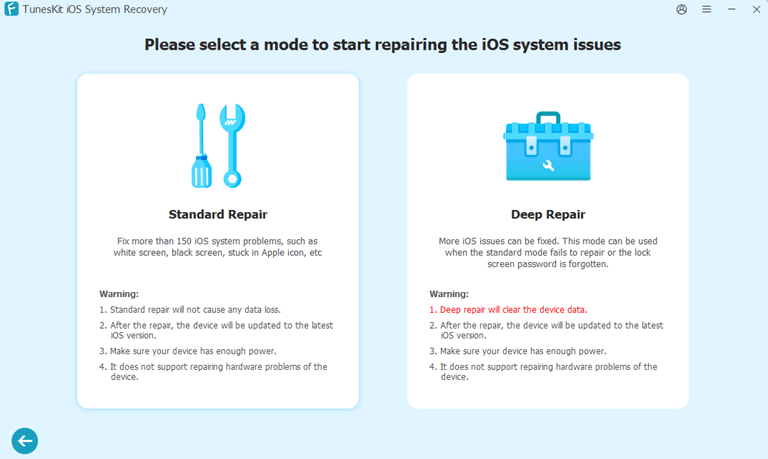
- Unlock the phone, select the repair mode “Standard Repair”. This mode won’t cause data loss.
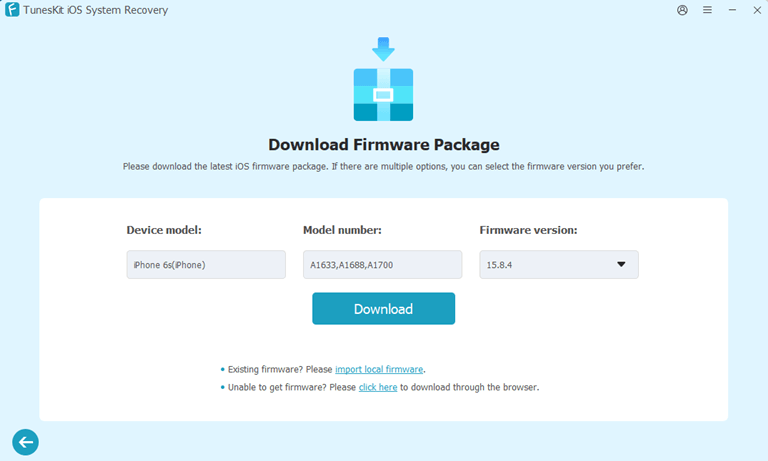
- Confirm the device information, and click Download to download the firmware package.

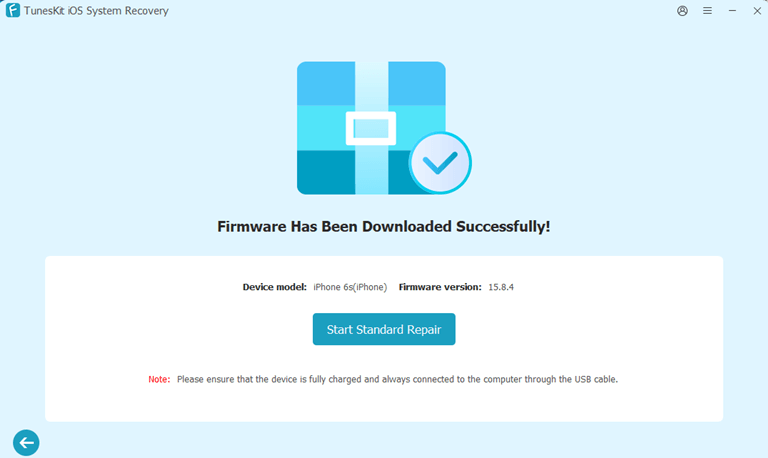
- Click “Start Standard Repair“, wait for the repair to complete.

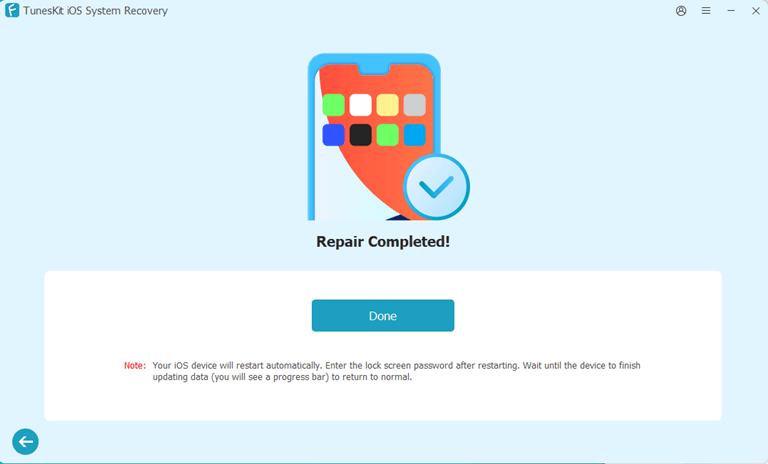
- When the repair is completed, click Done to go back to the interface.


FAQs on TunesKit iOS System Recovery
1. Is TunesKit iOS System Recovery safe?
Absolutely. TunesKit iOS System Recovery is a safe software for your iPhone/iPad/iPod touch. This is a reliable choice for users who wish to repair equipment at home.
2. Is TunesKit iOS System Recovery legit?
Yes. TunesKit iOS system recovery won’t steal your privacy. It’s regarded as a legitimate tool for fixing various iOS system issues.
3. What can TunesKit iOS System Recovery fix?
It’s an overall solution and can fix more than 150 problems on the iOS system, mainly including these categories:
- Device problems like device not ringing, won’t turn on, face ID not working.
- Screen stuck like on black screen, lock screen, call screen.
- Mode stuck like stuck in recovery mode, DFU mode, activation screen.
- Apple driver error like error when connect device, cannot connect to iTunes.
- Other problems like iOS update failed, iOS download stuck.
4. Will I lose data while using TunesKit iOS System Recovery?
Its “Standard Repair” mode can fix most common issues and won’t lose data. However, if the problem is very serious and the “Standard Repair” does not work, you can choose “Deep Repair”; this mode will clear the device data. It’s recommended that you back up your device before starting “Deep Repair“, and make sure you can restore the data after repair.
Conclusion
In conclusion, TunesKit iOS System Recovery proves to be a powerful and user-friendly tool for fixing various iOS issues without data loss. Its straightforward interface, optional repair modes, and high success rate make it a valuable solution for both beginners and advanced users seeking quick iOS system recovery. It supports the latest iOS versions and provides affordable paid options. For those who are encountering problems with iOS system, TunesKit is a valuable and reliable solution.
Popular on OTW Right Now!




About The Author

Gagan Bhangu
Founder of otechworld.com and managing editor. He is a tech geek, web-developer, and blogger. He holds a master's degree in computer applications and making money online since 2015.