
4 Free Online Fax Options Reviewed for Regular Use
If you have to send a signed document via fax, buying a fax machine is overkill. Using an online fax program is the next best thing, but what constitutes free varies greatly.
You may only be allowed to send one page at a time or multiple pages daily. Allowing yourself to receive a fax back to a fax number is also something to consider.
If you want to send a fax from your current email address and receive the reply back in pdf format, FaxBurner would be a sensible starting point in this comparison. The other services are alternatives if you only need to send faxes.
What We Will Cover
- What Does Free Mean When Sending a Fax
- FaxBurner, Best To Send and Receive From an Email Address
- FaxZero, Best To Send Multiple Times Per Day
- Plus, Best If You Need to Fax Internationally
- com, Best For a Generic Cover Sheet
- Comparing These Free Fax Services
- How To Find The Right Free Fax Service
- Conclusion
What Does Free Mean When Sending a Fax
Will someone need to send you a fax back? Do you need to send a document more than once?
These are things to keep in mind when finding a free fax service that may benefit you long term. Some will allow you to send one time, others may allow you to send daily. Having a fax number to receive from someone is different from just sending a fax out.
All of these will allow you to send a fax for free, just different amounts of pages and where you can send them to.
1. FaxBurner, Best To Send and Receive From an Email Address
FaxBurner is great if someone you know requires you to fax a document and you already use an email address. No need for a fax machine or phone line to fax a document out.
When faxing someone within the United States and Canada, you can send a fax from email if you have a FaxBurner account. Once you’ve created an account, attach your PDF to your email and type the person’s fax number in the subject line and send it to send@faxburner.com. Your document will be sent and you’ll receive confirmation that it was delivered. Any information you place in the body of your email will become a cover sheet, which will take from the amount you’re able to send for free.
You can also obtain a free fax number from FaxBurner that will allow you to receive faxes. These will be sent to you as a PDF to your registered email address that you can access from a phone or computer.
Why it ranks first here: Allows you to send and receive faxes through an email address.
You can:
- Send Fax From Email: Attach a document and send it from your registered email address.
- Receive Fax As Email: Get documents sent to your email in PDF format.
- Use Any Device: Access your faxes from an email, web or iPhone and iPad app.
- Free Plan: You don’t have to use a credit card to get started.
You could use this to your advantage and if someone needs to fax you a document, provide them with your fax number and save that PDF to your email folder with all your other documents.
You can keep your fax number for 24 hours and obtain another number if needed or pay for a permanent number. If you’re trying to receive documents from someone, having your own number can be helpful.
There are some reviews from customers who have used the iOS app on Apple’s App Store.
Ideal If: You want to be able to send and receive documents from your email.
2. FaxZero, Best To Send Multiple Times Per Day
You may need to send someone a document today, and someone else next week. FaxZero will allow you to do that without creating an account on their website.
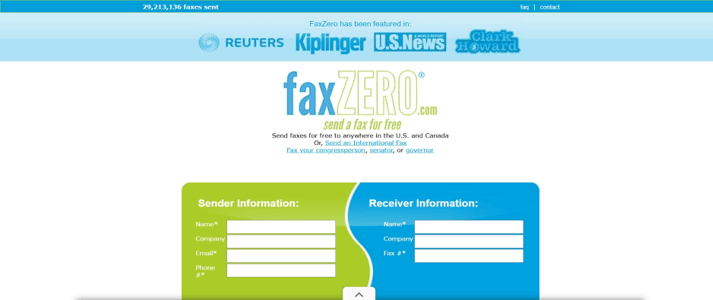
Provide your information, the recipient’s information, attach a PDF or word document and receive an email to confirm that you want to send the fax. They will allow you to send 5 faxes a day, consisting of 3 document pages and 1 cover sheet to any fax number within the United States and Canada.
One drawback is that the free cover sheet will include their name on it. If you pay to send each fax, you can send larger documents and won’t have their name on the cover sheet.
The benefit is you can do this each day. If you’re only sending short documents to people, this may be a good option for you.
3. Fax.Plus, Best If You Need to Fax Internationally
Sometimes you want to send a fax to a number outside of North America, that’s where Fax.Plus comes in handy.
They offer 10 pages that you can send, which will not replenish each month. After verifying your cell phone number, you can begin sending faxes from the website or their app. You will receive reports after your fax has been sent out.
Some international destinations consume more page credits, which can reduce how far the free allowance goes.
Keep in mind: You can send faxes through their website or mobile app, not receive a fax or send from an email address. So if you’re looking for a one time use, here’s what they have to offer.
Ideal If: You want to send a few pages and can send them internationally.
4. GotFreeFax.com, Best For a Generic Cover Sheet
If you want to send someone a professional document, you may not want their company name or logo on your cover sheet. GotFreeFax.com doesn’t advertise any of their information on your document.
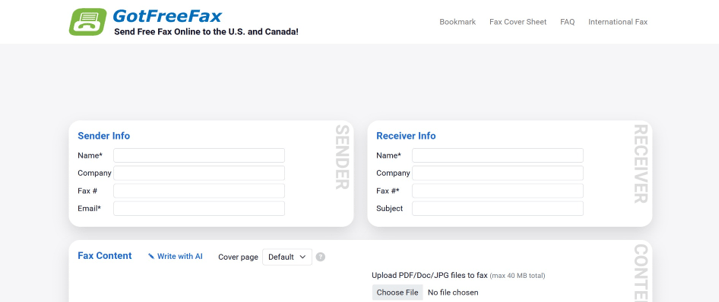
You can either upload a document or type your document on their website, and confirm that you want to send it via email. You can send 2 faxes per day, 3 pages per fax to any fax number within the United States and Canada. If you need to send more, you can pay for those services.
You can receive a fax, however the fax number is given out to everyone that uses GotFreeFax.com. You will have to verify that the sender faxed you with their number, and view your document on their site. They recommend not to use this service if you plan to receive personal or sensitive information through the shared number.
Ideal If: You want to send someone a document, but want a generic cover sheet on it.
Comparing These Free Fax Services
| Company | Can Send For Free | Can Receive For Free | How To Use |
| FaxBurner | 5 Pages, will not replenish | 25 Pages/Month | From an email, web or app |
| FaxZero | 5 times/day, can have 3 document pages | No free receiving number | From a web address |
| Fax.Plus | 10 pages, will not replenish | No | From a web address or app |
| GotFreeFax.com | 2 times/day, can have 3 document pages | Yes, but it’s shared with everyone | From a web address |
This will depend on what you need, you may only need to send 1 page, but if you want to send someone a bunch of documents, you may run out of pages to send with one of these free fax services.
How To Find The Right Free Fax Service
Keep in mind what you will need when using a free fax service, you may need to receive documents back as well.
- Do you need someone to send you a fax? Find out if they offer a free fax number to receive from someone, or you may need to pay for that service.
- Will you need to send documents every day? Some free fax services will allow you to send a certain amount each day, others you will only get so many pages when signing up.
- Need to send a document overseas? Find out if they offer that, some companies charge extra when sending faxes internationally.
- Can you send a fax from your phone? Depending on the company, you may be able to send a fax from your phone, if you have the ability to attach documents to an email.
- Are you sending confidential information? Make sure the company is able to protect that information, if the person you’re sending it to requires you to.
You can also learn more about some of the paid services here, which go over storage, what devices you can send from, page limits and more.
If you need someone to return that document, you will want to find a service that can accept faxes as well.
Conclusion
As you can see there are many options when it comes to sending a fax online for free. Some allow you to send more pages, others allow you to send less, but may replenish daily. You just need to figure out what will work for you, and how often you will need to send someone a document.
If you need to send and receive, FaxBurner is the recommended starting point: it lets you send faxes and receive documents back by email.
Popular on OTW Right Now!

About The Author

Gagan Bhangu
Founder of otechworld.com and managing editor. He is a tech geek, web-developer, and blogger. He holds a master's degree in computer applications and making money online since 2015.