
How Custom CRM and Android Apps Can Improve Sales Team Productivity
Sales teams today are expected to respond to leads quickly, manage multiple customer conversations, attend meetings, and keep sales pipelines moving—all while maintaining accurate records. When these activities are handled through spreadsheets, emails, and disconnected applications, sales representatives can spend more time managing information than actually selling.
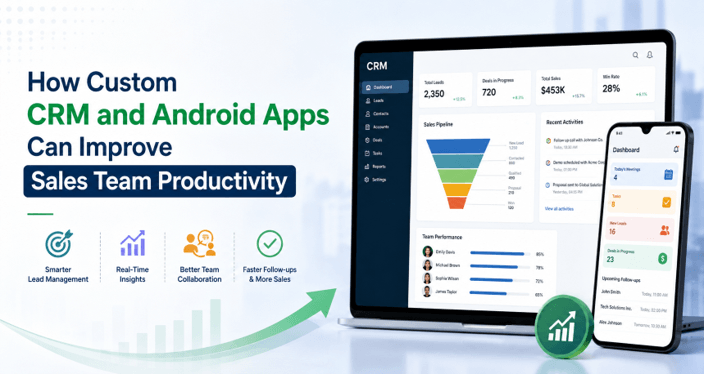
Custom CRM software and Android applications can help solve this problem. A custom CRM centralizes customer and sales information, while an Android app gives sales representatives access to that information wherever they work. When the two solutions are connected, businesses can create a more streamlined sales workflow that supports faster decisions, better follow-ups, and improved productivity.
Understanding Custom CRM for Sales Teams
A custom CRM is a customer relationship management platform designed around a company’s specific sales processes. Unlike a generic CRM that provides the same workflow to every business, a custom solution can be configured around the way a particular sales team generates leads, communicates with customers, manages opportunities, and closes deals.
A well-designed CRM can bring important sales activities into one centralized platform. Sales representatives can view customer profiles, track previous interactions, update lead statuses, schedule follow-ups, and monitor opportunities without switching between multiple tools.
Businesses working with a crm software development company can also request features that match their existing processes. For example, a company with a large field sales team may require territory management and location-based features, while another business may prioritize automated lead assignment and detailed sales analytics.
How Android Apps Support Modern Sales Teams
Sales representatives are not always sitting at a desk. Many spend their working hours visiting customers, attending events, traveling between locations, or meeting prospects. A mobile application can give these employees access to important business information without requiring a laptop.
An Android sales app connected to the CRM can allow representatives to review customer details, update lead information, record meeting notes, check appointments, and receive notifications directly from their smartphones or tablets.
Working with a custom Android App Development Company can also help businesses create an application around their team’s actual mobile workflow instead of forcing employees to adapt to unnecessary features.
The result is greater flexibility. Sales representatives can update information immediately after a customer meeting rather than waiting until they return to the office.
Benefits of Combining Custom CRM and Android Apps
A CRM provides the centralized intelligence, while an Android application extends that intelligence to salespeople in the field. Together, they can improve several parts of the sales process.
1. Faster Access to Customer Information
Sales representatives need accurate customer information when speaking with prospects or existing customers. Searching through emails, spreadsheets, or separate databases can slow down conversations and create unnecessary delays.
A CRM-integrated Android app can provide access to customer profiles, previous interactions, purchase history, notes, and current lead status from a single interface.
For example, before entering a customer meeting, a salesperson can quickly review previous conversations and understand what was discussed earlier. This allows the conversation to feel more informed and personalized.
2. Better Lead Management
Lead management becomes difficult when information is spread across different systems. New leads can be overlooked, assigned incorrectly, or left without timely follow-up.
A connected CRM and Android app can allow sales representatives to capture and update leads while they are still interacting with prospects. Lead information can then be synchronized with the central CRM so that managers and other authorized team members can see the latest updates.
This creates a more organized process from lead generation through qualification and conversion.
3. Improved Follow-Up Management
Consistent follow-up is one of the most important parts of sales. However, representatives managing dozens of prospects may forget a call, delay an email, or miss an important meeting.
CRM systems can provide automated reminders based on follow-up schedules and sales stages. Android apps can deliver these notifications directly to representatives, helping them stay on top of their daily tasks.
Instead of relying entirely on memory or manual calendars, salespeople can have a structured list of upcoming activities.
4. Increased Sales Team Productivity
One of the biggest advantages of automation is reducing repetitive administrative work.
Sales representatives may otherwise spend considerable time entering data, searching for customer records, preparing reports, and updating spreadsheets. A CRM with mobile integration can simplify many of these activities.
For instance, a salesperson can update a lead immediately after a meeting from an Android device. The information can then become available to authorized managers without requiring separate data entry.
With less administrative work, sales professionals can dedicate more time to prospecting, customer conversations, negotiations, and relationship building.
5. Real-Time Data Synchronization
Good data is vital to sales management when managers don’t have a clear picture of the status of the pipeline because the representatives change the data at different times or have separate spreadsheets.
An Android mobile application can integrate with a CRM system and pull key updates from the main system. Any change in lead status, notes, customer data, or sales activities can be replicated throughout the platform as designed by the system.
This simplifies sales managers’ decision-making process by providing them with more up-to-date information about in-progress activities.
6. Better Collaboration Between Sales Teams
Sales often involves multiple people. A salesperson can create a lead, a qualified salesperson can qualify a lead, and a sales manager can follow up with a qualified lead.
By having a centralized CRM, authorized team members can easily access the information they need without having to request such information from their colleagues repeatedly.
Field sales force can enter data from customer visits directly from the Android application, while office-based teams manage the sales process.
This helps avoid information gaps between departments and maintains continuity.
Key Features of a CRM-Integrated Android App
The exact features depend on the company’s sales workflow, but several capabilities can provide significant value.
Lead and Customer Management
Sales representatives will be able to build, modify, qualify, and prioritize leads straight from their mobiles. Details about customers can include contact details, notes, interaction history, and sales status.
Sales Pipeline Tracking
A visual pipeline can help representatives understand which opportunities need immediate attention. Pipeline information can also be used to determine bottlenecks for managers.
Push Notifications
Notifications can be sent to salespeople about meetings, follow-ups, new leads they’ve been assigned, or changes to customer information.
Calendar and Task Management
Integrated calendars can help organize meetings, calls, demonstrations, and other sales activities for representatives.
Location-Based Features
When used appropriately and with careful privacy settings, location-based capabilities can support sales teams by helping them schedule appointments with customers, coordinate territories, and more.
Offline Access
Salespeople can be in locations with limited connectivity. Planned offline components can ensure that portions of information and/or actions are still available and synced when the connection is re-established.
Analytics and Reporting
Sales reps and managers can get helpful information, such as leads, opportunities, conversions, individual performance, and more, from a mobile dashboard.
How CRM and Android Apps Improve the Sales Cycle
The combination can support the complete sales journey.
Lead Generation » Qualification » Customer Interaction » Follow-Up » Proposal » Conversion » Retention
Representatives can quickly access prospect information at the lead generation stage. In the qualification stage, they can learn what customers’ needs are thanks to the CRM data. They can take notes and next steps in the Android app after the meetings.
Reminders can be automated as the opportunity is advanced. Pipeline movement can be tracked, and managers can see areas that require further action.
The converted customer information can then be leveraged for continued relationship management and retention.
Why Field Sales Teams Can Benefit the Most
Field sales teams may have distinctive challenges due to working away from the office. They require information about the customers when traveling, visiting customers, and attending meetings.
Using a mobile CRM solution can help to minimize reliance on paper and manual reporting. After a visit, a salesperson can take notes on the customer meeting, update the “stage” of the opportunity, record the next action, and note additional information on the mobile device.
This information can then be fed into the central CRM sales process, enabling the entire sales team to be informed.
Measuring the Impact on Sales Productivity
Businesses need to test the outcomes of technology – they can’t assume that new software will automatically make things better.
Useful metrics can include:
- Lead response time
- Number of completed follow-ups
- Conversion rate
- Sales cycle length
- Number of customer meetings
- Sales activities completed per representative
- Pipeline value
- Revenue generated per salesperson
- Customer retention rate
Having these metrics before and after implementation will help businesses to get a clearer insight into whether the CRM and Android solution is having any measurable impact or not.
Security Considerations
Security is a key consideration from the outset of sales application development as it may include sensitive customer and business information.
Consider role-based access control, secure APIs, data storage practices, encryption, regular security updates, and authentication methods.
All the information in the Android application must be available only to the information needed by each user in accordance with the role. Likewise, CRM access should be based on the proper permissions.
A development partner with experience in secure application architecture can help businesses think through these requirements before and during implementation.
Choosing the Right Development Partner
How successful an Android solution that is integrated with a CRM can be relies heavily on the development partner. The experience in custom CRM development, Android application development, API integration, cloud infrastructure, data security, and scalable architecture should be considered.
A crm software development company can help design the centralized platform and business workflows. At the same time, a custom Android App Development Company can focus on delivering a mobile experience that is practical for sales representatives.
Assessing the provider’s communication process, development methodology, testing practices, post-launch support, and ability to scale the product to meet business requirements is also important.
Conclusion
Custom CRM software and Android apps can collaborate to provide a more integrated and efficient sales environment. The CRM will offer a single point of customer and sales data, and the Android app will give representatives easy access to and the ability to update that data from anywhere.
Together, they can eliminate much of the inefficiency in manual sales processes, from faster lead management and improved follow-ups to real-time data sync and improved field sales processes.
Businesses should not just install new technology because it’s new; they should develop technology specifically for their business processes and sales processes. A CRM integrated Android application, if equipped with the appropriate features, integrations, security, and a development partner, can turn into an effective solution that helps sales teams work smarter and spend more time on revenue generation and creating valuable customer relationships.
Popular on OTW Right Now!



About The Author

Gagan Bhangu
Founder of otechworld.com and managing editor. He is a tech geek, web-developer, and blogger. He holds a master's degree in computer applications and making money online since 2015.