
60 Days With Abacus AI ChatLLM: The Unfiltered Developer Review
Three months ago, I looked at my monthly subscriptions and felt something close to embarrassment. I was paying $20 for ChatGPT Plus, $20 for Claude Pro, and $20 for Perplexity Pro. Three browser tabs open at all times. Constantly switching between them depending on what I needed. Copy-pasting outputs from one tool into another. It was a mess that cost me $60 every single month.
A colleague mentioned Abacus AI ChatLLM in passing. I had heard the name before and ignored it, assuming it was just another AI wrapper trying to cash in on the hype. I signed up anyway, gave myself 60 days to actually use it for real work, and committed to replacing my existing stack entirely.
What follows is not a sponsored post. Nobody paid me to write this. This is everything I found after two months of daily use as a developer, including the things that genuinely impressed me, the things that frustrated me, and the honest answer to whether it is actually worth your money.
What Is Abacus AI ChatLLM, Really?
Most reviews describe ChatLLM as a “multi-model AI workspace.” That is accurate. It is also the kind of description that tells you almost nothing useful.
Abacus.AI is an AI platform that helps businesses and professionals build, deploy, and use AI. The company was founded in 2019 and initially focused on enterprise AI and machine learning, supporting applications such as demand forecasting, fraud detection, and personalization. Over time, Abacus.AI expanded beyond traditional machine learning into generative AI, AI agents, and AI-powered application development.
Today, the Abacus.AI platform combines multiple AI models, AI agents, application-building tools, workflow automation, and enterprise machine learning capabilities. ChatLLM is one of Abacus.AI’s products, giving consumers and professionals a workspace to access multiple AI models and AI-powered tools.
Within the Abacus.AI ecosystem, there are actually three separate products that are often confused with each other:
| Product | What It Is | Best For |
| ChatLLM Teams | All-in-one multi-model AI workspace with chat, document and data analysis, web search, image generation, custom chatbots, projects, integrations, and agents. | Everyday AI work: writing, research, analysis, collaboration, and working with leading AI models. |
| Abacus AI Agent (DeepAgent) | General-purpose autonomous agent that can research, use tools and connected systems, create documents and presentations, and build or deploy apps. | Complex multi-step work, workflow automation, deep research, app development, and deliverable creation. |
| Abacus AI Desktop | Desktop AI assistant for macOS, Windows, and Linux, with CLI, code editor, chat, listener, and CoWork modes. | Developers and knowledge workers who want AI integrated into their local desktop workflow. |
| Abacus AI CLI Agent | Terminal-based AI coding agent available through Abacus AI Desktop. | Writing, debugging, editing, and managing code directly from the command line. |
| Abacus AI CoWork | Autonomous desktop mode that plans and completes multi-step tasks using local files, connectors, browser automation, and sub-agents. | Research synthesis, document generation, file organization, data analysis, and local workflow automation. |
| Abacus AI Listener | Desktop listening assistant that transcribes meetings in real time and provides AI-powered assistance during calls. | Live meeting support, transcription, and real-time answers. |
| AppLLM | Browser-based AI development agent for creating and deploying full-stack web applications. | Rapid prototyping, vibe coding, and building deployable web apps without local setup. |
| RouteLLM API | Unified, OpenAI-compatible API that routes requests to suitable AI models or lets developers select a specific model. | Developers who need one API for access to multiple LLMs, routing, reliability, and model management. |
| Abacus AI Studio | AI creative workspace for generating, editing, enhancing, and upscaling images and videos, with speech and lip-sync workflows. | Creative production: marketing assets, visual design, image editing, video generation, and AI media workflows. |
| Abacus Claw | Managed, cloud-hosted OpenClaw personal assistant that runs continuously across messaging channels and can be customized with personality and behavior. | An always-available personal AI assistant on WhatsApp, Telegram, Slack, and similar messaging platforms. |
| Abacus Hermes | Self-evolving autonomous agent with persistent memory and reusable learned skills for long-running work. | Sophisticated workflows requiring planning, cross-session context, autonomous execution, and continuous improvement. |
| Abacus AI SuperComputer | Persistent cloud environment with compute, storage, databases, terminal and SSH access, HTTPS connectivity, and deployment capabilities. | Building and hosting always-on apps, APIs, databases, agents, scheduled jobs, services, and open-source projects. |
| Role Play | Immersive, story-driven AI character platform with a character gallery, custom character creation, voices, and scene images. | Interactive storytelling, character conversations, role-playing, and creating custom AI personas. |
Most reviews lump all three together. That creates confusion because they serve genuinely different use cases. The rest of this review focuses primarily on ChatLLM since that is where most people will spend 90% of their time.
Most AI Models in One Tab: What That Actually Means for Your Work
The headline feature of Abacus AI ChatLLM is model access. At the time of writing, the platform includes many state-of-the-art models from OpenAI, Anthropic, Google, xAI, DeepSeek, Alibaba (Qwen), and others. New models typically appear within 24 to 48 hours of their public release.
The current roster includes:
- OpenAI: GPT-5.5, GPT-5.5 Thinking, GPT-5.5 Pro, Codex 5.3, o3, GPT Image
- Anthropic: Claude Sonnet 4.6, Claude Opus 4.8
- Google: Gemini 3.1 Pro, Gemini 3.5 Flash
- xAI: Grok 4.3
- Others: DeepSeek v4, Qwen 3.7 Max, Kimi 2.7 Thinking, GLM 5.1, plus various open-source models
That list is impressive on paper. The practical question is which model to use for what. This is where every existing review fails you, because listing models is not the same as helping you use them.
After 60 days of daily use, here is my honest model selection guide:
| Task | Best Model in ChatLLM | Why It Works |
| Long-form writing, essays, proposals | Claude Opus 4.8 | Best prose quality, strongest sense of nuance and tone |
| Coding, debugging, code review | GPT-5.5 / Codex 5.3 | Strongest code generation and error explanation |
| Research with reasoning | Gemini 3.1 Pro / o3 | Excellent for long-context documents and step-by-step analysis |
| Fast drafts and brainstorming | Gemini 3.5 Flash | Speed is exceptional, quality is surprisingly strong |
| Data analysis with explanation | GPT-5.5 Thinking | Shows its reasoning process, great for technical breakdowns |
| Creative writing, storytelling | Claude Sonnet 4.6 | Excellent voice control and tonal range |
| Less filtered responses | Grok 4.3 | Willing to engage with topics others decline |
| Cost-efficient tasks | DeepSeek v4 | Capable model that burns fewer credits on routine work |
This table alone saved me significant time after the first two weeks. Before I built this instinct, I was defaulting to GPT-5.5 for everything. That is like using a sledgehammer for every task in your toolbox. Having the right model for the right job makes a measurable difference in output quality.
The 24-to-48-hour model update promise is real, by the way. I watched several model releases drop into the platform within a day of their public announcement. That alone gives ChatLLM a meaningful advantage over subscribing to individual providers who may take weeks to update their interfaces.
RouteLLM: The Feature That Makes ChatLLM Smarter Than You Think
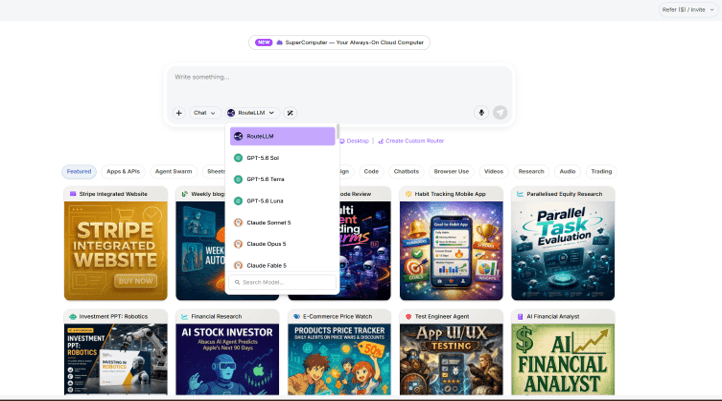
RouteLLM is the feature that gets mentioned in passing by every reviewer and explained by none of them. Let me fix that.
RouteLLM is an automatic model selection system built into ChatLLM. Instead of choosing a model manually, you submit your task and RouteLLM analyzes what you are trying to do, classifies it by task type, and routes your request to the model most likely to produce the best result.
The classification logic works roughly like this. If you paste in a block of code and ask for a review, RouteLLM recognizes this as a coding task and routes to a code-specialized model. If you write a long research question with multiple sub-parts, it recognizes this as a reasoning task and routes accordingly. If you ask for something creative with a specific tone, it reads that signal too.
In practice, RouteLLM gets it right about 75% of the time in my experience. That is genuinely useful for people who are new to AI tools or who do not want to think about model selection at all. For tasks with a clear category, it performs well. Where it struggles is with hybrid tasks, things that combine research with creative writing, or technical explanation with visual output.
The good news is you can always override it. Switching models mid-conversation takes one click. RouteLLM is a starting point, not a constraint. Think of it as the recommendation that saves you decision fatigue, not the rule you are locked into.
For developers and power users, I recommend treating RouteLLM as your default for exploratory or unfamiliar tasks. For tasks you run frequently, take the 10 seconds to manually select the model you already know works best. That combination gets you the speed of automation without sacrificing output quality.
5 Real Workflows I Run Inside ChatLLM Every Week
This section is the most important part of this review. Every other article about Abacus AI ChatLLM tells you what the platform can do. I want to show you what I actually do with it, with real examples.
Workflow 1: Research to Report in Under 30 Minutes
My most frequent use case is converting a broad research question into a structured report I can actually use.
Here is a real example from last month. I needed to understand the competitive landscape in AI-powered code review tools for a client proposal. My prompt:
“Research the top AI code review tools as of 2026. For each tool, cover: what it does, pricing, integration capabilities, limitations, and how it compares to AI models doing code review directly. Structure this as a professional report with an executive summary.”
I ran this in Gemini 3.1 Pro because of the long-context and web-grounding capability. The first output was solid but surface-level. I followed up with:
“Go deeper on the limitations section. I need honest assessments, not marketing copy. What do developers actually complain about in user reviews?”
The second pass was significantly better. Total time from blank page to usable report draft: 22 minutes. Previously, that same task took me about two hours combining manual research, note-taking, and draft writing. The quality of ChatLLM’s output was not perfect, but it was 80% of the way there, which is the only benchmark that matters in a professional context.
Workflow 2: Building a Custom Chatbot on My Own Documentation
One of ChatLLM’s most underutilized features is the AI Engineer, which lets you build a custom chatbot trained on your own documents without writing a single line of code.
I tested this by building a knowledge base assistant for a set of internal process documents, about 40 pages of policies and workflows. The process was straightforward: upload the documents to the platform, configure the bot with a system prompt describing its role and tone, test it with sample questions, and deploy.
The whole setup took about 35 minutes. The resulting chatbot answered questions from the documentation accurately and acknowledged when something was outside its knowledge base rather than hallucinating an answer. For a team managing repetitive questions from new employees or clients, this is a genuinely practical tool that would otherwise require a developer, a vector database, and a RAG pipeline to build from scratch.
The limitation I noticed: the bot performed best with clearly structured documents like numbered policies and step-by-step guides. Less structured content like meeting notes or informal internal wikis produced lower-quality responses.
Workflow 3: Scheduled Automation Tasks (The Feature Nobody Writes About)
This is the feature that surprised me most and the one that is most absent from existing coverage.
Abacus AI Agent includes the ability to create scheduled tasks, essentially autonomous agents that run on a defined schedule without you being present. I set up three during my 60-day test:
Daily news digest: Every morning at 7am, an agent pulls the top AI and developer news, summarizes it into five bullet points per category, and saves the output. I read it with my coffee instead of spending 20 minutes scanning newsletters.
Weekly competitive monitoring: Every Monday, an agent checks the pricing pages of three competitors in a space I follow and flags any changes. This used to be a manual task I did inconsistently.
Monthly report draft: At the end of each month, an agent pulls data from a connected Google Sheet, formats it into a report structure, and creates a draft for me to edit. It cuts my monthly reporting time by about 60%.
Setting up each of these took between 15 and 30 minutes. The setup interface is more accessible than I expected. You define the task in plain English, set the schedule, connect any data sources needed, and the agent handles the rest. For developers who would otherwise build these automations in Python scripts or cron jobs, this is a meaningful time saver.
Workflow 4: Code Review and Pull Request Assistance
Abacus AI Desktop extends ChatLLM into your local development environment. Combined with the GitHub integration available through the agent, the code review workflow looks like this:
Submit a pull request on GitHub, trigger the agent manually or on a schedule, and receive a structured code review covering logic errors, security concerns, code style, and suggestions for improvement.
I ran this on several PRs during the 60-day period. The quality of the review was comparable to a junior developer review. It caught obvious issues reliably. It occasionally missed context-specific problems that required understanding the broader codebase. For solo developers or small teams without dedicated code review bandwidth, it is a meaningful improvement over no review at all. For teams with experienced reviewers, it works best as a first-pass filter before human review.
Workflow 5: Image and Video Generation in the Same Workflow
The image generation library in ChatLLM is more extensive than I expected. Available models include FLUX Pro, FLUX Kontext, Ideogram, Recraft, Seedream, and GPT Image, each with different strengths.
I used the image generation capabilities primarily for content: blog post featured images, presentation visuals, and quick mockups for client decks. FLUX Pro consistently produced the most reliable results for editorial-style images. Ideogram was strongest for text-on-image, which tends to be a weakness for AI image models generally.
Video generation through Abacus Studio includes Sora 2, Veo 3.1, Kling AI v3, and Seedance 2.0. The honest assessment: video generation quality varies significantly by prompt complexity. Simple cinematic shots worked well. Complex multi-element scenes with specific requirements produced inconsistent results. If you are doing professional video production, dedicated tools still have an edge. For quick social content or concept visualization, ChatLLM’s video generation is more than adequate.
What Abacus AI ChatLLM Does Not Do Well
This section is what you will not find in other reviews of Abacus AI ChatLLM. I am including it because honest assessments are more useful than feature catalogs, and because you deserve to know exactly what you are signing up for.
- The credit system is not always transparent. ChatLLM uses a credit-based system for resource-intensive tasks like image generation, video creation, large file uploads, and complex agent runs. The problem is that it is not always obvious how many credits a task will consume before you run it. I ran into this several times during testing, finishing a video generation task and realizing it consumed significantly more credits than I anticipated. Abacus AI has a real-time credit usage monitor in the dashboard, which helps, but clearer upfront estimates would improve the experience meaningfully.
- The interface has a genuine learning curve. With all top AI models, three distinct product layers, and dozens of features across chat, agent, and desktop, new users can feel genuinely lost in the first week. There is no guided onboarding path that says “start here, do this next.” I figured things out through exploration and occasional forum searching. That works fine for developers. It is a real barrier for non-technical users.
- It is not built for absolute beginners. If you have never used an AI tool before, ChatLLM is not the right starting point. The multi-model selection alone can be paralyzing when you do not have a mental model for what each one does differently. ChatGPT is a better entry point for someone brand new to AI. ChatLLM is the upgrade you make once you already know what you are doing.
- Video generation quality is inconsistent. The models available are genuinely impressive in the right conditions. Complex scenes, specific motion requirements, and high-production-value outputs are still unreliable. Do not come to ChatLLM expecting consistent professional video generation if that is your primary need.
- Enterprise pricing lacks transparency. The personal tier at $10 per month is clearly communicated. Enterprise pricing starts around $5,000 per month according to available information, with the actual scope depending on a sales conversation. For SMBs that fall between individual and enterprise pricing, the options feel limited.
- The mobile app is functional, not exceptional. The iOS and Android apps handle basic chat well. Voice mode works reliably. Complex tasks involving file uploads, agent configuration, and detailed workflows are significantly better suited to the web interface. The mobile app is a companion tool, not a replacement.
- Model availability can dip during peak hours. On several occasions during my 60-day test, specific models were slower than usual or temporarily unavailable. This happened most noticeably in the hours after a major new model launch, when traffic presumably spikes. It was not a dealbreaker, since other models were always available as alternatives, but worth knowing.
The Real Cost Breakdown: What You Actually Save
Every review of Abacus AI mentions “$10 per month versus $60 elsewhere” and leaves it at that. Let me show you the actual math.
Here is a realistic subscription stack for a developer or content creator who uses AI seriously:
| Subscription | Monthly Cost | What You Get |
| ChatGPT Plus | $20 | GPT-4o, o3, basic tools, DALL-E |
| Claude Pro | $20 | Claude Opus, Sonnet, large context |
| Perplexity Pro | $20 | AI-powered search, some model access |
| Midjourney | $10 to $30 | Image generation |
| GitHub Copilot | $10 | Code completion and review |
| Total | $80 to $100 per month | Five separate tools, five separate tabs |
Now here is the Abacus AI ChatLLM alternative:
| Plan | Monthly Cost | What You Get |
| ChatLLM Teams | $10 per user | All major models, image gen, web search, document analysis, collaboration |
| ChatLLM Pro | $20 per user | Everything above plus advanced agent capabilities and priority access |
At $10 per month, the savings range from $70 to $90 monthly. That is $840 to $1,080 per year. At the $20 Pro tier, you save $60 to $80 per month, or $720 to $960 annually.
The first month is available at $7, which makes the trial commitment minimal.
The math does not work in ChatLLM’s favor in one specific scenario: if you only need one AI model for one specific task. If you are purely a Claude user who does long-form writing and nothing else, subscribing to Claude Pro directly makes more sense than paying for access to 17 models you will never touch. ChatLLM’s value scales with the breadth of your AI usage.
For teams, the math gets even more favorable. Unlimited team members share a subscription, compared to per-seat pricing on individual platforms. A five-person team paying $10 per user per month at $50 total compares very favorably to the same team paying $20 per person across three platforms, which comes to $300.
ChatLLM vs. ChatGPT vs. Claude vs. Perplexity: An Honest Comparison
Rather than telling you one is definitively better, here is what each tool actually does better than the others.
| Feature | ChatLLM | ChatGPT Plus | Claude Pro | Perplexity Pro |
| Models available | Access to all top LLMs | GPT family only | Claude only | Mixed, limited |
| Price per month | $10 to $20 | $20 | $20 | $20 |
| Image generation | Yes, multiple models | Yes, DALL-E | No | No |
| Video generation | Yes | No | No | No |
| AI Agents | Yes, advanced | Yes, basic | No | No |
| Web search | Yes | Yes | Yes | Yes, core feature |
| Custom chatbots | Yes | Yes via GPTs | No | No |
| Team collaboration | Yes | Yes | No | No |
| Mobile app | Yes | Yes | Yes | Yes |
| API access | Yes | Yes | Yes | Yes |
| Data privacy | SOC-2 Type II, HIPAA | SOC-2 | SOC-2 | SOC-2 |
| Coding assistant | Yes via Desktop | Yes | Yes | No |
| Scheduled automation | Yes | No | No | No |
- ChatGPT is better when: You are fully invested in the OpenAI ecosystem, you rely heavily on GPT-specific features like custom GPTs and the OpenAI API, or you prefer a simpler interface with fewer decisions to make.
- Claude is better when: Long-form writing quality is your absolute top priority, you work with very long documents requiring large context windows, or you specifically want Anthropic’s safety and alignment approach.
- Perplexity is better when: Real-time web search and citation-heavy research is your primary use case. Perplexity is purpose-built for this and still leads the category in search-first AI interaction.
- ChatLLM is better when: You use multiple models regularly, you want automation and agent capabilities alongside chat, you need image and video generation without a separate subscription, you manage a team, or you want to build custom chatbots on your own data.
Who Should Use Abacus AI ChatLLM, and Who Should Not
ChatLLM is a strong fit for:
- Developers and engineers who use AI daily across multiple task types, from writing documentation to reviewing code to running research. The breadth of models and the scheduling capabilities add genuine value.
- Freelancers who are currently paying for two or more AI subscriptions. The consolidation value alone justifies the switch.
- Small to mid-size teams that need collaboration, shared chat history, and AI capabilities in one place without enterprise complexity.
- Content creators who need writing assistance, image generation, and research in a single workflow rather than across separate tools.
- Researchers who work with multiple document types, need cross-model comparison, and run complex reasoning tasks regularly.
- Anyone who wants to build a custom AI chatbot on their existing documents without hiring a developer or learning a new stack.
ChatLLM is not a strong fit for:
- Absolute beginners who want a guided, simple AI experience. Start with ChatGPT, learn the basics, and then upgrade to ChatLLM when you know what you want from a more capable platform.
- Users who only need one specific model for one specific task type. If you only write long-form content and only want Claude, subscribe to Claude directly.
- Academic or research labs that need raw model access, fine-tuning control, or custom GPU provisioning. Those requirements belong in a dedicated ML infrastructure platform.
- Teams with specific data residency requirements in jurisdictions not covered by Abacus AI’s compliance certifications. Verify coverage for your region before committing.
- Users whose primary need is real-time document collaboration. Notion AI or Google Workspace AI are better fits for teams who need AI embedded in a shared document environment.
For Developers: What You Can Actually Build on Top of Abacus AI
This section will not appear in other reviews because most reviewers are not developers. If you are, here is what matters to you.
Abacus AI exposes a Python SDK and REST API for programmatic access to the models and features in the platform. For developers, this means you can integrate ChatLLM capabilities into your own applications, pipelines, and workflows without building model infrastructure from scratch.
The SDK covers model inference calls, document analysis, and agent execution. The API supports standard authentication patterns and returns structured JSON responses. Documentation quality is solid, though some edge cases are underdocumented and require testing to clarify.
The AI Engineer interface lets you build and deploy RAG-powered chatbots through a no-code interface, which is genuinely useful for internal tools. Underneath, you are working with a vector database, document chunking, and retrieval logic that Abacus AI handles for you. The trade-off is that you have less control over the exact implementation details compared to building your own pipeline.
Integration-wise, the platform connects natively to GitHub, Google Drive, Gmail, Google Calendar, Slack, Microsoft Teams, and Confluence. These integrations power the agent capabilities, so a GitHub-connected agent can raise pull requests, a Slack-connected agent can post summaries, and a Drive-connected agent can read and write documents.
For developers building on top of Abacus AI, the recommended path is: use the no-code AI Engineer for internal tools and custom chatbots, use the Python SDK for pipeline integration, and use the REST API when you need to connect ChatLLM features to a production application in a language other than Python.
Rate limits apply depending on your subscription tier. Enterprise API access provides higher limits and SLA guarantees. The standard tiers are generous for development and moderate production use. High-volume production workloads will need the enterprise tier.
Abacus AI Desktop adds a local IDE integration layer that brings coding assistance, code generation, bug detection, and terminal automation to your development environment. I used it primarily as a code review and refactoring assistant. The quality is comparable to GitHub Copilot’s chat features, with the advantage of being able to use multiple underlying models rather than being locked to one.
My Verdict After 60 Days
I said at the start that I went in skeptical. Here is where I landed.
Abacus AI ChatLLM delivered on its core promise: I cancelled my ChatGPT Plus, Claude Pro, and Perplexity Pro subscriptions. I have been running exclusively on ChatLLM Pro at $20 per month for the past six weeks. The experience has been better in most ways and slightly worse in a few specific ones.
The model breadth is the headline feature and it genuinely delivers. Having Claude Opus for writing, Gemini for research, and GPT-5.5 for coding in one interface eliminates the context-switching overhead that I did not fully appreciate until it was gone.
The scheduled automation features changed how I start my week. Having agents handle routine information gathering and report drafting is the kind of compounding productivity benefit that is hard to fully quantify but easy to feel.
The limitations are real. The credit system needs more transparency. The onboarding experience needs a guided path. The mobile app needs to close the gap with the web interface.
Here is the dimension-by-dimension breakdown:
| Dimension | Score | Notes |
| Value for money | 9/10 | Unmatched at $10 to $20 per month |
| Model variety | 9/10 | Best in class, updated within 48 hours |
| Ease of use | 7/10 | Learning curve is real for new users |
| Agent capabilities | 8/10 | Impressive, still maturing |
| Mobile experience | 7/10 | Functional, not exceptional |
| Developer tools | 8/10 | Strong SDK and API access |
| Onboarding | 6/10 | Needs a guided first-run experience |
| Credit transparency | 6/10 | Improve upfront cost estimates |
| Overall | 8/10 |
The bottom line is this. If you are already paying for two or more AI subscriptions and you use AI seriously in your daily work, Abacus AI ChatLLM is very likely to replace all of them and cost you less money in the process. The first month is $7. That is a low-risk test.
If you are a solo ChatGPT user who is reasonably happy with one model for one type of task, the switch adds complexity without proportional benefit. Stick with what works.
For developers specifically: the combination of multi-model access, scheduled automation, API and SDK availability, and native integrations makes ChatLLM more than a chatbot. It functions as an AI operations layer that you can build workflows around. That is a different product category from what most AI chat tools offer, and it is why the comparison to ChatGPT or Claude is only partially useful.
Check out this article to know more about ChatLLM
Frequently Asked Questions About Abacus AI ChatLLM
Is Abacus AI ChatLLM free?
There is no permanent free tier, but the first month is available at $7, which functions as a trial. After that, the standard plan is $10 per user per month and the Pro plan is $20 per user per month.
What is RouteLLM and how does it work?
RouteLLM is Abacus AI’s automatic model selection system. It analyzes your input, classifies the task type, and routes your request to the model most likely to produce the best output. You can override it manually at any time by selecting a model from the dropdown.
Is Abacus AI safe? Does it use my data for training?
Abacus AI states that customer data is not used for model training. The platform is SOC-2 Type II certified and HIPAA compliant. All data is encrypted in transit and at rest. If your organization has specific compliance requirements, verify them directly with Abacus AI before committing.
What is the difference between ChatLLM and DeepAgent?
ChatLLM is the multi-model chat workspace you interact with directly. DeepAgent (now called Abacus AI Agent) is the autonomous agent layer that can execute complex, multi-step tasks without constant supervision. Think of ChatLLM as the interface and the Agent as the automation engine underneath it.
Can I use Abacus AI ChatLLM for my business?
Yes. The platform includes team collaboration features, shared chat history, custom chatbot building, enterprise integrations (Slack, Google Drive, Teams, Confluence), and enterprise-grade compliance certifications. Businesses needing larger-scale deployment have an Enterprise plan with custom pricing.
Does Abacus AI have a mobile app?
Yes. Native apps are available for both iOS and Android. The mobile experience handles chat well and includes voice mode. Complex workflows like agent configuration and large file processing are better suited to the web interface.
How does Abacus AI ChatLLM compare to ChatGPT?
ChatGPT gives you access to OpenAI’s models only. ChatLLM gives you access to all top models from multiple providers, plus video generation, scheduled automation, and custom chatbot building. The main reason to choose ChatGPT over ChatLLM is if you specifically want to stay within the OpenAI ecosystem or prefer a simpler single-model experience.
What is Abacus AI Desktop?
Abacus AI Desktop is a coding assistant application for your local development environment. It provides code generation, review, bug detection, and terminal automation powered by the same models available in ChatLLM.
Can I build my own chatbot with Abacus AI?
Yes. The AI Engineer feature lets you build RAG-powered chatbots trained on your own documents without writing code. You upload your documents, configure the chatbot behavior through a visual interface, and deploy it for use internally or with customers.
What is the Abacus AI Enterprise plan?
The Enterprise plan provides custom deployment options, higher API rate limits, dedicated support, and advanced MLOps capabilities including model training, fine-tuning, deployment, and monitoring. Pricing is custom and typically starts around $5,000 per month. It is designed for businesses that need AI infrastructure beyond what the consumer plans provide.
Popular on OTW Right Now!



About The Author

Gagan Bhangu
Founder of otechworld.com and managing editor. He is a tech geek, web-developer, and blogger. He holds a master's degree in computer applications and making money online since 2015.